Introduction
A common pattern in large Azure deployments is to route VNet-to-VNet traffic through Microsoft Enterprise Edge (MSEE) routers. This happens when spoke VNets in a hub-and-spoke topology communicate with each other by hairpinning through the ExpressRoute circuit: traffic exits the Azure data center, traverses MSEE, and re-enters the data center to reach the destination VNet.
This pattern works, but it was not designed as the long-term connectivity model for east-west traffic. With Azure Virtual Network Manager (AVNM) mesh connectivity and recent scale improvements — including high-scale mesh up to 5,000 VNets and High-Scale Private Endpoints (HSPE) up to 20,000 Private Endpoints across connected VNets — enterprises can migrate to a direct, in-datacenter routing model that removes MSEE dependency for VNet-to-VNet traffic.
This article explains why the migration is useful, what the new scale limits are, how to enable the required features, and how to execute the migration with minimal disruption.
Who This Is For
This migration is most relevant if you have 50 or more spoke VNets communicating east-west through ExpressRoute hairpin routing, are approaching VNet peering limits, want to reduce ExpressRoute utilization from internal traffic, or need a simpler centrally managed connectivity model. Even if most east-west flows must continue through a hub firewall for inspection, you can still simplify connectivity management for the flows allowed to go direct.
Why MSEE Hairpin Routing for VNet-to-VNet Is Not Recommended
When spoke VNets communicate through MSEE, traffic follows a suboptimal path:
Spoke A → Hub VNet → ExpressRoute Gateway → MSEE → ExpressRoute Gateway → Hub VNet → Spoke B
- Single point of failure. MSEE becomes a shared dependency for east-west traffic. An MSEE outage or capacity constraint can affect every VNet pair in the topology.
- Lower-latency path. Traffic no longer needs to leave the data center and return for spoke-to-spoke communication. Direct mesh keeps east-west traffic on an in-datacenter path, which is generally lower latency than hairpinning through MSEE.
- Bandwidth constraints. MSEE circuits have finite bandwidth. Routing east-west traffic through them competes with north-south on-premises traffic and can saturate the circuit.
- Operational risk at scale. Large deployments place significant load on MSEE infrastructure, creating scalability, reliability, and operational concerns for environments with thousands of VNets.
Why Manual Peering Was Not a Practical Alternative
The obvious alternative — creating direct VNet peerings between every spoke pair — solves the MSEE dependency but introduces its own operational complexity:
- Combinatorial growth. Connecting N spokes requires N × (N - 1) / 2 peering relationships. For 100 spokes, that is 4,950 peerings. For 1,000 spokes, it is nearly 500,000.
- Management overhead. Each peering must be individually provisioned, monitored, and maintained. This increases drift, audit, and operational overhead.
How AVNM Mesh Solves This
AVNM mesh provides group-based connectivity. You define a set of VNets as a network group, apply a mesh connectivity configuration, and AVNM establishes bi-directional connectivity across all members.
Traffic between meshed VNets stays within the Azure data center: no MSEE traversal, no hub hop, and no manual peering management.
- Define once, connect all. A single mesh configuration connects every VNet in the group to every other VNet.
- Centralized management. Add or remove VNets from the group; AVNM reconciles connectivity automatically.
- Direct spoke-to-spoke paths. Traffic flows directly between VNets, bypassing both the hub and MSEE.
- Dynamic membership. Use Azure Policy to auto-enroll new VNets based on tags or resource group conditions.
How to Migrate Large Scale Topology
High-scale mesh lets user migrate larger topology — up to 5,000 VNets and 20,000 Private Endpoints in a mesh.
Scale — Standard Mesh vs. High-Scale Mesh
|
Dimension |
Standard Mesh |
High-Scale Mesh |
|
VNets per mesh |
Up to 250 (soft limit, can request increase) |
Up to 5,000 |
|
Private Endpoints per mesh |
Up to 2,000 |
Up to 20,000 (with HSPE enabled) |
|
Private Endpoints per VNet |
Up to 1,000 |
Up to 5,000 (with HSPE enabled) |
Enabling High-Scale Private Endpoints (HSPE)
As a mesh footprint grows, so does the number of Private Endpoints deployed across the connected VNets. The default platform limits — 1,000 Private Endpoints per VNet and 2,000 across connected VNets and mesh — can be reached quickly in large environments. Enabling HSPE raises these limits to 5,000 and 20,000, respectively.
For large-scale mesh migrations, enable HSPE proactively if the environment is expected to grow toward standard Private Endpoint limits by following the steps below.
Step 1 — Prepare Each VNet
- Ensure Private Endpoint Network Policies are set to Enabled or RouteTableEnabled on all subnets containing Private Endpoints. This is a prerequisite.
- Set the VNet-level property PrivateEndpointVNetPolicies to Basic. This activates HSPE on the VNet.
Step 2 — Enable HSPE on the Mesh Configuration
In the AVNM mesh connectivity configuration, enable the option for high-scale private endpoints. AVNM validates that all VNets in the mesh are HSPE-enabled. If any VNet is missing the configuration, the deployment is blocked with a clear error.
Step 3 — Deploy
Deploy the connectivity configuration. AVNM applies HSPE across the mesh.
Behavior Changes When Enabling HSPE
- Brief connection reset. Enabling or disabling HSPE triggers a one-time, approximately 1-second connection reset for existing Private Endpoint connections in the VNet. Plan this during a maintenance window.
- Per-PE Bytes In / Out monitoring is no longer available. HSPE treats each Private Endpoint IP like any other IP in the VNet, which removes per-PE traffic counters. If you depend on per-PE metrics, evaluate alternatives before enabling.
- On-premises PE traffic billing changes. PE traffic originating from on-premises appears as an aggregate bill on the gateway VNet, not on the individual Private Endpoint resource. The total bill does not change.
How to Avoid Downtime
- Mesh coexists with existing peerings. AVNM does not delete manually created peerings unless explicitly configured to do so.
- Traffic shifts automatically. Once mesh is deployed, spoke-to-spoke traffic routes directly. The MSEE hairpin path remains available if mesh is removed.
- No reconfiguration of hub components. Firewalls, gateways, and NVAs in the hub continue to function. North-south on-premises traffic still flows through the hub gateway.
- Rollback is simple while the legacy path remains. Keep the MSEE hairpin path in place during validation so affected VNets can fall back by removing them from the network group or undeploying the mesh configuration.
Security and East-West Traffic Inspection
A common concern is whether direct mesh connectivity bypasses hub firewalls or network virtual appliances. The answer depends on how inspection is enforced today.
- Mesh provides connectivity, not routing policy. If spoke subnets have UDRs that direct traffic through a hub NVA or firewall, those UDRs continue to apply and can keep inspected flows on the firewall path.
- Security Admin Rules provide centralized segmentation. For flows that do not require firewall inspection, AVNM Security Admin Rules can enforce network-level allow or deny policies across network groups.
- Use both where appropriate. Mesh can provide direct connectivity for approved flows while Security Admin Rules enforce segmentation boundaries where required.
Recommendation: Before migrating, inventory which spoke-to-spoke flows currently traverses the firewall. Decide per flow whether to maintain inspection by keeping UDRs in place or allowing a direct mesh path by removing the UDR for that flow pair.
Migration Order and Process
The migration from MSEE hairpin routing to AVNM mesh is non-disruptive by design. Mesh connectivity overlays on top of existing peerings and takes routing precedence for east-west traffic. You do not need to tear down the existing hub-and-spoke topology first.
Recommended Steps
- Design the mesh topology. Group VNets by region into mesh groups. If you expect more than 250 VNets per mesh, register the AllowHighScaleConnectedGroup feature in advance.
- Create a Network Manager and define Network Groups. Ensure that the AVNM scope covers all relevant subscriptions. Use static membership for initial migration or dynamic membership through Azure Policy for ongoing enrollment.
- Enable HSPE on every VNet in the mesh. Follow the HSPE enablement steps if you need to have more than 2,000 Pes in a mesh. Schedule the change during a maintenance window to account for the brief connection reset.
- Create the mesh connectivity configuration in AVNM. Select the network groups, enable mesh topology, enable high-scale private endpoints, and enable global mesh if cross-region connectivity is required.
- Deploy incrementally. Start with a pilot region or non-critical environment. Validate effective routes, spoke-to-spoke connectivity, spoke-to-hub-to-on-premises connectivity, Private Endpoint reachability, and expected VNet flow log patterns before expanding to production regions.
Route Behavior During and After Migration
During migration, mesh and MSEE can coexist. Mesh-connected VNets receive direct routes for mesh-connected destinations, while existing ExpressRoute gateway routes continue to serve on-premises destinations. UDRs still override system routes, so forced-tunneling and firewall inspection patterns remain in effect when UDRs are present.
- Mesh destinations. Traffic between mesh-connected VNets goes directly instead of hairpinning through MSEE when no UDR overrides the route.
- On-premises destinations. ExpressRoute continues to provide north-south connectivity to on-premises networks.
- Gateway transit. Spokes can continue to reach on-premises through the hub gateway when the design uses gateway transit.
Infrastructure-as-Code Considerations
If VNet peerings are managed through Terraform, Bicep, or ARM templates, treat AVNM mesh as the new source of truth only after validation.
- Deploy mesh first. AVNM mesh can coexist with existing peerings, so do not remove peering resources from IaC before validating the mesh path.
- Validate the traffic path. Use effective routes, Connection Monitor, and flow logs to confirm traffic is using mesh where expected.
- Guard against drift. Review pipeline state and lifecycle settings before decommissioning old peerings, especially in environments where multiple teams manage network resources.
- Codify AVNM. Manage the Network Manager, network groups, configuration, and deployment through IaC so mesh becomes the governed connectivity model.
DNS Resolution Across Mesh
Mesh connectivity does not change DNS resolution behavior by itself. If spoke VNets are already linked to Private DNS Zones hosted or managed through the hub, those links continue to determine name resolution. If spokes use custom DNS servers in the hub, verify that any UDR changes made during migration do not unintentionally alter the DNS traffic path.
Migration Example — Two Hub-and-Spoke Topologies into a Single Mesh
This example shows how an enterprise can migrate two regional hub-and-spoke environments into one centrally managed AVNM mesh while preserving the existing MSEE path during validation.
Current State — Two Hub-and-Spoke Topologies with MSEE Hairpin
Contoso Corp operates a large Azure environment in the East US region with two hub-and-spoke topologies:
|
Topology A |
Topology B | |
|
Hub VNet |
Hub-A |
Hub-B |
|
Spoke VNets |
500 |
500 |
|
ExpressRoute Gateway |
ER-GW-A in Hub-A |
ER-GW-B in Hub-B |
|
ExpressRoute Circuit |
Shared circuit, connected to both gateways |
Same shared circuit |
|
Avg. Private Endpoints per spoke |
~8 (4,000 total) |
~12 (6,000 total) |
|
Total Private Endpoints |
10,000 across both topologies | |
How traffic flows today:
- Spoke-to-spoke within Topology A: Spoke-A-01 → Hub-A → ER-GW-A → MSEE → ER-GW-A → Hub-A → Spoke-A-02
- Spoke-to-spoke across topologies: Spoke-A-01 → Hub-A → ER-GW-A → MSEE → ER-GW-B → Hub-B → Spoke-B-01
Every spoke-to-spoke packet — whether within the same topology or across topologies — exits the data center, traverses MSEE, and re-enters. With 1,000 spokes generating east-west traffic, MSEE becomes a shared single point of failure and adds latency to every flow.
Target State — A Single AVNM Mesh with 1,000 VNets
Contoso's goal is to consolidate all 1,000 spoke VNets into a single AVNM mesh, removing MSEE from the east-west traffic path.
- Spoke-to-spoke traffic, any pair: Spoke-A-01 → directly→ Spoke-B-01. Traffic stays in the data center and uses the direct mesh path.
- MSEE role: MSEE carries north-south on-premises traffic. East-west load is removed from the ExpressRoute hairpin path.
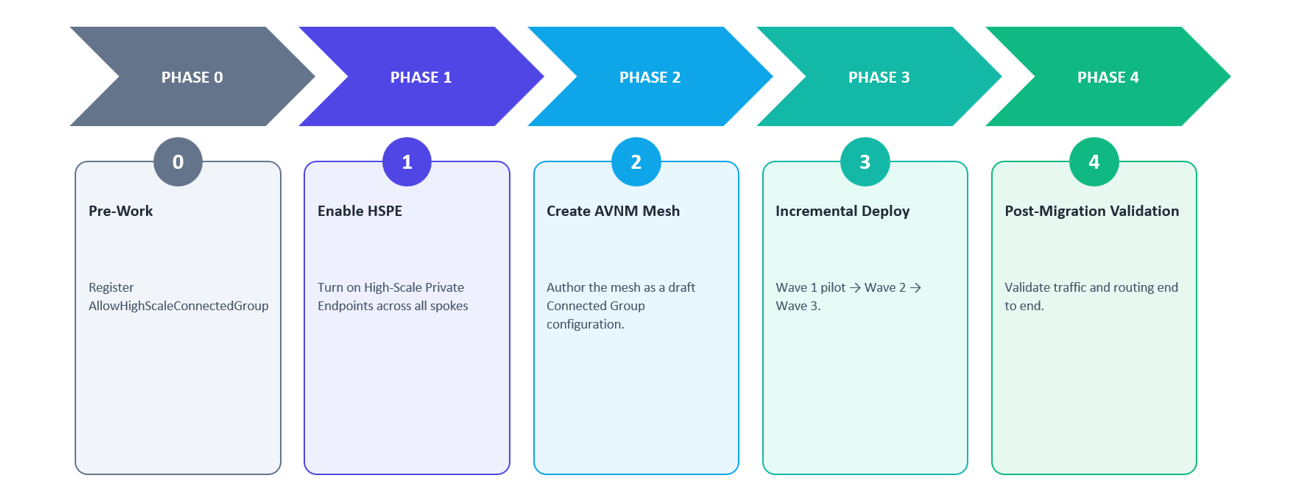
Migration Execution
Phase 0 — Pre-Work
- Register the feature. Since the mesh contains 1,000 VNets, above the 250 standard limit, Contoso registers the AllowHighScaleConnectedGroup feature flag on the subscription. This enables high-scale mesh support for up to 5,000 VNets.
- Inventory Private Endpoints. With 10,000 Private Endpoints across 1,000 VNets, Contoso exceeds the standard mesh Private Endpoint limit of 2,000. HSPE must be enabled.
Phase 1 — Enable HSPE on All 1,000 Spoke VNets
- Batch 1: Enable HSPE on all 500 spoke VNets in Topology A during the maintenance window by following the instructions.
- Batch 2: Apply the same configuration to all 500 spokes in Topology B.
- Expected impact: Each VNet may experience a brief connection reset for existing Private Endpoint connections when HSPE is enabled. Schedule the change during a maintenance window.
Phase 2 — Create the AVNM Mesh
- Create a Network Manager scoped to the management group containing all 1,000 spoke VNets.
- Define a single network group called eastus-mesh-all-spokes with dynamic membership using an Azure Policy and the tags.
- Create a mesh connectivity configuration. Set topology to Mesh, network group to eastus-mesh-all-spokes, high-scale private endpoints to Enabled, and global mesh to Not needed because all VNets are in the same region.
- Save the configuration as a draft and do not deploy yet.
Phase 3 — Incremental Deployment
Wave 1 — Pilot: Contoso deploys the mesh configuration to 50 dev/test spokes, either by using a temporary network group or by tagging only those VNets initially. Validation includes effective routes showing ConnectedGroup as the next-hop type for meshed spoke prefixes, spoke-to-spoke connectivity through the direct mesh path, Private Endpoint reachability across meshed spokes, unchanged on-premises connectivity through the hub and MSEE, and VNet flow logs that confirm expected direct spoke-to-spoke flows.
Wave 2 — Light production traffic VNets: After a successful pilot, Contoso tags light production traffic VNets. The dynamic network group picks them up automatically. Contoso redeploys the connectivity configuration, runs the same validation checklist, and monitors traffic to confirm that east-west traffic from these VNets is moving away from the ExpressRoute hairpin path.
Wave 3 — All remaining production VNets: Contoso tags all remaining spokes and redeploys the configuration. At this point, all 1,000 spokes are in the mesh.
No downtime migration: During Waves 2 and 3, existing MSEE hairpin routing remains functional. VNets not yet in the mesh continue to communicate through MSEE. VNets already in the mesh communicate directly through the mesh. This avoids a planned connectivity gap during migration.
Phase 4 — Post-Migration Validation
After deployment, confirm that mesh is active and traffic is taking the expected path before decommissioning the legacy route.
- Effective routes. Verify spoke subnets show direct routes to peer VNet prefixes instead of routing through the gateway or MSEE.
- Connection Monitor. Track representative spoke-to-spoke flows and compare latency and reachability before and after migration.
- VNet flow logs. Confirm east-west traffic matches the expected mesh path and is not still traversing the ExpressRoute gateway path.
- Network Watcher topology. Visualize the resulting connectivity model and identify any VNets not enrolled in the target network group.
If traffic is still hairpinning after mesh deployment, check for UDRs overriding system routes, spokes missing from the network group, deployment not committed to the target region, or IaC pipelines recreating legacy peerings.
Rollback
- Quick rollback while MSEE remains in place. Remove affected VNets from the network group or undeploy the mesh connectivity configuration. AVNM removes only the connectivity it created, and traffic can fall back to the existing MSEE hairpin path.
- Rollback after decommissioning legacy paths. If old peerings or route dependencies have already been removed, rollback may require reprovisioning those resources and should be treated as a longer change window.
- Recommendation. Keep the MSEE hairpin path available for at least two weeks after mesh deployment, monitor traffic patterns, and only then remove the legacy path.
Before and After Summary
|
Metric |
Before (MSEE Hairpin) |
After (AVNM HSPE Mesh) |
|
Spoke-to-spoke latency in the same region |
Higher due to the MSEE hairpin path |
Lower-latency direct in-datacenter path; actual latency depends on workload, region, and network conditions |
|
Traffic path for east-west |
Spoke → Hub → MSEE → Hub → Spoke |
Spoke → Spoke directly through the Mesh |
|
MSEE dependency for east-west |
Yes, shared dependency |
No MSEE dependency for east-west traffic |
|
Manual peerings required |
0 when using hairpin routing, but 499,500 if built manually for 1,000 spokes |
0 manual spoke-to-spoke peerings; AVNM manages connectivity |
|
Private Endpoints supported |
2,000 per mesh under standard limits |
20,000 per mesh with HSPE |
|
Rollback complexity |
Not applicable to the current hairpin model |
Remove VNets from the network group or undeploy the connectivity configuration |
|
Migration downtime |
Not applicable |
Designed for no planned downtime when deployed incrementally and validated carefully |
Closing Notes
Migrating to AVNM mesh does not require tearing down your existing network. The hub gateway, firewalls, and NVAs continue to function as they do today. What changes is that east-west spoke-to-spoke traffic stops leaving the data center unnecessarily.
- MSEE is not the right tool for the east-west fabric. Removing internal traffic from the ExpressRoute circuit is a reliability and capacity improvement.
- AVNM mesh replaces combinatorial complexity with group-based intent. The operational model scales with the number of groups, not the number of VNets.
- High-scale mesh and HSPE remove the ceiling — up to 5,000 VNets and 20,000 Private Endpoints per mesh.
- The migration is incremental and reversible. Mesh coexists with existing paths, and you can validate wave by wave before decommissioning the legacy route.
Start with a pilot mesh in a non-critical environment, validate the traffic shift, and expand from there.
Resources
- Connectivity configurations in Azure Virtual Network Manager
- Increase Private Endpoint virtual network limits
- Create a mesh topology with Azure Virtual Network Manager
- Security admin rules in Azure Virtual Network Manager
- Create a mesh network topology with Azure Virtual Network Manager using Terraform

 Microsoft