virtual network
65 TopicsAdvertised gateway prefixes in Azure
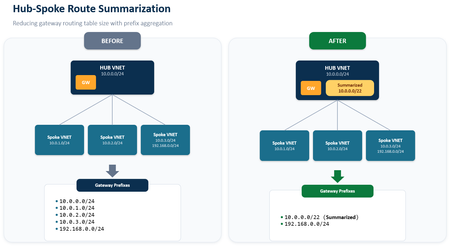
Introduction Large Azure hub-and-spoke environments can advertise a significant number of routes toward on-premises networks. By default, Azure VPN Gateway and ExpressRoute Gateway advertise the address spaces of the hub virtual network and the address spaces of peered spoke virtual networks that use gateway transit. As the number of spokes and address spaces grows, the border gateway protocol (BGP) route table grows as well. Advertised gateway prefixes provide a native way to summarize those Azure-side routes. The feature is configured on the hub virtual network through the summarizedGatewayPrefixes property, which is exposed in the Azure portal as Advertised gateway prefixes. Fewer BGP prefixes Replace many individual networks with one or more aggregated CIDRs. Better scale management Help large hub-and-spoke designs stay within advertised-prefix limits. Cleaner route visibility Make the intended Azure address plan easier to recognize on provider and on-premises route views. In this blog we will demonstrate leveraging Advertised gateway prefixes to summarize many Azure advertised prefixes into one. What are advertised gateway prefixes? Advertised gateway prefixes are summarized CIDR blocks that an Azure hybrid gateway advertises toward on-premises instead of advertising every covered hub and spoke address space individually. The configuration belongs on the gateway virtual network, usually the hub VNet that contains GatewaySubnet and the ExpressRoute or VPN gateway. How the route advertisement changes Default behavior With advertised gateway prefixes Hub: 10.27.0.0/24 Spoke 1: 10.27.1.0/24 Spoke 2: 10.27.2.0/24 Spoke 3: 10.27.3.0/24 Summary: 10.27.0.0/22 Four individual prefixes are advertised. One summary prefix is advertised. A spoke outside the summary is still advertised separately. Example: 172.16.1.0/24 remains visible if it is not covered by 10.27.0.0/22. When should you use it? You use a hub-and-spoke topology with gateway transit and many spoke address spaces. You want to advertise a covering prefix, such as a /16, instead of many smaller prefixes, such as multiple /24 networks. You are approaching ExpressRoute advertised-prefix limits or want to reduce route-table growth before scale becomes a problem. Your Azure address plan is sufficiently structured to create safe, intentional summary ranges. Note: ExpressRoute scale context: Microsoft documentation lists a maximum of 1,000 IPv4 prefixes and 100 IPv6 prefixes advertised from a virtual network to on-premises on a single ExpressRoute connection through private peering. Exceeding the connection prefix limit can cause the connection between the circuit and gateway to disconnect until the prefix count is reduced. Prerequisites A hub virtual network with GatewaySubnet. An ExpressRoute gateway or VPN gateway deployed in the hub virtual network. One or more peered spoke virtual networks if you want to demonstrate route summarization across spokes. A planned IPv4 and, when applicable, IPv6 summary that covers the intended hub and spoke address spaces. Access to the provider or on-premises BGP route view for validation. In this walkthrough, Megaport is used as the external verification point. Configure advertised gateway prefixes in the Azure portal The portal configuration is performed on the hub VNet, not on the ExpressRoute circuit and not on each spoke VNet. In the Azure portal, search for Virtual networks and select the hub VNet that contains GatewaySubnet. Open the hub virtual network Under Settings, select Address space. Open Address space In Advertised gateway prefixes, select + Add prefix. Enter the covering CIDR, such as 10.0.0.0/22 for four contiguous /24 networks. Add the summarized prefix For a dual-stack design, add IPv4 and IPv6 summarized prefixes explicitly. Add additional address families if needed Select Save and confirm the summarized prefixes remain listed in the Advertised gateway prefixes section. Save the configuration Validate the summarized route on routers or provider After Azure applies the change and BGP converges, I’m using ExpressRoute and Megaport here for my example, you can either log in to your router directly or view the incoming BGP routes via your provider’s interface to confirm what routes are being received from Azure. We want to capture a view that displays the BGP prefixes learned from the Azure side. Capture a baseline screenshot before enabling the feature, showing the individual hub and spoke prefixes. After configuration, refresh the route view and locate the new summarized prefix. Confirm that covered hub and spoke prefixes are no longer advertised individually. Confirm that any address space outside the configured summary remains advertised separately. Before: After: In my demo environment I have a hub and 20 spokes all within the 10.27.0.0/16 address prefix. We can see a successful implementation as before enabling the feature, I had a total of 21 prefixes being received at Megaport, after enabling the feature I have 1. Important design considerations Configure the hub, not the spokes: Only the virtual network containing the gateway subnet uses the summarizedGatewayPrefixes property for this behavior. A value placed on a spoke VNet is ignored. Avoid overlap within the prefix list: Do not configure overlapping entries in the advertised gateway prefixes list. Expect uncovered networks to remain visible: If a hub or spoke address space is not covered by a configured summary, the gateway continues to advertise it individually. Plan dual-stack explicitly: IPv4 and IPv6 summaries must be added separately. Removing all entries restores default behavior: When every advertised gateway prefix is removed, Azure returns to advertising hub and peered spoke address spaces individually. Protect the on-premises edge: Use appropriate route policies so only expected prefixes are accepted. Summarization simplifies advertisements, but it does not replace routing governance. Conclusion Advertised gateway prefixes give Azure networking teams a straightforward, native method to control route scale from a gateway-enabled hub VNet. Instead of sending every hub and spoke prefix across ExpressRoute or VPN connections, the gateway can advertise a concise list of summarized prefixes. The result is a smaller and more intentional route advertisement, while uncovered address spaces remain visible for compatibility. References Advertised gateway prefixes in Azure virtual networks Configure advertised gateway prefixes using the Azure portal Azure ExpressRoute FAQ About ExpressRoute virtual network gateways649Views0likes0CommentsInter-Hub Connectivity Using Azure Route Server
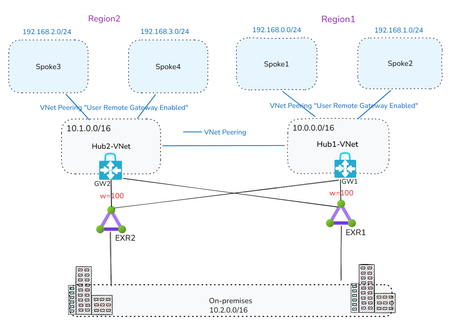
By Mays_Algebary shruthi_nair As your Azure footprint grows with a hub-and-spoke topology, managing User-Defined Routes (UDRs) for inter-hub connectivity can quickly become complex and error-prone. In this article, we’ll explore how Azure Route Server (ARS) can help streamline inter-hub routing by dynamically learning and advertising routes between hubs, reducing manual overhead and improving scalability. Baseline Architecture The baseline architecture includes two Hub VNets, each peered with their respective local spoke VNets as well as with the other Hub VNet for inter-hub connectivity. Both hubs are connected to local and remote ExpressRoute circuits in a bowtie configuration to ensure high availability and redundancy, with Weight used to prefer the local ExpressRoute circuit over the remote one. To maintain predictable routing behavior, the VNet-to-VNet configuration on the ExpressRoute Gateway should be disabled. Note: Adding ARS to an existing Hub with Virtual Network Gateway will cause downtime that expect to last 10 minutes. Scenario 1: ARS and NVA Coexist in the Hub Option A: Full Traffic Inspection ARS and NVA Coexist in the Hub In this scenario, ARS is deployed in each Hub VNet, alongside the Network Virtual Appliances (NVAs). NVA1 in Region1 establishes BGP peering with both the local ARS (ARS1) and the remote ARS (ARS2). Similarly, NVA2 in Region2 peers with both ARS2 (local) and ARS1 (remote). Let’s break down what each BGP peering relationship accomplishes. For clarity, we’ll focus on Region1, though the same logic applies to Region2: NVA1 Peering with Local ARS1 Through BGP peering with ARS1, NVA1 dynamically learns the prefixes of Spoke1 and Spoke2 at the OS level, eliminating the need to manually configure these routes. The same applies for NVA2 learning Spoke3 and Spoke4 prefixes via its BGP peering with ARS2. NVA1 Peering with Remote ARS2 When NVA1 peers with ARS2, the Spoke1 and Spoke2 prefixes are propagated to ARS2. ARS2 then injects these prefixes into NVA2 at both the NIC level with NVA1 as the next hop, and at the OS level. This mechanism removes the need for UDRs on the NVA subnets to enable inter-hub routing. Additionally, ARS2 advertises the Spoke1 and Spoke2 prefixes to both ExpressRoute circuits (EXR2 and EXR1 due to bowtie configuration) via GW2. 👉Important: To ensure that ARS2 accepts and propagates Spoke1/Spoke2 prefixes received via NVA1, AS-Override must be enabled. Without AS-Override, BGP loop prevention will block these routes at ARS2, since both ARS1 and ARS2 use the default ASN 65515, and ARS2 will consider the route as already originated locally. The same principle applies in reverse for Spoke3 and Spoke4 prefixes being advertised from NVA2 to ARS1. Traffic Flow Inter-Hub Traffic: Spoke VNets are configured with UDRs that contain only a default route (0.0.0.0/0) pointing to the local NVA as the next hop. Additionally, the “Propagate Gateway Routes” setting should be set to False to ensure all traffic, whether East-West (intra-hub/inter-hub) or North-South (to/from internet), is forced through the local NVA for inspection. Local NVAs will have the next hop to the other region spokes injected at the NIC level by local ARS, pointing to the other region NVA, for example NVA2 will have next hop to Spoke1 and Spoke2 as NVA1 (10.0.1.4) and vice versa. Why are UDRs still needed on spokes if ARS handles dynamic routing? Even with ARS in place, UDRs are required to maintain control of the next hop for traffic inspection. For instance, if Spoke1 and Spoke2 do not have UDRs, they will learn the remote spoke prefixes (e.g., Spoke3/Spoke4) injected via ARS1, which received them from NVA2. This results in Spoke1/Spoke2 attempting to route traffic directly to NVA2, a path that is invalid, since the spokes don’t have the path to NVA2. The UDR ensures traffic correctly routes through NVA1 instead. On-Premises Traffic: To explain the on-premises traffic flow, we'll break it down into two directions: Azure to on-premises, and on-premises to Azure. Azure to On-Premises Traffic Flow: As previously noted, Spokes send all traffic, including traffic to on-premises, via NVA1 due to the default route in the UDR. NVA1 then routes traffic to the local ExpressRoute circuit, using Weight to prefer the local path over the remote. Note: While NVA1 learns on-premises prefixes from both local and remote ARSs at the OS level, this doesn’t affect routing decisions. The actual NIC-level route injection determines the next hop, ensuring traffic is sent via the correct path—even if the OS selects a different “best” route internally. The screenshot below from NVA1 shows four next hops to the on-premises network 10.2.0.0/16. These include the local ARS (ARS1: 10.0.2.5 and 10.0.2.4) and the remote ARS (ARS2: 10.1.2.5 and 10.1.2.4). On-Premises to Azure Traffic Flow In a bowtie ExpressRoute configuration, Azure VNet prefixes are advertised to on-premises through both local and remote ExpressRoute circuits. Because of this dual advertisement, the on-premises network must ensure optimal path selection when routing traffic to Azure. From Azure side, to maintain traffic symmetry, add UDRs at the GatewaySubnet (GW1 and GW2) with specific routes to the local Spoke VNets, using the local NVA as the next hop. This ensures return traffic flows back through the same path it entered. 👉How Does the ExpressRoute Edge Router Select the Optimal Path? You might ask: If Spoke prefixes are advertised by both GW1 and GW2, how does the ExpressRoute edge router choose the best path? (e.g., diagram below shows EXR1 learns Region1 prefixes from GW1 and GW2) Here’s how: Edge routers (like EXR1) receive the same Spoke prefixes from both gateways. However, these routes have different AS-Path lengths: - Routes from the local gateway (GW1) have a shorter AS-Path. - Routes from the remote gateway (GW2) have a longer AS-Path because NVA1’s ASN (e.g., 65001) is prepended twice as part of the AS-Override mechanism. As a result, the edge router (EXR1) will prefer the local path from GW1, ensuring efficient and predictable routing. For example: EXR1 receives Spoke1, Spoke2, and Hub1-VNet prefixes from both GW1 and GW2. But because the path via GW1 has a shorter AS-Path, EXR1 will select that as the best route. (Refer to the diagram below for a visual of the AS-Path difference). Final Traffic Flow: Option-A Insights: This design simplifies UDR configuration for inter-hub routing, especially useful when dealing with non-contiguous prefixes or operating across multiple hubs. For simplicity, we used a single NVA in each Hub-VNet while explaining the setup and traffic flow throughout this article. However, a high available (HA) NVA deployment is recommended. To maintain traffic symmetry in an HA setup, you’ll need to enable the next-hop IP feature when peering with Azure Route Server (ARS). When on-premises traffic inspection is required, the UDR setup in the GatewaySubnet becomes more complex as the number of Spokes increases. As your Azure network scales, keep in mind that Azure Route Server supports a maximum of 16 BGP peers per instance (as of the time writing this article). This limit can impact architectures involving multiple NVAs or hubs. Option B: Bypass On-Premises Inspection If on-premises traffic inspection is not required, NVAs can advertise a supernet prefix summarizing the local Spoke VNets to the remote ARS. This approach provides granular control over which traffic is routed through the NVA and eliminates the need for BGP peering between the local NVA and local ARS. All other aspects of the architecture remain the same as described in Option A. For example, NVA2 can advertise the supernet 192.168.2.0/23 (supernet of Spoke3 and Spoke4) to ARS1. As a result, Spoke1 and Spoke2 will learn this route with NVA2 as the next hop. To ensure proper routing (as discussed earlier) and inter-hub inspection, you need apply a UDR in Spoke1 and Spoke2 that overrides this exact supernet prefix, redirecting traffic to NVA1 as the next hop. At the same time, traffic destined for on-premises will follow the system route through the local ExpressRoute gateway, bypassing NVA1 altogether. In this setup: UDRs on the Spokes should have "Propagate Gateway Routes" set to True. No UDRs are needed in the GatewaySubnet. 👉Can NVA2 Still Advertise Specific Spoke Prefixes? You might wonder: Can NVA2 still advertise specific prefixes (e.g., Spoke3 and Spoke4) learned from ARS2 to ARS1 instead of a supernet? Yes, this is technically possible, but it requires maintaining BGP peering between NVA2 and ARS2. However, this introduces UDR complexity in Spoke1 and Spoke2, as you'd need to manually override each specific prefix. This also defeats the purpose of using ARS for simplified route propagation, undermining the efficiency and scalability of the design. Bypass On-Premises Inspection Final Traffic Flow: Option B: Bypass on-premises inspection traffic flow Option-B Insights: This approach reduces the number of BGP peerings per ARS. Instead of maintaining two BGP sessions (local NVA and remote NVA) per Hub, you can limit it to just one, preserving capacity within ARS’s 8-peer limit for additional inter-hub NVA peerings. Each NVA should advertise a supernet prefix to the remote ARS. This can be challenging if your Spokes don’t use contiguous IP address spaces, as described in Option B. Scenario 2: ARS in the Hub and the NVA in Transit VNet In Scenario 1, we highlighted that when on-premises inspection is required, managing UDRs at the GatewaySubnet becomes increasingly complex as the number of Spoke VNets grows. This is due to the need for UDRs to include specific prefixes for each Spoke VNet. In this scenario, we eliminate the need to apply UDRs at the GatewaySubnet altogether. A in Transit VNet In this design, the NVA will be deployed in Transit VNet, where: Transit-VNet will be peered with local Spoke VNets and with the local Hub-VNet to enable intra-Hub and on-premises connectivity. Transit-VNet also peered with remote Transit VNets (e.g., Transit-VNet1 peered with Transit-VNet2) to handle inter-Hub connectivity through the NVAs. Additionally, Transit-VNets are peered with remote Hub-VNets, to establish BGP peering with the remote ARS. NVAs OS will need to add static routes for the local Spoke VNets prefixes, it can be specific or it can supernet prefix, which will later be advertised to ARSs over BGP Peering, then ARS will advertise it to on-premises via ExpressRoute. NVAs will BGP peer with local ARS and also with the remote ARS. To understand the reasoning behind this design, let’s take a closer look at the setup in Region1, focusing on how ARS and NVA are configured to connect to Region2. This will help illustrate both inter-hub and on-premises connectivity. The same concept applies in reverse from Region2 to Region1. Inetr-Hub: To enable NVA1 in Region1 to learn prefixes from Region2, NVA2 will configure static routes at the OS level for Spoke3 and Spoke4 (or their supernet prefix) and advertise them to ARS1 via remote BGP peering. As a result, these prefixes will be received by NVA1, both at the NIC level, with NVA2 as the next hop, and at the OS level for proper routing. Spoke1 and Spoke2 will have a UDR with a default route pointing to NVA1 as the next hop. For instance, when Spoke1 needs to communicate with Spoke3, the traffic will first route through NVA1. NVA1 will then forward the traffic to NVA2 using VNet peering between the two Hubs. A similar configuration will be applied in Region2, where NVA1 will configure static routes at the OS level for Spoke1 and Spoke2 (or their supernet prefix) and advertise them to ARS2 via remote BGP peering, as a result, these prefixes will be received by NVA2, both at the NIC level (injected by ARS2), with NVA1 as the next hop, and at the OS level for proper routing. Note: At the OS level, NVA1 learns Spoke3 and Spoke4 prefixes from both local and remote ARSs. However, the NIC-level route injection determines the actual next hop, so even if the OS selects a different best route, it won’t affect forwarding behavior. same applies to NVA2. On-Premises Traffic: To explain the on-premises traffic flow, we'll break it down into two directions: Azure to on-premises, and on-premises to Azure. Azure to On-Premises Traffic Flow: Spokes in Region1 route all traffic through NVA1 via a default route defined in their UDRs. Because of BGP peering between NVA1 and ARS1, ARS1 advertises the Spoke1 and Spoke2 (or their supernet prefix) to on-premises through ExpressRoute (EXR1). The Transit-VNet1 (hosting NVA1) is peered with Hub1-VNet, with “Use Remote Gateway” enabled. This allows NVA1 to learn on-premises prefixes from the local ExpressRoute gateway (GW1), and traffic to on-premises is routed through the local ExpressRoute circuit (EXR1) due to higher BGP Weight configuration. Note: At the OS level, NVA1 learns on-prem prefixes from both local and remote ARSs. However, the NIC-level route injection determines the actual next hop, so even if the OS selects a different best route, it won’t affect forwarding behavior. same applies to NVA2. On-Premises to Azure Traffic Flow: Through BGP peering with ARS1, NVA1 enables ARS1 to advertise Spoke1 and Spoke2 (or their supernet prefix) to both EXR1 and EXR2 circuits (due to the ExpressRoute bowtie setup). Additionally, due to BGP peering between NVA1 and ARS2, ARS2 also advertises Spoke1 and Spoke2 (or their supernet prefix) to EXR2 and EXR1 circuits. As a result, both ExpressRoute edge routers in Region1 and Region2 learn the same Spoke prefixes (or their supernet prefix) from both GW1 and GW2, with identical AS-Path lengths, as shown below. EXR1 learns Region1 Spokes's supernet prefixes from GW1 and GW2 This causes non-optimal inbound routing, where traffic from on-premises destined to Region1 Spokes may first land in Region2’s Hub2-VNet before traversing to NVA1 in Region1. However, return traffic from Spoke1 and Spoke2 will always exit through Hub1-VNet. To prevent suboptimal routing, configure NVA1 to prepend the AS path for Spoke1 and Spoke2 (or their supernet prefix) when advertising them to the remote ARS2. Likewise, ensure NVA2 prepends the AS path for Spoke3 and Spoke4 (or their supernet prefix) when advertising to ARS1. This approach helps maintain optimal routing under normal conditions and during ExpressRoute failover scenarios. Below diagram shows NVA1 is setting AS-Prepend for Spoke1 and Spoke2 supernet prefix when BGP peer with remote ARS (ARS1), same will apply for NVA2 when advertising Spoke3 and Spoke4 prefixes to ARS1. Final Traffic Flow: Full Inspection: Traffic flow when NVA in Transit-VNet Insights: This solution is ideal when full traffic inspection is required. Unlike Scenario 1 - Option A, it eliminates the need for UDRs in the GatewaySubnet. When ARS is deployed in a VNet (typically in Hub VNets), the VNet will be limited to 500 VNet peerings (as of the time writing this article). However, in this design, Spokes peer with the Transit-VNet instead of directly with the ARS VNet, allowing you to scale beyond the 500-peer limit by leveraging Azure Virtual Network Manager (AVNM) or submitting a support request. Some enterprise customers may encounter the 1,000-route advertisement limit on the ExpressRoute circuit from the ExpressRoute gateway. With Summarized Gateway Prefixes now generally available, Azure provides native control to summarize VNet address spaces before advertising them to ExpressRoute. This helps reduce the advertised route count without relying solely on NVAs for summarization. For simplicity, we used a single NVA in each Hub-VNet while explaining the setup and traffic flow throughout this article. However, a high available (HA) NVA deployment is recommended. To maintain traffic symmetry in an HA setup, you’ll need to enable the next-hop IP feature when peering with Azure Route Server (ARS). This design does require additional VNet peerings, including: Between Transit-VNets (inter-region), Between Transit-VNets and local Spokes, and Between Transit-VNets and both local and remote Hub-VNets.3.8KViews5likes2Comments
Announcing Public Preview - Azure Private Link over IPv6
1. Overview Private Link over IPv6 (PL IPv6) enables customers to securely access Azure PaaS services over IPv6-based connectivity. This capability is critical for: IPv6 based PE connectivity to PaaS resources Enabling IPv6 in On-prem environments This document is intended to serve as guide to setup and test the On-prem connectivity from IPv6 customer address to Azure PaaS resources over Express Route via Private link. (IPv6 PE connectivity) Note: This feature is currently in public preview and is not recommended for production workloads. 2. Supported Scenarios Scenario A: Native Azure (Azure VM → PaaS via IPv6 Private Endpoint) IPv6 client VM in VNet → IPv6 Private Endpoint → Azure PaaS Scenario B: OnPrem Access via ExpressRoute On-prem IPv6 client → ExpressRoute → VNet Routing Appliance (VNRA) à IPv6 Private Endpoint → PaaS Supported via ER Circuits 3. Prerequisites 3.1 Supported Regions (Preview Scope) Limited preview regions West Central US East Asia UK South US Central North Europe 3.2 Supported Services (Preview) Azure Storage Azure SQL Azure Key Vault Azure Data Explorer 3.3. Subscription registration An Azure account with an active subscription. Create an account for free. Your subscription must be registered for the Private Link over IPv6 preview. Registration is mandatory before you configure any resources. You can self-register the subscription by running the following commands: az feature register --namespace Microsoft.Network --name SupportIPv6PrivateEndpoint --subscription <subscription-id> az provider register --namespace Microsoft.Network 4. Configurations 4.1 Azure VNET level configurations Please note that you will need to create: Dual-stack IPv6-enabled Vnet with a VM that is assigned both IPv4 and IPv6 address. For on-prem connectivity, this is the same Vnet where ER Gateway is created. Refer: Create an Azure virtual machine with a dual-stack network - Azure Virtual Network | Microsoft Learn PL scale enabled on VNET via configuration flags (refer config flags mentioned further in this section and bolded flags in the code snippet) Dual Stack (IPv4+ IPv6) Subnet Private Endpoints with IPv6 Refer these flags for enabling VNET with PL scale: Vnet level : "privateEndpointVNetPolicies": "Basic", Subnet level: “privateEndpointNetworkPolicies": "RouteTableEnabled" Refer Azure documentation for VNET creation: Quickstart: Create an Azure Virtual Network | Microsoft Learn 4.3 Private endpoint configuration: With the Private Link IPv6 support, we have introduced a new parameter in PE creation API/CLI, ‘ip VersionType’. Please ensure that this is set to ‘IPv6’ for enabling PL IPv6 traffic. Refer Azure documentation for PE creation: Quickstart: Create a private endpoint - Azure portal - Azure Private Link | Microsoft Learn Reference CLI: az network private-endpoint create \ --name <private-endpoint-name> \ --resource-group <resource-group-name> \ --vnet-name <vnet-name> \ --subnet <subnet-name> \ --private-connection-resource-id <resource-id-of-target-service> \ --group-id <group-id> \ --connection-name <connection-name> \ --location <region> \ --ip-version-type <Ipv4|Ipv6 > 4.4 DNS Configuration Ensure these points for DNS configurations: Create Private DNS Zone for each Service type Attach the respective DNS zone to the Private Endpoints. Ensure to check that after above steps completed PaaS FQDN resolves to PEIPv6 address. Refer Azure documentation for On-prem access via Private Link: Azure Private Endpoint DNS Integration Scenarios | Microsoft Learn Native Azure Connectivity (Azure VM → PaaS via IPv6) Validation: Ensure the Storage Account FQDN resolves to the IPv6 Private Endpoint address. Access the Storage Account using the standard service FQDN. From the dual-stack VM: nslookup <storageaccount>.blob.core.windows.net Expected Result: <storageaccount>.privatelink.blob.core.windows.net AAAA: <Private Endpoint IPv6 Address> Connectivity validation: curl https://<storageaccount>.blob.core.windows.net Test-NetConnection <storageaccount>.blob.core.windows.net -Port 443 Configurations specific to On-prem connectivity via ER circuit and Virtual Network Routing Appliance On-premises IPv6 clients access IPv6 private endpoints over ExpressRoute through a Virtual Network Routing Appliance (VNRA). ExpressRoute forwards traffic from on-premises IPv6 clients to the VNRA, which then routes the traffic to the target IPv6 private endpoint that's hosted by the Azure PaaS service. This connectivity requires the following components: An ExpressRoute circuit with the appropriate gateway SKU for your connectivity type (FastPath or standard). For more information, see Create and modify an ExpressRoute circuit. 4.5 Virtual Network Routing Appliance (VNRA) configurations To know more about VNRA, refer: Overview of Routing Appliances - Azure Virtual Network | Microsoft Learn We are leveraging VNRA to facilitate PL IPv6 ER traffic forwarding. User would be required to create a VNRA in the VNet. To facilitate the forwarding of PL IPv6 traffic via VNRA, a UDR would be required to be added in the gateway subnet with next hop as VNRA IPv6 address. Below are the guided steps to achieve all of this. Step 1: Create a VNRA in the VNet Create a VNRA in your resource group via Azure Preview portal. Search for Azure Virtual Network routing appliance on the Azure portal search Click on create: In the above creation page, choose your subscription and resource group, enter name, region, capacity (10-200 Gbps) & the VNet. Review and Create the VNRA. Step 2: Create User Defined Route (UDR) to VNRA The UDR will ensure ER PLIPv6 traffic is forwarded to VNRA which will further process & forward the traffic to the IPv6 Private Endpoint. 1.Create a new route table on Azure portal: 2. Choose the subscription, resource group and set ‘Gateway propagation’ as default (true) 3. Add a route in this route table to forward the on-prem PLIPv6 traffic to VNRA (for this please add route as shown in reference below) as per below details: Enter ‘Destination type’ as ‘IP Address’ Enter ‘Destination IP addresses/CIDR Ranges’ as Private Endpoint IPv6 subnet range - This is the subnet on which your Private Endpoint resides to which the traffic would be sent Enter ‘Next hop’ as “Virtual Appliance”, Give the ‘Next hop address’ as the IPv6 address of VNRA 4.Attach this route table to the Gateway subnet This completes the VNRA setup. 5. Validate Connectivity After establishing configuration and deploying your setup, you can run following validations: From OnPrem VM: Perform DNS lookup on PaaS FQDN → confirm IPv6 PE resolution Connect using PaaS FQDN Validation Checks VM → PE connectivity over IPv6 Data plane traffic successful 6. Preview Considerations Limited regional availability (Check preview regions above) Destination PaaS resource must be in the same region as the Private Endppint. Cross region connectivity is not supported in this release. Limited PaaS onboarding (Azure Storage, Azure SQL, Azure Key Vault, Azure Data Explorer) Current on-premises connectivity support is limited to ExpressRoute-based scenarios and does not currently include VPN, Virtual WAN (vWAN), or Network Virtual Appliances (NVAs). In Private Link IPv6 scenarios, the original client IPv6 address is not preserved in downstream service logs. Due to implicit NAT translation, logs will display the VNet-side translated source IP address instead. Link to Azure documentation: Configure Azure Private Link over IPv6 (Preview) - Azure Private Link | Microsoft Learn541Views0likes0CommentsAzure Virtual Network routing appliance is now generally available
Modern cloud networks are evolving faster than ever. Organizations are building larger AI platforms, connecting more services through private connectivity, adopting IPv6, and expanding applications across regions and business units. As these environments grow, the network becomes a critical foundation for delivering performance, resiliency, and operational simplicity. Today, we're excited to announce the general availability of Azure Virtual Network routing appliance, a managed, platform-native routing service designed to provide high-performance connectivity across Azure virtual networks at cloud scale. Virtual Network routing appliance brings together Azure-native operations, specialized networking infrastructure, built-in resiliency, and high-bandwidth forwarding to help organizations build the next generation of cloud network architectures. Built for the era of AI infrastructure AI is changing the scale at which networks operate. Training clusters, inference services, analytics platforms, data processing pipelines, and distributed application environments generate unprecedented volumes of east-west traffic. These workloads require high-performance connectivity between services, networks, and regions while maintaining operational simplicity. Virtual Network routing appliance provides a managed routing foundation for these environments, enabling organizations to scale network connectivity alongside their AI investments. Instead of building and operating custom routing infrastructure, teams can focus on accelerating innovation, deploying new services, and delivering business outcomes. Scale hub-and-spoke architectures Hub-and-spoke remains one of the most widely adopted network architectures in Azure because it provides centralized governance, simplified operations, and efficient connectivity. As organizations expand, however, these architectures often grow from a handful of virtual networks into hundreds or even thousands of connected environments. Virtual Network routing appliance enables customers to scale these architectures while maintaining a consistent operational model. By providing a dedicated routing layer within the hub, Virtual Network routing appliance simplifies connectivity between applications, shared services, and business units while supporting the scale required by modern enterprise environments. The result is a network architecture that remains manageable even as organizational growth accelerates. Unlock large-scale private connectivity Private connectivity has become the default connectivity model for modern cloud deployments. Applications, databases, platforms, shared services, and partner solutions increasingly depend on private communication patterns across Azure environments. Virtual Network routing appliance provides a centralized routing foundation that helps customers build and scale these architectures while maintaining a consistent private networking experience across their environments. Virtual Network routing appliance can also help scale Private Endpoint connectivity beyond the current 20,000-endpoint HSPE boundary. Looking ahead, it establishes a foundation for further accelerating private connectivity to on-premises environments, without introducing additional architectural specifics. As organizations continue consolidating services onto private connectivity models, Virtual Network routing appliance provides the performance and scale needed to support long-term growth. Accelerate your IPv6 journey IPv6 adoption continues to grow across enterprise, telecommunications, and cloud environments. Organizations increasingly need network architectures capable of supporting IPv4, IPv6, and dual-stack deployments while maintaining operational consistency. Virtual Network routing appliance supports IPv4, IPv6, and dual-stack virtual networks, enabling customers to modernize network architectures and expand address space without introducing new operational complexity. Whether organizations are beginning their IPv6 transition or building IPv6-first architectures, Virtual Network routing appliance provides a consistent routing foundation across both address families. Simplify multi-region architectures Modern applications rarely live within a single region. Organizations increasingly deploy workloads globally to improve performance, resiliency, business continuity, and regulatory compliance. These architectures require a networking foundation capable of supporting connectivity across regions while remaining simple to operate and govern. Virtual Network routing appliance helps customers build scalable multi-region network architectures by providing a centralized, high-performance routing layer that integrates naturally into Azure networking designs. This allows teams to focus on application architecture and customer experience rather than operational management of routing infrastructure. Built for enterprise scale As organizations continue to grow, networking teams face a common challenge: supporting increasing scale without increasing operational complexity. Virtual Network routing appliance was designed to meet this challenge by combining: High-performance routing using specialized Azure networking infrastructure Built-in resiliency and availability zone support Native Azure management and governance integration Support for IPv4, IPv6, and dual-stack deployments Integrated monitoring and observability through Azure Monitor metrics available Configurable bandwidth tiers for production workloads Future support for scaling Private Endpoints beyond 20,000 These capabilities allow customers to build large-scale networking architectures while maintaining a familiar Azure-native operational experience. Learn more Azure Virtual Network routing appliance is more than a new networking resource. It is a foundational building block for the next generation of Azure networking. Organizations are continuing to build larger AI platforms, expand private connectivity, increase multi-region deployments, and modernize network architectures. These transformations require a routing foundation that can scale alongside them. Virtual Network routing appliance provides that foundation, delivering the performance, scale, resiliency, and operational simplicity required for modern cloud networks. Whether you're building an AI platform, expanding a hub-and-spoke architecture, scaling private connectivity, enabling IPv6, or designing a global application footprint, Azure Virtual Network routing appliance helps simplify networking so you can focus on what matters most: delivering innovation faster. Overview of Routing Appliances - Azure Virtual Network | Microsoft Learn4.7KViews1like0Comments
Simplify Virtual WAN Spoke Connectivity at Scale with Azure Virtual Network Manager
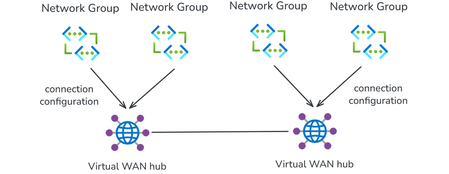
With Azure Virtual Network Manager (AVNM) integration, organizations using Virtual WAN for transitive connectivity can simplify spoke connectivity and policy management across large-scale hub-and-spoke deployments. By using a Virtual WAN hub as the hub in an AVNM hub-and-spoke topology, organizations can define connectivity and routing intent once at the network group level and apply it consistently across large numbers of spoke VNets. This reduces repetitive per-spoke connection and routing configuration, helps maintain operational consistency as deployments expand, and makes it easier to manage hub-and-spoke environments at scale. Together, AVNM’s centralized, group-based orchestration and Virtual WAN’s managed routing, security integration, and hybrid connectivity provide a more streamlined way to simplify operations and scale with confidence. What is Azure Virtual Network Manager? Azure Virtual Network Manager is a management service that lets you group, configure, and deploy network connectivity and security policies across virtual networks at scale. Instead of configuring VNet peering and access rules on each virtual network individually, you define network groups — logical collections of virtual networks based on static selection or dynamic Azure Policy conditions — and apply connectivity configurations and security admin rules to those groups. Key capabilities include: Hub-and-spoke and mesh topologies — Define how virtual networks in a network group connect to a central hub or to each other. Network groups — Group VNets statically or dynamically (using tags, subscriptions, resource group names, or other Azure Policy conditions). Security admin rules — Author and enforce access control lists across all VNets in a network group, providing a centralized layer of defense that complements NSGs and firewalls. Region-scoped deployment — Deploy configurations to specific Azure regions, enabling incremental rollout and controlled blast radius. AVNM operates as an overlay management layer — it orchestrates VNet peering, connectivity, and security rules without replacing the underlying networking primitives. What is Azure Virtual WAN? Azure Virtual WAN as a service brings together routing, security, VPN, ExpressRoute, and transitive connectivity in a hub-and-spoke architecture. A Virtual WAN hub is a managed regional resource that acts as a central transit point for branch connectivity, remote users, private enterprise connectivity, spoke virtual networks, and private traffic routing through security services. Site-to-site VPN connectivity (branch offices, SD-WAN devices) Point-to-site VPN connectivity (remote users) ExpressRoute private connectivity (on-premises datacenters) VNet-to-VNet transitive connectivity (spoke virtual networks) Routing, firewall, and encryption for private traffic All hubs in a Standard Virtual WAN are connected in a full mesh over the Microsoft backbone, enabling any-to-any connectivity between spokes, branches, and remote users across regions. Virtual WAN removes the need to manually manage complex route tables and transit VNets — routing is handled by the hub's built-in router. What this integration enables When you select a Virtual WAN hub as the hub in an AVNM connectivity configuration, AVNM handles the spoke-to-hub wiring for you. For each virtual network in your selected network groups: If the VNet is not yet connected to the Virtual WAN hub, AVNM creates the Virtual Network connection to Virtual WAN hub and applies a consistent routing configuration with Virtual WAN connection policy. If the VNet is already connected, AVNM updates the existing Virtual Network connection to utilize the routing properties in the Virtual WAN connection policy. A connection policy is a hub-level Virtual WAN resource that defines shared routing behavior for the virtual network connections it governs, including route table association and propagation, route maps, internet security settings, and propagated labels. Because the policy applies these settings consistently across governed connections, it helps standardize routing and overrides conflicting settings configured directly on individual connections. How it works The setup follows AVNM's standard workflow: Create a network group. Add virtual networks as members — either statically (by selecting specific VNets) or dynamically (using Azure Policy conditions such as tags or resource group names). Create a connectivity configuration. Choose hub-and-spoke topology, select your Virtual WAN hub as the hub, and select or create a connection policy. Deploy. Commit the configuration to your target regions. AVNM connects all VNets in the network groups to the Virtual WAN hub and applies the connection policy in parallel. You can also enable direct connectivity within a spoke network group. When enabled, VNet-to-VNet traffic within that group routes directly between virtual networks instead of transiting the Virtual WAN hub — useful for latency-sensitive or high-throughput east-west workloads. By default, direct connectivity is regional; enable global mesh to extend it across Azure regions. Key use cases Bulk spoke onboarding Connect many virtual networks to a Virtual WAN hub in one operation. All connections are orchestrated in parallel by AVNM, and the pre-defined routing configuration is automatically applied. Policy-based dynamic onboarding Use Azure Policy to define network group membership conditions. When a new virtual network matches those conditions—for example, a VNet tagged env:prod—it is automatically added to the network group. On the next deployment, AVNM connects it to the Virtual WAN hub with the correct routing configuration, reducing manual onboarding effort. Batch routing configuration updates Push routing changes to all virtual networks in a network group as a single, fully parallelized operation. This significantly reduces maintenance window duration for network-wide changes and makes rollback straightforward. Incremental deployment Segment your network into precise update domains by creating separate network groups — for example, by environment (staging, dev, production) or by region. Deploy connection policies to each group or region independently. This lets you test changes on a smaller subset before applying them broadly, minimizing blast radius. Mesh for selective inspection bypass If you use routing intent to send all private traffic through a firewall in the Virtual WAN hub, certain high-throughput or latency-sensitive flows (such as database replication) may benefit from bypassing that inspection. Enable direct connectivity in AVNM to create a mesh between selected spokes, allowing VNet-to-VNet traffic to route directly while all other traffic continues through the hub firewall. Security admin rules at scale Define network groups for your Virtual WAN spokes, then use AVNM security admin rules to author and deploy access control lists across those spokes. This provides an additional layer of defense alongside next-generation firewalls in the Virtual WAN hub. Getting started Prerequisites: An existing Azure Virtual Network Manager instance An existing Azure Virtual WAN and Virtual WAN hub One or more virtual networks to use as spoke members To configure: Go to your Network Manager instance in the Azure portal. Create a network group and add your spoke VNets. Create a connectivity configuration → select hub-and-spoke → select your Virtual WAN hub → select or create a connection policy → add spoke network groups. Deploy the configuration to your target regions. In your Virtual WAN resource, verify that the expected spoke VNet connections are in a connected state. Review effective routes in the virtual hub to confirm routing behavior matches the selected connection policy. For detailed step-by-step instructions, see Configure Azure Virtual WAN hub for Azure Virtual Network Manager. For more on connection policy, see Connection policy in Azure Virtual WAN. Learn more Azure Virtual Network Manager documentation Virtual WAN and Virtual Network Manager integration overview Azure Virtual WAN documentation911Views1like1CommentMigrating from MSEE Hairpin Routing to AVNM Mesh for Large-Scale VNet-to-VNet Connectivity
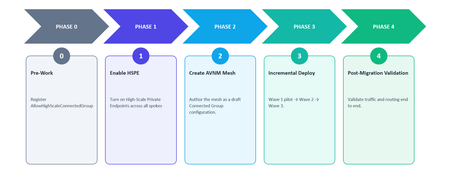
Introduction A common pattern in large Azure deployments is to route VNet-to-VNet traffic through Microsoft Enterprise Edge (MSEE) routers. This happens when spoke VNets in a hub-and-spoke topology communicate with each other by hairpinning through the ExpressRoute circuit: traffic exits the Azure data center, traverses MSEE, and re-enters the data center to reach the destination VNet. This pattern works, but it was not designed as the long-term connectivity model for east-west traffic. With Azure Virtual Network Manager (AVNM) mesh connectivity and recent scale improvements — including high-scale mesh up to 5,000 VNets and High-Scale Private Endpoints (HSPE) up to 20,000 Private Endpoints across connected VNets — enterprises can migrate to a direct, in-datacenter routing model that removes MSEE dependency for VNet-to-VNet traffic. This article explains why the migration is useful, what the new scale limits are, how to enable the required features, and how to execute the migration with minimal disruption. Who This Is For This migration is most relevant if you have 50 or more spoke VNets communicating east-west through ExpressRoute hairpin routing, are approaching VNet peering limits, want to reduce ExpressRoute utilization from internal traffic, or need a simpler centrally managed connectivity model. Even if most east-west flows must continue through a hub firewall for inspection, you can still simplify connectivity management for the flows allowed to go direct. Why MSEE Hairpin Routing for VNet-to-VNet Is Not Recommended When spoke VNets communicate through MSEE, traffic follows a suboptimal path: Spoke A → Hub VNet → ExpressRoute Gateway → MSEE → ExpressRoute Gateway → Hub VNet → Spoke B Single point of failure. MSEE becomes a shared dependency for east-west traffic. An MSEE outage or capacity constraint can affect every VNet pair in the topology. Lower-latency path. Traffic no longer needs to leave the data center and return for spoke-to-spoke communication. Direct mesh keeps east-west traffic on an in-datacenter path, which is generally lower latency than hairpinning through MSEE. Bandwidth constraints. MSEE circuits have finite bandwidth. Routing east-west traffic through them competes with north-south on-premises traffic and can saturate the circuit. Operational risk at scale. Large deployments place significant load on MSEE infrastructure, creating scalability, reliability, and operational concerns for environments with thousands of VNets. Why Manual Peering Was Not a Practical Alternative The obvious alternative — creating direct VNet peerings between every spoke pair — solves the MSEE dependency but introduces its own operational complexity: Combinatorial growth. Connecting N spokes requires N × (N - 1) / 2 peering relationships. For 100 spokes, that is 4,950 peerings. For 1,000 spokes, it is nearly 500,000. Management overhead. Each peering must be individually provisioned, monitored, and maintained. This increases drift, audit, and operational overhead. How AVNM Mesh Solves This AVNM mesh provides group-based connectivity. You define a set of VNets as a network group, apply a mesh connectivity configuration, and AVNM establishes bi-directional connectivity across all members. Traffic between meshed VNets stays within the Azure data center: no MSEE traversal, no hub hop, and no manual peering management. Define once, connect all. A single mesh configuration connects every VNet in the group to every other VNet. Centralized management. Add or remove VNets from the group; AVNM reconciles connectivity automatically. Direct spoke-to-spoke paths. Traffic flows directly between VNets, bypassing both the hub and MSEE. Dynamic membership. Use Azure Policy to auto-enroll new VNets based on tags or resource group conditions. How to Migrate Large Scale Topology High-scale mesh lets user migrate larger topology — up to 5,000 VNets and 20,000 Private Endpoints in a mesh. Scale — Standard Mesh vs. High-Scale Mesh Dimension Standard Mesh High-Scale Mesh VNets per mesh Up to 250 (soft limit, can request increase) Up to 5,000 Private Endpoints per mesh Up to 2,000 Up to 20,000 (with HSPE enabled) Private Endpoints per VNet Up to 1,000 Up to 5,000 (with HSPE enabled) Enabling High-Scale Private Endpoints (HSPE) As a mesh footprint grows, so does the number of Private Endpoints deployed across the connected VNets. The default platform limits — 1,000 Private Endpoints per VNet and 2,000 across connected VNets and mesh — can be reached quickly in large environments. Enabling HSPE raises these limits to 5,000 and 20,000, respectively. For large-scale mesh migrations, enable HSPE proactively if the environment is expected to grow toward standard Private Endpoint limits by following the steps below. Step 1 — Prepare Each VNet Ensure Private Endpoint Network Policies are set to Enabled or RouteTableEnabled on all subnets containing Private Endpoints. This is a prerequisite. Set the VNet-level property PrivateEndpointVNetPolicies to Basic. This activates HSPE on the VNet. Step 2 — Enable HSPE on the Mesh Configuration In the AVNM mesh connectivity configuration, enable the option for high-scale private endpoints. AVNM validates that all VNets in the mesh are HSPE-enabled. If any VNet is missing the configuration, the deployment is blocked with a clear error. Step 3 — Deploy Deploy the connectivity configuration. AVNM applies HSPE across the mesh. Behavior Changes When Enabling HSPE Brief connection reset. Enabling or disabling HSPE triggers a one-time, approximately 1-second connection reset for existing Private Endpoint connections in the VNet. Plan this during a maintenance window. Per-PE Bytes In / Out monitoring is no longer available. HSPE treats each Private Endpoint IP like any other IP in the VNet, which removes per-PE traffic counters. If you depend on per-PE metrics, evaluate alternatives before enabling. On-premises PE traffic billing changes. PE traffic originating from on-premises appears as an aggregate bill on the gateway VNet, not on the individual Private Endpoint resource. The total bill does not change. How to Avoid Downtime Mesh coexists with existing peerings. AVNM does not delete manually created peerings unless explicitly configured to do so. Traffic shifts automatically. Once mesh is deployed, spoke-to-spoke traffic routes directly. The MSEE hairpin path remains available if mesh is removed. No reconfiguration of hub components. Firewalls, gateways, and NVAs in the hub continue to function. North-south on-premises traffic still flows through the hub gateway. Rollback is simple while the legacy path remains. Keep the MSEE hairpin path in place during validation so affected VNets can fall back by removing them from the network group or undeploying the mesh configuration. Security and East-West Traffic Inspection A common concern is whether direct mesh connectivity bypasses hub firewalls or network virtual appliances. The answer depends on how inspection is enforced today. Mesh provides connectivity, not routing policy. If spoke subnets have UDRs that direct traffic through a hub NVA or firewall, those UDRs continue to apply and can keep inspected flows on the firewall path. Security Admin Rules provide centralized segmentation. For flows that do not require firewall inspection, AVNM Security Admin Rules can enforce network-level allow or deny policies across network groups. Use both where appropriate. Mesh can provide direct connectivity for approved flows while Security Admin Rules enforce segmentation boundaries where required. Recommendation: Before migrating, inventory which spoke-to-spoke flows currently traverses the firewall. Decide per flow whether to maintain inspection by keeping UDRs in place or allowing a direct mesh path by removing the UDR for that flow pair. Migration Order and Process The migration from MSEE hairpin routing to AVNM mesh is non-disruptive by design. Mesh connectivity overlays on top of existing peerings and takes routing precedence for east-west traffic. You do not need to tear down the existing hub-and-spoke topology first. Recommended Steps Design the mesh topology. Group VNets by region into mesh groups. If you expect more than 250 VNets per mesh, register the AllowHighScaleConnectedGroup feature in advance. Create a Network Manager and define Network Groups. Ensure that the AVNM scope covers all relevant subscriptions. Use static membership for initial migration or dynamic membership through Azure Policy for ongoing enrollment. Enable HSPE on every VNet in the mesh. Follow the HSPE enablement steps if you need to have more than 2,000 Pes in a mesh. Schedule the change during a maintenance window to account for the brief connection reset. Create the mesh connectivity configuration in AVNM. Select the network groups, enable mesh topology, enable high-scale private endpoints, and enable global mesh if cross-region connectivity is required. Deploy incrementally. Start with a pilot region or non-critical environment. Validate effective routes, spoke-to-spoke connectivity, spoke-to-hub-to-on-premises connectivity, Private Endpoint reachability, and expected VNet flow log patterns before expanding to production regions. Route Behavior During and After Migration During migration, mesh and MSEE can coexist. Mesh-connected VNets receive direct routes for mesh-connected destinations, while existing ExpressRoute gateway routes continue to serve on-premises destinations. UDRs still override system routes, so forced-tunneling and firewall inspection patterns remain in effect when UDRs are present. Mesh destinations. Traffic between mesh-connected VNets goes directly instead of hairpinning through MSEE when no UDR overrides the route. On-premises destinations. ExpressRoute continues to provide north-south connectivity to on-premises networks. Gateway transit. Spokes can continue to reach on-premises through the hub gateway when the design uses gateway transit. Infrastructure-as-Code Considerations If VNet peerings are managed through Terraform, Bicep, or ARM templates, treat AVNM mesh as the new source of truth only after validation. Deploy mesh first. AVNM mesh can coexist with existing peerings, so do not remove peering resources from IaC before validating the mesh path. Validate the traffic path. Use effective routes, Connection Monitor, and flow logs to confirm traffic is using mesh where expected. Guard against drift. Review pipeline state and lifecycle settings before decommissioning old peerings, especially in environments where multiple teams manage network resources. Codify AVNM. Manage the Network Manager, network groups, configuration, and deployment through IaC so mesh becomes the governed connectivity model. DNS Resolution Across Mesh Mesh connectivity does not change DNS resolution behavior by itself. If spoke VNets are already linked to Private DNS Zones hosted or managed through the hub, those links continue to determine name resolution. If spokes use custom DNS servers in the hub, verify that any UDR changes made during migration do not unintentionally alter the DNS traffic path. Migration Example — Two Hub-and-Spoke Topologies into a Single Mesh This example shows how an enterprise can migrate two regional hub-and-spoke environments into one centrally managed AVNM mesh while preserving the existing MSEE path during validation. Current State — Two Hub-and-Spoke Topologies with MSEE Hairpin Contoso Corp operates a large Azure environment in the East US region with two hub-and-spoke topologies: Topology A Topology B Hub VNet Hub-A Hub-B Spoke VNets 500 500 ExpressRoute Gateway ER-GW-A in Hub-A ER-GW-B in Hub-B ExpressRoute Circuit Shared circuit, connected to both gateways Same shared circuit Avg. Private Endpoints per spoke ~8 (4,000 total) ~12 (6,000 total) Total Private Endpoints 10,000 across both topologies How traffic flows today: Spoke-to-spoke within Topology A: Spoke-A-01 → Hub-A → ER-GW-A → MSEE → ER-GW-A → Hub-A → Spoke-A-02 Spoke-to-spoke across topologies: Spoke-A-01 → Hub-A → ER-GW-A → MSEE → ER-GW-B → Hub-B → Spoke-B-01 Every spoke-to-spoke packet — whether within the same topology or across topologies — exits the data center, traverses MSEE, and re-enters. With 1,000 spokes generating east-west traffic, MSEE becomes a shared single point of failure and adds latency to every flow. Target State — A Single AVNM Mesh with 1,000 VNets Contoso's goal is to consolidate all 1,000 spoke VNets into a single AVNM mesh, removing MSEE from the east-west traffic path. Spoke-to-spoke traffic, any pair: Spoke-A-01 → directly→ Spoke-B-01. Traffic stays in the data center and uses the direct mesh path. MSEE role: MSEE carries north-south on-premises traffic. East-west load is removed from the ExpressRoute hairpin path. Migration Execution Phase 0 — Pre-Work Register the feature. Since the mesh contains 1,000 VNets, above the 250 standard limit, Contoso registers the AllowHighScaleConnectedGroup feature flag on the subscription. This enables high-scale mesh support for up to 5,000 VNets. Inventory Private Endpoints. With 10,000 Private Endpoints across 1,000 VNets, Contoso exceeds the standard mesh Private Endpoint limit of 2,000. HSPE must be enabled. Phase 1 — Enable HSPE on All 1,000 Spoke VNets Batch 1: Enable HSPE on all 500 spoke VNets in Topology A during the maintenance window by following the instructions. Batch 2: Apply the same configuration to all 500 spokes in Topology B. Expected impact: Each VNet may experience a brief connection reset for existing Private Endpoint connections when HSPE is enabled. Schedule the change during a maintenance window. Phase 2 — Create the AVNM Mesh Create a Network Manager scoped to the management group containing all 1,000 spoke VNets. Define a single network group called eastus-mesh-all-spokes with dynamic membership using an Azure Policy and the tags. Create a mesh connectivity configuration. Set topology to Mesh, network group to eastus-mesh-all-spokes, high-scale private endpoints to Enabled, and global mesh to Not needed because all VNets are in the same region. Save the configuration as a draft and do not deploy yet. Phase 3 — Incremental Deployment Wave 1 — Pilot: Contoso deploys the mesh configuration to 50 dev/test spokes, either by using a temporary network group or by tagging only those VNets initially. Validation includes effective routes showing ConnectedGroup as the next-hop type for meshed spoke prefixes, spoke-to-spoke connectivity through the direct mesh path, Private Endpoint reachability across meshed spokes, unchanged on-premises connectivity through the hub and MSEE, and VNet flow logs that confirm expected direct spoke-to-spoke flows. Wave 2 — Light production traffic VNets: After a successful pilot, Contoso tags light production traffic VNets. The dynamic network group picks them up automatically. Contoso redeploys the connectivity configuration, runs the same validation checklist, and monitors traffic to confirm that east-west traffic from these VNets is moving away from the ExpressRoute hairpin path. Wave 3 — All remaining production VNets: Contoso tags all remaining spokes and redeploys the configuration. At this point, all 1,000 spokes are in the mesh. No downtime migration: During Waves 2 and 3, existing MSEE hairpin routing remains functional. VNets not yet in the mesh continue to communicate through MSEE. VNets already in the mesh communicate directly through the mesh. This avoids a planned connectivity gap during migration. Phase 4 — Post-Migration Validation After deployment, confirm that mesh is active and traffic is taking the expected path before decommissioning the legacy route. Effective routes. Verify spoke subnets show direct routes to peer VNet prefixes instead of routing through the gateway or MSEE. Connection Monitor. Track representative spoke-to-spoke flows and compare latency and reachability before and after migration. VNet flow logs. Confirm east-west traffic matches the expected mesh path and is not still traversing the ExpressRoute gateway path. Network Watcher topology. Visualize the resulting connectivity model and identify any VNets not enrolled in the target network group. If traffic is still hairpinning after mesh deployment, check for UDRs overriding system routes, spokes missing from the network group, deployment not committed to the target region, or IaC pipelines recreating legacy peerings. Rollback Quick rollback while MSEE remains in place. Remove affected VNets from the network group or undeploy the mesh connectivity configuration. AVNM removes only the connectivity it created, and traffic can fall back to the existing MSEE hairpin path. Rollback after decommissioning legacy paths. If old peerings or route dependencies have already been removed, rollback may require reprovisioning those resources and should be treated as a longer change window. Recommendation. Keep the MSEE hairpin path available for at least two weeks after mesh deployment, monitor traffic patterns, and only then remove the legacy path. Before and After Summary Metric Before (MSEE Hairpin) After (AVNM HSPE Mesh) Spoke-to-spoke latency in the same region Higher due to the MSEE hairpin path Lower-latency direct in-datacenter path; actual latency depends on workload, region, and network conditions Traffic path for east-west Spoke → Hub → MSEE → Hub → Spoke Spoke → Spoke directly through the Mesh MSEE dependency for east-west Yes, shared dependency No MSEE dependency for east-west traffic Manual peerings required 0 when using hairpin routing, but 499,500 if built manually for 1,000 spokes 0 manual spoke-to-spoke peerings; AVNM manages connectivity Private Endpoints supported 2,000 per mesh under standard limits 20,000 per mesh with HSPE Rollback complexity Not applicable to the current hairpin model Remove VNets from the network group or undeploy the connectivity configuration Migration downtime Not applicable Designed for no planned downtime when deployed incrementally and validated carefully Closing Notes Migrating to AVNM mesh does not require tearing down your existing network. The hub gateway, firewalls, and NVAs continue to function as they do today. What changes is that east-west spoke-to-spoke traffic stops leaving the data center unnecessarily. MSEE is not the right tool for the east-west fabric. Removing internal traffic from the ExpressRoute circuit is a reliability and capacity improvement. AVNM mesh replaces combinatorial complexity with group-based intent. The operational model scales with the number of groups, not the number of VNets. High-scale mesh and HSPE remove the ceiling — up to 5,000 VNets and 20,000 Private Endpoints per mesh. The migration is incremental and reversible. Mesh coexists with existing paths, and you can validate wave by wave before decommissioning the legacy route. Start with a pilot mesh in a non-critical environment, validate the traffic shift, and expand from there. Resources Connectivity configurations in Azure Virtual Network Manager Increase Private Endpoint virtual network limits Create a mesh topology with Azure Virtual Network Manager Security admin rules in Azure Virtual Network Manager Create a mesh network topology with Azure Virtual Network Manager using Terraform589Views0likes0CommentsICMP Support for Azure StandardV2 NAT Gateway
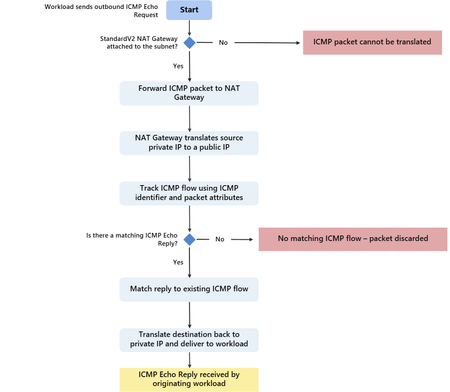
Our customers, across all industries, depend on consistent outbound connectivity and observability to operate and troubleshoot their cloud workloads at scale. As Azure environments grow in size and complexity, teams increasingly rely on standard network diagnostic tools such as ping to quickly validate reachability and identify connectivity issues. When customers route outbound traffic through Azure NAT Gateway, they benefit from centralized and scalable outbound connectivity designed to prevent SNAT port exhaustion, while simplifying management by removing the need for per‑resource public IPs. Historically, outbound connectivity through Azure NAT Gateway supported TCP and UDP traffic only for Azure workloads. We are pleased to announce that Azure StandardV2 NAT Gateway now supports outbound ping through ICMP Echo Request and Echo Reply traffic. Workloads that rely on NAT Gateway for internet egress can now use ping to validate reachability, improving operational visibility and simplifying network troubleshooting while preserving the scalability and resiliency characteristics of NAT Gateway. What’s now supported? Azure StandardV2 NAT Gateway supports outbound ICMP Echo Request and Echo Reply traffic (ping) for IPv4 and IPv6. Other ICMP message types are not currently supported. With this update, ICMP traffic sent from workloads behind a NAT Gateway can be translated to a public IP address and reliably receive responses from external endpoints. This brings ICMP behavior in line with existing TCP and UDP outbound flows, enabling consistent network diagnostics across all common transport types. This capability is available automatically when workloads egress through a StandardV2 NAT Gateway - no additional configuration or rule changes are required. Scenarios enabled by ICMP support Support for ICMP through StandardV2 NAT Gateway unlocks several common operational scenarios: Basic reachability testing – Operators can use ping from virtual machines, VM scale sets, or AKS nodes behind NAT Gateway to verify outbound connectivity to internet endpoints. Health validation and troubleshooting – Teams can perform quick checks during incident triage without deploying jump hosts, public IPs per VM, or temporary firewall exceptions. These scenarios are especially valuable in large‑scale environments where workloads rely on centralized outbound connectivity via NAT Gateway. How ICMP works through StandardV2 NAT Gateway Unlike TCP or UDP, ICMP does not use ports to differentiate flows. Instead, ICMP messages include an identifier field, which is used by diagnostic tools to correlate requests and responses. A common troubleshooting scenario is when workloads deployed behind an Azure StandardV2 NAT Gateway are unable to reach external endpoints. Since these workloads typically do not have public IP addresses, it can be difficult to quickly determine whether the issue is related to basic network reachability or higher-layer configuration. In such cases, ICMP‑based diagnostics such as ping can be used to validate outbound connectivity and help isolate the source of the issue. When a workload sends an outbound ICMP packet through a NAT Gateway: NAT Gateway translates the source private IP to one of its associated public IP addresses. The platform tracks the ICMP flow using the ICMP identifier and other packet attributes. Return ICMP responses from the external destination are matched to the originating flow. The response is translated back to the original private IP and delivered to the workload. This stateful handling allows replies to be routed correctly even when multiple workloads are sending ICMP traffic concurrently through the same NAT Gateway. Using ICMP for end-to-end outbound troubleshooting To validate outbound connectivity using ICMP from workloads deployed behind StandardV2 NAT Gateway: Go to your virtual network in the Azure portal and select the subnet hosting your workload. Verify that a StandardV2 NAT Gateway is associated with the subnet. The workload does not require a public IP address. Connect to the workload (for example, a virtual machine) running in the subnet. Run an ICMP ping to an external destination to validate outbound reachability. Successful ping from a workload behind an Azure StandardV2 NAT Gateway demonstrating outbound connectivity and ICMP Echo reply. Review the results. Successful ICMP echo replies confirm that outbound connectivity through StandardV2 NAT Gateway is functioning and that ICMP traffic is translated and returned correctly Summary With ICMP Echo support, Azure StandardV2 NAT Gateway provides a more complete outbound networking experience by enabling essential diagnostic tools to function reliably through NAT. Customers can validate reachability, perform basic troubleshooting, and diagnose connectivity issues while continuing to benefit from the simplicity and scale of centralized outbound connectivity. Learn More Azure NAT Gateway overview Troubleshoot Azure NAT Gateway1.4KViews1like0CommentsSummarized Gateway Prefixes for Route Advertisement in Azure Virtual Networks
Background Many Azure deployments follow a hub-and-spoke topology: one VNet is designated as the hub and holds the connection to on-premises (via ExpressRoute Gateway, VPN Gateway, or both), and workload VNets — the spokes — peer to the hub to reach on-premises and shared services. This centralizes gateway connectivity so many workloads can share a single ExpressRoute or VPN Gateway. However, in large hub-and-spoke topologies, ExpressRoute and VPN Gateway limits on advertised prefixes (for example, 1,000 IPv4 and 100 IPv6 prefixes) can be reached. Because each spoke adds its own address prefixes to that count, these limits are approached quickly, constraining how far the topology can scale. What's New With Summarized Gateway Prefixes, customers can now advertise a single covering prefix (for example, 10.0.0.0/16) instead of many smaller CIDRs (for example, multiple /24s) – dramatically reducing advertised route count and enabling larger-scale Azure environments. A new property, summarizedGatewayPrefixes, is now available on the Virtual Network resource in public preview. When configured on a hub VNet, it controls what your ExpressRoute Gateway and VPN Gateway advertise to on-premises, replacing the default behavior of advertising all individual hub and spoke VNet CIDRs with a set of aggregated prefixes you define. For example, instead of advertising 10.0.1.0/24, 10.0.2.0/24, 10.0.3.0/24, and so on for each spoke, you can advertise a single 10.0.0.0/16. Key Benefits Fewer advertised routes — Replace hundreds of individual spoke CIDRs with a small set of summarized prefixes. Scales with your topology — Supports deployments with 500+ spokes without requiring address plan redesigns or VNet splits. IPv4 and IPv6 — Summarize both address families. Works with both gateway types — Supported on ExpressRoute Gateway and VPN Gateway. Simple configuration — A single property on the VNet resource. No additional services or dependencies. Backward compatible — If the property is left empty, behavior is unchanged: all hub and peered spoke address spaces are advertised as before. How It Works Default behavior ExpressRoute Gateway and VPN Gateway advertise all address spaces of the hub VNet and all address spaces of peered spoke VNets to on-premises. With summarizedGatewayPrefixes configured The gateways advertise the summarized prefixes instead of the hub VNet's individual address spaces. For each peered spoke, if the spoke's address space falls within a summarized prefix, the spoke's individual CIDRs are suppressed from advertisement. Spoke address spaces not covered by a summarized prefix continue to be advertised individually. Example: Without Summarization With Summarization 10.0.1.0/24, 10.0.2.0/24, 10.0.3.0/24, … 10.0.0.0/16 Hundreds of prefixes One prefix Getting Started Open the hub VNet (the VNet containing your GatewaySubnet) in the Azure portal. Go to Address space → Advertised gateway prefixes. Add one or more IPv4 or IPv6 CIDR prefixes that cover the address spaces you want to summarize. Navigate to your virtual network and verify that the summarized prefixes appear. Things to Know The property is set on the hub VNet (the VNet with the GatewaySubnet). The summarized prefixes list can include prefixes outside the VNet's own address space. Avoid overlap among prefixes within the list, but overlap with peered VNet address spaces is expected in hub-and-spoke designs. For dual-stack (IPv4 + IPv6) VNets, define both IPv4 and IPv6 summarized prefixes explicitly.1.7KViews2likes0Comments
Azure virtual network terminal access point (TAP) public preview announcement
What is virtual network TAP? Virtual network TAP allows customers continuously stream virtual machine network traffic to a network packet collector or analytics tool. Many security and performance monitoring tools rely on packet-level insights that are difficult to access in cloud environments. Virtual network TAP bridges this gap by integrating with our industry partners to offer: Enhanced security and threat detection: Security teams can inspect full packet data in real-time to detect and respond to potential threats. Performance monitoring and troubleshooting: Operations teams can analyze live traffic patterns to identify bottlenecks, troubleshoot latency issues, and optimize application performance. Regulatory compliance: Organizations subject to compliance frameworks such as Health Insurance Portability and Accountability Act (HIPAA), and General Data Protection Regulation (GDPR) can use virtual network TAP to capture network activity for auditing and forensic investigations. Why use virtual network TAP? Unlike traditional packet capture solutions that require deploying additional agents or network appliances, virtual network TAP leverages Azure's native infrastructure to enable seamless traffic mirroring without complex configurations and without impacting the performance of the virtual machine. A key advantage is that mirrored traffic does not count towards virtual machine’s network limits, ensuring complete visibility without compromising application performance. Additionally, virtual network TAP supports all Azure virtual machine SKU. Deploying virtual network TAP The portal is a convenient way to get started with Azure virtual network TAP. However, if you have a lot of Azure resources and want to automate the setup you may want to use a PowerShell, CLI, or REST API. Add a TAP configuration on a network interface that is attached to a virtual machine deployed in your virtual network. The destination is a virtual network IP address in the same virtual network as the monitored network interface or a peered virtual network. The collector solution for virtual network TAP can be deployed behind an Azure Internal Load balancer for high availability. You can use the same virtual network TAP resource to aggregate traffic from multiple network interfaces in the same or different subscriptions. If the monitored network interfaces are in different subscriptions, the subscriptions must be associated to the same Microsoft Entra tenant. Additionally, the monitored network interfaces and the destination endpoint for aggregating the TAP traffic can be in peered virtual networks in the same region. Partnering with industry leaders to enhance network monitoring in Azure To maximize the value of virtual network TAP, we are proud to collaborate with industry-leading security and network visibility partners. Our partners provide deep packet inspection, analytics, threat detection, and monitoring solutions that seamlessly integrate with virtual network TAP: Network packet brokers Partner Product Gigamon GigaVUE Cloud Suite for Azure Keysight CloudLens Security analytics, network/application performance management Partner Product Darktrace Darktrace /NETWORK Netscout Omnis Cyber Intelligence NDR Corelight Corelight Open NDR Platform LinkShadow LinkShadow NDR Fortinet FortiNDR Cloud FortiGate VM cPacket cPacket Cloud Suite TrendMicro Trend Vision One™ Network Security Extrahop RevealX Bitdefender GravityZone Extended Detection and Response for Network eSentire eSentire MDR Vectra Vectra NDR AttackFence AttackFence NDR Arista Networks Arista NDR See our partner blogs: Bitdefender + Microsoft Virtual Network TAP: Deepening Visibility, Strengthening Security Streamline Traffic Mirroring in the Cloud with Azure Virtual Network Terminal Access Point (TAP) and Keysight Visibility | Keysight Blogs eSentire | Unlocking New Possibilities for Network Monitoring and… LinkShadow Unified Identity, Data, and Network Platform Integrated with Microsoft Virtual Network TAP Extrahop and Microsoft Extend Coverage for Azure Workloads Resources | Announcing cPacket Partnership with Azure virtual network terminal access point (TAP) Gain Network Traffic Visibility with FortiGate and Azure virtual network TAP Get started with virtual network TAP To learn more and get started, visit our website. We look forward to seeing how you leverage virtual network TAP to enhance security, performance, and compliance in your cloud environment. Stay tuned for more updates as we continue to refine and expand on our feature set! If you have any questions please reach out to us at azurevnettap@microsoft.com.3.5KViews3likes8Comments
Consistent DNS resolution in a hybrid hub spoke network topology
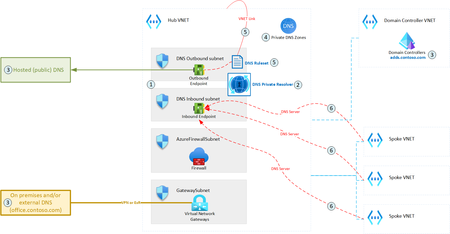
DNS is one of the most essential networking services, next to IP routing. A modern hybrid cloud network may have various sources of DNS: Azure Private DNS Zones, public DNS, domain controllers, etc. Some organizations may also prefer to route their public Internet DNS queries through a specific DNS provider. Therefore, it is crucial to ensure consistent DNS resolution across the whole (hybrid) network. This article describes how DNS Private Resolver can be leveraged to build such architecture.19KViews6likes5Comments