app
926 Topics
license to access Planner Premium from Power Apps
We want to create a Power Apps that connect to those main sources:- 1) SharePoint 2) Premium Planner now i know that connects Power Apps to Premium Planner will make the Power Apps as premium app, and users will need premium power apps license to access it. and also accessing Premium Planner will need atleast Planner Plan1. so what is the minimum license for those 3 groups of users:- 1) normal users will be accessing SharePoint lists only through the Power Apps 2) Admin users will be accessing SharePoint lists and Premium Planner through the Power Apps + Premium Planner through the Premium Planner UI. 3) Senior user will be accessing SharePoint lists and Premium Planner through the Power Apps only. does Planner Plan1 is enough for Senior user? and does Power Apps Premium is enough for admins? Thanks95Views0likes1Comment
Dynamic Mandatory Fields
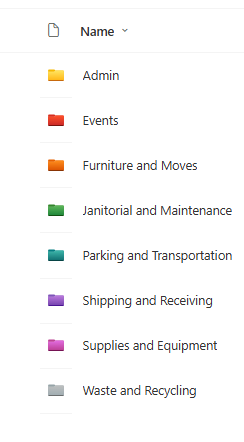
In a SharePoint library, I have folders which are = a. Admin b. Events c. Furniture and Moves d. Janitorial and Maintenance e. Parking and Transportation f. Shipping and Receiving g. Supplies and Equipment h. Waste and Recycling I have Meta data across the library whose data type are all choices and are: a. Document Type = Contract, Financial, planning b. Building = Gym, Garage, Heating c. Asset Category = Office, Playground d. Fiscal Year = FY23, FY24, FY25, FY26, FY27 e. Vendor = Maple Leaf, Canadian Tire, Home Depot f. Status = Active, Pending, Not Active g. Retention Label = 3 years, 5 years h. Service Type = Admin, Events, Furniture and Moves, Janitorial and Maintenance, Parking and Transportation, Shipping and Receiving, Supplies and Equipment, Waste and Recycling Service Type and Retention Label are mandatory fields, with the Rule below for all the files in the various folders: IF Folder Name = Admin, then Service Type = Admin and Retention Label = 5 years; the mandatory fields should be Document Type, Status and Fiscal Year IF Folder Name = Events, then Service Type = Events and Retention Label = 3 years; the mandatory fields should be Document Type, Status and Fiscal Year, Building and Vendor IF Folder Name = Furniture and Moves, then Service Type = Furniture and Moves and Retention Label = 3 years; the mandatory fields should be Document Type, Status and Building IF Folder Name = Janitorial and Maintenance, then Service Type = Janitorial and Maintenance and Retention Label = 3 years; the mandatory fields should be Document Type, Status and Fiscal Year IF Folder Name = Parking and Transportation, then Service Type = Parking and Transportation and Retention Label = 3 years; the mandatory fields should be Document Type, Status and Fiscal Year IF Folder Name = Shipping and Receiving, then Service Type = Shipping and Receiving and Retention Label = 3 years; the mandatory fields should be Document Type, Status IF Folder Name = Supplies and Equipment, then Service Type = Supplies and Equipment and Retention Label = 3 years; the mandatory fields should be Document Type, Status and Fiscal Year IF Folder Name = Waste and Recycling, then Service Type = Waste and Recycling and Retention Label = 3 years; the mandatory fields should be Document Type, Status and Vendor I have used Column Default Value Settings for SharePoint to display Auto-Display the Service Type and Retention Label, but I cannot seem to perform the conditional mandatory fields using Validations setting for the other requirements. Please help207Views0likes1CommentRecycle Bin and Site Content Hidden for Site Members and Site Visitors
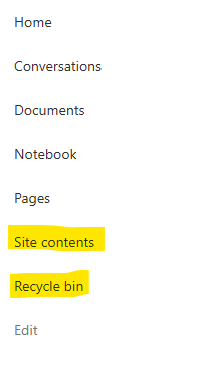
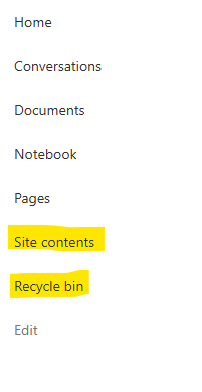
I have a requirement that the Recycle bin and Site Contents should not be be hidden from the Site Members and Site Visitors. Please how can I achieve this because the Server Infrastructure activation is not working for me. Any workarounds? Please help214Views0likes2CommentsRecycle Bin and Site Content Hidden for Site Members and Site Visitors
I posted this before but made a mistake with my write up, so I am reposting. I have a requirement that the Recycle bin and Site Contents should be be hidden from the Site Members and Site Visitors. Please how can I achieve this because the Server Infrastructure activation is not working for me. Any workarounds? Please help87Views0likes0Comments
Is using Planner for tracking OKRs a good idea?
So our team has been trying to use Planner to track OKRs. We set up buckets for each objective and tasks for key results. It kinda works for a small team but now that leadership wants to roll it out company wide, its getting messy. Theres no way to show progress rollups from team-level OKRs to company-level ones, no percentage tracking on key results, and managers cant see a consolidated view across teams. Has anyone found a decent way to make Planner work for OKR tracking at scale?195Views1like2Comments
Access VBA performance dramatically slowed since June Update
We are running an access based application with a large vba project. One customer with four different instances of this project experience extreme slow down in performance on all instances during the last week. We made no changes. The Microsoft Office Update was applied automatically. We believe the problem happened then. We have tried reverting to several different previous versions of Office but symptoms still remain.504Views0likes7Comments
SharePoint Library Help Needed
I have a SharePoint Library where I would like to implement these requirements below and would appreciate your advise: Folders were created at the library level, which looks like the image below. I do not want people to be able to create any folders or upload documents or folders at the library level, but rather only when they open the folders. I have disabled folder creation and created a PowerApps form, so that users can only upload document, edit documents, view details of the documents when they open any of the folders., but I cannot seem to find the Power Apps form when I open any of the folders and try to upload a document or view a document or edit the document details. 2. I have a choice column called Fiscal Year which has options as = FY22, FY 23, FY24, FY25, FY26. By March 2026, I would like to create an automate flow which will auto create FY27 and remove FY22 from the choice, so that the choice column is always limited to only 5 years.199Views0likes3Comments2026.02.20 - Planner UI update is worse
The UI changes to Planner within the latest Teams desktop app update (version 26032.208.4399.5) has regressed in its functionality and is worse than before. Previously, all of the contents of an item in the Planner were visible at the same time. Now I have to tab between Task Details, Attachments and Checklist, and am unable to view these at once, which has become a critical workflow for me. It is extremely irritating, as I've developed a workflow around how Planner was presented (which was that everything within a task was visible at once), and now it has been compartmentalised. Please unwind this - it is a regressive update and provides less information and requires more interaction to work through the detail of a task.3.7KViews31likes22Comments
Modern Employee Directory
Hi Team I’ve built a Modern Employee Directory web part and would really appreciate your feedback and suggestions for new features. It’s an open-source project. Feel free to share your thoughts in the GitHub Discussions section. If anyone is interested in collaborating, you’re more than welcome to join and contribute. https://www.wrvishnu.com/modern-employee-directory-sharepoint/41Views0likes0Comments
SharePoint Limitations of OneDrive App for External SharePoint Guests
Hello everyone, I am part of an organization and have created two SharePoint sites: one site for all members one site only for the board External guests have been added to both sites. Problem: Several of these guests would like to use the OneDrive app (desktop or mobile) to access the shared content. This is where I am stuck. Situation in detail: Some guests do not have a Microsoft account, others have created one themselves The SharePoint sites and documents are shared correctly, and access works via the browser In the OneDrive app, however, guests do not see any content Nothing appears under “Shared” The SharePoint sites are not visible Questions: How are external guests supposed to see SharePoint documents in the OneDrive app? Do guests have to have a Microsoft account, or is an email-invited guest sufficient? Is there an official or recommended approach for enabling guests to use OneDrive/SharePoint meaningfully via the app? Or is the OneDrive app simply not intended for external guests? Additional question: Is it officially supported or expected that guests can only access SharePoint content via a web browser (on PC and mobile) and not via the OneDrive app at all? I find a lot of contradictory information on this topic, and it has cost me quite a bit of nerves by now. Thank you very much for any explanation or best practice. Best regards, Nina151Views0likes1Comment