android
252 TopicsBehind the Scenes: Meet Ben Truelove, Principal Designer and Accessibility Champion at Microsoft
Happy Friday Microsoft 365 Insiders! Join us in celebrating Ben Truelove, Principal Designer & Accessibility Champion at Microsoft. His journey from dreaming of invention to pioneering inclusive technology is a testament to the power of passion and purpose. "The community has a motto, ‘nothing about us without us,’ which means that the people who will benefit” says Ben. His story is a must-read for anyone passionate about creating an inclusive world: Behind the Scenes: Meet Ben Truelove, Principal Designer and Accessibility Champion at Microsoft 🌍 Thanks! Perry Sjogren Microsoft 365 Insider Social Media Manager Become a Microsoft 365 Insider and gain exclusive access to new features and help shape the future of Microsoft 365. Join Now: Windows | Mac | iOS | Android328Views0likes0Comments
Onenote words navigation with keyboard modifier and Tables
Hello, I've noticed that OneNote for Android (both production and beta) do not allow to navigate words using the super usefult ALT+Direction Keys. This kills a lot of its functionality as quick writers tend to use this function a lot. I've tried both on a Samsung Tab S7 with the Book Cover Keyboard, as well as with a Samsung Tab S7 FE with a bluetooth keyboard or a Samsung Tab S2 with a USB keyboard. Also, on Android I can create a Table using the TAB key but I can't add Columns as there's no icon on the bar (and I can't seem to open an eventual option - if any - by long pressing on the table).549Views0likes0CommentsFind recently used files in the Microsoft 365 app for Android
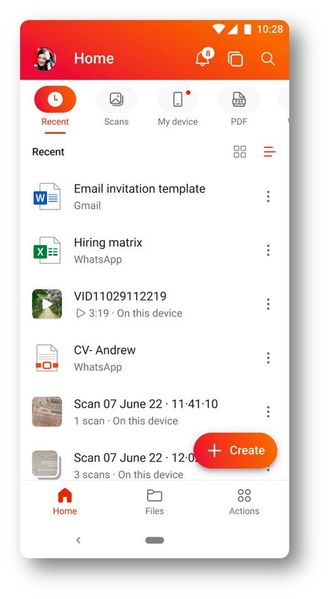
Hi, Insiders! My name is Sudheender Srinivasan and I’m a Product Manager on the Microsoft 365 mobile app team. I’m excited to share with you an improvement will help you find files that you’ve previously opened in the Microsoft 365 mobile app for Android and use them again. Find recently used files We heard from many of you that you wanted to be able to easily access files that you previously opened with the Microsoft 365 app. We’re happy to share that you now can! Word, Excel, PowerPoint, and PDF files opened from Microsoft apps and third-party apps such as WhatsApp, Gmail, Outlook and more, are now accessible through the Recent tab. This improvement helps you quickly locate previously opened files without having to browse or launch the source app. Interested? Learn more in our blog post! Best, Devin Microsoft 365 Insider Social Community Manager Become a Microsoft 365 Insider and gain exclusive access to new features while helping to shape the future of Microsoft 365. Join Now: Windows | Mac | iOS | Android795Views1like0CommentsRequest for partial Eraser on OneNote for Android
I would like to request partial eraser on the Onenote for Android app in addition to a stroke eraser. It is present on OneNote for iOS and windows but not Android. Currently using the eraser tool wipes the entire stroke but if only a part of a stroke is to be erased that's not possible on the app. Please try incorporating this feature.842Views0likes0CommentsPowerpoint Presentation Linking
Bonjour, Serge Lopez dossier 1039949515 voila l'historique du problème rencontré avec PowerPoint 365: description du problème: après une liste de réparations(remise à niveau du PC, réinstallation du pack 365,désactivation de l'accélération graphique), le problème reste entier. j'ouvre une présentation principale qui comporte plusieurs lien avec d'autres présentations. toutes les présentations possèdent un bouton avec pour action "arrêter le diaporama". chronologie: j'ouvre la présentation principale en mode diaporama"2-centre-2022.pptx je choisi des présentations en mode diaporama, puis je les ferment avec la fonction "arrêter le diaporama". environ 1 à 2 minutes plus tard, toutes les présentations se ferment, et 1 minute après elles s'ouvrent toutes ensemble en mode présentation. mon avis: je pense que c'est la fonction "arrêter le diaporama" qui pose des problèmes. j'ai essayé de remplacer l'action "arrêter le diaporama", par ouvrir une autre présentation, ça fonctionne, sauf que toutes les présentations restent ouverte. merci de me trouver une solution. nelly-serge05130590Views0likes0Comments