admin
9 Topics
How to disable reactions in a Team
Hello! I'm being harassed by a colleague who keeps clicking reactions like 🤮or 🤦♂️when I post messages in a Team, therefore creating a hostile work environment, not only for me, but everyone in the Team. When I reported it to HR, they talked to our IT Admin who said it was not possible to disable reactions in a Team. Does anyone know anything about how to turn off reactions? Did Microsoft really make a product that has the potential to hurt people, and not design a way to eliminate it when its abused? (Or does my IT Admin just need some direction on how to do it?)Solved3.3KViews1like4Comments
Meeting Options are limited
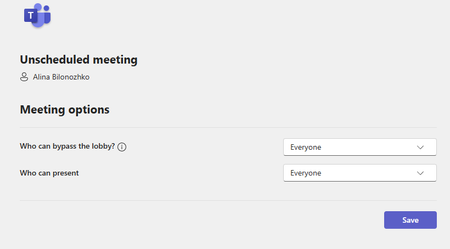
Hello, I have run into a problem of not having a full access to meeting options. I would like to schedule meetings for other people in the office where I do not necessarily have to attend. I would also like to assign other people as co-hosts so that they are able to admit people and have more control of the meeting. There should be settings of being able to let people come in without waiting in the waiting room as well, but I cannot seem to find it anywhere. Here is the attached screenshot: These are the only two options I get when clicking "Meeting Options". Additionally, whenever I set up a meeting, some people are not able to respond to it because they get an error of undeliverable response: "delivery has failed to these recipients or groups". What is the issue here? Does it have to do with how Outlook is set up? How can I change these limitations and errors? Thank you so much!495Views1like1CommentWhat happen with live event record if admin remove Office 365 A3 or A5 license from the user
What happen with live event record if admin remove Office 365 A3 or A5 license from the user? I'm not sure the live event resources such as engagement report, video-on-demand and Q&A record still able to access or remove.894Views1like0Comments