admin roles
32 Topics
M365 Admin Center Global Administrator Lockout
Hello Microsoft Community, I am seeking urgent assistance and guidance regarding a critical Microsoft 365 tenant lockout that has been ongoing for several days without a resolution or proper communication from the support team. Our organization manages Microsoft 365 services for a business with more than 200 active users who depend on Microsoft 365 for their daily operations. Issue Description We have been locked out of our Microsoft 365 tenant's administrator account. This prevents us from properly managing our Microsoft 365 environment and restoring normal access to essential business services. Our business-critical data, including important documents and operational information, is stored in SharePoint. The inability to access and manage these services has significantly disrupted our business operations. Microsoft Support Ticket References We have raised multiple support tickets and followed up repeatedly, but the issue remains unresolved. Tracking ID: 2610050040001149 Tracking ID: 2610090010001066 Tracking ID: 2610050040001222 Despite these support cases and repeated follow-ups, we have not received a satisfactory resolution or a clear recovery timeline. Support Experience So Far Following a discussion with the support team, we were expecting a call to assist with unlocking the administrator account and providing a temporary password through the appropriate recovery process. However, we have not received the expected call or a meaningful update. Our main concerns are: Complete loss of access to the Microsoft 365 tenant administrator account. More than 200 users affected by the ongoing incident. Critical business data and documents stored in SharePoint. Multiple support tickets without a concrete resolution. Lack of clear communication regarding the root cause and recovery timeline. No clear escalation path or confirmation of the next recovery steps. Our Concerns We understand that technical issues can occur, but leaving a business-critical environment inaccessible for an extended period without meaningful updates is extremely concerning. We purchase Microsoft 365 licenses through a partner and expect appropriate technical support and escalation assistance when critical incidents occur. Our organization previously used Google Workspace and recommended migrating to Microsoft 365 because of its enterprise capabilities. This incident has seriously affected user confidence and business continuity. If access cannot be restored promptly, we may have to consider alternative email hosting arrangements to minimize further disruption. Request for Assistance I would appreciate guidance from Microsoft engineers, Microsoft 365 administrators, and community members who have experienced similar situations. What is the appropriate escalation process when all available tenant administrator accounts are inaccessible? How can we expedite tenant ownership verification and administrator account recovery? Is there a dedicated Microsoft team that handles critical tenant lockout incidents affecting business operations? What is the recommended recovery process when the administrator cannot access the Microsoft 365 Admin Center? How can we obtain urgent assistance when multiple support tickets and repeated follow-ups have not resulted in a clear resolution? Can the three referenced support tickets be escalated for urgent review by the appropriate Microsoft support team? We are not looking for workarounds that compromise tenant security. We need Microsoft's official recovery process to restore authorized administrative access safely. Microsoft Support Team: If any Microsoft support representatives are monitoring this community, we would appreciate your guidance on the appropriate escalation channel for this incident. We can provide additional information privately through the appropriate official channels. Thank you for your time and assistance. Any guidance that helps us restore our services and protect business continuity would be greatly appreciated. Best regards, Microsoft 365 Tenant Administrator273Views0likes1Comment
Staff Email hacked how to reset from admin
One of my staff members' email accounts has been hacked. We are using an MSFT 365 online subscription. How do I reset it as an admin? I tried resetting the password, removing restrictions, and blocking/unblocking the user, but none of these steps worked. Please assist.221Views0likes3Comments
DNS connections
In 2021, I bought a domain and connected it to a Microsoft 365 account at the time. Over the years, I did not renew the domain and the 365 membership. Luckily last month, the domain was still available so I bought it back. Now, I can’t connect it to my new 365 account because it is still connected with the old one. I don’t have the username so I’m stuck at the moment160Views0likes0CommentsAI agent ownership change
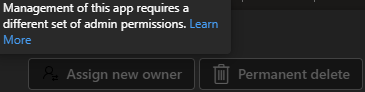
I was just in the M365 Admin Center because I needed to transfer ownership of an agent for a colleague – but it now suddenly looks like Microsoft has changed something in their permission structure. As a result, I can no longer transfer ownership of agents, and the system tells me that I don't have permission to manage that particular app. So, the question is: do I now also need the Application Administrator role in order to continue managing this? I get this message:740Views1like3Commentstenant completely unreachable after update PLAID number on partner portal
Hi, i'm a reseller in Italy. I have a partnership with a local distributor to resell Office 365 product from many years. On the license side (my panel at vendor) i see my license available yet, like other customers. In these days we have changed the PLAID as requested to enable again our partnership. I've opened the ticket as suggested and after that we have lost completeley the access with any admin of our domain (@noorduffici.com and onmicrosoft.com) I can't login even in the partner portal of microsoft that reply with ( the mail doesn't exists) I've tried to call any number of support but anytime I go on with a virtual caller without a solution . Someone could hel about this issue ? The domain is not corrupted because i've access and i change the MX record to work temporaly with mail NOT microsoft.277Views0likes1CommentLeadership of Outlook Newsletter
I’m requesting the ability to become the full administrator of Outlook newsletters not just in my organization, but across Microsoft 365. I want to manage templates, delivery settings, analytics, and permissions. My goal is to have broader control over how newsletters are created, customized, and distributed. I’m passionate about communication and want to help shape how newsletters work in Outlook. Please consider adding a role or feature that allows users like me to take ownership and lead newsletter strategy across organizations. I’ve seen cases where people used newsletters to share inappropriate content, including profanity and offensive language. Without proper moderation tools, this can damage professional communication and create serious issues. I want to help prevent misuse by having the ability to moderate, approve, or restrict newsletter content before it’s sent. I also want to contribute to improving the overall design and performance of the newsletter experience, making it more intuitive, professional, and reliable. Giving users like me full control over Outlook newsletters would improve communication quality, prevent abuse, and empower responsible leadership across organizations. If exclusive admin control isn’t granted, at minimum there should be a designated Admin role because without clear ownership, misuse and poor communication will continue unchecked. I’m ready to take on that responsibility and help shape the future of Outlook newsletters.375Views0likes1CommentAgent in SharePoint option is not visible in the M365 admin center
Agent in SharePoint option is not visible in my M365 admin center under pay as you go service and it's only show Syntex services option not the Agent in SharePoint. As before we were able to see both options like Agent in SharePoint and Syntex services but now Agent in SharePoint is not visible. I have also attached the screenshot where both of the options were visible but now the Agents in SharePoint option is not visible, so is there new update in admin portal or is this is some kind of issue?Solved583Views0likes3CommentsInterface Views in Microsoft 365 Admin Center
1. Simplified View Purpose: Designed for small businesses or organizations with limited IT resources. Features: Streamlined dashboard with essential tasks like user management, license assignment, and password resets. Minimal configuration options to reduce complexity. Quick access to support and basic service health info. Use Case: Ideal for admins who need to perform routine tasks without diving into advanced settings. 2. Dashboard View (Advanced View) Purpose: Tailored for medium to large enterprises with complex IT environments. Features: Full access to all admin centers (Exchange, SharePoint, Teams, etc.). Advanced analytics, reporting, and configuration tools. Role-based access control and security management. Customizable widgets and navigation for personalized workflows. Use Case: Suitable for IT teams managing multiple services, users, and compliance requirements. Customization Needs Are there specific tasks we perform frequently that can be automated in the dashboard?715Views0likes2Comments