accessibility
705 Topics
The New Start Menu Is a Perfect Example of Microsoft Forcing Unwanted “Features” on Users
I’m posting this because I’m beyond fed up with the direction Microsoft is taking with Windows, and the latest Start Menu redesign is really unwelcomed. Whoever decided to implement the new “All” section with forced Categories, Grid/List views, and a permanently attached app list seems to have completely forgotten something fundamental: this is my Start Menu, not theirs. I’ve already turned off every bit of clutter I can — Recommended, recent files, “suggestions,” all of it. Yet Windows still insists on injecting an enormous block of UI I never asked for and will never use. I don’t care whether it’s Categories, List, or Grid. I don’t want any of it. I want the Start menu to show ONLY the pinned items I chose, nothing else, the same way it worked for years. But now? Microsoft has deliberately removed the ability to collapse, hide, disable, or eliminate this lower “All” section entirely. It wastes space, disrupts workflow muscle memory, and provides zero value for users who already know exactly what they need. It’s an unwanted visual and functional takeover of the one UI element that should be the most personal and customizable. This is exactly the type of “change for the sake of change” that pushes long‑time Windows users away. It feels like decisions are being made by people who never actually use Windows for real work, and who believe their design experiments matter more than respecting users’ preferences. I’m tired of being forced into UI experiments I never opted into. I’m tired of updates that remove more choice than they add. And I’m tired of Microsoft ignoring the most universal feedback users keep giving: Stop shoving new UI elements in our faces and give us back full control over our own operating system. If Microsoft wants people to stay enthusiastic about Windows instead of increasingly frustrated with every forced redesign, then we need true user‑controlled customization — not “pick between three unwanted layouts,” not “view modes,” not scripts, not policies, not third‑party hacks. Just a simple, basic ability to hide what we don’t want. Give us the Start Menu we choose, not the Start Menu you decide we should have.129Views4likes2Comments
Microsoft Edge Webview icon
I'm I in the right community? My Widgets Icon on my toolbar doesn't open even with the Widgets turned on in the settings. Could you help me? I am the administrator. I have the Edition Windows 11 Home Version, 23H2, with a Windows Feature Experience Pack. I have Windows 11 software and has been updated recently. Everything under Task Manager, details, mswebview.exe is running, however, the window doesn't appear on the home screen. Could this be an easy fix? TIA Joseph60Views0likes3Comments
Windows 25H2 update – S3 sleep mode compatibility issue
Windows 25H2 update – S3 sleep mode compatibility issue Dear Microsoft Engineering Team, hello! I recently discovered a long-standing bug in Windows 11: the computer sleep configuration is the system default, and when it goes to sleep or the second time or after restarting, it will be woken up for no reason during sleep. Personally, I think the compatibility of Windows 11 operating system with S3 sleep is not good, especially for desktops and laptops with 2.5G unlimited brand network cards and onboard 2.5G network cards, there are bugs such as misjudgment of network card signals. In addition, after sleep is awakened, the sound card still has a long silence problem, which can only be restored after a period of time. The program itself does not support the wake-up function after investigation, and the commonly used programs will not disturb sleep, and can eliminate program and hardware problems. I tried the following troubleshooting method 1. Try to reinstall the system and install it cleanly (it cannot be solved) 2: Try to install the latest version of the driver, or even update the BIOS to the latest version (no solution) 3: Replace hardware such as motherboard, memory, power supply, etc., including replacing other brands (unsolvable) 4: Contact Microsoft support and take measures to turn off the wake-on-NIC (temporarily solved, but it affects the wake-on-NIC function, which is inconvenient to use) At present, I don't think this measure is a good stopgap measure, and the measure has seriously affected my normal use of the network card wake-up function, and at the same time is highly dependent on the sleep function. In addition, when asking for help on social media, I saw that ASUS computer staff found sleep compatibility issues between Windows 11 and 2.5G network cards as early as 2024, and the ASUS onboard Intel i226-v network card motherboard could not enter sleep mode normally (model number ROG STRIX B760-G Gaming D4). At the same time, in order to confirm my judgment, I used the tenth generation desktop of my work unit to install the same system to make a comparison, this host is a 1G network card, after testing, the 1G network card in the default power setting (network card wake-up is turned on by default in the device manager power option), there is no above problem, and combined with the two motherboards I replaced before, both have a 2.5G network card on board, one model is (ASUS PRIME B760M-A), the other is (GIGABYTE). GAMING X DDR4 GEN5), and replace a new motherboard again, the problem is still the same, as long as any 2.5G network card on board of any brand of motherboard, including but not limited to self-installed 2.5G network card (network card wake-up is turned on by default in the device manager power options), there is a sudden misjudgment of Windows 11's network card wake-up signal during sleep and is woken up for no reason. At the same time, others have also reported that the motherboard of the 15th generation platform also has the problem of sleep suddenly being woken up by this system bug, so I would like to share my new discovery with you, looking forward to the letter from your behind-the-scenes engineering team, and at the same time, I would like to ask when this problem can be solved (that is, the problem of wake-up suddenly being woken up by a misjudgment signal when the 2.5G network card is turned on by default to wake up and enter sleep)? Thank you very much and look forward to your reply from your engineering team.122Views0likes1CommentWindows Explorer doesn't show video thumbnails anymore [Win11Pro]
For several days now, Windows Explorer has not been displaying video thumbnails; instead, the program icon is displayed. This only affects video files (mp4, avi, mov, gif, etc.)—other icons, such as those for images and PDFs, are displayed correctly. It affects all folders on the system. No changes or updates have been made to the video player. Videos play correctly in the player. The problem with video thumbnails also exists in WhatsApp Desktop (installed via Microsoft Store). Version: Windows 11 Pro 25H2 (Build 26200.7171) Update status: latest (without beta) Attempted fixes: • Deleted thumbnail/icon cache • DISM /Online /Cleanup-Image /ScanHealth • DISM /Online /Cleanup-Image /RestoreHealth • sfc /scannow all unsuccessful regarding the thumbnails155Views0likes3Comments
Edit a SP list column unable to enter data
Hi, I'm trying to edit some data in a column within my SP list. The column type is Choice. The issue is the is not a 'Choice' field. When created it was going to be a Choice field but when I built the Powerapp that is feeding data to this column is has become a lookup field. So in my app the user selects Division and then the wards in the division are available for selection in the Ward field. Sort(Distinct) formula used looking at another SP list SharePoint PowerApp This as caused an issue as I need to edit one some values in the Division and Ward columns in SP. Can I amend the column values to Single line of text, without losing any of the data?? If not is there away I can amend, edit the data??43Views0likes1Comment
My microsoft account got hacked: Need actual support (Not copy and pasted ones)
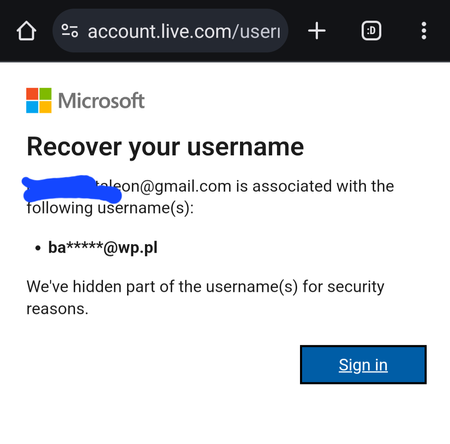
My account got hacked, i dont know how but im sure 2fa is turned on and hackers still got in. I dont understand why there wasnt any emails about it going through my email that someone logged in in my microsoft account. I had things connected to that account such as school and some game like minecraft. Currently my java minecraft is non existence and is deleted from minecraft forever because i cant find it in namemc, but my xbox gamer tag is still alive so it also confirms that it indeed had an association with my account before. The hacker changed the email of my account that cause my email to be non-existence in the microsoft system. (This is very huge flaw of microsoft, i hope before we do any changes in the account, it is first confirmed in the email address if this email should really be added to that microsoft account) But i do have evidence that it was indeed associated with it before the hacker change the email and its even confirmed by microsoft website, i also got the full email of the hackers email that was used on my account. I tried everything from contacting support to the account recovery form. But nothing works, i tried cursing the fake email of the hacker that was currently occupying my account, but recieved no response. I am in dilema on what to do now, this account has been with me ever since my email was created. I just hoped that i get it back, i could provide evidences. But its been getting ignored apparently.1.9KViews0likes5CommentsIs it a feature or a bug?
Hi, Romanian keyboard comes in 3 flavors: traditional, standard, programers. It seems you cannot uninstall one of them. I only use standard, which as the name says, it supposed to be... standard. Except not, the default layout is Traditional. Although I have setup standard as default layout, whenever I log in on that computer remotely, it defaults to traditional, which results in many failed logins as the characters in the passwords don't match the layout :). Is there a way to setup default keyboard layout for RDC?35Views0likes2CommentsHP Pavilion 15 Turns Off When USB Device Is Connected
Hi, I’m facing an issue with my HP Pavilion 15 (Windows 11). Whenever I try to charge my e-cig device using the laptop’s USB port, the laptop shuts down instantly without any warning or error. The battery health is good, and the laptop charges other devices (phone, earbuds, etc.) normally. The device also works fine when charged with a wall adapter. Is this related to USB power delivery, overcurrent protection, or a hardware/firmware safety feature in Windows laptops? Has anyone else experienced this? Thanks35Views0likes1Comment