support
86 Topics
Very Negative Experience With Microsoft Partner Program
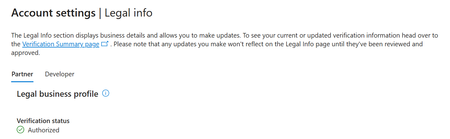
Since two months I am trying to verify my account, after countless attempts and errors and automatic rejections, finally I got authorized. I want to update my tax profile so I can send the add in, guess what Microsoft cant find my EIN although I sent official EIN number. After three weeks I sent another ticket and instead of finding a solution for the EIN number issue, they responded that there is a problem with account verification which is already approved!!! I dont know what is happening here total mess...
Unable to pass Employment Verifcation step in Partner Center
Hello everyone, I am stuck at the Employment Verification step while trying to enroll in the Microsoft Partner Center. I have already submitted the required documents, including the domain invoice and the assignment letter, but Microsoft responded with: "Based on the information you have provided to date, we have determined that your organization does not currently meet the requirements to pass verification." This leaves me very confused, as the reply does not explain what exactly is missing or what additional documents are required. I have carefully checked the documentation, but there is no clear guidance. As a company focusing on IT security, this is extremely frustrating. We recently shifted from Linux to Windows development, and without a Microsoft Partner account we are unable to proceed with building kernel-level antivirus solutions for our users. This has a devastating impact on our business. Could anyone please share their experience or advise on what specific documents or requirements Microsoft usually expects in order to pass Employment Verification? Any help would be greatly appreciated. Thank you!401Views2likes14Comments
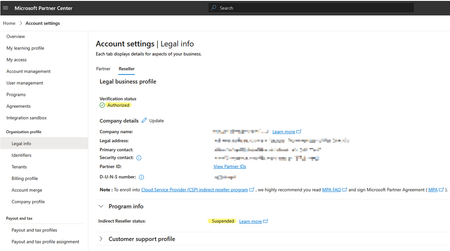
CSP Account Verified & Authorized yet Indirect Reseller Status: SUSPENDED
Hello Partner Community Please assist any way you can... JillArmourMicrosoft is this in your wheelhouse? We are an CSP partner that is struggling to have our indirect reseller account suspension lifted even though our partner account is now fully verified and authorised. Our account was originally suspended due to a business registration vs shop location mismatch that was not resolved within a 30 day termination notification time limit. We corrected the address problem AFTER the account was suspended and although our account is now verified and authorised, the Indirect Reseller account suspension has not been automatically lifted and we are unable to contact a human representative to have it manually moved back to the Active state. We have submitted several Partner Support tickets but they do not provide actual support at all and automated responses from these tickets return a disclaimer stating the following with no further correspondence and the ticket automatically closed. Hello, Thank you for contacting Microsoft Partner support about the notice of suspension and termination proceedings. In the Microsoft AI Cloud Partner Program Agreement, both Microsoft and our partners reserve the right to walk away from the partner relationship by providing 30 days' notice to the other. Neither party is required to offer an explanation for the decision to terminate the partner agreement. As Microsoft is exercising its rights under this section 4.b of the Microsoft AI Cloud Program Agreement, we are unable to share an explanation or further details. Kind Regards, *Random Name* (He/Him) Support Engineer Partner Support Delivery - Program Customer Support My Working Hours: M-F 11:30 AM to 08:30 PM AEDT This lack of support is excruciatingly frustrating and terribly aggravating given that we are now subject to an indefinite period of considerable income loss with no recourse. Note that along with the suspension, emails have been sent to our customers notifying them that we are no longer qualified to act as their licensing provider which has been distressing for both our sales team and the customers. Our distributor is doing the best they can to help but they are unable to provide any real assistance and from what I hear, are unable to get any sensible advice from their Microsoft reps. Upon speaking with several other indirect resellers and distributors alike, it is my understanding that many partners are suffering the same or similar denial of service and I question whether this practice is even legal under Australian law regardless of any contractual fine print and disclaimers after the fact. This denial of support is a huge failure of Microsoft's policy makers and extremely poor business practice in general. If Microsoft wish to declare utter contempt for the small businesses that have supported them for several decades then those businesses might consider alternative platforms for their customers going forward. To conclude, I welcome any support or feedback from the community to help resolve this particular problem and help others with the same issue. Kind Regards, One very Frustrated Reseller.SolvedApplied Skills Missing in Training Report
As a Microsoft Solutions Partner (approx 400 employees) we are working on creating a dashboard for managers to see how we are faring from a skilling perspective. This also helps us in the tracking and working towards retaining our specializations and designations. So far we have used the Trainings Report derived from the downloads hub to feed our database with applicable certifications that are held by our employees. That database we then used to also report on our skilling requirements for the solution area's and the specializations. Recently Microsoft introduced new specializations (Copilot) and those specializations require Applied Skills to be held by employees. These applied skills do not show in the trainings report offered by Microsoft. (E.g. APL-4002: Prepare security and compliance to support Microsoft 365 Copilot,APL-7008: Create agents in Microsoft Copilot Studio or DW-101: Copilot for Microsoft 365 Deployment Workshop ) As such we're wondering whether Microsoft is working on including these applied skills in the trainings reporting?Solved
MSLE Office Hours — French (FRANÇAIS)
Bienvenue à l'heure de permanence de MSLE animée par Cecilia, notre responsable de la communauté francophone de MSLE. Cette réunion vous offre l’opportunité de poser des questions, clarifier des concepts et recevoir des conseils personnalisés sur des sujets tels que le programme MSLE, l’intégration des cours de MSLE dans vos cours, l’exploration des parcours de certification, et bien plus encore. Rejoignez l’heure de permanence iciMSLE Office Hours — French (FRANÇAIS)
Bienvenue à l'heure de permanence de MSLE animée par Cecilia, notre responsable de la communauté francophone de MSLE. Cette réunion vous offre l’opportunité de poser des questions, clarifier des concepts et recevoir des conseils personnalisés sur des sujets tels que le programme MSLE, l’intégration des cours de MSLE dans vos cours, l’exploration des parcours de certification, et bien plus encore. Rejoignez l’heure de permanence iciMSLE Office Hours — French (FRANÇAIS)
Bienvenue à l'heure de permanence de MSLE animée par Cecilia, notre responsable de la communauté francophone de MSLE. Cette réunion vous offre l’opportunité de poser des questions, clarifier des concepts et recevoir des conseils personnalisés sur des sujets tels que le programme MSLE, l’intégration des cours de MSLE dans vos cours, l’exploration des parcours de certification, et bien plus encore. Rejoignez l’heure de permanence iciMSLE Office Hours — French (FRANÇAIS)
Bienvenue à l'heure de permanence de MSLE animée par Cecilia, notre responsable de la communauté francophone de MSLE. Cette réunion vous offre l’opportunité de poser des questions, clarifier des concepts et recevoir des conseils personnalisés sur des sujets tels que le programme MSLE, l’intégration des cours de MSLE dans vos cours, l’exploration des parcours de certification, et bien plus encore. Rejoignez l’heure de permanence iciMSLE Office Hours — French
MSLE Office Hours — French Bienvenue à l'heure de permanence de MSLE animée par Cecilia, notre responsable de la communauté francophone de MSLE. Cette réunion vous offre l’opportunité de poser des questions, clarifier des concepts et recevoir des conseils personnalisés sur des sujets tels que le programme MSLE, l’intégration des cours de MSLE dans vos cours, l’exploration des parcours de certification, et bien plus encore. Rejoignez l’heure de permanence ici
Unable to Register - "Legal Entity Already Exists" Error - Cannot Access Support
Hello, I'm trying to register for the Microsoft Partner Network to obtain an MPN ID for Azure app publisher verification, but I'm stuck in a catch-22 situation. The Problem: When registering through Partner Center, I receive this error: "A legal entity matching the request payload already exists when creating the legal entity" The Catch-22: I cannot create a support ticket because: - Partner Center help form requires selecting a workspace - I cannot create/access a workspace without completing registration - I cannot complete registration due to the duplicate entity error What I've Tried: - Searching for existing accounts within my organization - no one knows of any - Attempting to create a support ticket - blocked by the workspace requirement - Looking for alternative support channels - all redirect back to Partner Center What I Need: Either help locating an existing account for my company, obtaining the existing MPN ID, or resolving the duplicate registration issue. Has anyone successfully resolved this? Is there a direct contact at Microsoft Partner Support who can help? Any assistance would be greatly appreciated! Thank you.