support
215 Topics
Error message: unable to validate your 'Create new GDAP relationship'
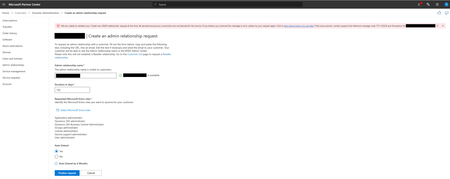
In Partner Center I want to create an admin relationship request for a certain customer. As you can see below I receive an error message when I clicked on 'finalize request'. The details of the error message: We are unable to validate your 'Create new GDAP relationship' request at this time. Be advised anonymous connections are not allowed for this service. If you believe you received this message in error, please try your request again. Click to https://learn.microsoft.com/en-us/partner-center/gdap-faq?branch=main#what-action-must-a-partner-perform-for-a-715-123220-error-or-anonymous-connections-are-not-allowed-for-this-service. If the issue persists, contact support and reference message code 715-123220 and Transaction ID: xxxxxxxxxxx-xxxx-xxxx-xxxx-xxxxxxxxxxxx. I tried to create a request on different times of the day and even my colleague doesn't managed to finalize the request because she also receives the same message. Does anyone here has a solution for this because I need to create this request as soon as possible. Thanks in advance!Solved5.6KViews1like8Comments
Ongoing "Identitiy Verification" failure without a change to verify
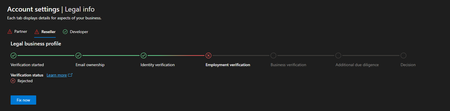
Hi everyone, I'm a managing director of a German GmbH trying to enroll in the Microsoft AI Cloud Partner Program. My verification has been permanently rejected at the Identity Verification step — but I was never asked to verify my identity. The Problem I never received any prompt to complete the AU10TIX identity check. No email, no Microsoft Authenticator notification, no link, no button — nothing. Despite this, the Partner Center shows Identity Verification as failed. The banner now states that my organization does not meet the requirements, no further appeals are available, and my application has been closed. I was rejected for a step I was never given the opportunity to perform. What I Observe Every time I update my legal information in Partner Center, the status briefly switches to "Pending" for a few minutes, then immediately flips back to "Rejected." This looks like an automated pre-check is failing before the any visible Identity Verification process is even triggered — but the UI shows Identity Verification as the failed step regardless. What I've Already Done Opened a support ticket — no response yet Verified that all company data is consistent across Partner Center, DUNS/D&B, domain WHOIS, and the German commercial register (Handelsregister) Confirmed that my Authenticator app is linked to the correct work account and checked spam folders — no invitation was ever sent What I Need The Identity Verification step needs to be actually triggered so I can complete the identity check. I have not used any manual appeals as the system declined me before I ever reached the actual identity check. I have my German ID card ready and can complete the verification immediately. I would appreciate any help from the community team or anyone who has experienced a similar situation. Happy to provide any additional details via DM or through my open support ticket. Thank you!Ongoing Issue with Employment Verification in Microsoft Partner Program
Hello I am experiencing a persistent issue with the Employment Verification process in the Microsoft Partner and Reseller programs. When attempting to resolve the issue by clicking “Fix Now” after a rejected verification, I am continuously redirected back to the Identity Verification step. Even after completing the identity verification, I am sent back to Employment Verification, only to be rejected again. This creates a loop, and every time I click “Fix Now,” I am not given the option to upload any documents, but instead, I am redirected to the previous step, making it impossible to proceed. This issue has been ongoing for 50 days, and I have contacted Microsoft Support many times. Unfortunately, I continue to receive the same generic responses, asking for the same documents to be uploaded. After submitting them, there is no further follow-up, and the issue remains unresolved. It seems as though I am receiving automated responses without any real resolution. What adds to the frustration is the contradiction in the process: The exact same documents I submitted for Developer Verification, which were successfully processed and authorized, are being rejected for the Partner and Reseller programs, despite being identical in every way. Given the significant impact this issue is having on my business, I am reaching out to the community for assistance. Has anyone else encountered a similar problem, or is there any guidance on how to resolve this? Any insights or advice would be greatly appreciated. Thank you for your time and support.3.7KViews6likes47Comments
Issue Accepting Microsoft Partner Agreement
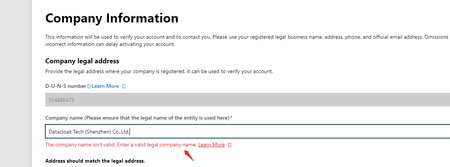
Hello, having an issue accepting the cloud partner agreement while enrolling in Partner Center. I am currently applying for our company's driver signing permissions on Microsoft. While filling out information on the following webpage: https://partner.microsoft.com/en-us/dashboard/account/exp/enrollnow/partner, I encountered an issue. When the webpage pulled our company name from Dun & Bradstreet, Microsoft deemed our company name invalid. I noticed that there is a comma in the name, as shown in the screenshot. However, when we applied for a signature from DigiCert, we used the same company name with the comma as the signing name. Therefore, I cannot remove the comma at this point because if I do, Microsoft might reject the signed certification file later due to a mismatch in the company name. Could you help resolve this issue?Solved
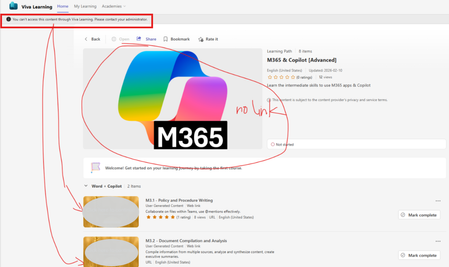
Error msg "you can't access this content thru viva learning. please contact your administrator"
Hi All, Need seeks for help. User are not able to open the customized learning module content with error msg as below. (Permission has been added to the user in Viva Learning) What are the possible rootcause and how to fix it? Thanks57Views0likes0Comments
Office 2016 Product Key Redeemed But License Not Showing in Account
Hello, I purchased Office 2016 and I'm facing an unusual issue with my product key activation. **The Problem:** When I try to activate Office 2016 with my product key, the system tells me the key was redeemed by the email address c****email address removed for privacy reasons. I have access to this email account, so I tried logging into office.com to check, but surprisingly there is NO Office license associated with this account. **What I've Done:** 1. I contacted Microsoft support. The first agent confirmed no Office was linked to that email address. 2. After a few minutes, the same agent then confirmed that the product key WAS indeed activated on that email account - but they said they couldn't help much because Office 2016 is already end-of-life. 3. When I try to sign into Office apps (Word, Excel, etc.) with that email, it says the account has no Office license. 4. However, when I use the product key, it says it's been redeemed on that email account. **The Contradiction:** There's a clear disconnect: the product key system says it's redeemed on my email, but the Office account management system says there's no license on that same email. **My Question:** How can I proceed to use my Office 2016 license? Is there a way to recover or re-link the license, or migrate it despite Office 2016 being end-of-life? Thank you for any guidance.43Views0likes0CommentsUnable to complete Partner Center Enrollment
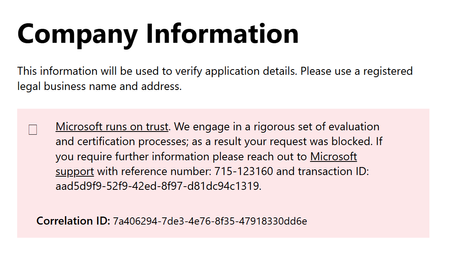
Hello, I am trying to enroll in the Microsoft AI Cloud Partner Program. I can get through the process (fill out company information, etc.) but when I go to the final acceptance form and click submit, it constantly throws an error: I can sign in to the Partner Center but cannot open a support ticket because the "contact support" dialogue has no entry for workspace and will not let me enter anything: Is there a workaround to submit a ticket on this?SolvedAnnouncing the retirement for Office Online Server
What’s changing? Microsoft is announcing the end of support and retirement for Office Online Server effective December 31, 2026. After this date, Office Online Server will no longer receive security updates, bug fixes, or technical support from Microsoft. This change is part of our ongoing commitment to modernizing productivity experiences and focusing on cloud-first solutions. To help stay secure and compliant, begin planning now to move to supported options, such as Microsoft 365. What does end of support mean? No more security updates. Systems running Office Online Server may be vulnerable to the evolving threat landscape. No bug fixes or technical support. Potential compliance risks. Unsupported software may put regulated organizations at risk of non-compliance. Why is this happening? Office Online Server was designed to provide browser-based versions of Word, Excel, PowerPoint, and OneNote for on-premises environments. As organizations have adopted Microsoft 365, Microsoft is focusing its browser-based Office app investments on Office for the Web to deliver secure, collaborative, and feature-rich experiences through Microsoft 365. What is the alternative for Office Online Server? If your organization relies on Office Online Server for browser-based document editing and collaboration, our recommended path is to transition to Microsoft 365, which includes cloud-powered versions of Word, Excel, PowerPoint, and OneNote. Microsoft 365 offers: Real-time collaboration and sharing. Automatic updates and ongoing support. Enhanced security and compliance features. Integration with Microsoft Teams, Outlook, SharePoint Online, and OneDrive for Business. Access to Microsoft 365 Copilot for AI-powered productivity. Learn more about Microsoft 365. And for organizations with 150+ licenses, consider engaging Microsoft FastTrack to support your planning and migration to Microsoft 365. For organizations using SharePoint Server Subscription Edition or Exchange Server Subscription Edition, Microsoft 365 Apps for Enterprise and Office LTSC 2024 remain supported desktop clients for viewing and editing documents hosted on those servers. If your organization uses Office Online Server to host Excel workbooks in Power BI Report Server, that functionality will no longer be supported. Alternatives include viewing workbooks in the Excel desktop application or migrating to the Power BI service. Prepare to make your move Support for Office Online Server ends December 31, 2026. Continuing to use it after this date may expose your organization to security, compliance, and productivity risks. We therefore strongly encourage all customers to begin planning their transition to supported solutions today. Microsoft is committed to helping you prepare. Use the resources below to help you get started: Explore Microsoft 365 offerings for modern, cloud-powered collaboration. Engage your Microsoft account team and Microsoft FastTrack (150+ seats) for migration planning. See the instructions for how to disconnect Office Online Server from a SharePoint Server farm. Thank you for being a Microsoft customer!25KViews1like36Comments