microsoft forms
3657 Topics
Disabling Copilot in Forms not possible
Hi everyone, Not sure if this has been addressed before - I couldn’t find anything about it in this forum. Since Copilot is now integrated into Microsoft Forms, there doesn’t seem to be any option to disable it (like in Word, Excel, Powerpoint). What I find frustrating is that every time I open a previously saved form, Copilot automatically runs checks and generates recommendations—which, in my experience, aren’t particularly useful. More concerning is that this process does consume AI credits. I'm on a personal plan with 60 credits, I’d prefer to have control over how and when those are used, rather than having them spent automatically on features I didn’t explicitly choose to use. Microsoft support has confirmed that there’s currently no way to turn Copilot off in Forms. Is anyone else experiencing this, and isn't this something Microsoft should address? Thanks!36Views0likes0Comments
Quiz scores and review scores are not equal. Why?
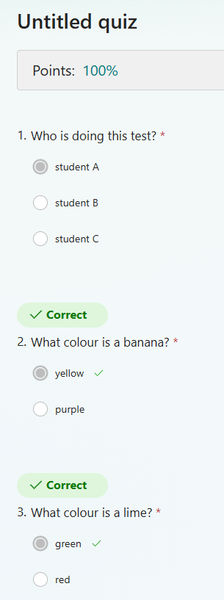
Hi maybe someone can help. Why is my actual test score 100% when I view my results, but if I check my score with the "review scores" option from admin screen, it only comes out to 67%.....? How do I get both to reflect 100%. I am looking to use the auto grade function. The drop down answers is not important as it's just gathering info. If I manually bump the score +1, that 67% won't increase (even with a refresh) to 100% but the answer gets a correct flag and I can see the "extra credit". This is very confusing for such a simple app. I get the same issue when I tried to use a branching question on another quiz. It's not being scored in one scenario (person doing the test so they get 100%), but in review scores, it's counted as a question and it comes across as a missed answer or something, so the percent is off. Thanks.145Views0likes2CommentsAllow form respondents to save and continue to fill the form later
My comment refers to this voting: https://microsoftforms.uservoice.com/forums/386451-welcome-to-microsoft-forms-suggestion-box/suggestions/18447406-allow-form-respondents-to-save-and-continue-to-fil In our company we use sharepoint and MS 365 Business every day. MS Forms is very intuitive and esasy to handle, thats great! I made a long survey on sustainability topics to our members. Then I got feedback that in many cases more than one person in the adressed member companies have to work together according to their expertise... so they need the option to save the survey, send it to another colleague who can conitnue answering the question... Right now I have to look to alternative tools to fullfill this very important option. But I would prefer to continue my survey (where I already put more than one week of effort) in MS Forms. Is there already any timeline, when Mircrosoft will implement this function? Best regards from Germany Matthias105KViews18likes56CommentsPre-fill Responses in Your Microsoft Forms
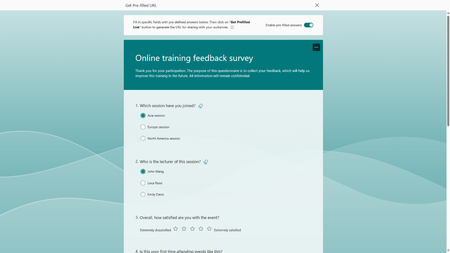
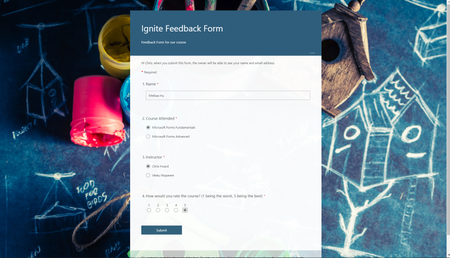
We are excited to share that Microsoft Forms now supports pre-filled links, making your data collection process more efficient and improving data accuracy. This feature not only allows you to set default answers for your questions, it empowers you to strategize how you would like the responses categorized. To help you better understand how to leverage this new feature, let's try it together with an online training feedback survey.73KViews10likes48Comments
Disable incessant nagware popups
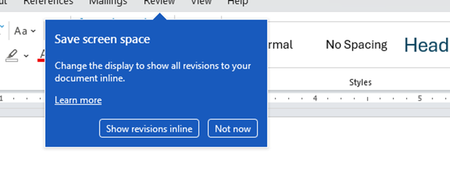
I don't know about everyone else, but I am sick and tired of the nagware pop ups in Word, Excel, PowerPoint, Outlook, etc. Every single product harasses me with pop ups trying to tell me "hey, did you know this feature was here?", "you can do this if you click that", "let me hold your hand through using products you've used for decades even though you don't want daddy Microslop to do that". This is a prime example. I keep getting the same ones again and again and again and everything I've read indicates they should only appear once. But they don't. They keep coming back like a psychotic stalker ex who wants alimony even though you were never married. How do I get this nagware to stop?!82Views0likes1Comment
Take user to a specific URL after they click "Submit" on a Microsoft Form
Hello, I would like to know if it is possible to do the following: 1. User completes a Microsoft Form. 2. User clicks the "Submit" button. 3. Microsoft Forms redirects the user to a new URL: thisisatest.com/thank-you I've been looking in different tech forums and reading articles, and I haven't been able to find any good info on this. I couldn't find an intuitive way to set this up from the settings on Microsoft Forms either. I don't see this listed as an option. Any suggestions will be appreciated it. Thanks.13KViews0likes3CommentsIgnite Blog: Taking Forms to the Next Level with Teams and Power Automate
I hope you are all having a great time at Microsoft Ignite! My name is Chris Hoard, Partner Education Lead at Vuzion here in the UK. I am a Microsoft Certified Trainer Regional Lead (MCT RL) and Office Apps and Services MVP.13KViews5likes3Comments