microsoft 365 apps
1579 TopicsPowerPoint NEW Image Editing Tools Explained — Remove Background, Upscale & Edit Images Instantly!
🚀 PowerPoint just received one of its most powerful updates ever! Microsoft has introduced a brand‑new built‑in image editing experience, allowing you to enhance visuals without leaving PowerPoint. In my latest YouTube video, I walk through all the new capabilities now rolling out in Microsoft 365, including: ✨ Remove background 🧽 Erase unwanted objects 🔄 Move elements inside an image 🔍 Upscale low‑resolution pictures ⚡ Auto‑enhance lighting & contrast 📝 Add or edit text directly on images All of this happens directly inside PowerPoint, making slide creation faster and more intuitive than ever. These features are now available on: 💻 Windows 🍎 Mac 🌐 PowerPoint for the Web If you work with presentations daily, this update is a real productivity boost. 📹 Watch the full breakdown and demo here ➡️ https://youtu.be/OZzfFi2qpAk Let me know what feature you find the most useful! 👇 #Microsoft365 #PowerPoint #Productivity #AI #Presentations #Microsoft365Insider #Creators126Views0likes4Comments
Bookings - No more notes or extra fields available
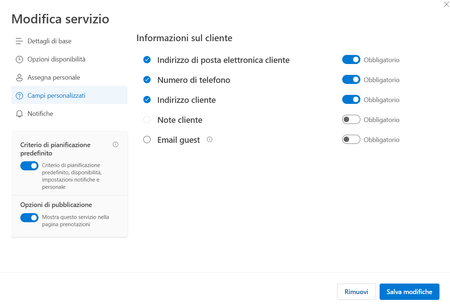
Hi there and happy new year to all. Starting from mid-december, we are facing an issue with our company Microsoft Bookings: basically the custom fields (like address, notes and so on). The book page will just ask for Name & Surname, E-mail Address and Phone Number. On our Administration back-end, the Customer Notes fileds is greyed out (you cannot enable it), and all the custom fields disappeared, you have just the standard ones. We have this issue in all our different booking pages, and all the services are affected. Any hint about this? Thanks!675Views0likes4CommentsAnnouncing the 2026 Microsoft 365 Community Conference Keynotes
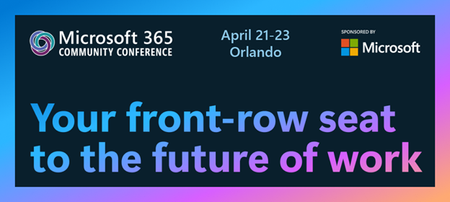
The Microsoft 365 Community Conference returns to Orlando this April, bringing together thousands of builders, innovators, creators, communicators, admins, architects, MVPs, and product makers for three unforgettable days of learning and community. This year’s theme, “A Beacon for Builders, Innovators & Icons of Intelligent Work,” celebrates the people shaping the AI‑powered future — and the keynote lineup reflects exactly that. These leaders will set the tone for our biggest, boldest M365 Community Conference. Below is your first look at the official 2026 keynote order and what to expect from each session. Opening Keynote Jeff Teper — President, Microsoft 365 Collaborative Apps & Platforms Building for the future: Microsoft 365, Agents and AI, what's new and what's next Join Jeff Teper, to discover how AI-powered innovation across Copilot, Teams, and SharePoint is reshaping how people communicate, create, and work together. This session highlights what’s new, what’s fundamentally different, and why thoughtful design continues to matter. See the latest advances in AI and agents, gain insight into where collaboration is headed, and learn why Microsoft is the company to continue to bet on when it comes to building what’s next. Expect: New breakthroughs in collaboration powered by AI and agents Fresh innovations across Teams, Copilot, and SharePoint Practical guidance on how design continues to shape effective teamwork Real world demos that show how AI is transforming communication and content Insight into what is new, what is changing, and what is coming next Business Apps & Agents Keynote Ryan Cunningham — Corporate Vice President, Power Platform In this keynote, Ryan Cunningham will share how Microsoft 365 Copilot, Copilot Studio, Power Apps, and Agent 365 come together to help makers build powerful agents and help IT teams deploy and govern them at scale. We’ll share how organizations can design, extend, and govern a new model for the intelligent workplace – connecting data, workflows, and systems into intelligent agents that move work forward. Copilot, apps, and agents: the next platform shift for Microsoft 365 Microsoft 365 Copilot has changed how we interact with software. Now AI agents are changing how work gets done – moving from responding to prompts to taking action, across the tools and data your organization already relies on. Expect: A clear explanation of how to leverage and build with Copilot and agents How agents access data, use tools, and complete multi-step work A deeper look at the latest capabilities across Microsoft 365 Copilot, Copilot Studio, and Power Apps End-to-end demos of agents in action Security, Trust & Responsible AI Keynote Vasu Jakkal — Corporate Vice President, Microsoft Security & Rohan Kumar — Corporate Vice President, Microsoft Security, Purview & Trust In our third keynote, Vasu Jakkal and Rohan Kumar join forces to address one of the most urgent topics of the AI era: trust and security at scale. As organizations accelerate into AI‑powered work, safeguarding identities, data, compliance, and governance is mission‑critical. Securing AI: Building Trust in the Era of AI Join Vasu Jakkal and Rohan Kumar as they unveil Microsoft’s vision for securing the new frontier of AI—showing how frontier firms are protecting their data, identities, and models amid rapid AI adoption. This session highlights how Microsoft is embedding security and governance into every layer of our AI platforms and unifying Purview, Defender, Entra, and Security Copilot to defend against threats like prompt injection, model tampering, and shadow AI. You’ll see how built-in protections across Microsoft 365 enable responsible, compliant AI innovation, and gain practical guidance to strengthen your own security posture as AI transforms the way everyone works. Expect: Microsoft's unified approach to secure AI transformation Forward‑looking insights across Security, Purview & Trust Guidance for building safe, responsible AI environments How to protect innovation without slowing momentum Future of Work Fireside Keynote Dr. Jaime Teevan — Chief Scientist & Technical Fellow, Microsoft Dr. Jaime Teevan, one of the foremost thought leaders on AI, productivity, and how work is evolving. In this intimate fireside‑style session, she’ll share research, real‑world insights, and Microsoft’s learnings from being both the maker and the first customer of the AI‑powered workplace. Expect: Insights from decades of workplace research The human side of AI transformation Practical guidance for leaders, creators, and practitioners Why collaboration is essential to unlock the true potential of AI. Community Closer Keynote Karuana Gatimu - Director, Microsoft Customer Advocacy Group & Heather Cook - Principal PM, MIcrosoft Customer Advocacy Group From Momentum to Movement: Where Community Goes Next As the final moments of Microsoft 365 Community Conference come to a close, Heather Cook and Karuana Gatimu invite the community to pause, reflect, and look forward together. This Community Closer keynote connects the breakthroughs, conversations, and shared experiences of the week into a bigger story—one about people, purpose, and progress. Together, they’ll explore how community transforms technology into impact, how advocates and builders shape what’s next across Microsoft 365, and why this moment matters more than ever. More than a recap, this session is a call to action—challenging attendees to take the energy of the conference back to their teams, regions, and communities, and turn inspiration into sustained momentum. You’ll leave not just with ideas, but with clarity, confidence, and a renewed sense of belonging—because community doesn’t end when the conference does. It’s where the real work begins. More Than Keynotes: Why You’ll Want to Be in Orlando The M365 Community Conference brings together: 200+ sessions and breakouts 21 hands‑on workshops 200+ Microsoft engineers and product leaders onsite The Microsoft Innovation Hub Ask the Experts, Meet & Greets, and Community Studio Women in Tech & Allies Luncheon SharePoint’s 25th Anniversary Celebration And an epic attendee party at Universal’s Islands of Adventure Whether you create, deploy, secure, govern, design, or lead with Microsoft 365 — this is your community, and this is your moment. Join Us for the Microsoft 365 Community Conference April 21–23, 2026 Loews Sapphire Falls & Loews Royal Pacific 👉 Register now: https://aka.ms/M365Con26 Use the SAVE150 code for $150USD off current pricing Come be part of the global community building the future of intelligent work.2.5KViews3likes2Comments
Office 365 issues
We have an end user that started with us approximately a year ago. Shortly after he started he began noticing that his status would go away on a fairly regular basis on MS Teams. We tried uninstall/reinstall, resetting, repairing and the problem persisted. Since he was a relatively new hire we were thinking it was something with his laptop so we replaced and the issue returned. Turned in a ticket with our Office 365 vendor who in turn opened a ticket with Microsoft. After some initial testing they sent a Teams install file that seemed to fix the issue. Since that time he has regularly had issues with Teams disconnecting, Outlook just stop receiving emails, while showing connected. Typically the only fix was a restart and on some occasions that did not work. Sometimes a reset or repair might fix this issue. Throughout this we did clear credential manager, caches, etc...This got a point yesterday where I created a new user profile for him, basically like a new laptop and it temporarily fixed the Teams and Outlook issue, however when attempting to sign into MS Edge it would just spin and had to use task manager to close the app. Tried a repair on the app as you cannot uninstall and same result it would hang up and have to forcibly closed. Just wondering if someone else has encountered something like this and possible fixes. Thanks73Views0likes1Comment
Publisher replacement ideas
Hey All, Looks like Microsoft won't be supporting Publisher after Oct. I have many hundreds of pages documenting the restoration of our land that I created in Publisher. I know I'll need to convert them to another publishing app. I'm wondering what others in this situation are choosing to do especially since Publisher doesn't convert to Designer. My needs are for an easy to use app as Publisher was and not something complicated. Any thoughts or ideas would be most welcomed! MarciSolved11KViews1like17CommentsIssue with viewing mode for E5 licensed users
I'm a sysadmin for a Health care provider in Sweden and we have an issue with users with an E5 license loading into Office apps in view-mode. As far as I know we are a coupe of organisations providing health care that have this same issue. Background: We have a mix of F3 and E5 licenses and sometimes the F3 licensed users need to view documents that contains info that isn't allowed to be saved in the cloud. To minimize the popups that show up when a user starts word unlicensed we have a GPO (viewer mode) that says that it should open i view-mode. Per my understanding this GPO is device based and not user based. However, this also affects the users of E5 license who regularly change workstations, easily 5-10 devices in a day. Since they should be able to view and edit documents in office apps it causes frustration and confusion when they load into view-mode and have to log out and then in again (or update license) and restart the program. Our computers devices are Microsoft Entra hybrid joined and shared computer licensing is enabled. Are there any solutions or viable workarounds for this issue? It's not complicated for users to handle but frustrating and causes a lot of tickets to the support team. Unsure if I'll be able to participate due to the time zone difference but will appreciate any and all help. /Per Ekholm
Disable incessant nagware popups
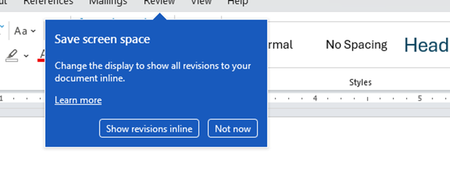
I don't know about everyone else, but I am sick and tired of the nagware pop ups in Word, Excel, PowerPoint, Outlook, etc. Every single product harasses me with pop ups trying to tell me "hey, did you know this feature was here?", "you can do this if you click that", "let me hold your hand through using products you've used for decades even though you don't want daddy Microslop to do that". This is a prime example. I keep getting the same ones again and again and again and everything I've read indicates they should only appear once. But they don't. They keep coming back like a psychotic stalker ex who wants alimony even though you were never married. How do I get this nagware to stop?!72Views0likes1CommentLive AMA: Microsoft Agent 365
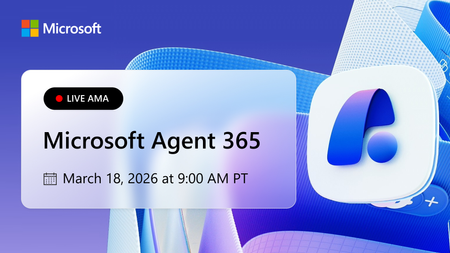
Learn more about the capabilities of Agent 365 in this live 'Ask Microsoft Anything' with product and engineering team experts! Get your questions answered about capabilities for agent observability, security, and governance, developer resources, and how to get started as you confidently scale agents in your organization. How to Participate Register for the Microsoft Tech Community using your email if you haven’t already. This allows you to post comments and ask questions. Visit this page during its scheduled time to join the conversation. You can post your questions in the comments, and product team members will respond live during the AMA. Watch the session live or catch the recording on demand after the event. Keep the conversation going in the Agent 365 discussion space after the sessions conclude. It’s a great place to follow up, share what’s working, and connect with others exploring similar topics. Hope to see you there! Come ready to learn and ask our experts all of your burning questions!6.2KViews7likes88CommentsWhy office outlook 365 and outlook mail sucks terribly and worst emails in the whole wide world?
It was so painful to say the truth but 365 emails sucks awfully. I will list down everything below. It is too slow and buttons are most of the time unresponsive. Emails are lost when viewing in browser. Both UI and UX makes the email system more complex and confusing. It's so beautiful but it's nearly useless when talking about efficiency. The good thing is only calendar feature. In outlook email, people suffer the birthday reminders which they cannot unsubscribe. And so many tons of bugs and pains I forget to mention. Now it is telling me "Session Expired" everytime after I log in. My colleagues also have the same problem.124KViews15likes73Comments