messaging
805 Topics
Introducing native Service Bus message publishing from Azure API Management (Preview)
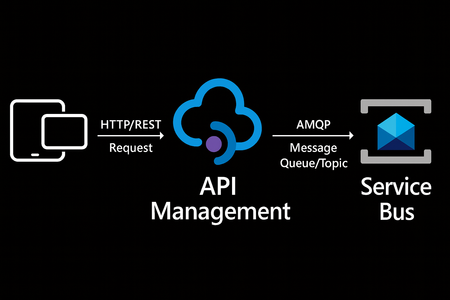
We’re excited to announce a preview capability in Azure API Management (APIM) — you can now send messages directly to Azure Service Bus from your APIs using a built-in policy. This enhancement, currently in public preview, simplifies how you connect your API layer with event-driven and asynchronous systems, helping you build more scalable, resilient, and loosely coupled architectures across your enterprise. Why this matters? Modern applications increasingly rely on asynchronous communication and event-driven designs. With this new integration: Any API hosted in API Management can publish to Service Bus — no SDKs, custom code, or middleware required. Partners, clients, and IoT devices can send data through standard HTTP calls, even if they don’t support AMQP natively. You stay in full control with authentication, throttling, and logging managed centrally in API Management. Your systems scale more smoothly by decoupling front-end requests from backend processing. How it works The new send-service-bus-message policy allows API Management to forward payloads from API calls directly into Service Bus queues or topics. High-level flow A client sends a standard HTTP request to your API endpoint in API Management. The policy executes and sends the payload as a message to Service Bus. Downstream consumers such as Logic Apps, Azure Functions, or microservices process those messages asynchronously. All configurations happen in API Management — no code changes or new infrastructure are required. Getting started You can try it out in minutes: Set up a Service Bus namespace and create a queue or topic. Enable a managed identity (system-assigned or user-assigned) on your API Management instance. Grant the identity the “Service Bus data sender” role in Azure RBAC, scoped to your queue/ topic. Add the policy to your API operation: <send-service-bus-message queue-name="orders"> <payload>@(context.Request.Body.As<string>())</payload> </send-service-bus-message> Once saved, each API call publishes its payload to the Service Bus queue or topic. 📖 Learn more. Common use cases This capability makes it easy to integrate your APIs into event-driven workflows: Order processing – Queue incoming orders for fulfillment or billing. Event notifications – Trigger internal workflows across multiple applications. Telemetry ingestion – Forward IoT or mobile app data to Service Bus for analytics. Partner integrations – Offer REST-based endpoints for external systems while maintaining policy-based control. Each of these scenarios benefits from simplified integration, centralized governance, and improved reliability. Secure and governed by design The integration uses managed identities for secure communication between API Management and Service Bus — no secrets required. You can further apply enterprise-grade controls: Enforce rate limits, quotas, and authorization through APIM policies. Gain API-level logging and tracing for each message sent. Use Service Bus metrics to monitor downstream processing. Together, these tools help you maintain a consistent security posture across your APIs and messaging layer. Build modern, event-driven architectures With this feature, API Management can serve as a bridge to your event-driven backbone. Start small by queuing a single API’s workload, or extend to enterprise-wide event distribution using topics and subscriptions. You’ll reduce architectural complexity while enabling more flexible, scalable, and decoupled application patterns. Learn more: Get the full walkthrough and examples in the documentation 👉 here3.6KViews2likes6Comments
Restoring/recovering an edited message
Can the original message which has been posted in Teams (Chat or Channel), which has subsequent been edited, be restored/accessed. Scenario: A student posts an inappropriate message in a chat or channel, realises their mistake/faux pas, and later edits it. A person or people saw the original message and was/were offended but didn't take a screen shot and the evidence has now disappeared. I know a deleted message can been recovered, but can an edited message also be recovered?Solved46KViews0likes6Comments
Teams missing GIF option in messaging
This morning we noticed the GIF option in Teams messaging is missing org wide. Desktop and Web client. Old messages that were sent with a GIF display as a link now instead of the image Our global org policy in the Admin porta is set to On Anyone else seeing this?Solved29KViews16likes38CommentsTeams drag-and-drop upload fails only from macOS screenshot thumbnail / markup window
I’m encountering a reproducible issue with Microsoft Teams file uploads that appears to be specific to the drag-and-drop source on macOS. Steps to reproduce On macOS, take a screenshot using: Cmd + Shift + 4 or Cmd + Shift + 5 When the floating screenshot thumbnail / markup window appears (bottom-right of screen), do not save the file manually Drag the screenshot directly from the floating thumbnail or markup window Drop it into the Teams message compose box in: a 1:1 chat, or a group chat Result Upload gets stuck on Uploading Environment macOS Teams Web (Chrome) Teams macOS desktop app30Views0likes0CommentsTeams email notifications of missed chats coming from wrong email address?
For the past several days, when some users have missed a chat message in teams and they are setup to receive an email notification, the sending email address of the notification is incorrect. It has always been that these notification emails appear to be sent from the person who sent the original chat message, but now, they are being sent from our global administrator account email. Obviously creating lots of confusion and has broken these users' ability to reply via email. Has something changed, or is this a bug?1.4KViews0likes8CommentsTeams Messaging Gets Autocorrect
The addition of Autocorrect for messaging is a small but important change for Teams messaging brings Teams up to speed with the other Office applications. It’s taken Teams a little longer than it perhaps should have to support Autocorrect and the implementation is not as functional as it is in Outlook, but that’s not a reason to overlook the update. https://office365itpros.com/2025/12/10/teams-autocorrect-messaging/126Views0likes1Comment
Require approval from IT to join a Team and/or Shared Channels
My company has two sides to its business. Both sides are under the same Microsoft 365 tenant. They can be called Group A and Group B. Group A should not be able to add those from Group B into teams and channels on their own. Likewise, Group B should not be able to add those from Group A. If either side wants to add the other to a team or channels, they should have to get approval from IT, with IT making the additions to the team or channel. We would rather not have this just done over emails. This has to be done while still allowing members of Group A and members of Group B the ability to have 1 on 1 and group chats. Does anyone have any suggestion how to do this?121Views0likes1CommentTeams Messaging Gains New Protections
Teams now includes weaponized file protection and malicious URL protection to make sure that people don’t share bad files or URLs in chats or channel conversations. Given that a user can post a message to up to 50 channels at one time, it obviously makes a heap of sense to check that any files or URLs that people share in chat or channel conversations are safe and not malicious. https://office365itpros.com/2025/11/24/weaponized-file-protection-teams/79Views0likes0Comments