Filtering
11 Topics
Filtering on Calculated Columns not working in SharePoint List
I have a table where i created a calculated column for the Fiscal Year/Quarter = Example: FY2023/Q3. I used to be able to filter on this field but now when i filter on it, it provides 0 (ZERO) results. Any suggestions as to make this work again? Thank you. If i have to, i can create a flow to pull the calculated column into a text column...if I have to...but id rather not.8.4KViews0likes9Comments
Communication site - problem with using refineable date filter on highlighted content
I'm trying to display announcements on our communications site homepage. I'm using the announcements app to create the underlying announcements list. On the homepage I can use the highlighted content on pages and filter successfully on SPcontenttype=announcement without any issues However I also want to filter to only show announcements which haven't expired (based on the expires date in the list). As expires doesn't appear as one of the standard filter options, I have mapped Refinabledate00 to ows_Expires (as Expires is the key field in the announcements list). I have then added a second filter in the highlighted content part to check for Refineabledate00 greater than [Today] However I can't get this to work at all. It just continues to display all announcements regardless of date. Am I doing anything wrong? Another issue is that if a user clicks on "see all" against the displayed announcements they are then taken to a blank page with a message that says "We didn't find anything to show here"2.4KViews0likes3CommentsMGDC for SharePoint and SharePoint Embedded
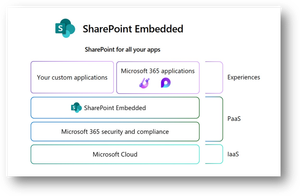
1. MGDC for SharePoint and SharePoint Embedded In this post, we’ll discuss how to use data from Microsoft Graph Data Connect (MGDC) for SharePoint to understand how SharePoint Embedded is being configured and used in your tenant. If you’re new to MGDC, get an overview at https://aka.ms/SharePointData. If you’re not familiar with SharePoint Embedded, check this Overview of SharePoint Embedded. 2. Introduction SharePoint Embedded is an API-only solution to use the power of the Microsoft 365 file and document storage platform. You can use it to build applications that expose Microsoft 365 features including those from Office, Purview and Copilot. The SharePoint Embedded files are stored in “File Storage Containers”, created by your enterprise applications or a third-party application. 3. MGDC for SharePoint and SharePoint Embedded One important detail is that MGDC for SharePoint sees these containers and files used by SharePoint Embedded. You can see the Containers (under Sites), the permissions granted and even each individual file inside the Containers. 4. Web Template Id To filter sites for SharePoint Embedded containers, just look for SharePoint Sites in MGDC that have the RootWeb.WebTemplateId of 70. This is used to differentiate this scenario, in the same way that OneDrives are sites with the RootWeb.WebTemplateId of 21. You can also check for the RootWeb.Template, which shows as “CSPCONTAINER” for SharePoint Embedded. A typical container for SharePoint Embedded will show in the SharePoint Sites datasets like this: { "ptenant": "00000001-0000-0000-0000-000000000000", "Id": "00000002-0000-0000-0000-000000000000", "Url": "https://tenantname.sharepoint.com/contentstorage/CSP_00000009-0000-0000-0000-000000000000", "ArchiveState": "None", "RootWeb": { "Configuration": 0, "Id": "00000003-0000-0000-0000-000000000000", "Title": "Ideas", "WebTemplate": "CSPCONTAINER", "WebTemplateId": 70, "LastItemModifiedDate": "2025-01-10T22:55:18.000Z" }, "WebCount": 1, "StorageQuota": 27487790694400, "StorageUsed": 149186, "StorageMetrics": { "MetadataSize": 8506, "TotalFileCount": 2, "TotalFileStreamSize": 41924, "TotalSize": 149186 }, "GroupId": "00000000-0000-0000-0000-000000000000", "GeoLocation": "CAN", "IsInRecycleBin": false, "RecycleBinItemCount": 0, "RecycleBinItemSize": 0, "SecondStageRecycleBinStorageUsage": 0, "IsTeamsConnectedSite": false, "IsTeamsChannelSite": false, "TeamsChannelType": "None", "IsCommunicationSite": false, "IsHubSite": false, "HubSiteId": "00000000-0000-0000-0000-000000000000", "IsOneDrive": false, "BlockAccessFromUnmanagedDevices": false, "BlockDownloadOfAllFilesOnUnmanagedDevices": false, "BlockDownloadOfViewableFilesOnUnmanagedDevices": false, "IsExternalSharingEnabled": true, "ShareByEmailEnabled": true, "ShareByLinkEnabled": true, "SensitivityLabelInfo": {}, "IBMode": "Open", "RelatedGroupId": "00000000-0000-0000-0000-000000000000", "Owner": { "Name": "System Account" }, "SecondaryContact": {}, "ReadLocked": false, "ReadOnly": false, "CreatedTime": "2025-01-09T22:54:50Z", "LastSecurityModifiedDate": "2025-01-09T22:57:11Z", "Operation": "Full", "LastUserAccessDate": "2025-01-09T22:54:51Z", "SnapshotDate": "2025-01-11T00:00:00Z" } Note: In all the sample JSON objects shown in this post, ids were redacted with zeros. You can learn more about how SharePoint uses WebTemplateId to identify the type of site at MGDC for SharePoint FAQ: Is OneDrive included? 5. Permissions The SharePoint Permissions dataset includes all the permissions granted for all the several types of SharePoint content, including OneDrive, Teams-connected sites, and SharePoint Embedded containers. Granular permissions by folder and individual files are also included. Here’s a typical object from the SharePoint Permissions dataset: { "ptenant": "00000001-0000-0000-0000-000000000000", "SiteId": "00000002-0000-0000-0000-000000000000", "WebId": "00000003-0000-0000-0000-000000000000", "ListId": "00000004-0000-0000-0000-000000000000", "ItemType": "File", "ItemURL": "contentstorage/CSP_00000009-0000-0000-0000-000000000000/Document Library/LoopAppData/ProjectBlue.loop", "FileExtension": "loop", "RoleDefinition": "Contribute", "LinkId": "00000005-0000-0000-0000-000000000000", "ScopeId": "00000006-0000-0000-0000-000000000000", "LinkScope": "Organization", "SharedWithCount": [], "SharedWith": [], "Operation": "Full", "SnapshotDate": "2025-01-11T00:00:00Z", "ShareCreatedBy": { "Type": "User", "Name": "Test User", "Email": "test@tenantname.onmicrosoft.com", "UPN": "test@tenantname.onmicrosoft.com" }, "ShareCreatedTime": "2025-01-09T22:55:51Z", "ShareLastModifiedBy": { "Type": "User", "Name": "Test User", "Email": "test@tenantname.onmicrosoft.com", "UPN": "test@tenantname.onmicrosoft.com" }, "ShareLastModifiedTime": "2025-01-09T22:55:51Z", "ListItemId": 4, "UniqueId": "00000007-0000-0000-0000-000000000000" } Note: The example above shows a single Contribute permission to a Loop file using a sharing link. Loop uses SharePoint Embedded to store files and it’s something you can easily configure and test in your tenant. MGDC for SharePoint will show all permissions granted in SharePoint Embedded containers, included permissions granted at various levels of the SharePoint hierarchy (site, web, library, folder, or file) and diverse types of security principals (users, SharePoint groups and Entra ID groups, internal or external). You can learn more about it at MGDC for SharePoint FAQ: What is in the Permissions dataset? 6. Files Finally, you can get a complete list of every file inside the SharePoint Embedded containers, including details like file name, size, author, last modifier and more. Here’s a typical object from the SharePoint Files dataset: { "ptenant": "00000001-0000-0000-0000-000000000000", "SiteId": "00000002-0000-0000-0000-000000000000", "Author": { "Name": "Test User", "Email": "test@tenantname.onmicrosoft.com" }, "DirName": "Document Library/LoopAppData", "Extension": "loop", "FileName": "ProjectBlue.loop", "IsLabelEncrypted": false, "ItemId": "00000008-0000-0000-0000-000000000000", "ListId": "00000004-0000-0000-0000-000000000000", "ListServerTemplate": "DocumentLibrary", "MajorVersion": 4, "MinorVersion": 0, "ModifiedBy": { "Name": "Test User", "Email": "test@tenantname.onmicrosoft.com" }, "Operation": "Full", "ScopeId": "00000006-0000-0000-0000-000000000000", "SensitivityLabelInfo": {}, "SiteUrl": "https://tenantname.sharepoint.com/contentstorage/CSP_00000009-0000-0000-0000-000000000000", "SizeInBytes": 24301, "SizeInBytesWithVersions": 57765, "TimeCreated": "2025-01-09T22:55:08Z", "TimeLastModified": "2025-01-09T22:56:13Z", "WebId": "00000003-0000-0000-0000-000000000000", "WebTemplateId": 70, "SnapshotDate": "2025-01-11T00:00:00Z" } Note: SharePoint Embedded does not support minor versions, so the “MinorVersion” column in the Files dataset will always show zero in this scenario. For details, check the schema for the SharePoint Files dataset. 7. Filtering You can easily download entire datasets and use Azure Data Tools to filter for rows where WebTemplateId is 70. For Sites and Files, there is also a mechanism to filter at the source, so you pull from Microsoft Graph Data Connect only the data related to SharePoint Embedded. The same filtering mechanism can be used to pull data just for a specific site, filtered by Id. For details, check this article about Filtering SharePoint dataset at the source. 8. Conclusion I hope this post helped you understand how to use MGDC for SharePoint to gather information about SharePoint Embedded containers and files. For more information, visit https://aka.ms/SharePointData.
Search and Filter adaptive cards in bot
Hello Team, Our requirement is as follows: Requirement : We have created a bot using teams toolkit. We further want to add a search bar within the bot which will search adaptive cards and filter them. As in show only searched cards and hide rest. Is it possible to add search bar in bot? One option we could think of is creating tab using fluent so that we can search the adaptive cards. Is their any way to directly implement it in a bot? Thanks!1.3KViews0likes5Comments
Filtering formulated cells
Hello! In my excel, on sheet 1 I have multiple formulated cells pulling data from 5 different sheets. In column A of the formulated cells, I want to filter the data being pulled from A to Z. When I filter though some of the data disappears and/or shows empty cells in between different cells with data in them. Is there a way to fix this so I can filter my column A and it shows all my data and in alphabetical form? Thanks!953Views0likes0Comments
Planner "Hub" - No Filter to jump to Plans(Web Version)?
Not sure why the Web Version of Planner does not have a "filter/search" in the "Hub" of Planner? Is there something I'm missing? The IOS App has this feature though the IOS App appears to currently also having significant error/issues on my devices.Solved907Views0likes3Comments
Organization Assets libraries - enable tagging and filtering
Hello SharePoint people! In April, MS announced a new feature in SPO - Organization Assets libraries. It's a fantastic way to provide digital assets to all users across the organisation but as it's pretty new and needs some improvements, and tagging and filtering would definitely be a useful one. If you agree, please could you vote for my https://sharepoint.uservoice.com/forums/329214-sites-and-collaboration/suggestions/38507506-additional-columns-in-organization-assets-librarie so that Microsoft can (hopefully) look into implementing it. Let me know what you think about the idea and if you've used Organization Assets yet (and if so, what are your thoughts about it). AA884Views0likes0Comments
Filterable Gallery showing collection data
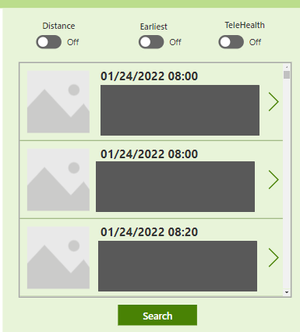
I would love some help on how to create a filterable gallery on our powerapp. Our idea was to have 3 toggles on top of our gallery that you can toggle on/off to filter by each, Multiple, or none.. We are open to other ways of doing this. Gallery data comes from a collection. We have tried a few ideas we found in forums, I can make it filterable if I put the code in the Items property of the Gallery but I cannot get the toggle to be what determines the filter be on/off.History wishes:➀Site-Partitioning➁Filtering➂FolderPath View➃exportable
When above yet available, softcopy of Windows 10 Edge is what I need to: select certain sites such as http://xyz.global.abc.com/Shared) extract folder path when History View shows only url; I am extracting it from address bar filter out items incurred by multi-tasking to open un-related Webpages (Viewer not yet capable of filtering) keep record longer than 90 days (current max capacity of Edge) accidental clearing of history Reason for above is to print, then assemble huge process tree of Sharepoint documents (Flowcharts) with external links. I need to trace where I clicked on for each webpage. Otherwise, for each webpage, other than tagging, I have to copy link from address bar extract folder path from link append into a Log file every day.771Views0likes0Comments