feedback
355 Topics
General Improvements to Windows and Apps
I’ve been thinking about how Windows could improve, especially around Fluent Design. I wrote down six ideas that I’d love to hear opinions on. I will be sharing them here to see what you all think: 1: Two branches for Windows and content updates; Trying to please everyone with a single version of Windows is difficult, so Microsoft could maintain two official branches of the system: a “Vintage Windows” (like Windows 10), for those who prefer the classic interface and a more traditional look, with extended support indefinitely. And a “Modern Windows” (Windows 11), consistent with Fluent Design, constantly updated, and focused on introducing new features. Both would use the same kernel and APIs for developer compatibility. This approach would offer users greater freedom of choice and demonstrate that a trillion-dollar company is dedicating teams to simultaneously deliver traditional features and modernity. I’ve seen many people complain about the lack of consistency and lack of content. Additionally, I miss feature updates for Windows and hope that Microsoft brings more flexibility, apps, and Fluent 2-style fixes in future updates. And, yes, this would increase the efforts and costs, but it's a cost that a trillionary company could take. 2: Modern Flyouts and Windows volume limits; In Windows 11, the multimedia controls displayed by apps like Fluent Flyouts are very limited; they only allow you to pause or skip tracks, with no option to adjust the volume or use repeat or shuffle buttons. This makes the experience less convenient compared to Android, where users can control the app’s volume or the music’s volume separately, and the operating system allows third-party apps to do so. My suggestion is that Microsoft should be more flexible and give apps like Modern Flyout the ability to adjust the volume, so you could turn the music up or down without affecting the overall system volume. Honestly, it’s surprising that something as basic as this hasn’t been implemented yet in the most widely used operating system. 3: Lack of flexibility in the Windows 11 search bar; It’s unbelievable that even in Windows 11, the system still limits users and developers to a rigid and impractical search bar. Apps like Fluent Search, Flow Search, and Everything Toolbar are much faster and more powerful, but they’re confined to taskbar icons or floating search bars, while the native search bar takes up space without offering the same efficiency. Microsoft needs to be more flexible and release an API that allows third-party apps to appear as a search bar directly on the taskbar. This isn’t a complex feature; it’s something simple and obvious that should already exist. If the official search bar itself isn’t improved, the least they could do is give other apps the freedom to offer a superior experience. It’s frustrating to see Windows remain limited in such basic aspects, while other systems offer more modern and practical solutions. Microsoft needs to listen to users and stop holding Windows back with an outdated model. 4: Windows Task Scheduler and other menus and tools need to be updated The native Windows Task Scheduler is completely outdated and inconsistent with the Fluent 2 style. Independent projects like the Fluent Task Scheduler show that it’s possible to have a modern, organized, and much more user-friendly interface. It’s frustrating that these apps have to coexist with outdated system tools, without being able to replace them or integrate with the system. Microsoft, as a trillion-dollar company, should invest in modernizing its own utilities or hire independent developers who have already proven capable of creating superior solutions, such as the Fluent Task Scheduler. The lack of visual and functional consistency in Windows is glaring and needs to be addressed 5: Lack of flexibility in naming user folders Compared to the Android system; Windows is very inflexible and lacks practicality in many ways. Here’s one example: C:\Users\eagl<- Here for example, I can’t correct my name—which would simply involve adding an “e”—; I have to create an entirely new account and move all my files to that account because of a typo. This should be a basic and simple fix. On Android, I was already so used to the system’s practicality that when I switched to Windows—which was supposed to be a more robust and powerful system—I was surprised to find it lacks even such a basic feature. 6: Differences in user experience between home and business users, and inconsistencies in Fluent 2; Microsoft seems to be focusing more and more on businesses, consistently applying Fluent 2 to apps like Teams, Outlook, and Office, while everyday users are left with a Windows full of outdated and inconsistent menus. This contradicts the marketing that promotes Fluent 2 as the standard, yet is frequently violated by the official apps themselves. It’s frustrating to see that Microsoft can’t deliver on its promises. If it really wants to preserve old elements for the sake of businesses, then it should separate the systems: a legacy one for compatibility and a modern one for home users. Or, at the very least, adhere to the Fluent 2 style across all of Windows. I love Fluent 2 and really want to see significant progress in this area, but seeing that Microsoft itself hasn’t made much effort in this regard has been a disappointment. The trillion-dollar company that talks so much about innovation shouldn’t be delivering a fragmented and outdated system. 7: Digital Wellness and productivity; Microsoft should make a native app with fluent style to help users watch their screen/app time. In 2026 there haven't any app that's free, solid and that feels native in Windows 11, because there aren't any API for that. Apps like Activity Watch for some reason don't work in my PC and apps like SolidTime are paid and not really fluent. Naturally, something like this should be made by Microsoft itself. Android has it since the beginning, why Windows doesn't have it yet?113Views2likes4Comments
A Vision for Windows 12: Familiar Power Meets Modern Innovation
Dear Microsoft Windows Development Team and Community Hub, With the inevitable speculation around Windows 12, I wanted to share a comprehensive vision for the next iteration of Windows. The goal is to blend the best elements of past versions with modern needs, creating a truly powerful and personalizable operating system. Here’s what many users like myself are hoping to see: 1. A Revitalized Start Menu & Screen Fresh, Resizable Layout: A clearly divided Start Menu with dedicated zones: Account Area (top-left), Shortcut Area (far left for common folders), List Area (pinned, most-used, and suggested apps), and a Pinned Tiles Area (right side, four-column layout). It should be resizable by dragging its edges. Full-Screen Start Screen Option: A return of the full-screen Start that combines the easy-to-browse list from Windows 7 with the dynamic Windows 8.1-style Live Tiles, supporting both horizontal and vertical arrangements. Enhanced Tile Flexibility: Tiles in five sizes (small, medium, long, wide, large, tall) with smooth resizing animations. New customization options should include colorful, gradient, light, dark, transparent, and semi-transparent tones. Migration Friendly: When upgrading from Windows 7, 8.1, 10, or 11, all pinned apps and websites should automatically migrate. Copilot Integration: A dedicated, prominent Copilot Tile to highlight the AI assistant's role, perhaps with a new rainbow effect for visual flair. 2. A More Functional Taskbar & Search Comprehensive Taskbar: Featuring the Cortana icon, mobile devices, Start, Search, Task View, Chat, applications, and the system tray. Prominent Search Box: The search box should be more prominent, changing from a circle to a rectangular shape, serving as a stronger entry point. Flexible Search Menu: The search interface should be highly adjustable and consistent with the new Start menu's style. 3. Personalized User Experience Lock Screen Customization: Options for left or center-aligned date and time. New photo effects that highlight the main subject, allowing it to overlay the time. Windows Hello: Facial recognition that works while wearing a mask. Enhanced Widgets: Desktop Pinning: Widgets should be pinnable anywhere on the desktop, not just in a sidebar. Full-Screen Widgets Board: A full-screen mode with a widget panel on the left and news/feeds on the right, supporting up to six columns. New Widgets: Introduction of a 'Calendar', 'People', 'Microsoft Edge', 'Cortana Suggestions', and a dedicated 'Microsoft Store' widget. 4. Peak Productivity & Multitasking Task View & Virtual Desktops: A return to the mature Windows 10 experience, allowing windows to be dragged directly to other desktops in Task View. Timeline Returns: The Timeline feature should come back, including cross-device history. Classic Alt+Tab: The Windows 10 Alt+Tab window switcher experience should be restored. Supercharged Snap Assist: Enhanced Snap Layouts supporting up to 8 segments for large screens, with specific, intelligent layouts for ultrawide (21:9, 32:9) monitors. 5. Application & Ecosystem Evolution App Updates: New versions of Mail, Calendar, and People. The new Outlook app should fully support popular third-party email services like QQ, 163, and 126. A New Cortana: Multilingual support with the return of consumer skills (music control, smart home, third-party skills). It could be offered in two visual forms and power the 'Cortana Suggestions' widget. Screenshot Tool Upgrade: Should support full-screen recording. Media Player: The return of an appearance selector and support for live tiles. Microsoft Store Revamp: UWP Return: High-quality UWP and classic Metro apps should return to the store, with PWAs transitioning to UWP. Gaming Expansion: Addition of dedicated PlayStation and Nintendo Switch apps, including a Nintendo game section. 6. Visual & Nostalgic Enhancements Refined Aesthetics: Improved window transparency with a new glass effect, rounded rectangle system avatars, and a new top bar (weather, system tray, time). Dynamic wallpaper effects would be a welcome addition. Keep the Win11 Sound: The Windows 11 startup sound is great and should be retained. The "Bold Strategy" – Legacy Feature Return: To satisfy power users and nostalgia, consider the large-scale return of beloved features like MSN apps, Windows 7 Desktop Gadgets, Windows Media Center, Groove Music, HomeGroup, a significantly enhanced Tablet Mode, and Windows Ink Workspace. 7. Hardware, Compatibility & Core System Broad Controller Support: Native compatibility with DualShock 4/5, Joy-Con, and others. Android Subsystem (WSA) Return: WSA should return with a focus on fixing previous pain points, especially full-screen landscape app support. Separated Notification Center: The Notification Center and Calendar quick actions should be separated for a cleaner interface. "Next-Gen PC" Promise: Windows 12 should deliver on larger storage, longer battery life, more power, and enhanced security/stability. Enhanced Backup & Transfer: Windows Backup should expand to more regions and add support for backing up personal files and apps to external drives, including migration from old PCs or to new hard drives. 8. Core Versioning & Hardware Requirements A Fresh Start: Version 26H1, with an internal OS version reset to 12.0.0.0. Tiered Editions: Windows 12e (for education, 2GB RAM), Windows 12 (mainstream, 4GB RAM, removing strict TPM restrictions), and Windows 12 Ultra (flagship, 8GB RAM, unlocking all AI and performance features). Extensive Free Upgrade Path: A critical strategy, offering free upgrades from Windows 11 (including SE), Windows 10 (including S), Windows 8/8.1 (including RT), and Windows 7. Doubled Support Lifecycle: Home/Pro/Workstation: 24 months → 48 months. Enterprise/Education/IoT: 36 months → 72 months. In summary, we envision a Windows 12 that isn't afraid to learn from its rich history while pushing forward with modern innovation. It should be a system that respects user choice, empowers productivity, and welcomes everyone from legacy users to those with the latest hardware. If you like this vision and want to support it, you can upvote it here: https://aka.ms/AAylqhw Thank you for considering this feedback. Sincerely, A Passionate Windows User1.9KViews0likes2CommentsBring Back Timeline Feature in Windows 12
Dear Microsoft Engineers, I'm writing to request the return of the Timeline feature in Windows 12. Timeline was a powerful productivity tool that allowed users to seamlessly continue activities across devices. Its removal disrupted workflows for many who relied on cross-device continuity. Key Benefits of Timeline: Cross-device activity sync (PC, Android, iOS) Quick access to recent files across time Seamless workflow continuity Request: Please bring back Timeline in Windows 12, ideally with: Enhanced cross-platform support Better integration with Microsoft 365 Optional cloud sync control for privacy This feature truly embodied Microsoft's vision of seamless computing. I hope the engineering team will consider its return. Thank you for your time and consideration. Please go to the 'Feedback Hub' to cast a vote in favor: https://aka.ms/AA1048j9 Sincerely, —— A Windows Enthusiast25Views0likes1CommentA Vision for the Start Menu/Screen in Windows 12
Hi Windows Community, After exploring various Start menu designs across Windows versions (from 7 to 11), I’ve put together a concept for what Windows 12’s Start Menu/Screen could look like. The goal is to blend productivity, flexibility, and visual personalization while respecting the strengths of past designs. Here’s my wishlist: 1. Streamlined Layout Four dedicated zones: Top-left: User account (quick switch/lock). Far-left: Shortcuts to folders (Documents, Downloads, etc.). Left-center: App list (with “Most used” and “Recommended” sections). Right: A resizable, four-column tile area (drag edges to adjust width). 2. Full-Screen Start Screen Returns Combine Windows 7’s vertical app list (easy scanning) with Windows 8.1-style live tiles (dynamic updates). Tiles can be arranged horizontally or vertically—your choice. 3. Tile Flexibility Six sizes: Small (1x1), Medium (2x2), Long (4x1), Wide (4x2), Large (4x4), Tall (4x6). Smooth animations when resizing tiles. 4. Deep Personalization Tile color options: Solid, gradients, light/dark, transparent (default), semi-transparent, and even rainbow effects. Match your mood or desktop theme effortlessly. 5. Seamless Upgrades When moving from Windows 7/8.1/10/11, your pinned apps, websites, and layout should automatically migrate—no rebuilding from scratch. 6. Rainbow Glow A subtle rainbow shimmer option for tiles (because why not add a bit of fun?). Why This Matters A Start menu should be both a launchpad and a reflection of your workflow. By combining the clarity of Windows 7, the visual energy of Windows 8.1, and the adaptability of Windows 10/11, Windows 12 could finally deliver a "best of all worlds" experience. What do you think? Would you add or change anything? Let’s discuss! Welcome to the 'Feedback Hub' upvote the individual customization requests that interest you: https://aka.ms/AA105dd975Views0likes2Comments
Insider Program watermark
Having never enrolled in the insider program I was surprised to find that there was a watermark after a recent update. Every solution I have found either wipes your computer, disables wallpapers completely, or uses a third party that for some reason breaks file explorer. Every day I become more and more annoyed with windows and they don't seem to be able to think of the simple things like a button that just hides or disables the watermark from appearing. If windows wasn't required for the programs I need for my job I would switch to Linux so fast. Anyone have a solution that doesn't disable some other part of the computer or require me having to back up all my files?67Views0likes3CommentsWhere to obtain Windows XP in 2025?
I am putting together a retro PC from the XP era and haven't used XP in at least 10 years. I have since tossed all my OS discs, but also know XP is insecure to use now. I heard you can install an unofficial SP4 to get it much safer though. Anyway, where is a legit/"safe" place to get an XP installer or ISO that is "secure" that isn't going to be full of malware? I am just trying to run old benchmarks and a handful of games, but would like to be online. Any advice from those running XP on retro PCs welcome, this is my first one!9.6KViews1like7CommentsEdge rendering inside a container that cuts off pixels
Hello. In Microsoft Edge version 145.0.3800.58 (Official Build) (64-bit), web pages are displayed by default within a container with rounded corners and padding on all sides. This results in pixels being lost in height and width. It also means that CSS definitions with a min-width for common resolutions such as Full HD (1920px in width) or WQHD (2560px in width) do not apply. Many front-end frameworks rely on these pixel thresholds to dynamically adjust container sizes. I'm sorry to be so blunt, but as so often in the long, sad history of Microsoft web browsers, common web standards are once again being ignored. This time it's for a feature that no one really needs, but which once again causes extra work for many web developers. Ever since I started working in web development, back when the dreadful Microsoft Internet Explorer was still widely used, it has always been extremely labour-intensive to adjust websites for Microsoft browsers. This has caused a great deal of frustration over the decades, and there seems to be no end in sight. Integrating the Chromium engine into Edge was a promising first step. But perhaps Microsoft could also start respecting web standards outside of the engine? I'm sure that hundreds of millions of web developers would be grateful. I suppose hope dies last 😉27Views0likes0Comments
FEATURE REQUEST: User-settable Favored AND Unfavored sources for search results
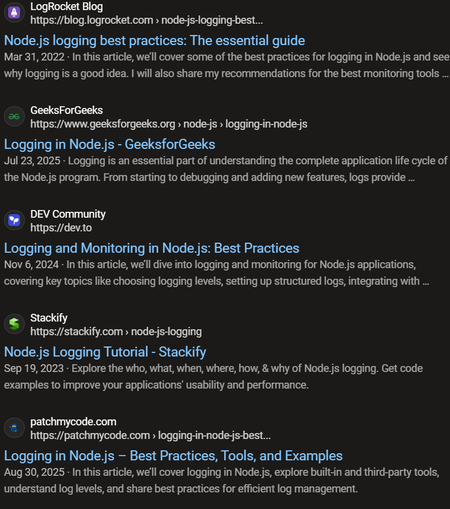
Google recently introduced https://blog.google/products/search/preferred-sources/ which allows people to see news results from sources they prefer more frequently. I think this is a great idea, and it would be even better if users could specify preferred and un-preferred sources for all search results in general, not just news results. For example, when I search for "nodejs logging," almost the entire first page of results is from company blogs or tutorial websites whose perspective I don't really care about: These sites are EVERYWHERE and I frequently find myself digging through many search results to find sources that I actually do want to hear from. There is no need for me to see five different company blog posts that look like paraphrasings of each other summarizing the "best practices for logging in nodejs" or similar. Maybe showing one of these posts from a source that I trust is appropriate, but after that, I'm interested in authentic community discussions (e.g., StackExchange, Reddit), RFC-type websites (not sure if these exist for Node.js, but things like Python's PEPs or Rust's RFCs, so very official, community-driven discussions), official documentation from the logging libraries themselves, and personal blog posts that go more in-depth into a real person's opinions about and experiences with logging. One way I could signal to Bing that this is what I want, is to set websites like StackExchange, Reddit, official documentation pages, personal blogs I like, etc. as "favored" sources, and set what I consider to be "slop" websites, like LogRocket, as "unfavored" sources. Another example of the above, which I want to emphasize because it frequently comes up for me, is looking up references for functions in the Python standard library, for example, "python open()". The first page of results in this case come from realpython.com, w3schools.com, geeksforgeeks.org, programiz.com, and a bunch of videos for the remainder of the page. In my opinion, it is insane that we get every website except the official Python.org documentation for open(), which is actually what I'm looking for. I could rectify this by adding python.org as a preferred source. A final example that frequently pops up for me is cooking. I often search questions like "how many cups are in a pound of sliced carrots," and invariably, I get search results from websites like these: I can't prove it, but these websites look like they are LLM-generated to me. At any rate, I much prefer to hear it from a source like this, which looks more like an actual publication with an editorial team and humans vetting the information: Since chefsresource.com comes up so frequently in my search results, and I always avoid looking at it, it would make sense for me to "blacklist" it by adding it as an unfavored source, so that almanac.com result is more likely to come up as a relevant result to me. Google search seems to avoid all of these problems by default, and it behaves more the way I want for a search engine. Still, I think allowing users to tailor their own search results by specifying "favored" and "unfavored" sources would be a great differentiating feature for Bing search.57Views0likes0Comments
Camera app not wirking
Hello, I am in the Relaese channel, 24H2. I have issues with my camera. Yesterday, Windows Hello and the camera app were not working but Zoom did. Today Windows Hello works but not the camera app. I get the message below. I tried ot unistall/reinstall the camera app and checked fir updates; I also tried to repair Windows with scc/scannow but it did not solve the issue. Would you have ideas? Thanks much416Views1like5CommentsFeedback Opportunity: Securing IoT devices across IT and OT environment
Here you have an opportunity to help our Azure Defender for IoT team with feedback. From their team: We in Azure Defender for IoT team are working on building a comprehensive, unified solution for securing IoT devices across IT and OT environments. This solution provides an extent of features and tools dedicated to explore, contextualize and protect unmanaged device. For more details, visit our website: https://azure.microsoft.com/en-us/services/azure-defender-for-iot/ Criteria: Customers with more than 100 employees or Partners managing customers in this scale. Preferably customers with both IT and OT environments. Please use this 5-minute survey to provide your insight and priorities when it comes to IoT security. Survey Link: https://aka.ms/AAaw2g3 We would love to hear your thoughts as soon as possible; your timely response is much appreciated!745Views0likes0Comments