Compliance
876 Topics
From “No” to “Now”: A 7-Layer Strategy for Enterprise AI Safety
The “block” posture on Generative AI has failed. In a global enterprise, banning these tools doesn't stop usage; it simply pushes intellectual property into unmanaged channels and creates a massive visibility gap in corporate telemetry. As 2026 approaches, the mandate has shifted from stopping AI to hardening the environment so that innovation can run at velocity without compromising data sovereignty. Traditional security perimeters are ineffective against the “slow bleed” of AI leakage - where data moves through prompts, clipboards, and autonomous agents rather than bulk file transfers. To secure this landscape, a 7-layer defense-in-depth model is required to treat the conversation itself as the new perimeter. Strategic Phase Layer Microsoft Technology Strategic Outcome I. THE FOUNDATION 1. Identity Entra ID + TRv2 / UTR Blocks leaks to personal accounts at the front door. 2. Visibility Purview DSPM for AI + MDCA Eliminates telemetry blindspots and Shadow AI. 3. Data Core Purview Information Protection AI-ready permissions and automated labeling. II. THE CONTROL 4. Session MDCA + Endpoint DLP Real-time prevention of clipboard/USB exfiltration. 5. Agents Agent 365 + Entra Agent ID Controlled discovery and execution of AI agents. III. THE VELOCITY 6. The Human M365 Copilot + Training High-velocity adoption via "Safe Harbor" tools. 7. Ops Sentinel + Defender + Purview Continuous oversight and EU AI Act compliance. 1. Identity: The Only Verifiable Perimeter Identity is the primary control plane. Access to AI services must be treated with the same rigor as administrative access to core infrastructure. The strategy centers on enforcing device-bound Conditional Access, where access is strictly contingent on device health. To solve the "Account Leak" problem, the deployment of Tenant Restrictions v2 (TRv2) is essential to prevent users from signing into personal tenants using corporate-managed devices. For enhanced coverage, Universal Tenant Restrictions (UTR) via Global Secure Access (GSA) allows for consistent enforcement at the cloud edge. While TRv2 authentication-plane is GA, the data-plane remains in preview. 2. Eliminating the Visibility Gap (Shadow AI) Visibility is the precursor to governance; it is impossible to secure what is not seen. Microsoft Defender for Cloud Apps (MDCA) serves to discover and govern the enterprise AI footprint, while Purview DSPM for AI (formerly AI Hub) monitors Copilot and third-party interactions. By categorizing tools using MDCA risk scores and compliance attributes, organizations can apply automated sanctioning decisions and enforce session controls for high-risk endpoints. 3. Data Hygiene: Hardening the “Work IQ” AI acts as a mirror of internal permissions. If the data environment is “flat,” AI will inadvertently surface sensitive information to unauthorized users. Hardening the foundation requires automated sensitivity labeling in Purview Information Protection. Identifying PII and proprietary code before assigning AI licenses ensures that labels travel with the data, preventing labeled content from being exfiltrated via prompts or unauthorized sharing. 4. Session Governance: Solving the “Clipboard Leak” The most pervasive leak in 2026 is not a file upload; it’s a simple copy-paste action or a USB transfer. Deploying Conditional Access App Control (CAAC) via MDCA session policies allows sanctioned apps to function while surgically blocking cut/copy/paste. This is complemented by Endpoint DLP, which extends governance to the physical device level, preventing sensitive data from being moved to unmanaged USB storage or printers during an AI-assisted workflow. 5. The “Agentic” Era: Agent 365 & Sharing Controls As the digital landscape moves from “Chat” to “Agents,” Agent 365 and Entra Agent ID provide the necessary identity and control plane for autonomous entities. Operational Insight: In large-scale tenants, default settings often present a governance risk. A critical first step is navigating to the Microsoft 365 admin center (Copilot > Agents) to disable the default “Anyone in organization” sharing option. Restricting agent creation and sharing to a validated security group is essential to prevent unvetted agent sprawl and ensure that only compliant agents are discoverable. 6. The Human Layer: “Safe Harbors” over Bans Security fails when it creates more friction than the risk it seeks to mitigate. Instead of an outright ban, investment in AI skilling—teaching users context minimization (redacting specifics before interacting with a model) - is the better path. Providing a sanctioned, enterprise-grade "Safe Harbor" like M365 Copilot offers a superior tool that naturally decays the adoption of Shadow AI. 7. Continuous Ops: Monitoring & Regulatory Audit Security is not a “set and forget” project, particularly with the EU AI Act on the horizon. Correlating AI interactions and DLP alerts in Microsoft Sentinel using Purview Audit (specifically the CopilotInteraction logs) data allows for real-time responses. Automated SOAR playbooks can then trigger protective actions—such as revoking an Agent ID - if an entity attempts to access sensitive HR or financial data. Conclusion Securing AI at scale is an architectural shift. By layering Identity, Session Governance, and Agentic Identity, AI is transformed from a fragmented risk into a governed competitive advantage for the modern global workplace.72Views0likes0Comments
Microsoft Compliance Assessment issues - ASD L1
Hi, We are using Microsoft Compliance Assessments in Microsoft Purview In the Microsoft Compliance Manager we have enabled the ASD Essentials Level 1 assessment Under the Microsoft Actions There are 2 actions, one is: Malicious Code Protection - Periodic and Real-Time Scans (SI-0116) The issue that currently the testing status is 'failed low risk' , but the testing status has the date tested as Monday Sep 30 2024, well before we opened the assessment, also with notes that are completely irrelevant to this client and certainly not something we have put in. The information in there is quite long, I can provide a txt file with this information I have checked the documentation and we have implemented the required security configuration With these items set the way they are we have no way to complete the assessment196Views0likes3CommentsWelcome to the Microsoft Security Community!
Protect it all with Microsoft Security Eliminate gaps and get the simplified, comprehensive protection, expertise, and AI-powered solutions you need to innovate and grow in a changing world. The Microsoft Security Community is your gateway to connect, learn, and collaborate with peers, experts, and product teams. Gain access to technical discussions, webinars, and help shape Microsoft’s security products. Get there fast To stay up to date on upcoming opportunities and the latest Microsoft Security Community news, make sure to subscribe to our email list. Find the latest skilling content and on-demand videos – subscribe to the Microsoft Security Community YouTube channel. Catch the latest announcements and connect with us on LinkedIn – Microsoft Security Community and Microsoft Entra Community. Index Community Calls: January 2026 | February 2026 Upcoming Community Calls January 2026 Jan. 8 | 8:00am | Microsoft Purview | Data Security & Compliance for Azure Foundry AI Apps & Agents As organizations accelerate adoption of Azure AI Foundry to build generative AI applications and autonomous agents, ensuring robust data security and regulatory compliance becomes mission-critical. This session outlines the end-to-end security, governance, and compliance controls that Microsoft Purview, DSPM for AI, offers to provide the governance for your Foundry apps and agents. The guidance provides architects, developers, and security teams with a prescriptive framework to design, deploy, and operate secure, compliant, and enterprise-ready AI solutions on Azure. Jan. 14 | 8:00am | 425 Show | Microsoft MCP Server for Enterprise: Transforming User, Security & Identity Tasks with AI See Microsoft’s MCP Server in action! Discover how AI-powered workflows simplify tasks and strengthen security. Packed with demos, this session shows how to operationalize AI across your organization. Jan. 15 | 8:00am | Microsoft Purview | Purview Data Security and Entra Global Secure Access Deep Dive Learn how Microsoft Global Secure Access (GSA) and Purview extend data loss prevention to the network, inspecting traffic to and from sanctioned and unsanctioned apps, including AI, and block sensitive data exfiltration in real time. The guidance in this session will provide actionable steps to security teams getting started with extending data security to the network layer to support compliance and zero trust strategies. Jan. 20 | 8:00am | Microsoft Defender for Cloud | What’s New in Microsoft Defender CSPM Cloud security posture management (CSPM) continues to evolve, and Microsoft Defender CSPM is leading the way with powerful enhancements introduced at Microsoft Ignite. This session will showcase the latest innovations designed to help security teams strengthen their posture and streamline operations. Jan. 22 | 8:00am | Azure Network Security | Advancing web application Protection with Azure WAF: Ruleset and Security Enhancements Explore the latest Azure WAF ruleset and security enhancements. Learn to fine-tune configurations, reduce false positives, gain threat visibility, and ensure consistent protection for web workloads—whether starting fresh or optimizing deployments. Jan. 22 | 8:00am | Security Copilot Skilling Series | Building Custom Agents: Unlocking Context, Automation, and Scale Microsoft Security Copilot already features a robust ecosystem of first-party and partner-built agents, but some scenarios require solutions tailored to your organization’s specific needs and context. In this session, you'll learn how the Security Copilot agent builder platform and MCP servers empower you to create tailored agents that provide context-aware reasoning and enterprise-scale solutions for your unique scenarios. RESCHEDULED for Jan. 27 | 9:00am | Microsoft Sentinel | AI-Powered Entity Analysis in Sentinel’s MCP Server Simplify entity risk assessment with Entity Analyzer. Eliminate complex playbooks; get unified, AI-driven analysis using Sentinel’s semantic understanding. Accelerate automation and enrich SOAR workflows with native Logic Apps integration. February 2026 Feb. 26 | 9:00am | Azure Network Security | Azure Firewall Integration with Microsoft Sentinel Learn how Azure Firewall integrates with Microsoft Sentinel to enhance threat visibility and streamline security investigations. This webinar will demonstrate how firewall logs and insights can be ingested into Sentinel to correlate network activity with broader security signals, enabling faster detection, deeper context, and more effective incident response. Looking for more? Join the Microsoft Customer Connection Program (MCCP)! As a MCCP member, you’ll gain early visibility into product roadmaps, participate in focus groups, and access private preview features before public release. You’ll have a direct channel to share feedback with engineering teams, influencing the direction of Microsoft Security products. The program also offers opportunities to collaborate and network with fellow security experts and Microsoft product teams. Join the MCCP that best fits your interests: www.aka.ms/joincommunity. Additional resources Microsoft Security Hub on Tech Community Virtual Ninja Training Courses Microsoft Security Documentation Azure Network Security GitHub Microsoft Defender for Cloud GitHub Microsoft Sentinel GitHub Microsoft Defender XDR GitHub Microsoft Defender for Cloud Apps GitHub Microsoft Defender for Identity GitHub Microsoft Purview GitHub7.6KViews4likes2CommentsSecurity as the core primitive - Securing AI agents and apps
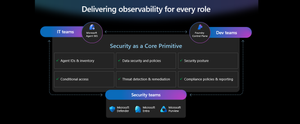
This week at Microsoft Ignite, we shared our vision for Microsoft security -- In the agentic era, security must be ambient and autonomous, like the AI it protects. It must be woven into and around everything we build—from silicon to OS, to agents, apps, data, platforms, and clouds—and throughout everything we do. In this blog, we are going to dive deeper into many of the new innovations we are introducing this week to secure AI agents and apps. As I spend time with our customers and partners, there are four consistent themes that have emerged as core security challenges to secure AI workloads. These are: preventing agent sprawl and access to resources, protecting against data oversharing and data leaks, defending against new AI threats and vulnerabilities, and adhering to evolving regulations. Addressing these challenges holistically requires a coordinated effort across IT, developers, and security leaders, not just within security teams and to enable this, we are introducing several new innovations: Microsoft Agent 365 for IT, Foundry Control Plane in Microsoft Foundry for developers, and the Security Dashboard for AI for security leaders. In addition, we are releasing several new purpose-built capabilities to protect and govern AI apps and agents across Microsoft Defender, Microsoft Entra, and Microsoft Purview. Observability at every layer of the stack To facilitate the organization-wide effort that it takes to secure and govern AI agents and apps – IT, developers, and security leaders need observability (security, management, and monitoring) at every level. IT teams need to enable the development and deployment of any agent in their environment. To ensure the responsible and secure deployment of agents into an organization, IT needs a unified agent registry, the ability to assign an identity to every agent, manage the agent’s access to data and resources, and manage the agent’s entire lifecycle. In addition, IT needs to be able to assign access to common productivity and collaboration tools, such as email and file storage, and be able to observe their entire agent estate for risks such as over-permissioned agents. Development teams need to build and test agents, apply security and compliance controls by default, and ensure AI models are evaluated for safety guardrails and security vulnerabilities. Post deployment, development teams must observe agents to ensure they are staying on task, accessing applications and data sources appropriately, and operating within their cost and performance expectations. Security & compliance teams must ensure overall security of their AI estate, including their AI infrastructure, platforms, data, apps, and agents. They need comprehensive visibility into all their security risks- including agent sprawl and resource access, data oversharing and leaks, AI threats and vulnerabilities, and complying with global regulations. They want to address these risks by extending their existing security investments that they are already invested in and familiar with, rather than using siloed or bolt-on tools. These teams can be most effective in delivering trustworthy AI to their organizations if security is natively integrated into the tools and platforms that they use every day, and if those tools and platforms share consistent security primitives such as agent identities from Entra; data security and compliance controls from Purview; and security posture, detections, and protections from Defender. With the new capabilities being released today, we are delivering observability at every layer of the AI stack, meeting IT, developers, and security teams where they are in the tools they already use to innovate with confidence. For IT Teams - Introducing Microsoft Agent 365, the control plane for agents, now in preview The best infrastructure for managing your agents is the one you already use to manage your users. With Agent 365, organizations can extend familiar tools and policies to confidently deploy and secure agents, without reinventing the wheel. By using the same trusted Microsoft 365 infrastructure, productivity apps, and protections, organizations can now apply consistent and familiar governance and security controls that are purpose-built to protect against agent-specific threats and risks. gement and governance of agents across organizations Microsoft Agent 365 delivers a unified agent Registry, Access Control, Visualization, Interoperability, and Security capabilities for your organization. These capabilities work together to help organizations manage agents and drive business value. The Registry powered by the Entra provides a complete and unified inventory of all the agents deployed and used in your organization including both Microsoft and third-party agents. Access Control allows you to limit the access privileges of your agents to only the resources that they need and protect their access to resources in real time. Visualization gives organizations the ability to see what matters most and gain insights through a unified dashboard, advanced analytics, and role-based reporting. Interop allows agents to access organizational data through Work IQ for added context, and to integrate with Microsoft 365 apps such as Outlook, Word, and Excel so they can create and collaborate alongside users. Security enables the proactive detection of vulnerabilities and misconfigurations, protects against common attacks such as prompt injections, prevents agents from processing or leaking sensitive data, and gives organizations the ability to audit agent interactions, assess compliance readiness and policy violations, and recommend controls for evolving regulatory requirements. Microsoft Agent 365 also includes the Agent 365 SDK, part of Microsoft Agent Framework, which empowers developers and ISVs to build agents on their own AI stack. The SDK enables agents to automatically inherit Microsoft's security and governance protections, such as identity controls, data security policies, and compliance capabilities, without the need for custom integration. For more details on Agent 365, read the blog here. For Developers - Introducing Microsoft Foundry Control Plane to observe, secure and manage agents, now in preview Developers are moving fast to bring agents into production, but operating them at scale introduces new challenges and responsibilities. Agents can access tools, take actions, and make decisions in real time, which means development teams must ensure that every agent behaves safely, securely, and consistently. Today, developers need to work across multiple disparate tools to get a holistic picture of the cybersecurity and safety risks that their agents may have. Once they understand the risk, they then need a unified and simplified way to monitor and manage their entire agent fleet and apply controls and guardrails as needed. Microsoft Foundry provides a unified platform for developers to build, evaluate and deploy AI apps and agents in a responsible way. Today we are excited to announce that Foundry Control Plane is available in preview. This enables developers to observe, secure, and manage their agent fleets with built-in security, and centralized governance controls. With this unified approach, developers can now identify risks and correlate disparate signals across their models, agents, and tools; enforce consistent policies and quality gates; and continuously monitor task adherence and runtime risks. Foundry Control Plane is deeply integrated with Microsoft’s security portfolio to provide a ‘secure by design’ foundation for developers. With Microsoft Entra, developers can ensure an agent identity (Agent ID) and access controls are built into every agent, mitigating the risk of unmanaged agents and over permissioned resources. With Microsoft Defender built in, developers gain contextualized alerts and posture recommendations for agents directly within the Foundry Control Plane. This integration proactively prevents configuration and access risks, while also defending agents from runtime threats in real time. Microsoft Purview’s native integration into Foundry Control Plane makes it easy to enable data security and compliance for every Foundry-built application or agent. This allows Purview to discover data security and compliance risks and apply policies to prevent user prompts and AI responses from safety and policy violations. In addition, agent interactions can be logged and searched for compliance and legal audits. This integration of the shared security capabilities, including identity and access, data security and compliance, and threat protection and posture ensures that security is not an afterthought; it’s embedded at every stage of the agent lifecycle, enabling you to start secure and stay secure. For more details, read the blog. For Security Teams - Introducing Security Dashboard for AI - unified risk visibility for CISOs and AI risk leaders, coming soon AI proliferation in the enterprise, combined with the emergence of AI governance committees and evolving AI regulations, leaves CISOs and AI risk leaders needing a clear view of their AI risks, such as data leaks, model vulnerabilities, misconfigurations, and unethical agent actions across their entire AI estate, spanning AI platforms, apps, and agents. 90% of security professionals, including CISOs, report that their responsibilities have expanded to include data governance and AI oversight within the past year. 1 At the same time, 86% of risk managers say disconnected data and systems lead to duplicated efforts and gaps in risk coverage. 2 To address these needs, we are excited to introduce the Security Dashboard for AI. This serves as a unified dashboard that aggregates posture and real-time risk signals from Microsoft Defender, Microsoft Entra, and Microsoft Purview. This unified dashboard allows CISOs and AI risk leaders to discover agents and AI apps, track AI posture and drift, and correlate risk signals to investigate and act across their entire AI ecosystem. For example, you can see your full AI inventory and get visibility into a quarantined agent, flagged for high data risk due to oversharing sensitive information in Purview. The dashboard then correlates that signal with identity insights from Entra and threat protection alerts from Defender to provide a complete picture of exposure. From there, you can delegate tasks to the appropriate teams to enforce policies and remediate issues quickly. With the Security Dashboard for AI, CISOs and risk leaders gain a clear, consolidated view of AI risks across agents, apps, and platforms—eliminating fragmented visibility, disconnected posture insights, and governance gaps as AI adoption scales. Best of all, there’s nothing new to buy. If you’re already using Microsoft security products to secure AI, you’re already a Security Dashboard for AI customer. Figure 5: Security Dashboard for AI provides CISOs and AI risk leaders with a unified view of their AI risk by bringing together their AI inventory, AI risk, and security recommendations to strengthen overall posture Together, these innovations deliver observability and security across IT, development, and security teams, powered by Microsoft’s shared security capabilities. With Microsoft Agent 365, IT teams can manage and secure agents alongside users. Foundry Control Plane gives developers unified governance and lifecycle controls for agent fleets. Security Dashboard for AI provides CISOs and AI risk leaders with a consolidated view of AI risks across platforms, apps, and agents. Added innovation to secure and govern your AI workloads In addition to the IT, developer, and security leader-focused innovations outlined above, we continue to accelerate our pace of innovation in Microsoft Entra, Microsoft Purview, and Microsoft Defender to address the most pressing needs for securing and governing your AI workloads. These needs are: Manage agent sprawl and resource access e.g. managing agent identity, access to resources, and permissions lifecycle at scale Prevent data oversharing and leaks e.g. protecting sensitive information shared in prompts, responses, and agent interactions Defend against shadow AI, new threats, and vulnerabilities e.g. managing unsanctioned applications, preventing prompt injection attacks, and detecting AI supply chain vulnerabilities Enable AI governance for regulatory compliance e.g. ensuring AI development, operations, and usage comply with evolving global regulations and frameworks Manage agent sprawl and resource access 76% of business leaders expect employees to manage agents within the next 2–3 years. 3 Widespread adoption of agents is driving the need for visibility and control, which includes the need for a unified registry, agent identities, lifecycle governance, and secure access to resources. Today, Microsoft Entra provides robust identity protection and secure access for applications and users. However, organizations lack a unified way to manage, govern, and protect agents in the same way they manage their users. Organizations need a purpose-built identity and access framework for agents. Introducing Microsoft Entra Agent ID, now in preview Microsoft Entra Agent ID offers enterprise-grade capabilities that enable organizations to prevent agent sprawl and protect agent identities and their access to resources. These new purpose-built capabilities enable organizations to: Register and manage agents: Get a complete inventory of the agent fleet and ensure all new agents are created with an identity built-in and are automatically protected by organization policies to accelerate adoption. Govern agent identities and lifecycle: Keep the agent fleet under control with lifecycle management and IT-defined guardrails for both agents and people who create and manage them. Protect agent access to resources: Reduce risk of breaches, block risky agents, and prevent agent access to malicious resources with conditional access and traffic inspection. Agents built in Microsoft Copilot Studio, Microsoft Foundry, and Security Copilot get an Entra Agent ID built-in at creation. Developers can also adopt Entra Agent ID for agents they build through Microsoft Agent Framework, Microsoft Agent 365 SDK, or Microsoft Entra Agent ID SDK. Read the Microsoft Entra blog to learn more. Prevent data oversharing and leaks Data security is more complex than ever. Information Security Media Group (ISMG) reports that 80% of leaders cite leakage of sensitive data as their top concern. 4 In addition to data security and compliance risks of generative AI (GenAI) apps, agents introduces new data risks such as unsupervised data access, highlighting the need to protect all types of corporate data, whether it is accessed by employees or agents. To mitigate these risks, we are introducing new Microsoft Purview data security and compliance capabilities for Microsoft 365 Copilot and for agents and AI apps built with Copilot Studio and Microsoft Foundry, providing unified protection, visibility, and control for users, AI Apps, and Agents. New Microsoft Purview controls safeguard Microsoft 365 Copilot with real-time protection and bulk remediation of oversharing risks Microsoft Purview and Microsoft 365 Copilot deliver a fully integrated solution for protecting sensitive data in AI workflows. Based on ongoing customer feedback, we’re introducing new capabilities to deliver real-time protection for sensitive data in M365 Copilot and accelerated remediation of oversharing risks: Data risk assessments: Previously, admins could monitor oversharing risks such as SharePoint sites with unprotected sensitive data. Now, they can perform item-level investigations and bulk remediation for overshared files in SharePoint and OneDrive to quickly reduce oversharing exposure. Data Loss Prevention (DLP) for M365 Copilot: DLP previously excluded files with sensitivity labels from Copilot processing. Now in preview, DLP also prevents prompts that include sensitive data from being processed in M365 Copilot, Copilot Chat, and Copilot agents, and prevents Copilot from using sensitive data in prompts for web grounding. Priority cleanup for M365 Copilot assets: Many organizations have org-wide policies to retain or delete data. Priority cleanup, now generally available, lets admins delete assets that are frequently processed by Copilot, such as meeting transcripts and recordings, on an independent schedule from the org-wide policies while maintaining regulatory compliance. On-demand classification for meeting transcripts: Purview can now detect sensitive information in meeting transcripts on-demand. This enables data security admins to apply DLP policies and enforce Priority cleanup based on the sensitive information detected. & bulk remediation Read the full Data Security blog to learn more. Introducing new Microsoft Purview data security capabilities for agents and apps built with Copilot Studio and Microsoft Foundry, now in preview Microsoft Purview now extends the same data security and compliance for users and Copilots to agents and apps. These new capabilities are: Enhanced Data Security Posture Management: A centralized DSPM dashboard that provides observability, risk assessment, and guided remediation across users, AI apps, and agents. Insider Risk Management (IRM) for Agents: Uniquely designed for agents, using dedicated behavioral analytics, Purview dynamically assigns risk levels to agents based on their risky handing of sensitive data and enables admins to apply conditional policies based on that risk level. Sensitive data protection with Azure AI Search: Azure AI Search enables fast, AI-driven retrieval across large document collections, essential for building AI Apps. When apps or agents use Azure AI Search to index or retrieve data, Purview sensitivity labels are preserved in the search index, ensuring that any sensitive information remains protected under the organization’s data security & compliance policies. For more information on preventing data oversharing and data leaks - Learn how Purview protects and governs agents in the Data Security and Compliance for Agents blog. Defend against shadow AI, new threats, and vulnerabilities AI workloads are subject to new AI-specific threats like prompt injections attacks, model poisoning, and data exfiltration of AI generated content. Although security admins and SOC analysts have similar tasks when securing agents, the attack methods and surfaces differ significantly. To help customers defend against these novel attacks, we are introducing new capabilities in Microsoft Defender that deliver end-to-end protection, from security posture management to runtime defense. Introducing Security Posture Management for agents, now in preview As organizations adopt AI agents to automate critical workflows, they become high-value targets and potential points of compromise, creating a critical need to ensure agents are hardened, compliant, and resilient by preventing misconfigurations and safeguarding against adversarial manipulation. Security Posture Management for agents in Microsoft Defender now provides an agent inventory for security teams across Microsoft Foundry and Copilot Studio agents. Here, analysts can assess the overall security posture of an agent, easily implement security recommendations, and identify vulnerabilities such as misconfigurations and excessive permissions, all aligned to the MITRE ATT&CK framework. Additionally, the new agent attack path analysis visualizes how an agent’s weak security posture can create broader organizational risk, so you can quickly limit exposure and prevent lateral movement. Introducing Threat Protection for agents, now in preview Attack techniques and attack surfaces for agents are fundamentally different from other assets in your environment. That’s why Defender is delivering purpose-built protections and detections to help defend against them. Defender is introducing runtime protection for Copilot Studio agents that automatically block prompt injection attacks in real time. In addition, we are announcing agent-specific threat detections for Copilot Studio and Microsoft Foundry agents coming soon. Defender automatically correlates these alerts with Microsoft’s industry-leading threat intelligence and cross-domain security signals to deliver richer, contextualized alerts and security incident views for the SOC analyst. Defender’s risk and threat signals are natively integrated into the new Microsoft Foundry Control Plane, giving development teams full observability and the ability to act directly from within their familiar environment. Finally, security analysts will be able to hunt across all agent telemetry in the Advanced Hunting experience in Defender, and the new Agent 365 SDK extends Defender’s visibility and hunting capabilities to third-party agents, starting with Genspark and Kasisto, giving security teams even more coverage across their AI landscape. To learn more about how you can harden the security posture of your agents and defend against threats, read the Microsoft Defender blog. Enable AI governance for regulatory compliance Global AI regulations like the EU AI Act and NIST AI RMF are evolving rapidly; yet, according to ISMG, 55% of leaders report lacking clarity on current and future AI regulatory requirements. 5 As enterprises adopt AI, they must ensure that their AI innovation aligns with global regulations and standards to avoid costly compliance gaps. Introducing new Microsoft Purview Compliance Manager capabilities to stay ahead of evolving AI regulations, now in preview Today, Purview Compliance Manager provides over 300 pre-built assessments for common industry, regional, and global standards and regulations. However, the pace of change for new AI regulations requires controls to be continuously re-evaluated and updated so that organizations can adapt to ongoing changes in regulations and stay compliant. To address this need, Compliance Manager now includes AI-powered regulatory templates. AI-powered regulatory templates enable real-time ingestion and analysis of global regulatory documents, allowing compliance teams to quickly adapt to changes as they happen. As regulations evolve, the updated regulatory documents can be uploaded to Compliance Manager, and the new requirements are automatically mapped to applicable recommended actions to implement controls across Microsoft Defender, Microsoft Entra, Microsoft Purview, Microsoft 365, and Microsoft Foundry. Automated actions by Compliance Manager further streamline governance, reduce manual workload, and strengthen regulatory accountability. Introducing expanded Microsoft Purview compliance capabilities for agents and AI apps now in preview Microsoft Purview now extends its compliance capabilities across agent-generated interactions, ensuring responsible use and regulatory alignment as AI becomes deeply embedded across business processes. New capabilities include expanded coverage for: Audit: Surface agent interactions, lifecycle events, and data usage with Purview Audit. Unified audit logs across user and agent activities, paired with traceability for every agent using an Entra Agent ID, support investigation, anomaly detection, and regulatory reporting. Communication Compliance: Detect prompts sent to agents and agent-generated responses containing inappropriate, unethical, or risky language, including attempts to manipulate agents into bypassing policies, generating risky content, or producing noncompliant outputs. When issues arise, data security admins get full context, including the prompt, the agent’s output, and relevant metadata, so they can investigate and take corrective action Data Lifecycle Management: Apply retention and deletion policies to agent-generated content and communication flows to automate lifecycle controls and reduce regulatory risk. Read about Microsoft Purview data security for agents to learn more. Finally, we are extending our data security, threat protection, and identity access capabilities to third-party apps and agents via the network. Advancing Microsoft Entra Internet Access Secure Web + AI Gateway - extend runtime protections to the network, now in preview Microsoft Entra Internet Access, part of the Microsoft Entra Suite, has new capabilities to secure access to and usage of GenAI at the network level, marking a transition from Secure Web Gateway to Secure Web and AI Gateway. Enterprises can accelerate GenAI adoption while maintaining compliance and reducing risk, empowering employees to experiment with new AI tools safely. The new capabilities include: Prompt injection protection which blocks malicious prompts in real time by extending Azure AI Prompt Shields to the network layer. Network file filtering which extends Microsoft Purview to inspect files in transit and prevents regulated or confidential data from being uploaded to unsanctioned AI services. Shadow AI Detection that provides visibility into unsanctioned AI applications through Cloud Application Analytics and Defender for Cloud Apps risk scoring, empowering security teams to monitor usage trends, apply Conditional Access, or block high-risk apps instantly. Unsanctioned MCP server blocking prevents access to MCP servers from unauthorized agents. With these controls, you can accelerate GenAI adoption while maintaining compliance and reducing risk, so employees can experiment with new AI tools safely. Read the Microsoft Entra blog to learn more. As AI transforms the enterprise, security must evolve to meet new challenges—spanning agent sprawl, data protection, emerging threats, and regulatory compliance. Our approach is to empower IT, developers, and security leaders with purpose-built innovations like Agent 365, Foundry Control Plane, and the Security Dashboard for AI. These solutions bring observability, governance, and protection to every layer of the AI stack, leveraging familiar tools and integrated controls across Microsoft Defender, Microsoft Entra, and Microsoft Purview. The future of security is ambient, autonomous, and deeply woven into the fabric of how we build, deploy, and govern AI systems. Explore additional resources Learn more about Security for AI solutions on our webpage Learn more about Microsoft Agent 365 Learn more about Microsoft Entra Agent ID Get started with Microsoft 365 Copilot Get started with Microsoft Copilot Studio Get started with Microsoft Foundry Get started with Microsoft Defender for Cloud Get started with Microsoft Entra Get started with Microsoft Purview Get started with Microsoft Purview Compliance Manager Sign up for a free Microsoft 365 E5 Security Trial and Microsoft Purview Trial 1 Bedrock Security, 2025 Data Security Confidence Index, published Mar 17, 2025. 2 AuditBoard & Ascend2, Connected Risk Report 2024; as cited by MIT Sloan Management Review, Spring 2025. 3 KPMG AI Quarterly Pulse Survey | Q3 2025. September 2025. n= 130 U.S.-based C-suite and business leaders representing organizations with annual revenue of $1 billion or more 4 First Annual Generative AI study: Business Rewards vs. Security Risks, , Q3 2023, ISMG, N=400 5 First Annual Generative AI study: Business Rewards vs. Security Risks, Q3 2023, ISMG, N=400
CSP Account Verified & Authorized yet Indirect Reseller Status: SUSPENDED
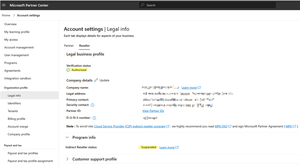
Hello Partner Community Please assist any way you can... JillArmourMicrosoft is this in your wheelhouse? We are an CSP partner that is struggling to have our indirect reseller account suspension lifted even though our partner account is now fully verified and authorised. Our account was originally suspended due to a business registration vs shop location mismatch that was not resolved within a 30 day termination notification time limit. We corrected the address problem AFTER the account was suspended and although our account is now verified and authorised, the Indirect Reseller account suspension has not been automatically lifted and we are unable to contact a human representative to have it manually moved back to the Active state. We have submitted several Partner Support tickets but they do not provide actual support at all and automated responses from these tickets return a disclaimer stating the following with no further correspondence and the ticket automatically closed. Hello, Thank you for contacting Microsoft Partner support about the notice of suspension and termination proceedings. In the Microsoft AI Cloud Partner Program Agreement, both Microsoft and our partners reserve the right to walk away from the partner relationship by providing 30 days' notice to the other. Neither party is required to offer an explanation for the decision to terminate the partner agreement. As Microsoft is exercising its rights under this section 4.b of the Microsoft AI Cloud Program Agreement, we are unable to share an explanation or further details. Kind Regards, *Random Name* (He/Him) Support Engineer Partner Support Delivery - Program Customer Support My Working Hours: M-F 11:30 AM to 08:30 PM AEDT This lack of support is excruciatingly frustrating and terribly aggravating given that we are now subject to an indefinite period of considerable income loss with no recourse. Note that along with the suspension, emails have been sent to our customers notifying them that we are no longer qualified to act as their licensing provider which has been distressing for both our sales team and the customers. Our distributor is doing the best they can to help but they are unable to provide any real assistance and from what I hear, are unable to get any sensible advice from their Microsoft reps. Upon speaking with several other indirect resellers and distributors alike, it is my understanding that many partners are suffering the same or similar denial of service and I question whether this practice is even legal under Australian law regardless of any contractual fine print and disclaimers after the fact. This denial of support is a huge failure of Microsoft's policy makers and extremely poor business practice in general. If Microsoft wish to declare utter contempt for the small businesses that have supported them for several decades then those businesses might consider alternative platforms for their customers going forward. To conclude, I welcome any support or feedback from the community to help resolve this particular problem and help others with the same issue. Kind Regards, One very Frustrated Reseller.SolvedSecurity Guidance Series: CAF 4.0 Threat Hunting From Detection to Anticipation
The CAF 4.0 update reframes C2 (Threat Hunting) as a cornerstone of proactive cyber resilience. According to the NCSC CAF 4.0, this principle is no longer about occasional investigations or manual log reviews; it now demands structured, frequent, and intelligence-led threat hunting that evolves in line with organizational risk. The expectation is that UK public sector organizations will not just respond to alerts but will actively search for hidden or emerging threats that evade standard detection technologies, documenting their findings and using them to strengthen controls and response. In practice, this represents a shift from detection to anticipation. Threat hunting under CAF 4.0 should be hypothesis-driven, focusing on attacker tactics, techniques, and procedures (TTPs) rather than isolated indicators of compromise (IoCs). Organizations must build confidence that their hunting processes are repeatable, measurable, and continuously improving, leveraging automation and threat intelligence to expand coverage and consistency. Microsoft E3 Microsoft E3 equips organizations with the baseline capabilities to begin threat investigation, forming the starting point for Partially Achieved maturity under CAF 4.0 C2. At this level, hunting is ad hoc and event-driven, but it establishes the foundation for structured processes. How E3 contributes to the following objectives in C2: Reactive detection for initial hunts: Defender for Endpoint Plan 1 surfaces alerts on phishing, malware, and suspicious endpoint activity. Analysts can use these alerts to triage incidents and document steps taken, creating the first iteration of a hunting methodology. Identity correlation and manual investigation: Entra ID P1 provides Conditional Access and MFA enforcement, while audit telemetry in the Security & Compliance Centre supports manual reviews of identity anomalies. These capabilities allow organizations to link endpoint and identity signals during investigations. Learning from incidents: By recording findings from reactive hunts and feeding lessons into risk decisions, organizations begin to build repeatable processes, even if hunts are not yet hypothesis-driven or frequent enough to match risk. What’s missing for Achieved: Under E3, hunts remain reactive, lack documented hypotheses, and do not routinely convert findings into automated detections. Achieving full maturity typically requires regular, TTP-focused hunts, automation, and integration with advanced analytics, capabilities found in higher-tier solutions. Microsoft E5 Microsoft E5 elevates threat hunting from reactive investigation to a structured, intelligence-driven discipline, a defining feature of Achieved maturity under CAF 4.0, C2. Distinctive E5 capabilities for C2: Hypothesis-driven hunts at scale: Defender Advanced Hunting (KQL) enables analysts to test hypotheses across correlated telemetry from endpoints, identities, email, and SaaS applications. This supports hunts focused on adversary TTPs, not just atomic IoCs, as CAF requires. Turning hunts into detections: Custom hunting queries can be converted into alert rules, operationalizing findings into automated detection and reducing reliance on manual triage. Threat intelligence integration: Microsoft Threat Intelligence feeds real-time actor tradecraft and sector-specific campaigns into the hunting workflow, ensuring hunts anticipate emerging threats rather than react to incidents. Identity and lateral movement focus: Defender for Identity surfaces Kerberos abuse, credential replay, and lateral movement patterns, enabling hunts that span beyond endpoints and email. Documented and repeatable process: E5 supports recording hunt queries and outcomes via APIs and portals, creating evidence for audits and driving continuous improvement, a CAF expectation. By embedding hypothesis-driven hunts, automation, and intelligence into business-as-usual operations, E5 helps public sector organizations meet CAF C2’s requirement for regular, documented hunts that proactively reduce risk, and evolve with the threat landscape. Sentinel Microsoft Sentinel takes threat hunting beyond the Microsoft ecosystem, unifying telemetry from endpoints, firewalls, OT systems, and third-party SaaS into a single cloud-native SIEM and SOAR platform. This consolidation helps enable hunts that span the entire attack surface, a critical step toward achieving maturity under CAF 4.0 C2. Key capabilities for control C2: Attacker-centric analysis: MITRE ATT&CK-aligned analytics and KQL-based hunting allow teams to identify stealthy behaviours, simulate breach paths, and validate detection coverage. Threat intelligence integration: Sentinel enriches hunts with national and sector-specific intelligence (e.g. NCSC advisories), ensuring hunts target the most relevant TTPs. Automation and repeatability: SOAR playbooks convert post-hunt findings into automated workflows for containment, investigation, and documentation, meeting CAF’s requirement for structured, continuously improving hunts. Evidence-driven improvement: Recorded hunts and automated reporting create a feedback loop that strengthens posture and demonstrates compliance. By combining telemetry, intelligence, and automation, Sentinel helps organizations embed threat hunting as a routine, scalable process, turning insights into detections and ensuring hunts evolve with the threat landscape. The video below shows how E3, E5 and Sentinel power real C2 threat hunts. Bringing it all Together By progressing from E3’s reactive investigation to E5’s intelligence-led correlation and Sentinel’s automated hunting and orchestration, organizations can develop an end-to-end capability that not only detects but anticipates and helps prevent disruption to essential public services across the UK. This is the operational reality of Achieved under CAF 4.0 C2 (Threat Hunting) - a structured, data-driven, and intelligence-informed approach that transforms threat hunting from an isolated task into an ongoing discipline of proactive defence. To demonstrate what effective, CAF-aligned threat hunting looks like, the following one-slider and demo walk through how Microsoft’s security tools support structured, repeatable hunts that match organizational risk. These examples help translate C2’s expectations into practical, operational activity. CAF 4.0 challenges public-sector defenders to move beyond detection and embrace anticipation. How mature is your organization’s ability to uncover the threats that have not yet been seen? In this final post of the series, the message is clear - true cyber resilience moves beyond reactivity towards a predictive approach.Secure and govern AI apps and agents with Microsoft Purview
The Microsoft Purview family is here to help you secure and govern data across third party IaaS and Saas, multi-platform data environment, while helping you meet compliance requirements you may be subject to. Purview brings simplicity with a comprehensive set of solutions built on a platform of shared capabilities, that helps keep your most important asset, data, safe. With the introduction of AI technology, Purview also expanded its data coverage to include discovering, protecting, and governing the interactions of AI apps and agents, such as Microsoft Copilots like Microsoft 365 Copilot and Security Copilot, Enterprise built AI apps like Chat GPT enterprise, and other consumer AI apps like DeepSeek, accessed through the browser. To help you view, investigate interactions with all those AI apps, and to create and manage policies to secure and govern them in one centralized place, we have launched Purview Data Security Posture Management (DSPM) for AI. You can learn more about DSPM for AI here with short video walkthroughs: Learn how Microsoft Purview Data Security Posture Management (DSPM) for AI provides data security and compliance protections for Copilots and other generative AI apps | Microsoft Learn Purview capabilities for AI apps and agents To understand our current set of capabilities within Purview to discover, protect, and govern various AI apps and agents, please refer to our Learn doc here: Microsoft Purview data security and compliance protections for Microsoft 365 Copilot and other generative AI apps | Microsoft Learn Here is a quick reference guide for the capabilities available today: Note that currently, DLP for Copilot and adhering to sensitivity label are currently designed to protect content in Microsoft 365. Thus, Security Copilot and Copilot in Fabric, along with Copilot studio custom agents that do not use Microsoft 365 as a content source, do not have these features available. Please see list of AI sites supported by Microsoft Purview DSPM for AI here Conclusion Microsoft Purview can help you discover, protect, and govern the prompts and responses from AI applications in Microsoft Copilot experiences, Enterprise AI apps, and other AI apps through its data security and data compliance solutions, while allowing you to view, investigate, and manage interactions in one centralized place in DSPM for AI. Follow up reading Check out the deployment guides for DSPM for AI How to deploy DSPM for AI - https://aka.ms/DSPMforAI/deploy How to use DSPM for AI data risk assessment to address oversharing - https://aka.ms/dspmforai/oversharing Address oversharing concerns with Microsoft 365 blueprint - aka.ms/Copilot/Oversharing Explore the Purview SDK Microsoft Purview SDK Public Preview | Microsoft Community Hub (blog) Microsoft Purview documentation - purview-sdk | Microsoft Learn Build secure and compliant AI applications with Microsoft Purview (video) References for DSPM for AI Microsoft Purview data security and compliance protections for Microsoft 365 Copilot and other generative AI apps | Microsoft Learn Considerations for deploying Microsoft Purview AI Hub and data security and compliance protections for Microsoft 365 Copilot and Microsoft Copilot | Microsoft Learn Block Users From Sharing Sensitive Information to Unmanaged AI Apps Via Edge on Managed Devices (preview) | Microsoft Learn as part of Scenario 7 of Create and deploy a data loss prevention policy | Microsoft Learn Commonly used properties in Copilot audit logs - Audit logs for Copilot and AI activities | Microsoft Learn Supported AI sites by Microsoft Purview for data security and compliance protections | Microsoft Learn Where Copilot usage data is stored and how you can audit it - Microsoft 365 Copilot data protection and auditing architecture | Microsoft Learn Downloadable whitepaper: Data Security for AI Adoption | Microsoft Explore the roadmap for DSPM for AI Public roadmap for DSPM for AI - Microsoft 365 Roadmap | Microsoft 365PMPurBeyond Visibility: The new Microsoft Purview Data Security Posture Management (DSPM) experience
In today’s AI-powered enterprises, understanding your data estate—and the risks that come with it—is both more complex and more critical than ever. Meanwhile, many organizations still grapple with a fragmented data security landscape, relying on a patchwork of disconnected tools that obscure visibility and hinder effective data security posture management. As AI adoption accelerates, entirely new data risk vectors are emerging—ranging from oversharing and compliance gaps to operational inefficiencies. According to recent research[1], 40% of data security incidents now occur within AI applications, and 78% of AI users are bringing their own AI tools to work. This challenge is further compounded by the rise of AI agents, creating a scenario that demands a unified, context-aware approach to understanding and securing data within trusted workflows. This is where data security posture management helps organizations - by providing the visibility and control they need across sprawling data estates and evolving risk surfaces. By continuously assessing data security posture, organizations can better identify gaps and remediate risks, avoiding fragmented efforts. However, even with these capabilities, many organizations still struggle to stay focused on the ultimate goal—achieving meaningful security outcomes rather than simply managing tools or processes. To overcome this, organizations must shift their perspective: seeing data security not as a collection of individual solutions, but as a holistic program anchored in desired business and security outcomes. Managing data security posture should become the foundation for building a sustainable and healthy data security program—one that continuously improves, drives measurable resilience, strengthens trust, and systematically reduces risk across the enterprise. At Microsoft Ignite, we’re excited to share the newly enhanced Microsoft Purview Data Security Posture Management (DSPM) experience—an AI-powered, centralized solution that focuses on the goals your organization needs to accomplish, and helps you strengthen data security to confidently embrace AI apps and agents with actionable insights, new third-party signals, and Security Copilot agents. Enabling AI and agents confidently with enhanced data security posture The enhanced DSPM experience is designed to simplify data security posture by stitching together the scenarios and goals customers need to achieve when it comes to their data. We are combining the depth of Purview visibility and controls with the breadth of external signals and agentic activities, complemented by Security Copilot agents, to provide a strong, proactive DSPM experience. See what’s new in Purview DSPM: ▪ Outcome-based guided workflows: To avoid the guesswork of interpreting insights and determining the next best actions, now customers can manage their data security posture by selecting which data security outcome to prioritize and the risks related to each—shifting from reactive visibility to actionable, outcome-driven insights. For each outcome, this experience will guide customers through the key metrics and risk patterns present in their organization, as well as a recommended action plan, including the expected impact of taking those actions. For example, if an admin chooses to address the risk of “Preventing sensitive data exfiltration to risky destinations,” DSPM will show how many sensitive files are at risk, how many have been exfiltrated to personal domains or external cloud services in the past 30 days, and provide recommended actions to mitigate these risks. These actions may include creating a new DLP policy and an IRM policy to detect and prevent such exfiltration to personal emails, and admins can see the impact each of these actions will have. After that, they can continuously assess their data security posture through the outcome metrics. [Figure 1: List of data security objectives, with metrics and remediation plans per objective] ▪ External data source visibility: Organizations trust Microsoft for collaboration and productivity, but their footprint spans to external data platforms too. To provide a more complete and comprehensive view of data risks across the digital estate, we’re excited to announce the advancement of the Purview partner ecosystem, with the inclusion of third-party signals in DSPM through the collaboration with our partners Varonis, BigID, Cyera and OneTrust. This partnership, possible via integration with Microsoft Sentinel Data Lake, is designed to help organizations see and understand more of their data—wherever it resides. Through DSPM, a customer will be able to easily turn on these external data signals and evaluate data asset information (such as permissions, location, sensitive information types) in these environments. Available sources initially will be: Salesforce (provided by Varonis), Databricks (provided by BigID), Snowflake (provided by Cyera), and Google Cloud Platform (provided by OneTrust), with additional external data coverage coming soon. By integrating these external data sources into Purview, data security teams gain extended visibility into sensitive data across third-party platforms alongside their Microsoft data, which also empowers teams to raise their confidence when adopting AI apps and agents by expanding visibility on external data that is referenced by those tools. This collaboration not only eliminates blind spots and strengthens risk posture, but also simplifies data security operations with a single, streamlined experience. These signals will be offered using pay-as-you-go billing through Microsoft Sentinel consumptive meters. Learn more here. [Figure 2: Asset explorer with external data from Databricks, Snowflake, Google Cloud Platform, and Salesforce] ▪ New out-of-the-box reports for posture insights: DSPM also extends visibility by presenting new out-of-the-box reports that deliver immediate visibility into top-of-mind metrics organizations care about, such as protection coverage via Sensitivity labels, Data Loss Prevention (DLP) policy triggers, and posture trends over time. With advanced filtering options and deep drilldowns, security teams can quickly identify unprotected sensitive data, track label adoption, monitor policy effectiveness, and surface potential risks earlier. These actionable insights streamline monitoring and support precise policy fine-tuning, enabling data security teams to shift from reactive operations to proactive, data-driven strategic decisions. ▪ Expanded coverage and remediation on Data Risk Assessments: DSPM now extends Data Risk Assessments to item-level analysis with automated new remediation actions like—enabling bulk disabling of overshared SharePoint links and direct activation of protection policies. Starting from an outcome-based remediation plan or the Data Risk Assessment tab, teams can take targeted actions such as removing or tightening sharing links, notifying owners, and applying or updating sensitivity labels—including new support for bulk manual labeling from search—so fixes occur where the risky items reside, and progress is immediately reflected in posture metrics. Beyond Microsoft 365, Data Risk Assessments have also expanded to Microsoft Fabric, surfacing Fabric assets in a new default assessment and proactive actions to protect new Fabric assets with DLP policies or sensitivity labels. These enhancements address key customer challenges around visibility gaps, fragmented remediation workflows, and governance across hybrid environments. AI agents are growing rapidly in enterprise environments, bringing unique data risks that traditional security can’t address. Their autonomous actions and broad access to sensitive information create complex risk profiles tied to behavior, not just identity. To stay secure, organizations need data protection strategies that treat agents as first-class entities with tailored visibility, risk scoring, and policy controls. DSPM is also adapting to this new scenario: ▪ AI Observability for agents: We’re introducing a dedicated view within DSPM that treats agents—such as the ones created on Microsoft 365 Copilot, Copilot Studio, and Azure AI Foundry—as first-class entities in your organizations when it comes to data security posture. It provides a unified inventory of all agents – including third-party agents – as well as the assigned insider risk level based on the agent behavior, posture metrics, and activity trends of each agent. Security teams can drill down into individual agents to see contextual insights like risky behaviors, oversharing patterns, and can take recommended actions, such as the creation of retention policies. AI Observability gives customers clear visibility across agents and connects insights to guided actions— simplifying governance, facilitating risk prioritization, and enabling secure AI adoption without slowing innovation. [Figure 3: AI Observability plane with inventory of 1st and 3rd party agents within the organization, as well as assigned risk level per agent] Learn more about all the innovations we are announcing to help you safely adopt agents. Redefining data security posture for the AI-powered era The new DSPM experience marks a pivotal moment in Microsoft Purview’s journey to secure the modern enterprise. By unifying visibility, protection, and investigation across human and agentic data activity, Purview empowers organizations to embrace AI responsibly, reduce risk, and drive continuous improvement in their data security posture. When it comes to leveraging built-in AI within data security solutions, admins can view proactive or summary insights and launch a Data Security Investigation (DSI) directly from DSPM. This important integration allows admins to utilize the power and scale of DSI analysis to take a closer look at data risks. Furthermore, applying AI to strengthen data security is just as critical as securing AI itself, as AI-powered solutions help organizations anticipate and neutralize risks at scale, and agents have the potential to take data security processes to another level, increasing automation and allowing teams to focus on the most pressing risks. That’s why we’re thrilled to introduce the Data Security Posture Agent, designed to augment the new Purview DSPM experience even further. This agent leverages LLMs to understand context and intent, going beyond traditional classifiers that can often miss nuance. It analyzes selected file sets and generates precise reports on requested information, such as merger & acquisition details or PO numbers. Armed with these insights, admins can decide on their own next steps, whether that’s applying new labels, updating policies, or initiating investigations, streamlining discovery and risk reduction in one intelligent, outcome-driven experience. This capability tackles the challenges of manual, time-consuming data analysis and limited visibility into sensitive information, helping organizations achieve faster resolution, stronger compliance posture, and greater operational efficiency. [Figure 4: Data Security Posture Agent to discover sensitive data and take appropriate actions] Combined with the Data Security Triage agent and other Security Copilot capabilities integrated within Purview, the Data Security Posture agent creates a robust AI-powered foundation for modern data security teams. To make the agents easily accessible and help teams get started more quickly, we are excited to announce that Security Copilot will be available to all Microsoft 365 E5 customers. Rollout starts today for existing Security Copilot customers with Microsoft 365 E5 and will continue in the upcoming months for all Microsoft 365 E5 customers. Customers will receive advanced notice before activation. Learn more: https://aka.ms/SCP-Ignite25 Building the future of data security alongside customers As organizations navigate this new era of AI-driven innovation, the ability to secure data confidently and proactively is no longer optional—it’s mission-critical. Microsoft Purview DSPM delivers a unified, outcome-based approach that transforms complexity into clarity, guiding teams from insight to action with precision. Current solutions Purview DSPM and DSPM for AI will remain available until June, when the new Purview DSPM experience becomes the centralized solution. Costumers’ top-of-mind capabilities within current workflows, such as Data Risk Assessments and Security Copilot prompt gallery, will also be available within the new DSPM experience. The new DSPM experience and capabilities will roll out in Public Preview within the next few weeks, and will be available for customers with Microsoft 365 E5 and E5 Compliance licenses. By extending visibility across external sources, introducing AI observability, and empowering remediation through intelligent agents, Purview enables enterprises to embrace AI and agents without compromise—strengthening trust, reducing risk, and driving continuous improvement in data security posture. The future of secure AI adoption starts here. Getting connected with Microsoft Purview Read our blog with the main announcements across the Purview data security solutions at Ignite. Try Microsoft Purview data security. Learn more about Microsoft Purview on our website and Microsoft Learn. [1] July 2025 multi-national survey of over 1700 data security professionals commissioned by Microsoft from Hypothesis GroupThe next chapter for AI-powered work management in Microsoft Planner
Today at Microsoft Ignite, we’re excited to share the next major evolution in work management—one that builds on the journey we began in April 2024, when we unified Microsoft To Do, Planner, and Project for the web into a single, modern experience we called the new Planner. Now available in Microsoft Teams and as a web app, Planner has further been enhanced with the Project Manager Agent, an AI-powered assistant that helps streamline your planning process. Now, we’re taking the next step by bringing advanced AI skills through Project Manager Agent to our platform—delivering intelligent automation and a seamless planning environment that can help empower teams to move faster, stay aligned, and deliver results with less friction. A day in the life: From conversation to coordination It’s Monday morning. A product launch team gathers—some in person, some remote. Instead of action items getting lost in chat threads or emails, Facilitator and Project Manager Agent are now part of the meeting experience. During the meeting, Facilitator listens for spoken intent and captures decisions as actionable tasks. Team members can also prompt Facilitator through the meeting chat to add, update, or assign tasks in real time. This ensures that nothing is missed and that tasks are created directly from the flow of conversation. Project Manager Agent structures these tasks within Planner, assigning owners and due dates as directed by the team. The agent helps team members organize and track their work efficiently by making it easier to create, assign, and update tasks within Teams meetings. Furthermore, the Project Manager Agent works alongside Facilitator to generate a marketing plan, so the team can use the document as a reference for stakeholders. The agents are able to create the document, pulling context from the meeting transcript, meeting chat, and files shared during the meeting. The document is posted in the meeting chat and is also available as an attachment to the task in the meeting plan. As the meeting wraps up, the plan is live in Planner, with clear ownership and next steps. Everyone leaves the meeting aligned, knowing exactly what needs to be done and who is responsible. This is the story we’re showcasing at Ignite: how Planner and agents are helping teams drive work across Teams. What’s rolling out soon to general availability Below is a list of features that are currently available in public preview and rolling out to general availability in the next two weeks. Project Manager Agent skills in Teams meetings: Leveraging the skills of Project Manager Agent, Facilitator can create tasks during meetings and automatically extract tasks from meeting transcripts to ensure nothing is overlooked. These tasks are captured in meeting notes and seamlessly synced to Planner for enhanced post-meeting tracking. Additionally, the Facilitator can generate documents from meetings, helping resolve the "cold start" challenge. Simply @mention Facilitator to create, assign, or access tasks, or to generate required documents. Project Manager Agent skills in Teams channels: Leveraging the skills of Project Manager Agent in Teams channels, users can create tasks, set due dates, and assign tasks seamlessly within their collaborative workspace by @mentioning the respective Channel Agent. Learn more about Project Manager Agent skills in Teams meetings and channels in our announcement blog post. What’s new for Project Manager Agent and Planner Below is a list of features that are new to Project Manager Agent, Channel Agent in Teams, and Planner. Workback plans in Teams channels: Project Manager Agent and the Channel Agent together now support the creation of AI-powered workback plans, automatically generating a reverse timeline of tasks and milestones based on the target deadline and goal provided. A screenshot of a Teams channel shows a conversation with the Channel Agent. The Channel Agent has created a workback plan with tasks and due dates. Ask questions about your plans in Teams channels: You can now ask the Channel Agent questions related to your plans in Planner. Simply @mention the Channel Agent directly in your channel conversation with questions such as: What tasks are assigned to me? What tasks need to be completed this week? Create and update tasks with Channel Agent: You can also ask the Channel Agent to create new tasks and update existing ones. Simply @mention the Channel Agent with prompts such as: Create a task to complete the Quarterly Business Review deck. Assign the LT review prep task to Daniel. For more information, see how to create project tasks using Channel Agent. Status reports with Planner data: Channel Agent uses its knowledge to create status reports for channel members. These status reports are delivered as a Loop file within the channel, allowing team members to review, edit, collaborate, and share with others. Previously, the Channel Agent would generate status reports based on messages in its respective channel, as well as meeting summaries for any meetings the agent was added to. Now, status reports generated by the Channel Agent are enriched with Planner data to provide additional context, improve project visibility for all stakeholders, and enable better decision making by highlighting progress, risks, and blockers. Learn how to generate a status report using Channel Agent. Please note, these new capabilities in Teams channels are currently available in public preview. A Microsoft 365 Copilot license is required to create, interact with, and manage Channel Agent in Teams. Learn how to get started with Channel Agent for Teams channels. Support for Information Barriers: Microsoft Purview Information Barriers are policies in Microsoft 365 that a compliance admin can configure to prevent individuals or groups from communicating and collaborating with each other. Support for Information Barriers in Planner enables organizations to restrict access to plans and tasks based on user groups. This feature can help prevent data leaks, enforce internal policies, and support regulatory mandates by limiting plan visibility and collaboration to authorized segments. Support for Information Barriers is now generally available in basic plans only across: Planner for the web Planner in Teams (web, desktop, and mobile) Learn more about Information Barriers in Microsoft Planner. What’s coming soon to Planner Below is a list of additional compliance features that are currently rolling out or starting to roll out in Planner next month. Please note, these features are not being demoed at Ignite. Check the Microsoft 365 public roadmap for rollout status and additional details. Microsoft Information Protection (MIP) label support in Planner: Up until now, Planner has supported container labels for Microsoft 365 Group-backed and Roster plans, restricting access based on label permissions. This update will enable support for content labels, enforcing Data Loss Prevention controls, such as: Preventing users from copying task content, exporting plans to Excel or other formats, and forwarding tasks or plans to unauthorized users. Restricting users from printing plans or tasks when the content label includes a “block print” directive and restricting users from any form of hard copy generation of sensitive plans. Displaying watermarks on plans and tasks when required and ensuring watermark visibility across all supported clients (web, desktop, and mobile). Inheriting content labels from Loop Task List components or other linked containers, applying the same restriction to the Roster plan created from a Loop file, and respecting label changes. Informing users when label restrictions are in effect, preventing actions that violate label policies, and offering downgrade prompts if label changes would revoke access for certain users. With this rollout, users will be able to apply and modify content labels on Group-backed plans. Roster plans created from meetings will inherit the meeting label. eDiscovery support for Roster plans: Up until now, Planner has only provided eDiscovery support for modern Group-backed plans. This update will enable eDiscovery support for Roster plans as well. Once rolled out to your organization, admins will be able to pull the task data relevant to a user by selecting the individual’s mailbox. When the eDiscovery admin selects a user’s mailbox as the data source, they would see the task that the user was assigned to. Join our sessions at Ignite 2025! Whether you’re on site at the Moscone Center or joining us online, dive deeper with demos and Q&A. We’ll share additional details on the features above and announce some exciting updates coming soon to Planner. Theater session (THR761): Accelerating productivity with Planner and Project Manager agent in Microsoft Teams Time: Thursday, November 20 at 10:00 AM Pacific Speakers: George Bullock, Robyn Guarriello Duration: 25 minutes (in person, live Q&A) Breakout session (BRK287): Planner & agents: Driving work across Teams, Outlook, and Copilot Chat Time: Thursday, November 20 at 4:45 PM Pacific Speakers: Howard Crow, Robyn Guarriello Duration: 45 minutes (in person, streamed live, and on demand) Expert meetups: Visit the Copilot & Agents station for hands-on demos and unblocked Q&A with product experts. Learn more Watch the on-demand Breakout session from Ignite 2025. Sign up to receive future communication about Planner. Check out the Planner adoption page and Planner help & learning page to learn more about Planner. Visit the Microsoft 365 roadmap for feature descriptions and estimated release dates for Planner. Walk through the interactive demos for Project Manager Agent in Planner and Project Manager Agent skills in Teams meetings. Take these hands-on learning courses to enhance your AI business solutions with Copilot and agents at work.4.4KViews3likes12Comments