compliance
883 TopicsWelcome to the Microsoft Security Community!
Protect it all with Microsoft Security Eliminate gaps and get the simplified, comprehensive protection, expertise, and AI-powered solutions you need to innovate and grow in a changing world. The Microsoft Security Community is your gateway to connect, learn, and collaborate with peers, experts, and product teams. Gain access to technical discussions, webinars, and help shape Microsoft’s security products. Get there fast To stay up to date on upcoming opportunities and the latest Microsoft Security Community news, make sure to subscribe to our email list. Find the latest skilling content and on-demand videos – subscribe to the Microsoft Security Community YouTube channel. Catch the latest announcements and connect with us on LinkedIn – Microsoft Security Community and Microsoft Entra Community. Index Community Calls: January 2026 | February 2026 Upcoming Community Calls January 2026 Jan. 21 | 8:00am | Microsoft Entra | Microsoft Agent Identity Platform Fundamentals In this session, we take a deep technical dive into the Microsoft Agent Identity Platform. You’ll learn how the platform’s core building blocks—Agent Identity Blueprints, Agent Identities, Agent Users, and the Agent Registry—work together to enable secure, scalable agent authentication and authorization. Jan. 22 | 8:00am | Azure Network Security | Advancing web application Protection with Azure WAF: Ruleset and Security Enhancements Explore the latest Azure WAF ruleset and security enhancements. Learn to fine-tune configurations, reduce false positives, gain threat visibility, and ensure consistent protection for web workloads—whether starting fresh or optimizing deployments. Jan. 22 | 8:00am | Security Copilot Skilling Series | Building Custom Agents: Unlocking Context, Automation, and Scale Microsoft Security Copilot already features a robust ecosystem of first-party and partner-built agents, but some scenarios require solutions tailored to your organization’s specific needs and context. In this session, you'll learn how the Security Copilot agent builder platform and MCP servers empower you to create tailored agents that provide context-aware reasoning and enterprise-scale solutions for your unique scenarios. RESCHEDULED for Jan. 27 | 9:00am | Microsoft Sentinel | AI-Powered Entity Analysis in Sentinel’s MCP Server Simplify entity risk assessment with Entity Analyzer. Eliminate complex playbooks; get unified, AI-driven analysis using Sentinel’s semantic understanding. Accelerate automation and enrich SOAR workflows with native Logic Apps integration. Jan. 28 | 8:00am | Security Copilot Skilling Series | Security Copilot in Purview Technical Deep Dive Discover how AI-powered alert triage agents for Data Loss Prevention (DLP) and Insider Risk Management (IRM) are transforming incident response and compliance workflows. Explore new Data Security Posture Management (DSPM) capabilities that deliver deeper insights and automation to strengthen your security posture. This session will showcase real-world scenarios and actionable strategies to help you protect sensitive data and simplify compliance. February 2026 Feb. 2 | 9:00am | Microsoft Sentinel | Accelerate your SIEM migration to Microsoft Sentinel Join us for an insightful webinar to discover how Microsoft Sentinel simplifies SIEM migration and enables true SOC transformation. Experience the new AI-powered SIEM migration tool that goes beyond syntax conversion—delivering advanced correlation, actionable insights, and accurate intent-based mapping for improved detection coverage and continuous optimization. Feb 4. | 8:00am | 425 Show | Introducing the Identity Risk Management Agent for Entra ID Protection Discover how the Identity Risk Management Agent for Microsoft Entra ID Protection simplifies identity defense. Learn how it analyzes risk signals, surfaces risky users, and enables one-click remediation to help teams stay ahead of identity-based threats. Feb. 10 | 8:00am | Microsoft Security Store | From Alert to Resolution: Using Security Agents to Power Real‑World SOC Workflows In this webinar, we’ll show how SOC analysts can harness security agents from Microsoft Security Store to strengthen every stage of the incident lifecycle. Through realistic SOC workflows based on everyday analyst tasks, we will follow each scenario end to end, beginning with the initial alert and moving through triage, investigation, and remediation. Along the way, we’ll demonstrate how agents in Security Store streamline signal correlation, reduce manual investigation steps, and accelerate decision‑making when dealing with three of the most common incident types: phishing attacks, credential compromise, and business email compromise (BEC), helping analysts work faster and more confidently by automating key tasks, surfacing relevant insights, and improving consistency in response actions. Feb. 12 | 8:00am | Microsoft Purview | Data Security Investigations (DSI) Introducing Microsoft Purview Data Security Investigations (DSI) Identify: Efficiently search your Microsoft 365 data estate to locate incident-relevant documents, emails, Copilot prompts and responses, and Teams messages Investigate: Use AI-powered deep content analysis enriched with activity insights to find key sensitive data and security risks within impacted data quickly. Mitigate: Collaborate with partner teams securely to mitigate identified risks and use investigation learnings to strengthen security practices. Launch DSI from its home page, Microsoft Defender XDR, Microsoft Purview Insider Risk Management, or Microsoft Purview Data Security Posture Management. Feb. 26 | 9:00am | Azure Network Security | Azure Firewall Integration with Microsoft Sentinel Learn how Azure Firewall integrates with Microsoft Sentinel to enhance threat visibility and streamline security investigations. This webinar will demonstrate how firewall logs and insights can be ingested into Sentinel to correlate network activity with broader security signals, enabling faster detection, deeper context, and more effective incident response. Looking for more? Join the Microsoft Customer Connection Program (MCCP)! As a MCCP member, you’ll gain early visibility into product roadmaps, participate in focus groups, and access private preview features before public release. You’ll have a direct channel to share feedback with engineering teams, influencing the direction of Microsoft Security products. The program also offers opportunities to collaborate and network with fellow security experts and Microsoft product teams. Join the MCCP that best fits your interests: www.aka.ms/joincommunity. Additional resources Microsoft Security Hub on Tech Community Virtual Ninja Training Courses Microsoft Security Documentation Azure Network Security GitHub Microsoft Defender for Cloud GitHub Microsoft Sentinel GitHub Microsoft Defender XDR GitHub Microsoft Defender for Cloud Apps GitHub Microsoft Defender for Identity GitHub Microsoft Purview GitHub17KViews6likes3CommentsSecurity Baseline for M365 Apps for enterprise v2512
Security baseline for Microsoft 365 Apps for enterprise (v2512, December 2025) Microsoft is pleased to announce the latest Security Baseline for Microsoft 365 Apps for enterprise, version 2512, is now available as part of the Microsoft Security Compliance Toolkit. This release builds on previous baselines and introduces updated, security‑hardened recommendations aligned with modern threat landscapes and the latest Office administrative templates. As with prior releases, this baseline is intended to help enterprise administrators quickly deploy Microsoft recommended security configurations, reduce configuration drift, and ensure consistent protection across user environments. Download the updated baseline today from the Microsoft Security Compliance Toolkit, test the recommended configurations, and implement as appropriate. This release introduces and updates several security focused policies designed to strengthen protections in Microsoft Excel, PowerPoint, and core Microsoft 365 Apps components. These changes reflect evolving attacker techniques, partner feedback, and Microsoft’s secure by design engineering standards. The recommended settings in this security baseline correspond with the administrative templates released in version 5516. Below are the updated settings included in this baseline: Excel: File Block Includes External Link Files Policy Path: User Configuration\Administrative Templates\Microsoft Excel 2016\Excel Options\Security\Trust Center\File Block Settings\File Block includes external link files The baseline will ensure that external links to workbooks blocked by File Block will no longer refresh. Attempts to create or update links to blocked files return an error. This prevents data ingestion from untrusted or potentially malicious sources. Block Insecure Protocols Across Microsoft 365 Apps Policy Path: User Configuration\Administrative Templates\Microsoft Office 2016\Security Settings\Block Insecure Protocols The baseline will block all non‑HTTPS protocols when opening documents, eliminating downgrade paths and unsafe connections. This aligns with Microsoft’s broader effort to enforce TLS‑secure communication across productivity and cloud services. Block OLE Graph Functionality Policy Path: User Configuration\Administrative Templates\Microsoft Office 2016\Security Settings\Block OLE Graph This setting will prevent MSGraph.Application and MSGraph.Chart (classic OLE Graph components) from executing. Microsoft 365 Apps will instead render a static image, mitigating a historically risky automation interface. Block OrgChart Add‑in Policy Path: User Configuration\Administrative Templates\Microsoft Office 2016\Security Settings\Block OrgChart The legacy OrgChart add‑in is disabled, preventing execution and replacing output with an image. This reduces exposure to outdated automation frameworks while maintaining visual fidelity. Restrict FPRPC Fallback in Microsoft 365 Apps Policy Path: User Configuration\Administrative Templates\Microsoft Office 2016\Security Settings\Restrict Apps from FPRPC Fallback The baseline disables the ability for Microsoft 365 Apps to fall back to FrontPage Server Extensions RPC which is an aging protocol not designed for modern security requirements. Avoiding fallback ensures consistent use of modern, authenticated file‑access methods. PowerPoint: OLE Active Content Controls Updated Policy Path: User Configuration\Administrative Templates\Microsoft PowerPoint 2016\PowerPoint Options\Security\OLE Active Content This baseline enforces disabling interactive OLE actions, no OLE content will be activate. The recommended baseline selection ensures secure‑by‑default OLE activation, reducing risk from embedded legacy objects. Deployment options for the baseline IT Admins can apply baseline settings in different ways. Depending on the method(s) chosen, different registry keys will be written, and they will be observed in order of precedence: Office cloud policies will override ADMX/Group Policies which will override end user settings in the Trust Center. Cloud policies may be deployed with the Office cloud policy service for policies in HKCU. Cloud policies apply to a user on any device accessing files in Office apps with their AAD account. In Office cloud policy service, you can create a filter for the Area column to display the current Security Baselines, and within each policy's context pane the recommended baseline setting is set by default. Learn more about Office cloud policy service. ADMX policies may be deployed with Microsoft Intune for both HKCU and HKLM policies. These settings are written to the same place as Group Policy, but managed from the cloud. There are two methods to create and deploy policy configurations: Administrative templates or the settings catalog. Group Policy may be deployed with on premise AD DS to deploy Group Policy Objects (GPO) to users and computers. The downloadable baseline package includes importable GPOs, a script to apply the GPOs to local policy, a script to import the GPOs into Active Directory Group Policy, updated custom administrative template (SecGuide.ADMX/L) file, all the recommended settings in spreadsheet form and a Policy Analyzer rules file. GPOs included in the baseline Most organizations can implement the baseline’s recommended settings without any problems. However, there are a few settings that will cause operational issues for some organizations. We've broken out related groups of such settings into their own GPOs to make it easier for organizations to add or remove these restrictions as a set. The local-policy script (Baseline-LocalInstall.ps1) offers command-line options to control whether these GPOs are installed. "MSFT Microsoft 365 Apps v2512" GPO set includes “Computer” and “User” GPOs that represent the “core” settings that should be trouble free, and each of these potentially challenging GPOs: “DDE Block - User” is a User Configuration GPO that blocks using DDE to search for existing DDE server processes or to start new ones. “Legacy File Block - User” is a User Configuration GPO that prevents Office applications from opening or saving legacy file formats. "Legacy JScript Block - Computer" disables the legacy JScript execution for websites in the Internet Zone and Restricted Sites Zone. “Require Macro Signing - User” is a User Configuration GPO that disables unsigned macros in each of the Office applications. If you have questions or issues, please let us know via the Security Baseline Community or this post. Related: Learn about Microsoft Baseline Security ModeSearch and Purge using the Security and Compliance PowerShell cmdlets
Welcome back to the series of blogs covering search and purge in Microsoft Purview eDiscovery! If you are new to this series, please first visit the blog post in our series that you can find here: Search and Purge workflow in the new modern eDiscovery experience. Also please ensure you read in full the Microsoft Learn documentation on this topic as I will not be covering some of the steps in full (permissions, releasing holds, all limitations): Find and delete email messages in eDiscovery | Microsoft Learn So as a reminder, E3/G3 customers must use the Security and Compliance PowerShell cmdlets to execute the purge operation. Searches can continue to be created using the New-ComplianceSearch cmdlet and then run the newly created search using the Start-ComplianceSearch cmdlet. Once a search has run, the statistics can be reviewed before executing the New-ComplianceSearchAction cmdlet with the Purge switch to remove the item from the targeted locations. However, some organizations may want to initially run the search, review statistics and export an item report in the new user experience before using the New-ComplianceSearchAction cmdlet to purge the items from the mailbox. Before starting, ensure you have version 3.9.0 or later of the Exchange Online Management PowerShell Module installed (link). If multiple versions of the Exchange Online Management PowerShell module are installed alongside version 3.9.0, remove the older versions of the module to avoid potential conflicts between the different versions of the module. When connecting using the Connect-IPPSession cmdlet ensure you include the EnableSearchOnlySession parameter otherwise the purge command will not run and may generate an error (link) Create the case, if you will be using the new Content Search case you can skip this step. However, if you want to create a new case to host the search, you must create the case via PowerShell. This ensures any searches created within the case in the Purview portal will support the PowerShell based purge command. Use the Connect-IPPSession command to connect to Security and Compliance PowerShell before running the following command to create a new case. New-ComplianceCase “Test Case” Select the new Purview Content Search case or the new case you created in step 1 and create a new Search Within your new search use the Add Sources option to search for and select the mailboxes containing the item to be purged by adding them to the Data sources of your newly created search. Note: Make sure only Exchange mailboxes are selected as you can only purge items contained within Exchange Mailboxes. If you added both the mailbox and associated sites, you can remove the sites using the 3 dot menu next to the data source under User Options. Alternatively, use the manage sources button to remove the sites associated with the data source. Within Condition builder define the conditions required to target the item you wish to purge. In this example, I am targeting an email with a specific subject, from a specific sender, on a specific day. To help me understand the estimated number of items that would be returned by the search I can run a statistics job first to give me confidence that the query is correct. I do this by selecting Run Query from the search itself. Then I can select Statistics and Run Query to trigger the Statistics job. Note, you can view the progress of the job via the Process Manager Once completed I can view the Statistics to confirm the query looks accurate and returning the numbers I was expecting. If I want to further verify that the items returned by the search is what I am looking for, I can run a Sample job to review a sample of the items matching the search query Once the Sample job is completed, I can review samples for locations with hits to determine if this is indeed the items I want to purge. If I need to go further and generate a report of the items that match the search (not just statistics and sampling) I can run an export to generate a report for the items that match the search criteria. Note: It is important to run the export report to review the results that purge action will remove from the mailbox. This will ensure that we purge only the items of interest. Download the report for the export job via the Process Manager or the Export tab to review the items that were a match Note: If very few locations have hits it is recommended to reduce the scope of your search by updating the data sources to include only the locations with hits. Switch back to the cmdlet and use Get-ComplianceSearch cmdlet as below, ensure the query is as you specified in the Purview Portal Get-ComplianceSearch -Identity "My search and purge" | fl As the search hasn’t be run yet in PowerShell – the Items count is 0 and the JobEndTime is not set - the search needs to be re-run via PS as per the example shown below Start-ComplianceSearch "My search and purge" Give it a few minutes to complete and use Get-ComplianceSearch to check the status of the search, if the status is not “Completed” and JobEndTime is not set you may need to give it more time Check the search returned the same results once it has finished running Get-ComplianceSearch -Identity "My search and purge" | fl name,status,searchtype,items,searchstatistics CRITICAL: It is important to make sure the Items count match the number of items returned in the item report generated from the Purview Portal. If the number of items returned in PowerShell do not match, then do not continue with the purge action. Issue the purge command using the New-ComplianceSearchAction cmdlet New-ComplianceSearchAction -SearchName "My search and purge" -Purge -PurgeType HardDelete Once completed check the status of the purge command to confirm that the items have been deleted Get-ComplianceSearchAction "My search and purge_purge" | fl Now that the purge operation has been completed successfully, it has been removed from the target mailbox and is no longer accessible by the user.The next chapter for AI-powered work management in Microsoft Planner
Today at Microsoft Ignite, we’re excited to share the next major evolution in work management—one that builds on the journey we began in April 2024, when we unified Microsoft To Do, Planner, and Project for the web into a single, modern experience we called the new Planner. Now available in Microsoft Teams and as a web app, Planner has further been enhanced with the Project Manager Agent, an AI-powered assistant that helps streamline your planning process. Now, we’re taking the next step by bringing advanced AI skills through Project Manager Agent to our platform—delivering intelligent automation and a seamless planning environment that can help empower teams to move faster, stay aligned, and deliver results with less friction. A day in the life: From conversation to coordination It’s Monday morning. A product launch team gathers—some in person, some remote. Instead of action items getting lost in chat threads or emails, Facilitator and Project Manager Agent are now part of the meeting experience. During the meeting, Facilitator listens for spoken intent and captures decisions as actionable tasks. Team members can also prompt Facilitator through the meeting chat to add, update, or assign tasks in real time. This ensures that nothing is missed and that tasks are created directly from the flow of conversation. Project Manager Agent structures these tasks within Planner, assigning owners and due dates as directed by the team. The agent helps team members organize and track their work efficiently by making it easier to create, assign, and update tasks within Teams meetings. Furthermore, the Project Manager Agent works alongside Facilitator to generate a marketing plan, so the team can use the document as a reference for stakeholders. The agents are able to create the document, pulling context from the meeting transcript, meeting chat, and files shared during the meeting. The document is posted in the meeting chat and is also available as an attachment to the task in the meeting plan. As the meeting wraps up, the plan is live in Planner, with clear ownership and next steps. Everyone leaves the meeting aligned, knowing exactly what needs to be done and who is responsible. This is the story we’re showcasing at Ignite: how Planner and agents are helping teams drive work across Teams. What’s rolling out soon to general availability Below is a list of features that are currently available in public preview and rolling out to general availability in the next two weeks. Project Manager Agent skills in Teams meetings: Leveraging the skills of Project Manager Agent, Facilitator can create tasks during meetings and automatically extract tasks from meeting transcripts to ensure nothing is overlooked. These tasks are captured in meeting notes and seamlessly synced to Planner for enhanced post-meeting tracking. Additionally, the Facilitator can generate documents from meetings, helping resolve the "cold start" challenge. Simply @mention Facilitator to create, assign, or access tasks, or to generate required documents. Project Manager Agent skills in Teams channels: Leveraging the skills of Project Manager Agent in Teams channels, users can create tasks, set due dates, and assign tasks seamlessly within their collaborative workspace by @mentioning the respective Channel Agent. Learn more about Project Manager Agent skills in Teams meetings and channels in our announcement blog post. What’s new for Project Manager Agent and Planner Below is a list of features that are new to Project Manager Agent, Channel Agent in Teams, and Planner. Workback plans in Teams channels: Project Manager Agent and the Channel Agent together now support the creation of AI-powered workback plans, automatically generating a reverse timeline of tasks and milestones based on the target deadline and goal provided. A screenshot of a Teams channel shows a conversation with the Channel Agent. The Channel Agent has created a workback plan with tasks and due dates. Ask questions about your plans in Teams channels: You can now ask the Channel Agent questions related to your plans in Planner. Simply @mention the Channel Agent directly in your channel conversation with questions such as: What tasks are assigned to me? What tasks need to be completed this week? Create and update tasks with Channel Agent: You can also ask the Channel Agent to create new tasks and update existing ones. Simply @mention the Channel Agent with prompts such as: Create a task to complete the Quarterly Business Review deck. Assign the LT review prep task to Daniel. For more information, see how to create project tasks using Channel Agent. Status reports with Planner data: Channel Agent uses its knowledge to create status reports for channel members. These status reports are delivered as a Loop file within the channel, allowing team members to review, edit, collaborate, and share with others. Previously, the Channel Agent would generate status reports based on messages in its respective channel, as well as meeting summaries for any meetings the agent was added to. Now, status reports generated by the Channel Agent are enriched with Planner data to provide additional context, improve project visibility for all stakeholders, and enable better decision making by highlighting progress, risks, and blockers. Learn how to generate a status report using Channel Agent. Please note, these new capabilities in Teams channels are currently available in public preview. A Microsoft 365 Copilot license is required to create, interact with, and manage Channel Agent in Teams. Learn how to get started with Channel Agent for Teams channels. Support for Information Barriers: Microsoft Purview Information Barriers are policies in Microsoft 365 that a compliance admin can configure to prevent individuals or groups from communicating and collaborating with each other. Support for Information Barriers in Planner enables organizations to restrict access to plans and tasks based on user groups. This feature can help prevent data leaks, enforce internal policies, and support regulatory mandates by limiting plan visibility and collaboration to authorized segments. Support for Information Barriers is now generally available in basic plans only across: Planner for the web Planner in Teams (web, desktop, and mobile) Learn more about Information Barriers in Microsoft Planner. What’s coming soon to Planner Below is a list of additional compliance features that are currently rolling out or starting to roll out in Planner next month. Please note, these features are not being demoed at Ignite. Check the Microsoft 365 public roadmap for rollout status and additional details. Microsoft Information Protection (MIP) label support in Planner: Up until now, Planner has supported container labels for Microsoft 365 Group-backed and Roster plans, restricting access based on label permissions. This update will enable support for content labels, enforcing Data Loss Prevention controls, such as: Preventing users from copying task content, exporting plans to Excel or other formats, and forwarding tasks or plans to unauthorized users. Restricting users from printing plans or tasks when the content label includes a “block print” directive and restricting users from any form of hard copy generation of sensitive plans. Displaying watermarks on plans and tasks when required and ensuring watermark visibility across all supported clients (web, desktop, and mobile). Inheriting content labels from Loop Task List components or other linked containers, applying the same restriction to the Roster plan created from a Loop file, and respecting label changes. Informing users when label restrictions are in effect, preventing actions that violate label policies, and offering downgrade prompts if label changes would revoke access for certain users. With this rollout, users will be able to apply and modify content labels on Group-backed plans. Roster plans created from meetings will inherit the meeting label. eDiscovery support for Roster plans: Up until now, Planner has only provided eDiscovery support for modern Group-backed plans. This update will enable eDiscovery support for Roster plans as well. Once rolled out to your organization, admins will be able to pull the task data relevant to a user by selecting the individual’s mailbox. When the eDiscovery admin selects a user’s mailbox as the data source, they would see the task that the user was assigned to. Join our sessions at Ignite 2025! Whether you’re on site at the Moscone Center or joining us online, dive deeper with demos and Q&A. We’ll share additional details on the features above and announce some exciting updates coming soon to Planner. Theater session (THR761): Accelerating productivity with Planner and Project Manager agent in Microsoft Teams Time: Thursday, November 20 at 10:00 AM Pacific Speakers: George Bullock, Robyn Guarriello Duration: 25 minutes (in person, live Q&A) Breakout session (BRK287): Planner & agents: Driving work across Teams, Outlook, and Copilot Chat Time: Thursday, November 20 at 4:45 PM Pacific Speakers: Howard Crow, Robyn Guarriello Duration: 45 minutes (in person, streamed live, and on demand) Expert meetups: Visit the Copilot & Agents station for hands-on demos and unblocked Q&A with product experts. Learn more Watch the on-demand Breakout session from Ignite 2025. Sign up to receive future communication about Planner. Check out the Planner adoption page and Planner help & learning page to learn more about Planner. Visit the Microsoft 365 roadmap for feature descriptions and estimated release dates for Planner. Walk through the interactive demos for Project Manager Agent in Planner and Project Manager Agent skills in Teams meetings. Take these hands-on learning courses to enhance your AI business solutions with Copilot and agents at work.5.3KViews3likes13CommentsSecurity Review for Microsoft Edge version 144
We have reviewed the new settings in Microsoft Edge version 144 and determined that there are no additional security settings that require enforcement. The Microsoft Edge version 139 security baseline continues to be our recommended configuration which can be downloaded from the Microsoft Security Compliance Toolkit. Microsoft Edge version 144 introduced 2 new Computer and User settings; we have included a spreadsheet listing the new settings to make it easier for you to find. As a friendly reminder, all available settings for Microsoft Edge are documented here, and all available settings for Microsoft Edge Update are documented here. Please continue to give us feedback through the Security Baselines Discussion site or this post.Introducing new security and compliance add-ons for Microsoft 365 Business Premium
Small and medium businesses (SMBs) are under pressure like never before. Cyber threats are evolving rapidly, and regulatory requirements are becoming increasingly complex. Microsoft 365 Business Premium is our productivity and security solution designed for SMBs (1–300 users). It includes Office apps, Teams, advanced security such as Microsoft Defender for Business, and device management — all in one cost-effective package. Today, we’re taking that a step further. We’re excited to announce three new Microsoft 365 Business Premium add-ons designed to supercharge security and compliance. Tailored for medium-sized organizations, these add-ons bring enterprise-grade security, compliance, and identity protection to the Business Premium experience without the enterprise price tag. Microsoft Defender Suite for Business Premium: $10/user/month Cyberattacks are becoming more complex. Attackers are getting smarter. Microsoft Defender Suite provides end-to-end security to safeguard your businesses from identity attacks, device threats, email phishing, and risky cloud apps. It enables SMBs to reduce risks, respond faster, and maintain a strong security posture without adding complexity. It includes: Protect your business from identity threats: Microsoft Entra ID P2 offers advanced security and governance features including Microsoft Entra ID Protection and Microsoft Entra ID Governance. Microsoft Entra ID protection offers risk-based conditional access that helps block identity attacks in real time using behavioral analytics and signals from both user risk and sign-in risk. It also enables SMBs to detect, investigate, and remediate potential identity-based risks using sophisticated machine learning and anomaly detection capabilities. With detailed reports and alerts, your business is notified of suspicious user activities and sign-in attempts, including scenarios like a password-spray where attackers try to gain unauthorized access to company employee accounts by trying a small number of commonly used passwords across many different accounts. ID Governance capabilities are also included to help automate workflows and processes that give users access to resources. For example, IT admins historically manage the onboarding process manually and generate repetitive user access requests for Managers to review which is time consuming and inefficient. With ID Governance capabilities, pre-configured workflows facilitate the automation of employee onboarding, user access, and lifecycle management throughout their employment, streamlining the process and reducing onboarding time. Microsoft Defender for Identity includes dedicated sensors and connectors for common identity elements that offer visibility into your unique identity landscape and provide detailed posture recommendations, robust detections and response actions. These powerful detections are then automatically enriched and correlated with data from other domains across Defender XDR for true incident-level visibility. Keep your devices safe: Microsoft Defender for Endpoint Plan 2 offers industry-leading antimalware, cyberattack surface reduction, device-based conditional access, comprehensive endpoint detection and response (EDR), advanced hunting with support for custom detections, and attack surface reduction capabilities powered by Secure Score. Secure email and collaboration: With Microsoft Defender for Office 365 P2, you gain access to cyber-attack simulation training, which provides SMBs with a safe and controlled environment to simulate real-world cyber-attacks, helping to train employees in recognizing phishing attempts. Additionally automated response capabilities and post-breach investigations help reduce the time and resources required to identify and remediate potential security breaches. Detailed reports are also available that capture information on employees’ URL clicks, internal and external email distribution, and more. Protect your cloud apps: Microsoft Defender for Cloud Apps is a comprehensive, AI-powered software-as-a-service (SaaS) security solution that enables IT teams to identify and manage shadow IT and ensure that only approved applications are used. It protects against sophisticated SaaS-based attacks, OAuth attacks, and risky interactions with generative AI apps by combining SaaS app discovery, security posture management, app-to-app protection, and integrated threat protection. IT teams can gain full visibility into their SaaS app landscape, understand the risks and set up controls to manage the apps. SaaS security posture management quickly identifies app misconfigurations and provides remediation actions to reduce the attack surface. Microsoft Purview Suite for Business Premium: $10/user/month Protect against insider threats Microsoft Purview Insider Risk Management uses behavioral analytics to detect risky activities, like an employee downloading large volumes of files before leaving the company. Privacy is built in, so you can act early without breaking employee trust. Protect sensitive data wherever it goes Microsoft Purview Information Protection classifies and labels sensitive data, so the right protections follow the data wherever it goes. Think of it as a ‘security tag’ that stays attached to a document whether it’s stored in OneDrive, shared in Teams, or emailed outside the company. Policies can be set based on the ‘tag’ to prevent data oversharing, ensuring sensitive files are only accessible to the right people. Microsoft Purview Data Loss Prevention (DLP) works in the background to stop sensitive information, like credit card numbers or health data, from being accidentally shared with unauthorized people Microsoft Purview Message Encryption adds another layer by making sure email content stays private, even when sent outside the organization. Microsoft Purview Customer Key gives organizations control of their own encryption keys, helping meet strict regulatory requirements. Ensure data privacy and compliant communications Microsoft Purview Communication Compliance monitors and flags inappropriate or risky communications to protect against policy and compliance violations. Protect AI interactions Microsoft Purview Data Security Posture Management (DSPM) for AI provides visibility into how AI interacts with sensitive data, helping detect oversharing, risky prompts, and unethical behavior. Monitors Copilot and third-party AI usage with real-time alerts, policy enforcement, and risk scoring. Manage information through its lifecycle Microsoft Purview Records and Data Lifecycle Management helps businesses meet compliance obligations by applying policies that enable automatic retention or deletion of data. Stay investigation-ready Microsoft Purview eDiscovery (Premium) makes it easier to respond to internal investigations, legal holds, or compliance reviews. Instead of juggling multiple systems, you can search, place holds, and export information in one place — ensuring legal and compliance teams work efficiently. Microsoft Purview Audit (Premium) provides deeper audit logs and analytics to trace activity like file access, email reads, or user actions. This level of detail is critical for incident response and forensic investigations, helping SMBs maintain regulatory readiness and customer trust. Simplify Compliance Management Microsoft Purview Compliance Manager helps track regulatory requirements, assess risk, and manage improvement actions, all in one dashboard tailored for SMBs. Together, these capabilities help SMBs operate with the same level of compliance and data protection as large enterprises but simplified for smaller teams and tighter budgets. Microsoft Defender and Purview Suites for Business Premium: $15/user/month The new Microsoft Defender and Purview Suites unite the full capabilities of Microsoft Defender and Purview into a single, cost-effective package. This all-in-one solution delivers comprehensive security, compliance, and data protection, while helping SMB customers unlock up to 68% savings compared to buying the products separately, making it easier than ever to safeguard your organization without compromising on features or budget. FAQ Q: When will these new add-ons be available for purchase? A: They will be available for purchase as add-ons to Business Premium in September 2025. Q: How can I purchase? A: You can purchase these as add-ons to your Business Premium subscription through Microsoft Security for SMBs website or through your Partner. Q: Are there any seat limits for the add-on offers? A: Yes. Customers can purchase a mix of add-on offers, but the total number of seats across all add-ons is limited to 300 per customer. Q: Does Microsoft 365 Business Premium plus Microsoft Defender Suite allow mixed licensing for endpoint security solutions? A: Microsoft Defender for Business does not support mixed licensing so a tenant with Defender for Business (included in Microsoft 365 Business Premium) along with Defender for Endpoint Plan 2 (included in Microsoft 365 Security) will default to Defender for Business. For example, if you have 80 users licensed for Microsoft 365 Business Premium and you’ve added Microsoft Defender Suite for 30 of those users, the experience for all users will default to Defender for Business. If you would like to change that to the Defender for Endpoint Plan 2 experience, you should license all users for Defender for Endpoint Plan 2 (either through standalone or Microsoft Defender Suite) and then contact Microsoft Support to request the switch for your tenant. You can learn more here. Q: Can customers who purchased the E5 Security Suite as an add-on to Microsoft 365 Business Premium transition to the new Defender Suite starting from the October billing cycle? A: Yes. Customers currently using the Microsoft 365 E5 Security add-on with Microsoft 365 Business Premium are eligible to transition to the new Defender Suite beginning with the October billing cycle. For detailed guidance, please refer to the guidelines here. Q: As a Partner, how do I build Managed Detection and Response (MDR) services with MDB? A: For partners or customers looking to build their own security operations center (SOC) with MDR, Defender for Business supports the streaming of device events (device file, registry, network, logon events and more) to Azure Event Hub, Azure Storage, and Microsoft Sentinel to support advanced hunting and attack detection. If you are using the streaming API for the first time, you can find step-by-step instructions in the Microsoft 365 Streaming API Guide on configuring the Microsoft 365 Streaming API to stream events to your Azure Event Hubs or to your Azure Storage Account. To learn more about Microsoft Security solutions for SMBs you can visit our website.54KViews9likes37Comments
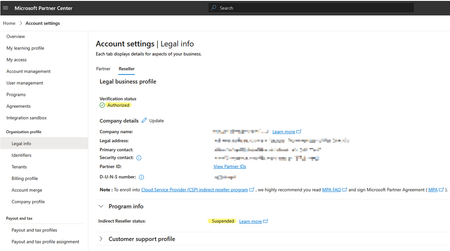
CSP Account Verified & Authorized yet Indirect Reseller Status: SUSPENDED
Hello Partner Community Please assist any way you can... JillArmourMicrosoft is this in your wheelhouse? We are an CSP partner that is struggling to have our indirect reseller account suspension lifted even though our partner account is now fully verified and authorised. Our account was originally suspended due to a business registration vs shop location mismatch that was not resolved within a 30 day termination notification time limit. We corrected the address problem AFTER the account was suspended and although our account is now verified and authorised, the Indirect Reseller account suspension has not been automatically lifted and we are unable to contact a human representative to have it manually moved back to the Active state. We have submitted several Partner Support tickets but they do not provide actual support at all and automated responses from these tickets return a disclaimer stating the following with no further correspondence and the ticket automatically closed. Hello, Thank you for contacting Microsoft Partner support about the notice of suspension and termination proceedings. In the Microsoft AI Cloud Partner Program Agreement, both Microsoft and our partners reserve the right to walk away from the partner relationship by providing 30 days' notice to the other. Neither party is required to offer an explanation for the decision to terminate the partner agreement. As Microsoft is exercising its rights under this section 4.b of the Microsoft AI Cloud Program Agreement, we are unable to share an explanation or further details. Kind Regards, *Random Name* (He/Him) Support Engineer Partner Support Delivery - Program Customer Support My Working Hours: M-F 11:30 AM to 08:30 PM AEDT This lack of support is excruciatingly frustrating and terribly aggravating given that we are now subject to an indefinite period of considerable income loss with no recourse. Note that along with the suspension, emails have been sent to our customers notifying them that we are no longer qualified to act as their licensing provider which has been distressing for both our sales team and the customers. Our distributor is doing the best they can to help but they are unable to provide any real assistance and from what I hear, are unable to get any sensible advice from their Microsoft reps. Upon speaking with several other indirect resellers and distributors alike, it is my understanding that many partners are suffering the same or similar denial of service and I question whether this practice is even legal under Australian law regardless of any contractual fine print and disclaimers after the fact. This denial of support is a huge failure of Microsoft's policy makers and extremely poor business practice in general. If Microsoft wish to declare utter contempt for the small businesses that have supported them for several decades then those businesses might consider alternative platforms for their customers going forward. To conclude, I welcome any support or feedback from the community to help resolve this particular problem and help others with the same issue. Kind Regards, One very Frustrated Reseller.SolvedPriority Cleanup for SharePoint Online and OneDrive for Business Is Generally Available
Priority cleanup is a Microsoft Purview solution that allows tenants to remove items even when the items are subject to retention hold. That sounds like Priority cleanup goes against the nature of data governance, but sometimes it's more important to remove items than to keep them for their full retention period. This article explains how Priority Cleanup works and some of the important concepts that you need to master before removing anything. https://practical365.com/priority-cleanup-for-sharepoint/44Views0likes0CommentsA CISO's Guide to Securing AI - Securing AI for Federal, DIB, and DoW Entities
Artificial Intelligence (AI) is rapidly reshaping federal missions, defense operations, and critical infrastructure. From intelligence analysis to logistics and cyber defense, AI’s transformative power is undeniable. Yet, with great power comes great responsibility and risk.616Views0likes0Comments