Community
3158 Topics
what linux has the best openGL support?
windows 11 is actually destroying my computer I can't afford to stay on it, I'm asking here because I'm wondering what windows users switched to specifically please thanks (idk where to post this it's so hard finding a way to post anything on microsoft stuff I can't even figure out how to make a review in the microsoft store in recent versions, been using windows since I was 3 lol)13Views0likes2Comments
Fully Automated Windows Factory Reset for Corporate Laptops
Hello, I am working on a corporate project where we need to allow employees to purchase company laptops. After purchase, the laptop must be fully reset to a “factory state,” removing all corporate data and files. I have tried several approaches: systemreset -factoryreset — but it always shows the GUI and prompts the user to choose whether to keep files or remove everything. Using a ResetConfig.xml — but without an OEM recovery image, it does not work. Applying install.wim via DISM — but after reboot, the system remains unchanged. My goal is to fully automate the factory reset without any user interaction, ideally in a corporate environment. I am considering using MDT, SCCM, or Intune. My questions: What is the best approach to fully automate Windows reset for corporate laptops? Are there best practices or official guides from Microsoft for this scenario? Has anyone successfully implemented fully automated factory reset in a corporate deployment?46Views0likes2Comments
Random BSOD during startup
Hi folks, I’ve been experiencing this issue ever since I bought my laptop, a Zephyrus Duo 16 with RTX 3070 Ti. I’m getting random BSODs. At first, the crashes only happened when the laptop was not plugged in, but now they occur even while connected to the charger. So far, I’ve tried the following: Performed a fresh OS installation Replaced the battery Upgraded the RAM from 32 GB to 64 GB using new modules After each crash, I run sfc /scannow, which reports that corrupted files were found and repaired. I’ve attached the CBS log file for reference. http://www.notepad.link/share/dzaGdrirn5cb1oX6gRDm Any help or insight would be greatly appreciated. Thank you.31Views0likes2Comments
Introduction – Microsoft Certified Trainer and Solution Architect
Hello everyone, I’m Patrizio Tardiolo Bonifazi, a Microsoft Certified Trainer (MCT), Solution Architect, and Senior Engineer. I work extensively with Microsoft Azure, Microsoft 365, Microsoft Graph, Power Platform, Microsoft Teams Premium, Microsoft Entra ID, and DevOps practices, combining hands-on engineering with training delivery. I joined the Microsoft Tech Community to learn from others, share real-world experiences, and contribute with practical insights and best practices. Nice to meet you all!12Views0likes1Comment
Not Allowing Entries to be blank
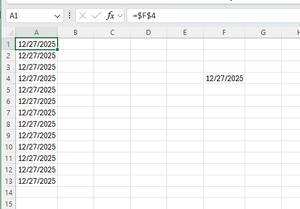
I have a cell that is formatted for a date that will get updated by the user (F4 Below). And then column A is just copying that value all the way down. I want to prevent the information in column A from being deleted accidentally. It will likely be a hidden column, so accidentally deleting it is possible. I tried data validation and rules, and they worked in all cases except if they are deleted. How can I prevent A1 from being deleted, but still have the user be able to update the date in F4 and have A1 update.75Views0likes2CommentsSCOM Linux Parameter for Expression/Alert Description
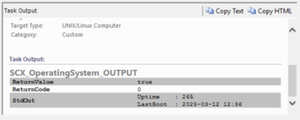
Hi, I would like to know if there is a way to get more information from //*[local-name()="StdOut"] parameter. I know that it can be used in this way in Expression and $Data/Context///*[local-name()="StdOut"]$ in Alert. But I would like to forward little bit more info into Alert and Expression itself. For example got script which returns two values Uptime and LastBoot. And I would like to build the Expression based on Uptime and provide LastBoot into Alert description. I wonder if this is even possible in SCOM. Script itself : #!/bin/bash # Get uptime in seconds uptime_seconds=$(cat /proc/uptime | cut -d'.' -f1) # Get last boot time last_boot=$(who -b | awk '{print $3, $4}') # Output in the required format echo "Uptime : $uptime_seconds" echo "LastBoot : $last_boot" So I tried with //*[local-name()="StdOut"][contains(., "last_boot")]/text() $Data/Context///*[local-name()="StdOut"][contains(., "last_boot")]/text()$ But it doesn't work.160Views1like3CommentsWINDOWS 11 TASKBAR SYSTEM TRAY ICONS KEEP MOVING OUT OF HIDDEN MENU
Hi all I have been setting up a new laptop with Windows 11 25H2 Build 26200.6584 and when I move system tray icons to the hiden menu, about 40 or 50 seconds later windows unhides them and there appear back on the task bar. It is driving me mad as the task bar looks to cluttered. If it is a known bug, is there a fix for this? According to google searches, this is a known bug and none of the suggested fixes work.. I have tried: Re-arrange Icons via Drag-and-Drop. Restart Windows Explorer. Disable Fast Startup. Rebuild the Icon Cache using CMD window as admin I tried to delete the icon cache so windows had to rebuild it but taskkill /IM explorer.exe /F del /A:H "%localappdata%\Microsoft\Windows\Explorer\iconcache*" start explorer.exe but it gave the error below. Microsoft Windows [Version 10.0.26200.6584] (c) Microsoft Corporation. All rights reserved. C:\Windows\System32>taskkill /IM explorer.exe /F SUCCESS: The process "explorer.exe" with PID 10720 has been terminated. C:\Windows\System32>del /A:H "%localappdata%\Microsoft\Windows\Explorer\iconcache*" Could Not Find C:\Users\Kenny\AppData\Local\Microsoft\Windows\Explorer\iconcache* C:\Windows\System32>start explorer.exe C:\Windows\System32>71Views0likes2Comments
Windows 11 23H2 → 25H2 in-place upgrade fails in SAFE_OS / MIGRATE_DATA
I'm trying to in-place upgrade a Windows 11 23H2 system to 25H2 and consistently get a rollback in the SAFE_OS / MIGRATE_DATA phase with 0x8007042B – 0x2000D. After a lot of analysis (Panther logs, SetupDiag, DISM, etc.), the failure always points to migration problems around Microsoft-Windows-TPM-Driver-WMI (CCSIAgent) and, secondarily, Microsoft-Windows-DirectoryServices-ADAM-Client (adammigrate.dll). I'd like to confirm whether this is a known 25H2 migration issue (especially on Education) and if there is any supported workaround short of a clean install. --- ENVIRONMENT - OS: Windows 11 Education 23H2, Build 22631.6276 - Edition: Education (confirmed via winver and Settings → System → About) - Target: Windows 11 25H2 (26200.6584, "2025 Update") - Upgrade method tried: - Windows Update feature enablement - Windows 11 Installation Assistant - Official 25H2 ISO (26200.6584.250915-1905.25h2_ge_release_svc_refresh_CLIENT_CONSUMER_x64FRE_en-us.iso) mounted locally → setup.exe - Hardware: - Motherboard: Gigabyte Z690 AORUS PRO (BIOS F31) - SSD: WD_BLACK SN770 NVMe (firmware 731130WD, WD Dashboard reports "Healthy", no errors) - TPM 2.0: Intel PTT (firmware TPM) enabled - Secure Boot: Enabled - BitLocker on C: OFF (fully decrypted) --- SYMPTOM Every full in-place upgrade attempt (23H2 → 25H2) behaves as follows: 1. Setup runs, copies files, reboots to SAFE_OS phase. 2. During MIGRATE_DATA, setup fails and rolls back to 23H2. 3. Message on screen: "0x8007042B – 0x2000D The installation failed in the SAFE_OS phase with an error during MIGRATE_DATA operation" In C:\$WINDOWS.~BT\Sources\Panther\setuperr.log / setupact.log, the failure is always in SAFE_OS / MIGRATE_DATA and includes: V2VArbitrate: Source migration unit <System>\Microsoft-Windows-TPM-Driver-WMI (CCSIAgent) is not supported on the destination machine and it will not be restored V2VArbitrate: Source migration unit is critical, arbitration will fail V2V Arbitration failed. Last error: 0x00000032 pSPExecuteApply: Apply operation failed. Error: 0x0000002C Apply (machine-independent apply, offline phase): Migration phase failed. Result: 44 ExecuteOperations: Failed execution phase Safe OS. Error: 0x8007042B On some runs, just before the TPM arbitration failure, there are also errors related to DirectoryServices-ADAM-Client: Failure while calling IPostApply->ApplySuccess for Plugin="Microsoft-Windows-DirectoryServices-ADAM-Client\adammigrate.dll"… Error: 0x80070002 Error READ, 0x00000002 while gathering/applying object: apply-success, Action,CMXEXmlPlugin, C:\$WINDOWS.~BT\Sources\ReplacementManifests, Microsoft-Windows-DirectoryServices-ADAM-Client\adammigrate.dll… However, the ADAM plugin errors are logged as "ignore" in some traces, while the actual rollback is always tied to the critical TPM-Driver-WMI migration unit. --- WHAT I HAVE ALREADY TRIED I've tried to rule out all the usual suspects and a bit more: 1. Health checks & storage - sfc /scannow → no integrity violations - DISM /Online /Cleanup-Image /ScanHealth / CheckHealth / RestoreHealth → clean - chkdsk C: /scan → no file system / bad sector issues - WD Dashboard extended test → drive healthy, no SMART warnings 2. Drivers, TPM, AV, services - TPM: - Device: "Trusted Platform Module 2.0" (ACPI\MSFT0101\1) - Driver provider: Microsoft (inbox TPM driver), no OEM TPM drivers - pnputil /enum-drivers | findstr /i tpm shows only Microsoft TPM entries; any OEM/TMP-related oem*.inf were removed. - Legacy / problematic drivers: - Removed old Intel CougarPoint USB driver (oem25.inf) via pnputil /delete-driver oem25.inf /uninstall /force. - Antivirus / security: - McAfee WebAdvisor fully uninstalled. - Kaspersky products uninstalled via standard uninstallers and then cleaned with Kaspersky's kavremover in Safe Mode. - No Kaspersky services, drivers, files, or uninstall entries remain. - Currently only Microsoft Defender is active. - Telemetry: - Connected User Experiences and Telemetry (DiagTrack) service set to Manual and Running to avoid telemetry-related cancellation (0x800704C7). 3. Upgrade artefacts / component cleanup - Deleted: - C:\$WINDOWS.~BT - C:\$GetCurrent - C:\$WINDOWS.~WS - C:\Windows\SoftwareDistribution\Download - Ran: - DISM /Online /Cleanup-Image /StartComponentCleanup /ResetBase - Then again DISM /Online /Cleanup-Image /RestoreHealth and sfc /scannow 4. ISO & media verification - 23H2 ISO: Win11_23H2_English_x64.iso (official multi-edition ISO, SHA-256 verified). - 25H2 ISO: 26200.6584.250915-1905.25h2_ge_release_svc_refresh_CLIENT_CONSUMER_x64FRE_en-us.iso (official 25H2 ISO, SHA-256 verified). - Both mounted locally; upgrade run via setup.exe from the ISO (no third-party media tools). - Tried with Dynamic Update enabled and disabled (/DynamicUpdate Disable). 5. Compatibility scan vs full upgrade behavior - Running from 25H2 ISO: setup.exe /Compat ScanOnly /DynamicUpdate Disable → completes WITHOUT logging the earlier TPM-Driver-WMI / MIGRATE_DATA critical failures. - However, when running a FULL in-place upgrade (same ISO, same environment, DynamicUpdate disabled, "Keep personal files and apps"), the upgrade still fails in SAFE_OS / MIGRATE_DATA with the same TPM-Driver-WMI critical arbitration error and rollback. So, compatibility scan looks clean, but the real SAFE_OS/MIGRATE_DATA phase still hits the TPM-Driver-WMI migration problem. 6. ADAM / DirectoryServices-ADAM-Client state - DISM shows DirectoryServices-ADAM-Client feature as Disabled. - The ADAM migration plugin (adammigrate.dll) logs 0x80070002 during IPostApply->ApplySuccess on some runs. - As suggested in other cases, I have tried: - dism /online /enable-feature /featurename:DirectoryServices-ADAM-Client /norestart → reboot - dism /online /disable-feature /featurename:DirectoryServices-ADAM-Client /norestart → reboot - The ADAM error sometimes disappears or is logged as "ignored", but the TPM-Driver-WMI critical arbitration error persists and still causes rollback. 7. Attempt to repair TPM-Driver-WMI as a package (failed) Following the idea that TPM-Driver-WMI might be a partially removed servicing package, I: - Ran: DISM /Online /Get-Packages | findstr /i "TPM-Driver-WMI" → NO ENTRIES. There is no Microsoft-Windows-TPM-Driver-WMI-Package~… installed as a standalone package. - Mounted Win11_23H2_English_x64.iso as G: and searched for *TPM-Driver-WMI*.cab: → No such cab found anywhere in the ISO. - Mounted install.wim (index 4, Education) read-only and inspected Windows\servicing\Packages, and ran offline DISM /Image:... /Get-Packages | findstr TPM: → No Microsoft-Windows-TPM-Driver-WMI package or mum/cab. Only the component payload exists in WinSxS (amd64_microsoft-windows-tpm-driver-wmi_31bf3856ad364e35_10.0.22621.1...), but there is no installable package to feed into DISM /Add-Package. So there is NO STANDALONE TPM-Driver-WMI package that I can re-add or repair via DISM; it appears baked into the base image. --- CURRENT SITUATION - TPM driver: Microsoft inbox, no OEM TPM drivers. - AV: only Defender. - Component store: DISM /RestoreHealth and sfc /scannow are clean. - Storage: healthy. - Telemetry service: running. - ADAM client: "enable → disable" cycle tried. - 25H2 compatibility scan: now passes without TPM migration errors. - Full upgrade: still fails in SAFE_OS / MIGRATE_DATA with: - Source migration unit <System>\Microsoft-Windows-TPM-Driver-WMI (CCSIAgent) is not supported on the destination machine and it will not be restored - Source migration unit is critical, arbitration will fail - V2V Arbitration failed. Last error: 0x00000032 - pSPExecuteApply: Apply operation failed. Error: 0x0000002C - ExecuteOperations: Failed execution phase Safe OS. Error: 0x8007042B At this point, the only remaining options I can see are: - In-place repair install of 23H2 using the 23H2 ISO (setup.exe → keep apps & data), to rebuild the whole servicing/migration stack, and then retry 25H2; - Or clean install 25H2 from scratch. Before I go down that path, I'd like to know: --- QUESTIONS 1. Is this a known migration issue in Windows 11 25H2 (especially for Education) involving Microsoft-Windows-TPM-Driver-WMI (CCSIAgent)? In other words, is the "not supported on the destination machine" for this migration unit an expected symptom of a current 25H2 bug or a misconfiguration on my side? 2. Is there any supported way to reset/repair/ignore the TPM-Driver-WMI migration unit on the source side, given that: - there is no standalone Microsoft-Windows-TPM-Driver-WMI-Package~*.cab in the 23H2 ISO, and - DISM /Get-Packages does not list such a package? 3. Is an in-place repair install of 23H2 the recommended next step in this scenario, or is the official guidance to perform a clean install of 25H2 when SAFE_OS / MIGRATE_DATA fails on a critical migration unit like this? 4. Is there any known difference between consumer vs Education/volume 25H2 media that could affect whether the TPM-Driver-WMI migration manifest is present on the target image? Any official guidance or confirmation (e.g., "this is a known issue; wait for an updated 25H2 image or cumulative update" vs "your 23H2 install is irreparably corrupted, clean install recommended") would be very helpful before I commit to a wipe-and-reinstall. Thank you in advance.1KViews2likes6Comments
Can't extend the screen timeout on Windows 11? It always turns off after 3 minutes.
The system screen timeout is set to 15 minutes, but the screen still turns off after only 3 minutes. I have tried adjusting all relevant options in the power plan settings (including timeouts in advanced settings and hardware-related parameters), but none have worked. I am seeking a permanent solution.35Views0likes2Comments