community
3206 Topics
Windows 11 23H2 → 25H2 in-place upgrade fails in SAFE_OS / MIGRATE_DATA
I'm trying to in-place upgrade a Windows 11 23H2 system to 25H2 and consistently get a rollback in the SAFE_OS / MIGRATE_DATA phase with 0x8007042B – 0x2000D. After a lot of analysis (Panther logs, SetupDiag, DISM, etc.), the failure always points to migration problems around Microsoft-Windows-TPM-Driver-WMI (CCSIAgent) and, secondarily, Microsoft-Windows-DirectoryServices-ADAM-Client (adammigrate.dll). I'd like to confirm whether this is a known 25H2 migration issue (especially on Education) and if there is any supported workaround short of a clean install. --- ENVIRONMENT - OS: Windows 11 Education 23H2, Build 22631.6276 - Edition: Education (confirmed via winver and Settings → System → About) - Target: Windows 11 25H2 (26200.6584, "2025 Update") - Upgrade method tried: - Windows Update feature enablement - Windows 11 Installation Assistant - Official 25H2 ISO (26200.6584.250915-1905.25h2_ge_release_svc_refresh_CLIENT_CONSUMER_x64FRE_en-us.iso) mounted locally → setup.exe - Hardware: - Motherboard: Gigabyte Z690 AORUS PRO (BIOS F31) - SSD: WD_BLACK SN770 NVMe (firmware 731130WD, WD Dashboard reports "Healthy", no errors) - TPM 2.0: Intel PTT (firmware TPM) enabled - Secure Boot: Enabled - BitLocker on C: OFF (fully decrypted) --- SYMPTOM Every full in-place upgrade attempt (23H2 → 25H2) behaves as follows: 1. Setup runs, copies files, reboots to SAFE_OS phase. 2. During MIGRATE_DATA, setup fails and rolls back to 23H2. 3. Message on screen: "0x8007042B – 0x2000D The installation failed in the SAFE_OS phase with an error during MIGRATE_DATA operation" In C:\$WINDOWS.~BT\Sources\Panther\setuperr.log / setupact.log, the failure is always in SAFE_OS / MIGRATE_DATA and includes: V2VArbitrate: Source migration unit <System>\Microsoft-Windows-TPM-Driver-WMI (CCSIAgent) is not supported on the destination machine and it will not be restored V2VArbitrate: Source migration unit is critical, arbitration will fail V2V Arbitration failed. Last error: 0x00000032 pSPExecuteApply: Apply operation failed. Error: 0x0000002C Apply (machine-independent apply, offline phase): Migration phase failed. Result: 44 ExecuteOperations: Failed execution phase Safe OS. Error: 0x8007042B On some runs, just before the TPM arbitration failure, there are also errors related to DirectoryServices-ADAM-Client: Failure while calling IPostApply->ApplySuccess for Plugin="Microsoft-Windows-DirectoryServices-ADAM-Client\adammigrate.dll"… Error: 0x80070002 Error READ, 0x00000002 while gathering/applying object: apply-success, Action,CMXEXmlPlugin, C:\$WINDOWS.~BT\Sources\ReplacementManifests, Microsoft-Windows-DirectoryServices-ADAM-Client\adammigrate.dll… However, the ADAM plugin errors are logged as "ignore" in some traces, while the actual rollback is always tied to the critical TPM-Driver-WMI migration unit. --- WHAT I HAVE ALREADY TRIED I've tried to rule out all the usual suspects and a bit more: 1. Health checks & storage - sfc /scannow → no integrity violations - DISM /Online /Cleanup-Image /ScanHealth / CheckHealth / RestoreHealth → clean - chkdsk C: /scan → no file system / bad sector issues - WD Dashboard extended test → drive healthy, no SMART warnings 2. Drivers, TPM, AV, services - TPM: - Device: "Trusted Platform Module 2.0" (ACPI\MSFT0101\1) - Driver provider: Microsoft (inbox TPM driver), no OEM TPM drivers - pnputil /enum-drivers | findstr /i tpm shows only Microsoft TPM entries; any OEM/TMP-related oem*.inf were removed. - Legacy / problematic drivers: - Removed old Intel CougarPoint USB driver (oem25.inf) via pnputil /delete-driver oem25.inf /uninstall /force. - Antivirus / security: - McAfee WebAdvisor fully uninstalled. - Kaspersky products uninstalled via standard uninstallers and then cleaned with Kaspersky's kavremover in Safe Mode. - No Kaspersky services, drivers, files, or uninstall entries remain. - Currently only Microsoft Defender is active. - Telemetry: - Connected User Experiences and Telemetry (DiagTrack) service set to Manual and Running to avoid telemetry-related cancellation (0x800704C7). 3. Upgrade artefacts / component cleanup - Deleted: - C:\$WINDOWS.~BT - C:\$GetCurrent - C:\$WINDOWS.~WS - C:\Windows\SoftwareDistribution\Download - Ran: - DISM /Online /Cleanup-Image /StartComponentCleanup /ResetBase - Then again DISM /Online /Cleanup-Image /RestoreHealth and sfc /scannow 4. ISO & media verification - 23H2 ISO: Win11_23H2_English_x64.iso (official multi-edition ISO, SHA-256 verified). - 25H2 ISO: 26200.6584.250915-1905.25h2_ge_release_svc_refresh_CLIENT_CONSUMER_x64FRE_en-us.iso (official 25H2 ISO, SHA-256 verified). - Both mounted locally; upgrade run via setup.exe from the ISO (no third-party media tools). - Tried with Dynamic Update enabled and disabled (/DynamicUpdate Disable). 5. Compatibility scan vs full upgrade behavior - Running from 25H2 ISO: setup.exe /Compat ScanOnly /DynamicUpdate Disable → completes WITHOUT logging the earlier TPM-Driver-WMI / MIGRATE_DATA critical failures. - However, when running a FULL in-place upgrade (same ISO, same environment, DynamicUpdate disabled, "Keep personal files and apps"), the upgrade still fails in SAFE_OS / MIGRATE_DATA with the same TPM-Driver-WMI critical arbitration error and rollback. So, compatibility scan looks clean, but the real SAFE_OS/MIGRATE_DATA phase still hits the TPM-Driver-WMI migration problem. 6. ADAM / DirectoryServices-ADAM-Client state - DISM shows DirectoryServices-ADAM-Client feature as Disabled. - The ADAM migration plugin (adammigrate.dll) logs 0x80070002 during IPostApply->ApplySuccess on some runs. - As suggested in other cases, I have tried: - dism /online /enable-feature /featurename:DirectoryServices-ADAM-Client /norestart → reboot - dism /online /disable-feature /featurename:DirectoryServices-ADAM-Client /norestart → reboot - The ADAM error sometimes disappears or is logged as "ignored", but the TPM-Driver-WMI critical arbitration error persists and still causes rollback. 7. Attempt to repair TPM-Driver-WMI as a package (failed) Following the idea that TPM-Driver-WMI might be a partially removed servicing package, I: - Ran: DISM /Online /Get-Packages | findstr /i "TPM-Driver-WMI" → NO ENTRIES. There is no Microsoft-Windows-TPM-Driver-WMI-Package~… installed as a standalone package. - Mounted Win11_23H2_English_x64.iso as G: and searched for *TPM-Driver-WMI*.cab: → No such cab found anywhere in the ISO. - Mounted install.wim (index 4, Education) read-only and inspected Windows\servicing\Packages, and ran offline DISM /Image:... /Get-Packages | findstr TPM: → No Microsoft-Windows-TPM-Driver-WMI package or mum/cab. Only the component payload exists in WinSxS (amd64_microsoft-windows-tpm-driver-wmi_31bf3856ad364e35_10.0.22621.1...), but there is no installable package to feed into DISM /Add-Package. So there is NO STANDALONE TPM-Driver-WMI package that I can re-add or repair via DISM; it appears baked into the base image. --- CURRENT SITUATION - TPM driver: Microsoft inbox, no OEM TPM drivers. - AV: only Defender. - Component store: DISM /RestoreHealth and sfc /scannow are clean. - Storage: healthy. - Telemetry service: running. - ADAM client: "enable → disable" cycle tried. - 25H2 compatibility scan: now passes without TPM migration errors. - Full upgrade: still fails in SAFE_OS / MIGRATE_DATA with: - Source migration unit <System>\Microsoft-Windows-TPM-Driver-WMI (CCSIAgent) is not supported on the destination machine and it will not be restored - Source migration unit is critical, arbitration will fail - V2V Arbitration failed. Last error: 0x00000032 - pSPExecuteApply: Apply operation failed. Error: 0x0000002C - ExecuteOperations: Failed execution phase Safe OS. Error: 0x8007042B At this point, the only remaining options I can see are: - In-place repair install of 23H2 using the 23H2 ISO (setup.exe → keep apps & data), to rebuild the whole servicing/migration stack, and then retry 25H2; - Or clean install 25H2 from scratch. Before I go down that path, I'd like to know: --- QUESTIONS 1. Is this a known migration issue in Windows 11 25H2 (especially for Education) involving Microsoft-Windows-TPM-Driver-WMI (CCSIAgent)? In other words, is the "not supported on the destination machine" for this migration unit an expected symptom of a current 25H2 bug or a misconfiguration on my side? 2. Is there any supported way to reset/repair/ignore the TPM-Driver-WMI migration unit on the source side, given that: - there is no standalone Microsoft-Windows-TPM-Driver-WMI-Package~*.cab in the 23H2 ISO, and - DISM /Get-Packages does not list such a package? 3. Is an in-place repair install of 23H2 the recommended next step in this scenario, or is the official guidance to perform a clean install of 25H2 when SAFE_OS / MIGRATE_DATA fails on a critical migration unit like this? 4. Is there any known difference between consumer vs Education/volume 25H2 media that could affect whether the TPM-Driver-WMI migration manifest is present on the target image? Any official guidance or confirmation (e.g., "this is a known issue; wait for an updated 25H2 image or cumulative update" vs "your 23H2 install is irreparably corrupted, clean install recommended") would be very helpful before I commit to a wipe-and-reinstall. Thank you in advance.1.7KViews2likes11Commentssolucion imposible
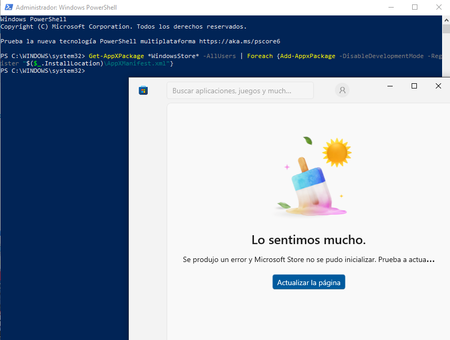
spanish version....... teniendo problemas con la aplicacion de microsoft store al iniciar la aplicacion de un momento a otro salto con un mensaje en pantalla "lo sentimos mucho se produjo un error y microsoft store no se pudo inicializar. prueba a actualizar o vuelve mas tarde" he intentado realizar distintos metodos para solucionar el problema como realizar reinstalacion con la opcion de actualizar este pc del programa media creator tool para instalar windows 10 y aun el problema persiste, he realizado un intento por la powershell con el siguiente comando Get-AppXPackage *WindowsStore* -AllUsers | Foreach {Add-AppxPackage -DisableDevelopmentMode -Register "$($_.InstallLocation)\AppXManifest.xml"} descrito en varias respuesta para casos similares dispuestos en el foro de la comunidad de microsoft respuesta proporcionada por el usuario KapilArya en el hub "https://techcommunity.microsoft.com/discussions/windowsinsiderprogram/microsoft-store-wont-launch/1513414" tambien junto a un agente de soporte se intento realizar una solucion con la creacion de un usuario nuevo para solventar y no funciono tambien se realizo el diagnostico para la instalacion de windows 11 pero mi equipo no cuenta con las caracteristicas minimas para que este sea instalado y aun asi sigo sin poder solucionar el problema y no me gustaria realizar la reinstalacion de windows 10 por medio externos (USB) por que asi perderia demasiada informacion sobre las aplicaciones y datos que tengo de varios años de recoleccion y me gustaria saber si puedo hacer algo mas para poder solucionar este problema sin perder datos me dustaria obtener ayuda lo mas pronto posible gracias por brindarme su atencion y ayuda para resolver este caso adjunto evidencias sobre problema y metodos realizados. english version...... Having problems with the Microsoft Store app. When I launch it, it suddenly pops up with a message on the screen: "We're very sorry, an error occurred and the Microsoft Store could not be initialized. Please try updating or come back later." I've tried various methods to solve the problem, such as reinstalling with the "Update this PC" option in the Media Creator Tool to install Windows 10, and the problem still persists. I tried using PowerShell with the following command: Get-AppXPackage *WindowsStore* -AllUsers | Foreach {Add-AppxPackage -DisableDevelopmentMode -Register "$($_.InstallLocation)\AppXManifest.xml"} Described in several answers for similar cases posted on the Microsoft community forum. Answer provided by user KapilArya on the hub "https://techcommunity.microsoft.com/discussions/windowsinsiderprogram/microsoft-store-wont-launch/1513414" Also, together with a support agent, a solution was attempted by creating a new user to solve the problem, but it didn't work. A diagnosis was also performed for the installation of Windows 11, but my computer doesn't have the minimum specifications for it to be installed. And even so, I still can't solve the problem and I wouldn't like to reinstall Windows 10 using external media (USB) because I would lose too much information about the applications and data that I have from several years of experience. I'm collecting and would like to know if I can do anything else to resolve this issue without losing data. I would like to get help as soon as possible. Thank you for your attention and help in resolving this issue. I attach evidence of the problem and the methods used.75Views0likes2Comments
Recent windows 11 25H2 update memory leak
My first time posting, I am unsure if this has been Acknowledged or what’s the fix but, after the recent updates for windows 11 25H2, I also needed to update drivers, intel drivers and Nvidia Drivers. I’m using an HP omen 16, 32GB of ram, Intel Ultra 7, Nvidia RTX5080. Normally idling uses about 20% ram, I opened Microsoft PC manager and it now was idling at 40% ram usage. After checking task manager, it was WMIproviderhost hogging the ram. Mainly SecurityHealthService in the events WMI log errors. I’ve tried running sc stop SecurityHealthService and responded access denied as admin. I’ve tried changing the folder to SecurityHealth_old to promote a refreshed new folder. Access was denied (system owns it) I have tried the repair app feature for windows security, then reboot. Still slowly ramping memory up. I then reset windows security and rebooted. Still doing it. I’ve verifyrepository and WMI repository came back consistent. delivery optimization has been turned off so it’s not that recent issue and AppX, but WMIproviderhost had been steady climbing upwards of 500mb of ram usage before restarting comp. Any ideas?42Views0likes1Comment
Windows 11 Version 25H2 Update failed install
I currently have HP Laptop 3C0C5E63 with windows 11 version 24H2 build 26100.6584. I have repeatedly tried to install the Version 25H2 update which continued to fail. Last error code was 0x800f0983. I understand that this error message just like previous error messages has to do with a corrupted file. Is there going to be a replacement update file??? I would appreciate any help with this as I would like to get this new version installed. Thanks missykat48Views0likes3Comments
Backup and restore the Azure Database for MySQL flexible server
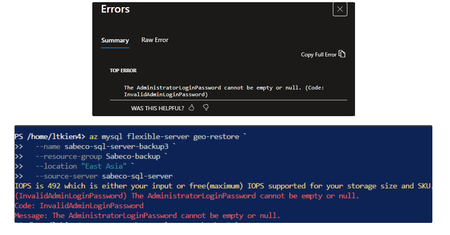
Hi everyone, I’m running into an issue while performing a geo-restore for an Azure MySQL Flexible Server using Azure CLI and Portal. When executing the az mysql flexible-server geo-restore command, the restore process fails with the error “InvalidAdminLoginPassword: The AdministratorLoginPassword cannot be empty or null”. I don’t see any administrator password configuration option in the Azure Portal, and there is also no auto-populated argument in the CLI. According to the official documentation, geo-restore uses the source server as the restore point, so the administrator login configuration is expected to be derived from the source server. Are there any recommended best practices for handling admin credentials securely during geo-restore? Thanks in advance for your insights. I used this official doc as a reference, https://learn.microsoft.com/en-us/azure/mysql/flexible-server/how-to-restore-server-portal3Views0likes0Comments
How to clear all cache and junk files from my Windows 11/10 computer?
My Windows 11 PC and Windows 10 laptop start to run slowly and the C drive keeps losing free space even though no large files were added. I don't know the exact reason. I know Windows creates temporary files, update cache, and app leftovers, but not sure which ones are safe to delete and which tools or built-in options are recommended by Microsoft. Disk Cleanup seems basic, and I'm unsure if it clears everything. Could someone explain the best method to clear all cache and junk files from Windows 11 without risking system stability?212Views0likes7Comments