community
3853 TopicsNew User Group Form Error
I have a user group over at Power Platform Community, and we'd like to expand our reach by creating an in-person group here for Power Platform and M365 users in our area. However, when I try to submit the form for a new user group, I get this error: GraphQL Error: 400 Form.graphql.error.requestFailed It doesn't seem to matter if I logout, login, use another browser/computer. I've checked all fields, removed special characters. Appreciate your help.155Views1like4Comments
Taskbar goes dark black intermittently
Pretty sure this is a bug with Windows' MPO or graphical presentation model, but basically: For the past few months my taskbar has 'randomly' been going dark black, usually with Chrome open. Upon moving the mouse or clicking the taskbar, it immediately reverts. It's not a monitor and it's not a driver issue. This has also persisted across a fresh format and fresh driver installs. Turning off "Show shadows under windows" seems like it reduced the frequency, but it still happens even with that disabled. I've been told that potentially, disabling HAGS might fix it - but that shouldn't be necessary in the first place. What is going on with this?1.9KViews1like7Comments
Win11 System tray Safely Remove Hardware icon disappears while a USB drive is still connected
Even if the USB flash drive is still connected to the computer, the Safely Remove Hardware and Eject Media icon in the system tray will disappear. Although the drive is still accessible in File Explorer, you cannot safely eject it. After unplugging and reinserting the drive, the icon will temporarily reappear, but it may disappear again after a short while.12Views0likes0CommentsCan't edit cells in Excel 2010 since Sept 2026 patch Tuesday
I can't edit cells in Excel 2010 spreadsheets since Sept 2026 patch Tuesday. How do I reverse this back to the former working software. There was one comment that said it might be caused by a Windows 10 security update. Since Windows 10 isn't supposed to get security updates anymore, how can that be an issue? Ron47Views0likes1Comment
SentinelOne detected \Config.Msi\4e6142cc.rbf as Ransomware in Windows Server
Hi, Recently, one of our Dell Windows servers triggered a critical ransomware detection in SentinelOne. Here are the specific alert details: File Path: \Device\HarddiskVolume3\Config.Msi\4e6142cc.rbf Originating Process: msiexec.exe (SupportAssist_x64.msi) SentinelOne Alert Summary: The alert indicates a critical detection on the Windows server involving an unsigned file (4e6142cc.rbf) located in the system's MSI configuration directory. Executed under the NT AUTHORITY\SYSTEM context by msiexec.exe (associated with SupportAssist_x64.msi), the file was flagged as ransomware under a "User-Defined Blocklist" policy with a malicious confidence rating. The system highlighted potential ransomware activity utilizing MSI installer processes, prompting immediate enforcement and investigation. We attempted to remove the file, but it reappears periodically, likely triggered by background installer/update tasks. Has anyone encountered similar alerts with Dell SupportAssist or SentinelOne? Is this a known false positive associated with MSI rollback (.rbf) files, or is further remediation required? Any insights or recommendations would be greatly appreciated. Many thanks, Sebastian65Views0likes1CommentMicrosoft support KB5124010, KB5124008: Known issues in this update, Highlights: semantic ambiguity
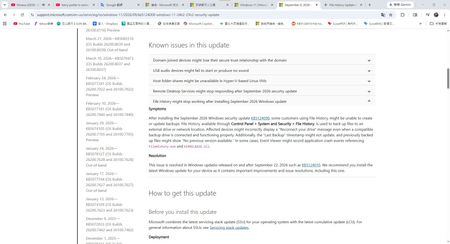
Hello, I have a question regarding Microsoft is announcement. Hi everyone,I was reviewing the Microsoft support pages for the September 2026 Windows updates and got quite confused by the wording regarding the File History bug fix. Furthermore, my actual experience after updating doesn't seem to align with the official description. I'd like to hear your thoughts on this. Question 1: Does the word after in KB5124008 imply a phased/partial fix? https://support.microsoft.com/en-us/servicing/os/windows-11/2026/09/kb5124008-windows-11-24h2-25h2-security-update In the Known issues section of KB5124008, Microsoft lists a few specific symptoms: Incorrectly displaying a Reconnect your drive message. The Last Backup timestamp might not update, and previously backed-up files might show No previous version available. Application crash events referencing FileHistory.exe. However, in the Resolution section, Microsoft states: This issue is resolved in Windows updates released on and after September 22, 2026 such as KB5124010. What exactly does after mean in this context? Does it imply that KB5124010 did not completely fix all symptoms, and the remaining issues (like the timestamp bug) will not be fully resolved until the October 13th Patch Tuesday? Question 2: Why did the KB5124010 release notes omit the timestamp issue? https://support.microsoft.com/en-us/servicing/os/windows-11/2026/09/kb5124010-windows-11-24h2-25h2-update I then checked the Highlights section for KB5124010, which states: File History Fixed: This update addresses an issue where File History might fail to back up or restore files... Affected devices might incorrectly display a Reconnect your drive message... Noticeably, it completely omits any mention of fixing the Last Backup timestamp might not update symptom. Does this omission mean that this specific part of the bug has not been fixed yet? My Actual Experience: My suspicions seem to be confirmed in my actual usage. After installing the latest KB5124010 update, my File History can now successfully find the backup drive, run properly, and back up new files (Symptom 1 is resolved). However, the Last Backup date/timestamp still has not changed at all (Symptom 2 remains). To summarize my questions: Based on Microsoft is wording, is KB5124010 only a partial fix? For the lingering issues regarding the timestamp not updating and no previous version available, do I just have to wait for the October update? Has anyone else experienced this exact situation?1KViews1like4CommentsAfter updating KB5127648, only half of the archive history was restored.
For Microsoft engineers After fixing the update from Windows 11 KB5124010/Windows 10 KB5120249 to Windows 11 KB5127648/Windows 10 KB5126657, the File History can find and run the backup drive, but the last copy date of the files has not changed, and any new files can be backed up. This is my question: Click in and read carefully. File History timestamp sync bug still broken in KB5124010 - Anyone else? | Microsoft Community Hub After updating KB5127648, only half of the archive history was restored. | Microsoft Community Hub This is my opinion response center report. https://aka.ms/AA13n2f3 https://aka.ms/AA13n22w https://aka.ms/AA13ucfz https://aka.ms/AA13urx3 https://aka.ms/AA13ukxv Please click here. If you have the same problem as me, please agree, add a comment, or ask your question in the feedback post. You can also paste the URL in the comments section.107Views0likes1Comment
Having an Issue with Widows File Explorer Home Icon Popping Up On Desktop
No matter where I am working with windows file explorer in the directory structure, if I delete a folder a file explorer home icon appears on the desktop, it will disappear but I haven't noticed when that happens yet. See included image of the icon.... Any ideas from anybody? Tried Dism health, sfc /scannow, rebuils icon cache etc... HELP!6Views0likes0Comments
Do we not meet High Volume Sender authentication requirements?
For a customer, we developed some custom sofware that, as a part of it functionality, generates notification mails to their clients. This worked ok for some years, however nowadays these mails are rejected by recipients who have hotmail.com or outlook.com email addresses. The bounce information suggests that this is because the customer are regarded by Outlook as High Volume Senders. We can understand this as there may be a few thousands of their clients who have a hotmail.com or outlook.com email address, each receiving several messages yearly (in a range of at least 1 up to about 10 messages yearly). Now my question is: it seems to me that we do meet all criteria as published at https://support.microsoft.com/en-us/outlook/fix-ndr-error-550-5-7-515-in-outlook-com, however the emails are still being rejected. Is there anyone who can help us to verify if we do (or do not) meet these criteria? And / or check if this is really the reason for this issue, or do we need to look in a different direction to solve this situation? As far as we know, this issue is only present with hotmail.com or outlook.com email addresses. PS Maybe I posted this question in the wrong discussion category. If so, please help me to find the right place. I'm new with the Microsoft Community and the list of categories to select from was a bit overwhelming to me...47Views0likes1Comment
AQEMU: a native QEMU front end for Windows 11 on x64 and ARM64. Feedback welcome
Hi all, I'm Philip, the developer of AQEMU. It's a point-and-click Qt front end for QEMU, and I've been building it for Windows 11. It has native builds for both x64 and ARM64 (Snapdragon) PCs. It bundles QEMU 11, so there's nothing extra to install. It comes with 195 ready-made guest profiles across 29 architectures, from DOS and retro PCs to ARM, RISC-V and PowerPC. It uses WHPX acceleration on x64, with TCG as the fallback everywhere else. It's open source under GPL-2.0, and there's also a Linux build. I'd really like feedback from Windows 11 users, especially anyone on Arm, on what works, what breaks and which guests you'd like added. Microsoft Store (7-day free trial): https://apps.microsoft.com/detail/9P0HGKHQ9W19?cid=techcommunity Source: https://github.com/chronic8000/aqemu9Views0likes0Comments