community
3730 Topics
Windows is very slow after clean install from USB
Hi Folks, I don't know what to do. I reinstalled my system as it started to work slow after two years. For some reason my pc feels like it is a laptop from 2000. It is taking ages to instal something, open internet site or listen to the music while doing something. These are my specs: Processor 13th Gen Intel(R) Core(TM) i5-13600K (3.50 GHz) Installed RAM 32.0 GB (31.8 GB usable) NVIDIA GeForce GTX 980 Ti System type 64-bit operating system, x64-based processor I have installed all drivers. Reinstalled system 3 times. Tried with updates and without. I have up to date bios. I feel stuck and do not know what to do. System repair also did not help.29Views0likes0Comments
Localized Dutch (nl-NL) issues in the latest Windows 11 (Insider) Experimental and Stable builds
Subject: Localized Dutch (nl-NL) issues in the latest Windows 11 (Insider) Experimental and Stable builds Localized Dutch (nl-NL) visible/textual/grammar/translation issues exists in the latest Windows 11 (Insider) Experimental and Stable builds: https://aka.ms/AAxumnr "Verwijderen" in the Dutch Contextmenu isn't correctly aligned https://aka.ms/AAuxxi6 'System Product Name' and 'System manufacturer' aren't translated into Dutch (nl-NL) https://aka.ms/AAuycwb The word "read" in the error message is not translated into Dutch (nl-NL) as "gelezen" https://aka.ms/AA112m6k Background harddisk icons in properties form sometimes has a different color on first initialization https://aka.ms/AA130l2m The height of the Run dialog box in Windows 11 Start Menu should be increased by a few pixels and multiplied when the screen scale is increased https://aka.ms/AA13bbpg DUTCH (NL-NL REGION) CONTROL PANEL MISSING LETTERS (1x) OR DOT (6x) MISSING AT THE END OF ALMOST EVERY TOOLTIP https://aka.ms/AA13bbpv DUTCH (NL-NL REGION) LANGUAGE ISSUES IN NETWORK INFRASTRUCTURE AREA IN WINDOWS EXPLORER https://aka.ms/AA13dmzz Text not correctly aligned in the Drivers userform in Device manager https://aka.ms/AA13eol3 Button in Properties of Network station in Windows Explorer too small Please let the Dutch Engineering team fix these localization visible/textual/grammar/translation Dutch (nl-NL) issues.28Views0likes1CommentUpload file window highlights wrong folder in sidebar – is this a UI bug?
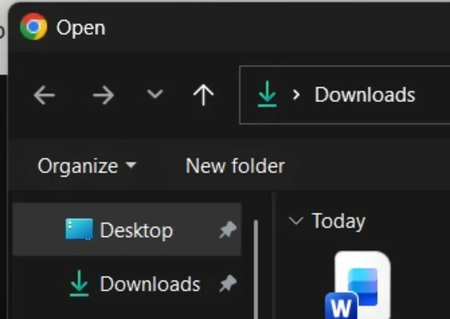
Windows 11 25H2 latest stable build. Whenever I click the attach/upload button on any website, the file picker window opens and defaults to the Downloads folder—you can see it in the top path. But in the sidebar, it highlights Desktop instead, which is confusing. If I click Downloads in the sidebar and then click Desktop again, it shows the correct items and highlights properly from that point on. But initially, it's always misaligned. Can anyone else replicate this, or is it just me?34Views0likes1Comment
Why Did Microsoft's Dedicated Product Communities Disappear?
Over the past few months, it looks like Microsoft has quietly removed or collapsed many of the dedicated product communities — including the Copilot Users Group, Tips & Tricks sections, and other structured hubs that used to exist under the old Answers/Community system. If you post a NEW question, you can still find them (see below), but I’ve found no way to reliably locate one and browse. Today, everything funnels into the generic Learn/Answers front door, and normal navigation no longer exposes product‑specific groups. The only way I’ve been able to reach them is accidentally: if a search returns zero results (announcements don't count), the system offers the opportunity to “ask a question,” (with that header), and only then does it reveal a product/community picker for the "posting space." Without that side‑door, the communities appear to be gone. This raises a few questions: Were the dedicated communities intentionally depreciated, or is this an unintended side effect of the Learn/Answers consolidation? Is the conditional “ask a question” picker now the only official way to reach product‑specific groups? If communities still exist, why are they no longer discoverable through normal navigation? Is Microsoft planning a replacement structure, or is everything moving toward a single flat Q&A model? I’m asking because the old product communities were genuinely useful — especially for product-specific workflow tips, user‑to‑user knowledge sharing, and related discussions. If anyone has insight into the reorganization, or knows whether the dedicated communities are coming back, I’d appreciate it. P.S. If anyone has seen a different workflow or found a reliable navigation path, I’d be interested in hearing it.19Views0likes1Comment
changing boot drive
I bought a new computer with a 512 GB SSD and installed the 1 TB SSD from my old computer as a data drive. The C drive now has only 52.9 GB free while the E drive has 806 GB free. How can I make the larger drive the boot drive without loosing all of the data on it. Should I clone C to E and recover all of my data from my external backup and Google Drive.25Views0likes2Comments
Word not opening PDF Docs
When I want to open PDF document in Word I keep getting a popup that says WORD WILL CONVERT YOUR PDF TO AN EDITABLE WORD DOCUMENT. THE RESULTING WORD DOCUMENT... What can I do to get word to open all PDF docs automatically so don't always get this popup.5Views0likes0CommentsSecond-hand laptop stuck in previous owner's Windows Autopilot tenant – how to reach human support?
Hi, I'm trying to find the correct human Microsoft support team for Windows Autopilot deregistration. I own a second-hand Lenovo ThinkPad X1 Yoga Gen 6 which I purchased on eBay on August 6, 2023. I used Linux on it for the last few years, so I only discovered the problem now after installing Windows 11 Pro. During OOBE, the laptop downloads an Autopilot profile belonging to a previous organization and forces organizational enrollment. Autopilot diagnostics confirm: CloudAssignedForcedEnrollment = 1 IsForcedEnrollmentEnabled = 1 DeploymentProfileName = CSE Autopilot Pilot I have no relationship with the previous organization and no access to its tenant. The eBay seller is no longer active. I contacted regular Microsoft Windows Support. I provided: eBay purchase/order confirmation signed bank transaction device serial number screenshots Autopilot.cab diagnostics Support acknowledged that I own the device and that I cannot remove the registration myself. However, instead of escalating the case, they repeatedly directed me to Autopilot deployment documentation, Feedback Hub and Tech Community. Microsoft's documentation says that a device permanently leaving an organization should be deregistered from Windows Autopilot. I have also found Microsoft Q&A cases suggesting that Commercial/Intune Support can review inaccessible-tenant deregistration cases after proof of ownership has been verified. My question is simply: how can a private end user actually reach a human Microsoft Intune/Autopilot support engineer who can review and escalate this? I do not have an Intune tenant or access to the previous organization's tenant, so I cannot open a support request from their Intune Admin Center. I am not asking for a way to bypass Autopilot. I am asking for the legitimate device ownership to be reviewed and the stale Autopilot registration to be removed from Microsoft's service. If anyone from Microsoft can provide the correct support route or escalate this internally, I would greatly appreciate it.7Views0likes0Comments
system image problem
I have been using a Seagate external hard drive for years when creating a system image backup in File history; lately I've been getting errors (backup fails) a month later when I try another backup. This only happens if I don't delete the first backup before starting the second one - didn't do that until about 3 months ago. Any advice on how to fix this?1View0likes0CommentsWindows locked me out with the correct password – worked again after a restart
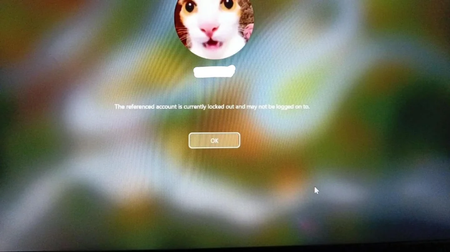
I turned on my laptop today and was hit with a Windows message saying: “The referenced account is currently locked out and may not be logged on to.” I entered my usual password—which I'm absolutely sure was correct—and got the same message again. I tried Safe Mode, same thing. Then I did a normal restart, entered the exact same password, and it worked just fine. No password reset, no unlock, no changes made. I'm confused. Could this have been caused by a background service, another device trying to authenticate with an old password, or just a temporary glitch? Is there a way to check the logs to see why the account was locked in the first place? First time this has happened on Windows 11. Any insight would be appreciated.107Views0likes2Comments