Bookings
1294 TopicsCreate bookingStaffMember also requires Add-MailboxPermission
I created an Entra application with the required Graph permissions to manage Bookings scheduling mailboxes so that I could update the staffing for a Bookings page that I'm not a staff member of. Using that application to request a Microsoft Graph access token, meant I had the required permissions to add a user account (that already had a Bookings license) as an "administrator" (role) for a Bookings page (Bookings business), to replace another person who was the previous Bookings page administrator, but who had since left. I used https://learn.microsoft.com/en-us/graph/api/bookingbusiness-post-staffmembers?view=graph-rest-1.0&tabs=powershell to do this. For the record, I was not able to do this using https://learn.microsoft.com/en-us/powershell/module/microsoft.graph.bookings/new-mgbookingbusinessstaffmember?view=graph-powershell-1.0 using Microsoft.Graph.Bookings module version 2.30.0, presumably because I am not a staff member with the Bookings "administrator" role for that particular Bookings page. However, the newly added user could not access that Bookings page at https://outlook.office.com/bookings/homepage until a further step had been completed (Error: "You don't have access to this booking page" shows instead). To ensure the new Bookings page administrator could access the Bookings page, I needed to add mailbox permissions, which I used https://learn.microsoft.com/en-us/powershell/module/exchangepowershell/add-mailboxpermission?view=exchange-ps for. I found that giving the new Bookings page administrator full access to the scheduling mailbox ensured they could access the Bookings page. Example using ExchangeOnlineManagement PowerShell module: Add-MailboxPermission -Identity email address removed for privacy reasons -User email address removed for privacy reasons -AccessRights FullAccess If there is a more efficient way for an system admin to add new staff to a Bookings page, please let me know - otherwise, hopefully this helps someone who gets stuck 😊17Views0likes0Comments
No more than 2 slots available for services
Hi, I am currently having an issue with bookings in which I have defined one service for every member of my team. They have different schedules, but some days there may be 5 people at the same time working. However I don't want them to be all on meetings at the same time. Is there an option that allows me that, if two members are scheduled on a meeting on a specific day and time, the other services calendars are unavailable to book? Thanks, Carlos3Views0likes0Comments
MS Bookings glitches across timezones
Hello, thanks for reading. Problem: Staff calendars not appearing properly across time zones in MS Bookings In Microsoft Bookings, staff create recurring Free slots in Outlook to mark availability for schedulers. These slots always display in the business’ timezone, regardless of the viewer’s timezone. However, all other calendar items (including Bookings appointments, as well as outlook events) shift to the local timezone of the calendar viewer. This mismatch causes schedulers to place appointments that appear to fit to them, but staff in other timezones see them shifted outside the intended Free slots, creating conflicts and misaligned bookings. Example: Business timezone = MST. Scheduler timezone = MST. Staff timezone = PST. 1. Staff creates a recurring Free slot from 12:00–1:00pm PST (which shows correctly as 1:00–2:00pm MST in the shared business calendar). 2. Scheduler (in MST) books a 1:00pm MST appointment, believing it fits inside the Free slot. But on the staff’s Outlook calendar, the booking appears at 12:00pm PST, which is outside their Free slot, and at an objectively different time. I have verified that the staff and scheduler have correctly identified their timezones via Outlook on the Web > Settings > General > Language and time > Current time zone.12Views0likes0Comments
Bookings shows available time slots even though it is booked in my calendar
I created a personal booking page. But I do not see the time slots displayed in my calendar and when I go to the booking page, all time are available completely not taking into account the meetings that are already in my calendar. Why in the name of god would you ever design a self booking function that does not look at existing meetings in the target calendar. Worked with google self scheduler and calendly and this is absolutely a non existing problem for both of these platforms. Now transitioned to 365 and I can't seem to get a simple feature as a self scheduler set up :( Attached a screenshot of all the available configuration options. So 2 questions: - I want to see the blocks in my calendar (attached an example of google self scheduler how it shows up in your calendar - it completely ignores meetings in my calendar and lets people book those slots leading to double bookings. Please help me out.1.1KViews10likes14Comments
Problem with the option to prevent customers managing their bookings
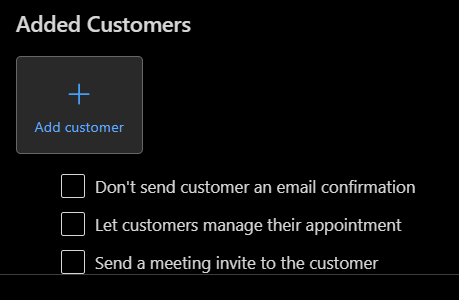
We have used Microsoft Bookings for several years to let our customers book services with us but we're noticing a trend that the customers tend to rebook their appointments an excessive amount of times which often leads to available spaces on group bookings being wasted. It also increases the admin time because each rebooking needs to be processed again so that the necessary preparations for the customer can be made. One idea we have to try and keep things under control would be to say that the customers should only book the service one time so that we can administer their bookings one time only and then if they miss their appointment time they could just "drop-in" because all the necessary preparations would have already been made for them. But I don't think this will change the behaviour with how the customers keep moving their bookings. What we really need is the option to prevent the customers from cancelling or rebooking their times themselves. I am aware that there is an option to "Let customers manage their appointments" but this feature seems to be broken! To disable the option you have to go into the calendar and select the group booking. In the pop-up window underneath the "Added Customers" you can disable the option to prevent the customers from managing their appointments. When you do this it takes away the reschedule and cancel buttons but it only works as a temporary measure because as soon as a new person books a place on the same group booking then the option becomes automatically enabled again! Then all the previous customers can also see the reschedule and cancel buttons again. It feels like this part of Microsoft Bookings is broken and unusable at the moment. The only way I could imagine it working at the moment is if a group booking runs out of free spaces and then nobody else would be able to book a place so if you manually disable the option at this point then would remain disabled for everybody. But until the appointment time runs out of spaces then people are just going to keep moving their bookings around. You could probably keep manually disabling the option when new bookings are made but this also adds to the admin time and it doesn't seem like a very practical workaround. Another idea we have had is to set a longer "minimum lead time" because this is another way to prevent people from cancelling and moving their bookings but it reduces the flexibility of when the services can be booked. But we're actually going to try this idea and see how it affects things along with changing the information to try and make the customers aware that they are being restricted to one booking. We hope that the option for the customers to manage their own bookings gets fixed soon. It also does not make much sense that it needs to be disabled per booking in the calendar? Shouldn't this be a feature that applies to every booking for a service instead? I've tried to disable the option on two different booking pages but the experience is just the same, the option just becomes automatically enabled again when a new booking is made.1.2KViews1like1Comment
public booking pages will not load for non-office users
Clients attempting to book time with me using the Bookings page are receiving this error when they click the public link: UTC Date: 2024-08-29T14:28:44.800Z Client Id: 2 Session Id: BootResult: retry Back Filled Errors: Unhandled Rejection: SyntaxError: The string did not match the expected pattern.:undefinedlUnhandled Rejec err: Microsoft.Exchange.Clients.Owa2.Server.Core.OwaUserHasNoMailboxAndNoLicenseAssignedException esrc: StartupData et: ServerError estack: st: 500 ehk: X-OWA-Error efe: DS7P222CA0023, SA9PR11CA0021 ebe: DM8PR01MB6933 emsg: UserHasNoMailboxAndNoLicenseAssignedError How do I resolve this so outside users can use the link to book?404Views1like3Comments
Specify multiple attendees per booking to count toward max attendees
I would like a way for attendees of a particular service instance to specify how many people are are in their party being booked for that service, so that will automatically be accounted for in the maximum number of attendees. E.g., if I provide a service with max 10 attendees, when making a booking, a customer can specify 3 people in their party, so now the bookings website knows there is room for 7 more people. Is this possible?618Views1like1Comment