azure
3339 TopicsPartner Blog | Expanded partner benefits are now available: What’s new in February 2026
Expanded partner benefits are now available across the Microsoft AI Cloud Partner Program. These updates reflect continued investment in the tools, resources, and support partners rely on to build, differentiate, and grow, and they incorporate feedback we hear consistently across the ecosystem. If you read our January post about planning ahead for the February refresh, this is the follow-up: the new benefits are now rolling out, and partners with eligible offers will find them in Partner Center as they become available. What’s new You’ll find a range of meaningful additions designed to empower you to move faster with AI, support security needs, and improve go-to-market execution. Highlights include: Copilot additions in select offers: The FY26 refresh introduces new Copilot-related benefits across parts of the program, including Microsoft 365 Copilot, Copilot Studio, and Microsoft Dragon Copilot (per user) in select partner offers where available. Security benefits expansion: Security-focused benefits have been broadened, including additions such as Microsoft Defender Suite, Microsoft Entra Suite, and Microsoft Intune Suite in select offerings. Azure credit updates: Azure benefits are being updated across multiple offers, including new additions and increases in value for certain cloud benefits. These credits are designed to support solution development, testing, and expansion of your practice. Go-to-market resources: As partners continue to access marketing benefits and resources through the program, Microsoft is simplifying discovery and execution—so you can bring campaigns to market with less friction. Continue reading here219Views2likes4Comments
How Cloud + AI Solutions Empower Nonprofits to Do More with Less
Nonprofits play a vital role in our communities—delivering essential services, supporting vulnerable groups, and driving social change. Yet many face familiar hurdles: limited budgets, outdated systems, rising data demands, and the need to stay connected with donors, volunteers, and the people they serve. Cloud technology and artificial intelligence (AI) are helping nonprofits overcome these challenges. Solutions like Microsoft Azure make it easier to modernize, stay secure, and expand impact. The Cloud + AI Advantage for Nonprofits Cloud computing provides secure storage, flexible computing power, and modern tools without costly infrastructure. AI builds on that foundation—analyzing data, automating tasks, understanding language, and making predictions that help teams work smarter. Together, cloud and AI help nonprofits: Reduce manual work Improve staff and volunteer efficiency Personalize communications Gain deeper data insights Build more responsive, effective programs In short, AI becomes a digital copilot that frees teams to focus on their mission. Secure Data, Stronger Trust Nonprofits manage sensitive information and complex compliance needs. Azure offers built‑in security, encryption, and access controls—allowing organizations to protect data with enterprise‑grade safeguards, without needing a large IT team. Modernize Without Overspending Aging servers and disconnected systems slow organizations down. Azure enables nonprofits to: Move files and apps to the cloud Scale storage as needed Avoid expensive hardware upgrades Reduce downtime and crashes This flexibility stretches budgets while improving reliability. Unlock Better Insights With AI Data is powerful only when it’s usable. Azure AI helps nonprofits analyze trends, measure impact, forecast needs, and improve engagement—turning raw data into actionable insights. Do More With Limited Resources Small teams often juggle many roles. Cloud automation and AI‑enhanced workflows streamline processes, reduce manual tasks, and boost productivity—so more time goes toward serving communities. Ready to Explore Azure? Cloud and AI don’t replace human effort—they amplify it. With the right foundation, nonprofits can become more agile, secure, and impactful. Register for the eBook: The cloud + AI: Microsoft Azure solutions for nonprofits45Views0likes0Comments
Microsoft Finland - Software Developing Companies monthly community series.
Tervetuloa jälleen mukaan Microsoftin webinaarisarjaan teknologiayrityksille! Microsoft Finlandin järjestämä Software Development monthly Community series on webinaarisarja, joka tarjoaa ohjelmistotaloille ajankohtaista tietoa, konkreettisia esimerkkejä ja strategisia näkemyksiä siitä, miten yhteistyö Microsoftin kanssa voi vauhdittaa kasvua ja avata uusia liiketoimintamahdollisuuksia. Sarja on suunnattu kaikenkokoisille ja eri kehitysvaiheissa oleville teknologiayrityksille - startupeista globaaleihin toimijoihin. Jokaisessa jaksossa pureudutaan käytännönläheisesti siihen, miten ohjelmistoyritykset voivat hyödyntää Microsoftin ekosysteemiä, teknologioita ja kumppanuusohjelmia omassa liiketoiminnassaan. Huom. Microsoft Software Developing Companies monthly community webinars -webinaarisarja järjestetään Cloud Champion -sivustolla, josta webinaarit ovat kätevästi saatavilla tallenteina pari tuntia live-lähetyksen jälkeen. Muistathan rekisteröityä Cloud Champion -alustalle ensimmäisellä kerralla, jonka jälkeen pääset aina sisältöön sekä tallenteisiin käsiksi. Pääset rekisteröitymään, "Register now"-kohdasta. Täytä tietosi ja valitse Distributor kohtaan - Other, mikäli et tiedä Microsoft-tukkurianne. Webinaarit: 27.2.2026 klo 09:00-09:30 - M-Files polku menestykseen yhdessä Microsoftin kanssa Mitä globaalin kumppanuuden rakentaminen M-Files:in ja Microsoft:in välillä on vaatinut – ja mitä hyötyä siitä on syntynyt? Tässä webinaarissa kuulet insiderit suoraan M-Filesin Kimmo Järvensivulta, Stategic Alliances Director: miten kumppanuus Microsoft kanssa on rakennettu, mitä matkalla on opittu ja miten yhteistyö on vauhdittanut kasvua. M-Files on älykäs tiedonhallinta-alusta, joka auttaa organisaatioita hallitsemaan dokumentteja ja tietoa metatiedon avulla sijainnista riippumatta. Se tehostaa tiedon löytämistä, parantaa vaatimustenmukaisuutta ja tukee modernia työtä Microsoft-ekosysteemissä. Tule kuulemaan, mitä menestyksekäs kumppanuus todella vaatii, ja miten siitä tehdään strateginen kilpailuetu. Rekisteröidy mukaan: Microsoft Finland – Software Developing Companies Monthly Community Series – M-Files polku menestykseen yhdessä Microsoftin kanssa – Finland Cloud Champion Asiantuntijat: Kimmi Järvensivu, Strategic Alliances Director, M-Files Mikko Marttinen, Sr Partner Development Manager, Microsoft Eetu Roponen, Sr Partner Development Manager, Microsoft 30.1.2026 klo 09:00-09:30 - Model Context Protocol (MCP)—avoin standardi, joka mullistaa AI-integraatiot Webinaarissa käymme läpi, mikä on Model Context Protocol (MCP), miten se mahdollistaa turvalliset ja skaalautuvat yhteydet AI‑mallien ja ulkoisten järjestelmien välillä ilman räätälöityä koodia, mikä on Microsoftin lähestyminen MCP‑protokollan hyödyntämiseen sekä miten softayritykset voivat hyödyntää MCP‑standardin tarjoamia liiketoimintamahdollisuuksia. Webinaarissa käymme läpi: Mikä MCP on ja miksi se on tärkeä nykyaikaisissa AI‑prosesseissa Kuinka MCP vähentää integraatioiden monimutkaisuutta ja nopeuttaa kehitystä Käytännön esimerkkejä Webiinarin asiaosuus käydään läpi englanniksi. Katso nauhoite: 30.1.2026 klo 09:00-09:30 – Model Context Protocol (MCP)—avoin standardi, joka mullistaa AI-integraatiot – Finland Cloud Champion Asiantuntijat: Massimo Caterino, Kumppaniteknologiastrategisti, Microsoft Europe North Mikko Marttinen, Sr Partner Development Manager, Microsoft Eetu Roponen, Sr Partner Development Manager, Microsoft 12.12. klo 09:00-09:30 - Mitä Suomen Azure-regioona tarkoittaa ohjelmistotaloille? Microsoftin uusi datakeskusalue Suomeen tuo pilvipalvelut lähemmäksi suomalaisia ohjelmistotaloja – olipa kyseessä startup, scaleup tai globaali toimija. Webinaarissa pureudumme siihen, mitä mahdollisuuksia uusi Azure-regioona avaa datan sijainnin, suorituskyvyn, sääntelyn ja asiakasvaatimusten näkökulmasta. Keskustelemme muun muassa: Miten datan paikallinen sijainti tukee asiakasvaatimuksia ja sääntelyä? Mitä hyötyä ohjelmistotaloille on pienemmästä latenssista ja paremmasta suorituskyvystä? Miten Azure-regioona tukee yhteismyyntiä ja skaalautumista Suomessa? Miten valmistautua teknisesti ja kaupallisesti uuden regioonan avaamiseen? Puhujat: Fama Doumbouya, Sales Director, Cloud Infra and Security, Microsoft Mikko Marttinen, Sr Partner Development Manager, Microsoft Eetu Roponen, Sr Partner Development Manager, Microsoft Katso nauhoite: Microsoft Finland – Software Developing Companies Monthly Community Series – Mitä Suomen Azure-regioona tarkoittaa ohjelmistotaloille? – Finland Cloud Champion 28.11. klo 09:00-09:30 - Pilvipalvelut omilla ehdoilla – mitä Microsoftin Sovereign Cloud tarkoittaa ohjelmistotaloille? Yhä useampi ohjelmistotalo kohtaa vaatimuksia datan sijainnista, sääntelyn noudattamisesta ja operatiivisesta kontrollista – erityisesti julkisella sektorilla ja säädellyillä toimialoilla. Tässä webinaarissa pureudumme siihen, miten Microsoftin uusi Sovereign Cloud -tarjonta vastaa näihin tarpeisiin ja mitä mahdollisuuksia se avaa suomalaisille ohjelmistoyrityksille. Keskustelemme muun muassa: Miten Sovereign Public ja Private Cloud eroavat ja mitä ne mahdollistavat? Miten datan hallinta, salaus ja operatiivinen suvereniteetti toteutuvat eurooppalaisessa kontekstissa? Mitä tämä tarkoittaa ohjelmistoyrityksille, jotka rakentavat ratkaisuja julkiselle sektorille tai säädellyille toimialoille? Puhujat: Juha Karppinen, National Security Officer, Microsoft Mikko Marttinen, Sr Partner Development Manager, Microsoft Eetu Roponen, Sr Partner Development Manager, Microsoft Katso nauhoite: Microsoft Finland – Software Developing Companies Monthly Community Series – Pilvipalvelut omilla ehdoilla – mitä Microsoftin Sovereign Cloud tarkoittaa ohjelmistotaloille? – Finland Cloud Champion 31.10. klo 09:00-09:30 - Kasvua ja näkyvyyttä ohjelmistotaloille – hyödynnä ISV Success ja Azure Marketplace rewards -ohjelmia Tässä webinaarissa pureudumme ohjelmistotaloille suunnattuihin Microsoftin keskeisiin kiihdytinohjelmiin, jotka tukevat kasvua, skaalautuvuutta ja kansainvälistä näkyvyyttä. Käymme läpi, miten ISV Success -ohjelma tarjoaa teknistä ja kaupallista tukea ohjelmistoyrityksille eri kehitysvaiheissa, ja miten Azure Marketplace toimii tehokkaana myyntikanavana uusien asiakkaiden tavoittamiseen. Lisäksi esittelemme Marketplace Rewards -edut, jotka tukevat markkinointia, yhteismyyntiä ja asiakashankintaa Microsoftin ekosysteemissä. Webinaari tarjoaa: Konkreettisia esimerkkejä ohjelmien hyödyistä Käytännön vinkkejä ohjelmiin liittymiseen ja hyödyntämiseen Näkemyksiä siitä, miten ohjelmistotalot voivat linjata strategiansa Microsoftin tarjoamiin mahdollisuuksiin Puhujat: Mikko Marttinen, Sr Partner Development Manager, Microsoft Eetu Roponen, Sr Partner Development Manager, Microsoft Nauhoite: Microsoft Finland – Software Developing Companies Monthly Community Series – Kasvua ja näkyvyyttä ohjelmistotaloille – hyödynnä ISV Success ja Azure Marketplace rewards -ohjelmia – Finland Cloud Champion 3.10. klo 09:00-09:30 - Autonomiset ratkaisut ohjelmistotaloille – Azure AI Foundry ja agenttiteknologioiden uudet mahdollisuudet Agenttiteknologiat mullistavat tapaa, jolla ohjelmistotalot voivat rakentaa älykkäitä ja skaalautuvia ratkaisuja. Tässä webinaarissa tutustumme siihen, miten Azure AI Foundry tarjoaa kehittäjille ja tuoteomistajille työkalut autonomisten agenttien rakentamiseen – mahdollistaen monimutkaisten prosessien automatisoinnin ja uudenlaisen asiakasarvon tuottamisen. Kuulet mm. Miten agenttiteknologiat muuttavat ohjelmistokehitystä ja liiketoimintaa. Miten Azure AI Foundry tukee agenttien suunnittelua, kehitystä ja käyttöönottoa. Miten ohjelmistotalot voivat hyödyntää agentteja kilpailuetuna. Puhujat: Juha Karvonen, Sr Partner Tech Strategist Mikko Marttinen, Sr Partner Development Manager, Microsoft Eetu Roponen, Sr Partner Development Manager, Microsoft Katso nauhoite täältä: Microsoft Finland – Software Developing Companies Monthly Community Series – Autonomiset ratkaisut ohjelmistotaloille – Azure AI Foundry ja agenttiteknologioiden uudet mahdollisuudet – Finland Cloud Champion 5.9.2025 klo 09:00-09:30 - Teknologiayritysten ja Microsoftin prioriteetit syksylle 2025. Tervetuloa jälleen mukaan Microsoftin webinaarisarjaan teknologiayrityksille! Jatkamme sarjassa kuukausittain pureutumista siihen, miten yhteistyö Microsoftin kanssa voi vauhdittaa kasvua ja avata uusia mahdollisuuksia eri vaiheissa oleville ohjelmistotaloille – olipa yritys sitten start-up, scale-up tai globaalia toimintaa harjoittava. Jokaisessa jaksossa jaamme konkreettisia esimerkkejä, näkemyksiä ja strategioita, jotka tukevat teknologia-alan yritysten liiketoiminnan kehitystä ja innovaatioita. Elokuun lopun jaksossa keskitymme syksyn 2025 prioriteetteihin ja uusiin mahdollisuuksiin, jotka tukevat ohjelmistoyritysten oman toiminnan suunnittelua, kehittämistä ja kasvun vauhdittamista. Käymme läpi, mitkä ovat Microsoftin strategiset painopisteet tulevalle tilikaudelle – ja ennen kaikkea, miten ohjelmistotalot voivat hyödyntää niitä omassa liiketoiminnassaan. Tavoitteena on tarjota kuulijoille selkeä ymmärrys siitä, miten oma tuote, palvelu tai markkinastrategia voidaan linjata ekosysteemin kehityksen kanssa, ja miten Microsoft voi tukea tätä matkaa konkreettisin keinoin. Puhujat: Mikko Marttinen, Sr Partner Development Manager, Microsoft Eetu Roponen, Sr Partner Development Manager, Microsoft Katso nauhoitus täältä: Teknologiayritysten ja Microsoftin prioriteetit syksylle 2025. – Finland Cloud Champion367Views0likes0CommentsAzure AI Connect - March 2 to March 6 2026
The Future of AI is Connected. The Future is on Azure. Join us for a 5-day virtual event dedicated to mastering the Microsoft Azure AI platform. Azure AI Connect isn't just another virtual conference. It's a 5-day deep-dive immersion into the *connective tissue* of artificial intelligence on the cloud. We're bringing together developers, data scientists, and enterprise leaders to explore the full spectrum of Azure AI services—from Cognitive Services and Machine Learning to the latest breakthroughs in Generative AI. Explore the Ecosystem: Understand how services work *together* to create powerful, end-to-end solutions. Learn from Experts: Get direct insights from Microsoft MVPs, product teams, and industry pioneers. Gain Practical Skills: Move beyond theory with code-driven sessions, practical workshops, and live Q&As. Connect with Peers: Network with a global community in our virtual lounge. Event Details204Views0likes0CommentsGet alignment early to build AI apps and agents and sell on Marketplace
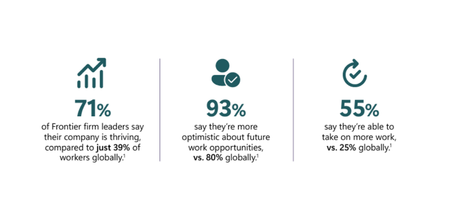
Frontier firms are pulling ahead. The data is clear why. According to Microsoft research of Frontier firms: 71% of leaders say their company is thriving, compared to just 39% of workers globally, 93% are optimistic about future work opportunities, 55% say they’re able to take on more work, versus 25% globally. But the difference isn’t experimentation with AI. It’s execution. Work Trend Index Annual Report, 2025 How getting business and technical alignment with AI development helps Frontier firms are succeeding because they align business intent, technical design, and security expectations before building AI apps and agents. They don’t treat alignment as a workshop or a slide deck. They treat it as a prerequisite to building agents that actually work, scale, and earn trust. Microsoft helps you adopt this same approach through structured guidance in App Advisor, AI envisioning resources, and practical checklists designed to keep teams aligned from design through deployment. Why alignment separates Frontier firms from the rest AI apps and agents increasingly operate inside critical business workflows. That raises the bar. When alignment is missing, teams often ship agents that technically function but fail in production due to security gaps, unclear ownership, or mismatched expectations around outcomes. Teams that align early are better positioned to: Move faster through build by eliminating ambiguity, Build agents that reliably perform the job they’re designed to do, Embed security, governance, and trust by design, not as an afterthought, Reduce redesign cycles caused by unclear requirements or late-stage constraints. This is where guidance-first approach from Microsoft plays a critical role. How App Advisor helps teams align before they build App Advisor is intentionally designed to help teams put an alignment framework together at the start. To move faster later. App Advisor gives you: Tools to help your business get an AI Center of Excellence, Systems, like Azure Essentials and Cloud Adoption Framework, Checklists for every step of the way, so that teams stay informed, Toolkits and services that build in answers to friction that your team can leverage. These shared starting points helps ensure what teams build reflects real business needs and can be deployed responsibly. Using AI envisioning sessions to align outcomes The Microsoft AI envisioning sessions complement App Advisor by helping teams translate strategy into execution. The Business–Technical Alignment Checklist for Microsoft Foundry helps teams stay synchronized as they build. It ensures architecture, cost, security, and delivery choices support a clear business outcome—not just technical success. This checklist reinforces practices like: Defining shared success metrics and KPIs, Setting joint budget guardrails and cost visibility, Establishing cross-functional cadence and governance, Planning for integration testing and real-world workflows, Using a shared project workspace as a single source of truth. This alignment reduces late-stage friction when you’re preparing to publish, co-sell, or scale. This translates into offers that are easier to describe on Marketplace, more likely to attract customers, and better for those customers to deploy. Moving from aligned design to confident build to sales growth After alignment is established, teams can move into build with momentum. App Advisor showcases development toolkits, SDKs, templates, and reference architectures that reflect the decisions already made during design. That continuity matters. It keeps teams focused on execution instead of re-litigating fundamentals mid-build. Alignment isn’t a meeting. It’s a system. Microsoft provides the structure to support it. Start aligning today to sell more tomorrow Get resources to help your teams align and keep in step in App Advisor.127Views7likes0CommentsICYMI: 🚀 February Azure Update: What’s New for Partners
From expanded Microsoft Fabric capabilities and new secure migration incentives, to major skilling opportunities and can’t‑miss Azure events, this month’s Azure update is packed with ways to help you migrate, modernize, and lead with AI. Highlights include: New Defender for Cloud migration investments and incentives Expanded Microsoft Fabric features, including Fabric IQ and OneLake integrations FY26 migration incentives for software development companies Upcoming events like Azure Summit, FABCON/SQLCON, and Cosmos DB Conference New go‑to‑market resources to drive SMB and enterprise growth 👉 Dive in to explore the latest updates designed to help you build smarter solutions, secure workloads, and unlock new partner opportunities. Read the full February Azure Newsletter here74Views0likes0Comments
Looking for advice on collaborating with complementary Microsoft partners
a { text-decoration: none; color: #464feb; } tr th, tr td { border: 1px solid #e6e6e6; } tr th { background-color: #f5f5f5; } Hi everyone 👋 My name is Martin Rojze. I’m focused on the Microsoft data platform, with a specialization in Microsoft Fabric and Power BI. My work is centered on helping organizations design, implement, and scale modern analytics and reporting solutions on Azure, with a strong emphasis on real world business outcomes rather than just dashboards. As demand for end to end solutions continues to grow, I’m looking to deepen collaboration with complementary Microsoft partners, for example partners who focus on Dynamics 365 or Business Central Data engineering, data science, or AI App development including Power Apps, custom apps, or ISVs Security, governance, or change management I’d really appreciate advice from partners who have successfully built co sell or referral relationships, specifically What has worked and what has not when partnering with other Microsoft partners How you structure collaboration so it’s mutually beneficial and scalable Tips on aligning around go to market, co selling, or delivery without stepping on each other’s toes If you’re a partner interested in collaborating around Fabric and Power BI led analytics engagements, or if you’re willing to share lessons learned, I’d love to connect and learn from your experience. Thanks in advance and looking forward to the discussion. MartinHow to Set Up Claude Code with Microsoft Foundry Models on macOS
Introduction Building with AI isn't just about picking a smart model. It is about where that model lives. I chose to route my Claude Code setup through Microsoft Foundry because I needed more than just a raw API. I wanted the reliability, compliance, and structured management that comes with Microsoft's ecosystem. When you are moving from a prototype to something real, having that level of infrastructure backing your calls makes a significant difference. The challenge is that Foundry is designed for enterprise cloud environments, while my daily development work happens locally on a MacBook. Getting the two to communicate seamlessly involved navigating a maze of shell configurations and environment variables that weren't immediately obvious. I wrote this guide to document the exact steps for bridging that gap. Here is how you can set up Claude Code to run locally on macOS while leveraging the stability of models deployed on Microsoft Foundry. Requirements Before we open the terminal, let's make sure you have the necessary accounts and environments ready. Since we are bridging a local CLI with an enterprise cloud setup, having these credentials handy now will save you time later. Azure Subscription with Microsoft Foundry Setup - This is the most critical piece. You need an active Azure subscription where the Microsoft Foundry environment is initialized. Ensure that you have deployed the Claude model you intend to use and that the deployment status is active. You will need the specific endpoint URL and the associated API keys from this deployment to configure the connection. An Anthropic User Account - Even though the compute is happening on Azure, the interface requires an Anthropic account. You will need this to authenticate your session and manage your user profile settings within the Claude Code ecosystem. Claude Code Client on macOS - We will be running the commands locally, so you need the Claude Code CLI installed on your MacBook. Step 1: Install Claude Code on macOS The recommended installation method is via Homebrew or Curl, which sets it up for terminal access ("OS level"). Option A: Homebrew (Recommended) brew install --cask claude-code Option B: Curl curl -fsSL https://claude.ai/install.sh | bash Verify Installation: Run claude --version. Step 2: Set Up Microsoft Foundry to deploy Claude model Navigate to your Microsoft Foundry portal, and find the Claude model catalog, and deploy the selected Claude model. [Microsoft Foundry > My Assets > Models + endpoints > + Deploy Model > Deploy Base model > Search for "Claude"] In your Model Deployment dashboard, go to the deployed Claude Models and get the "Endpoints and keys". Store it somewhere safe, because we will need them to configure Claude Code later on. Configure Environment Variables in MacOS terminal: Now we need to tell your local Claude Code client to route requests through Microsoft Foundry instead of the default Anthropic endpoints. This is handled by setting specific environment variables that act as a bridge between your local machine and your Azure resources. You could run these commands manually every time you open a terminal, but it is much more efficient to save them permanently in your shell profile. For most modern macOS users, this file is .zshrc. Open your terminal and add the following lines to your profile, making sure to replace the placeholder text with your actual Azure credentials: export CLAUDE_CODE_USE_FOUNDRY=1 export ANTHROPIC_FOUNDRY_API_KEY="your-azure-api-key" export ANTHROPIC_FOUNDRY_RESOURCE="your-resource-name" # Specify the deployment name for Opus export CLAUDE_CODE_MODEL="your-opus-deployment-name" Once you have added these variables, you need to reload your shell configuration for the changes to take effect. Run the source command below to update your current session, and then verify the setup by launching Claude: source ~/.zshrc claude If everything is configured correctly, the Claude CLI will initialize using your Microsoft Foundry deployment as the backend. Once you execute the claude command, the CLI will prompt you to choose an authentication method. Select Option 2 (Antrophic Console account) to proceed. This action triggers your default web browser and redirects you to the Claude Console. Simply sign in using your standard Anthropic account credentials. After you have successfully signed in, you will be presented with a permissions screen. Click the Authorize button to link your web session back to your local terminal. Return to your terminal window, and you should see a notification confirming that the login process is complete. Press Enter to finalize the setup. You are now fully connected. You can start using Claude Code locally, powered entirely by the model deployment running in your Microsoft Foundry environment. Conclusion Setting up this environment might seem like a heavy lift just to run a CLI tool, but the payoff is significant. You now have a workflow that combines the immediate feedback of local development with the security and infrastructure benefits of Microsoft Foundry. One of the most practical upgrades is the removal of standard usage caps. You are no longer limited to the 5-hour API call limits, which gives you the freedom to iterate, test, and debug for as long as your project requires without hitting a wall. By bridging your local macOS terminal to Azure, you are no longer just hitting an API endpoint. You are leveraging a managed, compliance-ready environment that scales with your needs. The best part is that now the configuration is locked in, you don't need to think about the plumbing again. You can focus entirely on coding, knowing that the reliability of an enterprise platform is running quietly in the background supporting every command.517Views1like0CommentsAccelerate your AI innovation with App Advisor
Have a great idea for an AI app or agent but unsure how to take it to market? Microsoft’s newly released App Advisor provides a clear, guided path from concept to commercialization. Whether you’re shaping an early idea, navigating build decisions, or preparing your solution for the Microsoft commercial marketplace, App Advisor helps streamline each step—reducing friction and increasing confidence. This walkthrough highlights how App Advisor connects the dots: From concept to execution with structured guidance From development to best practices with informed build recommendations From finished product to revenue through proven Marketplace readiness insights If you’re looking to build and sell AI solutions faster and more effectively, this resource is well worth your time. Read the full article: Build an AI app or agent faster to sell on Marketplace with App Advisor | Microsoft Community Hub