authenticator app
47 Topics
Can't access Microsoft Authenticator for business accounts
Hello. I am the tech support for a small church, where I am the admin for our MS 365 accounts, which are set up as "business accounts". I have been using Microsoft Authenticator for MFA for years. Recently I switched to a new phone and installed Microsoft Authenticator. All of my personal Authenticator accounts transferred over just fine, but all of the church's business accounts say "Scan the QR Code provided by your organization to finish recovering this account". The thing is, I am the "organization" and I don't know how to generate any QR code to recover the accounts. It was suggested that I could do something about this by logging into my Microsoft 365 administrator account, but when I try to log into my admin account, the only MFA option is "enter the code from Microsoft Authenticator". It's not offering a text or alternate email, only Microsoft Authenticator, which is what I'm locked out of. So I'm stuck in a loop. I opened a ticket with Microsoft Support nine days ago. I have received one phone call since then. The support person insisted that they needed to talk to the account's "alternate administrator", which I set up as my pastor, who is pretty computer savvy but not a deep IT person. They tried to call him one time, but he was not available to answer right then. There has been no communication since then. I'm hoping someone in this group can help me figure this out.33Views1like1CommentMy Azure login is stuck at MFA and cannot proceed
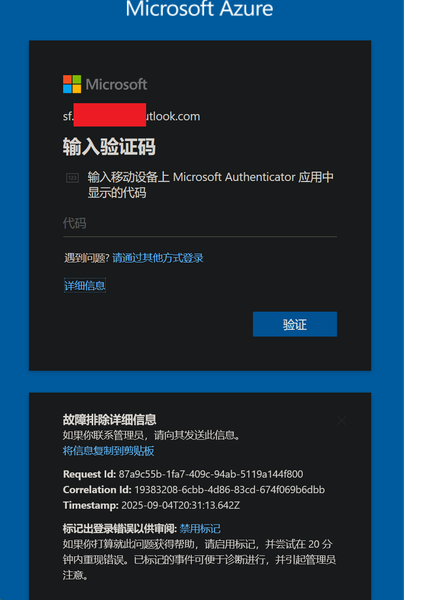
In August, I was still able to log in to Azure, and by logging in through GitHub I could bypass 2FA. But now, no matter how I try, logging in via GitHub always requires 2FA. I can’t access my Azure account anymore—nothing works. The system prompts me to use Microsoft Authenticator to confirm a two-digit code in real time. My Microsoft Authenticator on my iPhone is logged into the same Microsoft account, but I’m not receiving any verification requests for Azure login. No matter how much I refresh, nothing shows up. I’ve already updated the Microsoft Authenticator app to the latest version from the App Store. However, my personal Microsoft account works fine and can log in without any issues.226Views0likes2CommentsAccount Hacked
Hello Community, My account has been hacked, copied and/or duplicated with some other account as I was originally Sids1 with this email for more than 6 months now and this has changed somehow. It's very concerning to me since I also found some other person named Siddhartha when I was logging into my account. I reported that to the Microsoft Account Team but have not received any replies yet. Please suggest anything that can be done to catch this hacker who is stealing my identity to and fro. Best Regards Siddhartha SharmaSolved1.1KViews1like4Comments
In "Per-user multifactor authentication" I disabled MFA for one user; All got disabled
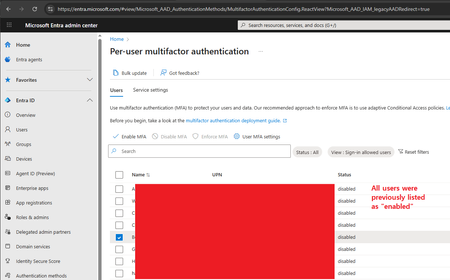
Hi, I'm the 365 admin for our org. Today I had a user that got a new phone and became stuck in a MS Authenticator app loop. (The app required MFA to login to the app, but they can't login to the app because they aren't logged into the app. This happened once before, and is a ridiculous Kafkaesque situation; but I digress.) To solve it, I went to disable MFA on their account, allowing them to login to the app. Then MFA could be re-enabled. Problem solved. And indeed that did work. However, on the admin side (per the screenshot) I checked off their user account (the user starting with the letter "B") and hit the "Disable MFA" link. A confirmation appeared asking me if I wanted to disable MFA for all selected users. Because I'm the careful sort, I could still see that only that one user was checked off as the popover div didn't cover that much of the screen. Hence I confirmed that I wanted to disable MFA for the selected users (i.e. that one user). I then refreshed the page, and all users are now shown as having MFA disabled. I'm 100% sure only that one user was selected, not everyone in my org. That would've been foolish. Trying to figure out what's wrong with this portion of the admin site.228Views0likes2Comments
Microsoft Authenticator Passkeys for Entra ID on unmanaged devices
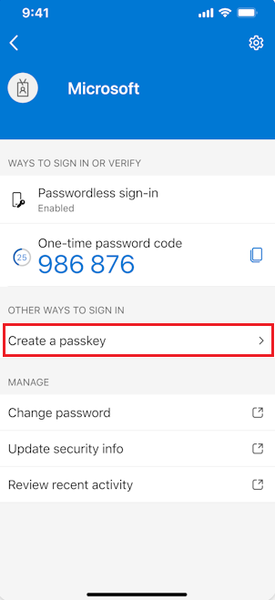
Hello, has anyone successfully registered passkeys on an unmanaged phone in an organisation with device compliance policies? Use case is to provide a phishing-resistant MFA option via Authenticator app for logging into apps on their desktop. Users already have authenticator app on their phone and do number matching MFA. https://learn.microsoft.com/en-us/entra/identity/authentication/how-to-register-passkey-authenticator?tabs=iOS When I select "Create a passkey" - I need to log into my account. However I'm blocked from successful authentication because I have conditional access policies to require compliant devices. As my mobile phone is not enrolled into Intune, I never get to the step where the passkey is created and registered. Based on the constraints - it seems like passkeys cannot be used for unmanaged/BYOD devices for organisations that have device compliance policies. It can only be used for users who have enrolled their mobile phone. Looking to see if anyone has tips or different experience using passkeys on unmanaged mobile phones to log into Entra?463Views0likes1Comment
Can't Login to Authenticator App
I am unable to login to my Microsoft 365 Business account, because I'm unable to login to my Authenticator App. I am also the only administrator on my business account, so no one in my organization can help me. Microsoft online support and phone support just keep sending me in circles. The only way I see to create a support ticket is to login, but my issue is that I can't login. Help, please!207Views1like3Comments
Transfer Authenticator data from one iPhone to another
I bought a new iPhone. All the apps and settings that were present on my old iPhone are now on the new one but Microsoft Authenticator is empty. How can I transfer all my Authenticator accounts and passwords from the old iPhone to the new one, please?275Views0likes1Comment
Microsoft authenticator
Good day. I’d like to ask how to solve a problem with Microsoft Authenticator. A Microsoft Authenticator suddenly appeared on my account out of nowhere, and I can’t remove it because I’ve lost access to the account. Logging in with a password doesn’t work, it can’t send an SMS to my phone, and the account is logged out everywhere. As far as I remember, I never set up Microsoft Authenticator.64Views0likes1Comment
Locked out because of bugged 2FA
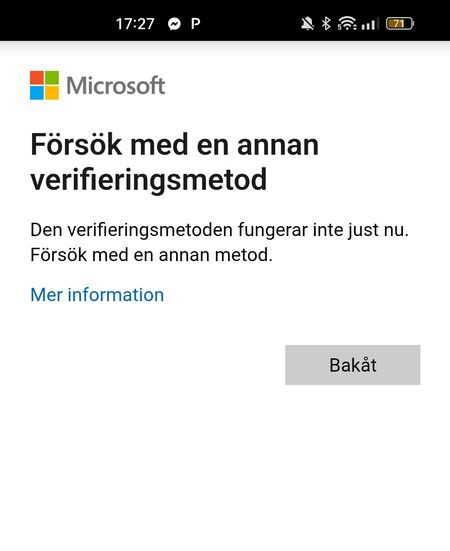
Hello, I have one irritating problem. I did a reset of my microsoft authenticator app since it stopped working, i did not save the Authenticators security code, i got 2FA activated on my account. Now i have been trying to log in on my microsoft account for one month without succes. The 3 options i have for 2FA is Code to external my gmail - This works 2 times a day, then locked for 24h Code by text to my cellphone - This does not work when trying to log in, i get the error "Try another verification method, this method does not work at the moment". I know it works, its just in the combination with 2FA it wont work. Microsoft Authenticator - I cannot log into this one since the textmessage does not work on 2FA-login. I have been in a loop for the last month, i cant log into my ordinary e-mail, xbox and so on. Im still logged in on my computer and cellphone at the moment but im afraid it will time out very soon. Microsoft support says that they cannot do anything about it, it is only a server doing all the security. I cant remove 2FA on the account im still logged into, i need 2FA for that. Help!466Views0likes6Comments