User Profile

evandromalmsteen
Brass Contributor
Joined Dec 05, 2020


User Widgets
Recent Discussions
Re: OWA “Manage Add-ins” Stuck Loading After Clicking Settings (Exchange 2019 CU15 / Exchange SE RTM)
I forced OWA/EWS to use the corporate proxy via system.net/defaultProxy because, in CU15/SE, the IIS/.NET HTTP/HTTPS calls were not honoring WinHTTP/InternetWebProxy. In a network with outbound traffic blocked, that was causing failures. The bypasslist was adjusted to use valid regex patterns so we wouldn’t break OWA, keeping only internal exceptions. I solved the problem doing those configurations: # 1) Check current settings (on the current server) Get-ExchangeServer $env:COMPUTERNAME | fl Name,InternetWebProxy,InternetWebProxyBypassList # 2) Configure the proxy on Exchange (recommended) Set-ExchangeServer $env:COMPUTERNAME -InternetWebProxy http://proxy.email.domainlocal.prv:3128 # 3) (Optional | I didn’t use it; it’s not necessary) Set the bypass list ONLY with valid FQDNs (no IP/localhost/[::1]/wildcards) # Example: keep the server itself out of the proxy Set-ExchangeServer $env:COMPUTERNAME -InternetWebProxyBypassList @("SRVMBX01.domainlocal.br") # 4) Validate again Get-ExchangeServer $env:COMPUTERNAME | fl Name,InternetWebProxy,InternetWebProxyBypassList # 5) Apply to ALL Exchange servers (to avoid intermittent behavior behind the load balancer) $proxy = http://proxy.email.domainlocal.prv:3128 Get-ExchangeServer | ForEach-Object { if ($null -eq $_.InternetWebProxy -or [string]::IsNullOrWhiteSpace([string]$_.InternetWebProxy)) { Write-Host "Setting proxy on: $($_.Name)" -ForegroundColor Cyan Set-ExchangeServer $_.Name -InternetWebProxy $proxy } } # 6) List any servers still missing a proxy (verification) Get-ExchangeServer | Select Name,InternetWebProxy | Sort Name # 7) Restart IIS on the server (run on each node serving OWA/ECP) iisreset /restart # 8) Rollback #Set-ExchangeServer $env:COMPUTERNAME -InternetWebProxy $null -InternetWebProxyBypassList $null #9 Set the proxyaddress C:\Program Files\Microsoft\Exchange Server\V15\ClientAccess\Owa <defaultProxy> <proxy proxyaddress=http://proxy.email.domainlocal.prv:3128 bypassonlocal="true" /> <bypasslist> <add address="<local>" /> <add address="(^|\.)domainlocal\.net\.br$" /> <add address="^localhost$" /> <add address="^127\.0\.0\.1$" /> <add address="^\[::1\]$" /> </bypasslist> </defaultProxy> Or <system.net> <defaultProxy> <proxy proxyaddress=http://proxy.email.domainlocal.prv:3128 bypassonlocal="true" /> <bypasslist> <add address="<local>" /> <add address="(^|\.)domainlocal\.net\.br$" /> <add address="^localhost$" /> <add address="^127\.0\.0\.1$" /> <add address="^\[::1\]$" /> </bypasslist> </defaultProxy> </system.net> <system.webServer> <!-- allows the server to data stream immediately from client--> # Recicle o AppPool do OWA Import-Module WebAdministration Restart-WebAppPool MSExchangeOwaAppPool --- It's working so far, no problem yet. Microsoft Professional Support has fallen behind so far; I’m ahead of them. But, I have questions about EWS? There is no proxy setting (or at least I couldn’t find one) in the files under the two EWS directories below. Can you confirm whether a proxy also needs to be configured somewhere else, and if so, where and what the correct syntax is? Also, for the directories below, I didn’t see any proxy configuration either: • C:\Program Files\Microsoft\Exchange Server\V15\ClientAccess\exchweb\ews • C:\Program Files\Microsoft\Exchange Server\V15\ClientAccess\Sync • C:\Program Files\Microsoft\Exchange Server\V15\FrontEnd\HttpProxy\ews • C:\Program Files\Microsoft\Exchange Server\V15\FrontEnd\HttpProxy\owa • C:\Program Files\Microsoft\Exchange Server\V15\FrontEnd\HttpProxy\sync AND These values to <bypasslist>is the right way? I'm using it. <add address="<local>" /> <add address="(^|\.)domainlocal\.net\.br$" /> <add address="^localhost$" /> <add address="^127\.0\.0\.1$" /> <add address="^\[::1\]$" /> Other values occur this error: X-ClientId: 150811E942E94E01A485410A98FFA61E request-id 5a872104-4641-424b-98f6-9b6e016cf47f X-OWA-Error System.Configuration.ConfigurationErrorsException X-OWA-Version 15.2.2562.35 X-FEServer SRVMBX01 X-BEServer SRVMBX01 Date:10/02/2026 23:38:23 InnerException: System.ArgumentException0Views0likes0CommentsRe: OWA “Manage Add-ins” Stuck Loading After Clicking Settings (Exchange 2019 CU15 / Exchange SE RTM)
I understand. I'll see what I can do about this with Microsoft Support. If there are any updates, I'll post here again with how it turned out it the end. Thank you for the response.104Views0likes2CommentsOWA “Manage Add-ins” Stuck Loading After Clicking Settings (Exchange 2019 CU15 / Exchange SE RTM)
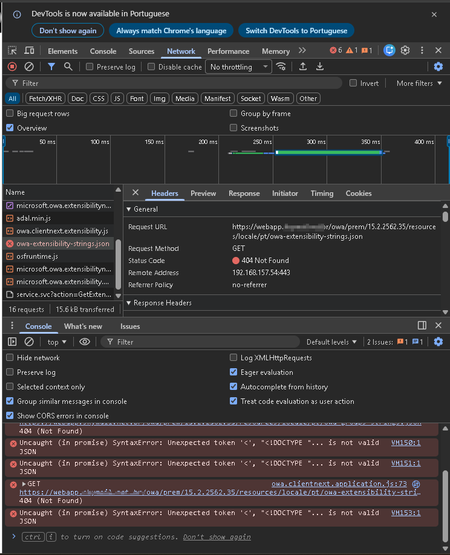
I have an Exchange Server environment with three versions: Exchange Server 2019 CU14 Dec25SU, Exchange Server 2019 CU15 Sept25H, Exchange Server SE RTM, and Exchange Server SE RTM Dec25SU. Issue: When users click the Settings icon/button in OWA/Outlook on the web and then click Manage add-ins, the page does not redirect and remains stuck on an external loading screen. Tested environments: Exchange Server 2019 CU14 Dec25SU: Works without issues Exchange Server 2019 CU15 Sept25H, Exchange Server SE RTM, and Exchange Server SE RTM Dec25SU: Does not work on any of them Troubleshooting performed: Moved all arbitral mailboxes to a database on Exchange Server SE RTM Dec25SU (the most recent version in the forest). (No success) Migrated all servers to Exchange Server SE RTM Dec25SU. (No success) Isolated testing using the hosts file (DNS) pointing to each host individually, and all hosts have the issue. All SE RTM Dec25SU servers were installed in admin mode via Command Prompt. I also ran the two .ps1 scripts below on a test host after installing the SU: #learn.microsoft.com/en-us/troubleshoot/exchange/client-connectivity/owa-stops-working-after-update cd "C:\Program Files\Microsoft\Exchange Server\V15\Bin" .\UpdateCas.ps1 .\UpdateConfigFiles.ps1 iisreset /restart Workaround: With the user already authenticated, if I manually open the URL below in the same authenticated session, it loads normally: webapp.mydomain.com/owa/#path=/options/manageapps Does anyone know how to fix this, or if this is a bug that started with CU15 (or a later SU)?228Views0likes4CommentsSystem Center Orchestrator 2019 - DefaultRunspace must be a LocalRunspace (Run Runbooks)
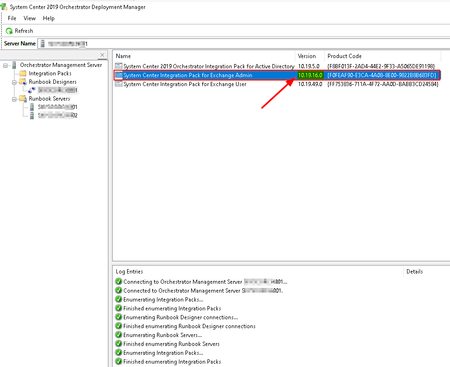
Hi guys, Years ago, I deployed a System Center Orchestrator 2019 cluster with 2 SQL AlwaysOn nodes and 2 orchestrator servers in a Xen Server virtualization environment. I tested System Center 2025 with the 2019 Web API and encountered some bugs, so I decided not to proceed. As we are now migrating from the Xen Server hypervisor to KVM, I deployed a new SC Orchestrator 2019 with RU6 using the latest ISO from VLSC: SW_DVD5_Sys_Ctr_DataCenter_Core_201925H1_MultiLang_-2_Orch_MLF_X24-03831, in the same scenario as before, with 2 SQL AlwaysOn and 2 SC Orchestrator servers 2019. I simply exported all runbooks from the old environment to the new one. However, I am now encountering the following error when executing the same runbooks that work in the legacy environment, I'm using the latest version from IP 2019. Has anyone encountered this issue before? DefaultRunspace must be a LocalRunspace Exception: InvalidOperationException Target site: Runspace.set_DefaultRunspace Stack trace: at System.Management.Automation.Runspaces.Runspace.set_DefaultRunspace(Runspace value) at SystemCenter.IntegrationPack.ExchangeAdmin.Gateway.Core.ExchangeGatewayBase.ExecuteScript(String script) at SystemCenter.IntegrationPack.ExchangeAdmin.Domain.Core.RunPowerShellCommandHandler.ExecuteCommand(ActivityCommand command) at SystemCenter.IntegrationPack.ExchangeAdmin.Domain.ExecuteContext.Execute(ActivityCommand command) at SystemCenter.IntegrationPack.ExchangeAdmin.Activity.RunPowerShellCommandActivity.Execute(IActivityRequest request, IActivityResponse response) # C:\ProgramData\Microsoft System Center 2012\Orchestrator\PolicyModule.exe\Logs Process ID: 6256 Version : http://10.19.236.0/ Computer : SRVCORCH001 User : DOMAIN\scorchsvc 2025-06-09 14:43:05 [7520] 1 Name="Run Exchange Management Shell Cmdlet" ID={59A542C9-FBB 2025-06-09 14:43:12 [7520] 1 Name="Run Exchange Management Shell Cmdlet" ID={59A542C9-FBB6-4ABC-AAF1-0A0C8F992331} DefaultRunspace must be a LocalRunspace Exception: InvalidOperationException Target site: Runspace.set_DefaultRunspace Stack trace: at System.Management.Automation.Runspaces.Runspace.set_DefaultRunspace(Runspace value) at SystemCenter.IntegrationPack.ExchangeAdmin.Gateway.Core.ExchangeGatewayBase.ExecuteScr56Views0likes1CommentRe: Automatic redirection of Exchange ActiveSync On-Pre
Hi Andres-Bohren I would make this change in the files in these directories below, is there any information somewhere so I can read and do some tests? C:\Program Files\Microsoft\Exchange Server\V15\ClientAccess\Autodiscover\web.config C:\Program Files\Microsoft\Exchange Server\V15\ClientAccess\Sync\web.config C:\Program Files\Microsoft\Exchange Server\V15\ClientAccess\exchweb\ews\web.config70Views0likes2CommentsRe: Outlook Android App error occurred during authentication. Please try again later.
Step 1 - I had before posting on this forum, and I can confirm that I got the same error on more than one phone. I cleared the app cache on the phone and tested it, same error. Then I removed the app from the phone and reinstalled it, same error. Finally, I entered the advanced boot mode of Android and cleared the app cache, same problem after reinstall again. Step 2 - All Exchange and Active Directory servers have their SPNs correct. Here is an example: https://learn-attachment.microsoft.com/api/attachments/7ed066d9-ce8c-4dc7-8ac2-9f105fa2d49b?platform=QnA Step 3 - I don't use modern authentication on-premises with OAuth or any third-party authentication. I continue to use the same basic on-premises authentication model in both on-premises Exchange forests. https://learn-attachment.microsoft.com/api/attachments/f5afd0f4-1f96-40f3-a0e6-d63b49e520bd?platform=QnA Step 4 - They all point to the same URL. https://learn-attachment.microsoft.com/api/attachments/8587d99f-4725-45e5-bfb1-43ae475f93ee?platform=QnA Additional steps 1 - Another test I did was, I prepared the account via Prepare-MoveRequest.ps1, ran ADMT, merged the password, didn't copy the SidHistory, moved the mailbox to the new forest, and tried to reconfigure it in the app, but the same error occurred. Additional steps 2 - I have already tried renaming the UPN and reverting to the original UPN, renaming the SamAccountName and reverting to the original, and even changing the UPN to another one. Is there any workaround I can do on the Exchange server side or on the user's app to clear any issues and allow using the email in the username field? For accounts created in the destination environment, it has always been like this. Workaround to configure post-migrated accounts: Email address: login@domain Password: User's forest password Server: FQDN of the NEW on-premises Exchange server Domain: Empty User Name: login@domain (Expected, objective) User Name: DOMAIN\SamAccountName (Workaround, bad config) Note: If I change the user's UPN attribute domain in Active Directory, for example: I rename from email address removed for privacy reasons to email address removed for privacy reasons in the UPN attribute and in the "Username" field I change email address removed for privacy reasons to the email email address removed for privacy reasons, it works. There is something exclusively with this Outlook Mobile App that does not handle the UPN correctly after migration.38Views0likes0CommentsOutlook Android App error occurred during authentication. Please try again later.
Hi, I am migrating mailboxes between on-premises Exchange forests using ADMT automated calls in SC Orchestrator 2019. 1-Prepare-MoveRequest; 2-Migrate-ADMTUser; 3-MoveMailbox; 4-Set-Resources; Problem: Outlook mobile app using ActiveSync does not configure the same account after the mailbox is migrated from the source forest to the target forest with the email address in the "Username" field. Only using DOMAIN\Login or NETBIOS\SamAccountName. This happens with some accounts, but there are cases where it does not happen, even though the migration method is the same for all cases. Error message in the app: Outlook Android App error occurred during authentication. Please try again later. Workaround to configure post-migrated accounts: Email address: login@domain Password: User's forest password Server: FQDN of the NEW on-premises Exchange server Domain: Empty User Name: DOMAIN\SamAccountName PS: I can connect normally with 'Email - Fast & Secure Mail' and 'Gmail App ActiveSync'. This problem doesn't occur, and I can use the email address in the Username field." Troubleshooting performed: Enabled ActiveSync Logging: Set-CASMailbox -Identity "login@domain" -ActiveSyncDebugLogging:$true Get-Mailbox login@domain | Set-User -LinkedMasterAccount $Null Set-CASMailbox login@domain -ActiveSyncBlockedDeviceIDs $null Compared all attributes in Active Directory of an account with issues with another that does not have this problem; Compared all attributes in Exchange Server of an account with issues with another that does not have this problem; Both Exchange Server 2019 in the source and target forest with the latest CU14 and SUv2 from November. The Outlook Android App Support is very very complicated. It practically doesn't exist because no one ever responds.618Views1like3CommentsAutomatic redirection of Exchange ActiveSync On-Pre
I am migrating mailboxes between on-premises Exchange forests using ADMT automated calls in SC Orchestrator 2019. Prepare-MoveRequest Migrate-ADMTUser MoveMailbox Set-Resources Has anyone already done the automatic redirection of Exchange ActiveSync in the following scenario: Moving mailboxes between on-premises Exchange organizations. I know the link below says it is not possible, but I would like to know if anyone has overcome this limitation? https://learn.microsoft.com/pt-br/exchange/activesync-settings194Views0likes4CommentsRe: The input object cannot be bound to any parameters for the command either because the command does
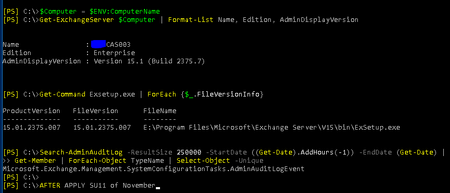
This server the "TypeName" was correct and the script is worked fine, now after to apply SU11 of November, now broken my script, how to se to "Microsoft.Exchange.Management.SystemConfigurationTasks.AdminAuditLogEvent" again? Search-AdminAuditLog -ResultSize 250000 -StartDate ((Get-Date).AddHours(-1)) -EndDate (Get-Date) | Get-Member | ForEach-Object TypeName | Select-Object -Unique14KViews0likes1CommentThe input object cannot be bound to any parameters for the command either because the command does
Hi guys, I've always run the script below since exchange server 2013 and after applying the exchange server 2019 CU11 and exchange server 2016 CU22 updates I've been getting the error below. I tried in various ways to get around and was not successful in getting around this situation. Can someone help me please? param( [Parameter(Position=0, Mandatory=$true)] $To, [Parameter(Position=1, Mandatory=$true)] $From, [Parameter(Position=2, Mandatory=$true)] $SmtpServer ) function New-AuditLogReport { [CmdletBinding()] param( [Parameter(Position=0, Mandatory=$true, ValueFromPipeline=$true)] [Deserialized.Microsoft.Exchange.Management.SystemConfigurationTasks.AdminAuditLogEvent] $AuditLogEntry ) begin { $css = @' <style type="text/css"> body { font-family: Tahoma, Geneva, Verdana, sans-serif;} table {border-collapse: separate; background-color: #F2F2F2; border: 3px solid #103E69; caption-side: bottom;} td { border:1px solid #103E69; margin: 3px; padding: 3px; vertical-align: top; background: #F2F2F2; color: #000;font-size: 12px;} thead th {background: #903; color:#fefdcf; text-align: left; font-weight: bold; padding: 3px;border: 1px solid #990033;} th {border:1px solid #CC9933; padding: 3px;} tbody th:hover {background-color: #fefdcf;} th a:link, th a:visited {color:#903; font-weight: normal; text-decoration: none; border-bottom:1px dotted #c93;} caption {background: #903; color:#fcee9e; padding: 4px 0; text-align: center; width: 40%; font-weight: bold;} tbody td a:link {color: #903;} tbody td a:visited {color:#633;} tbody td a:hover {color:#000; text-decoration: none; } </style> '@ $sb = New-Object System.Text.StringBuilder [void]$sb.AppendLine($css) [void]$sb.AppendLine("<table cellspacing='0'>") [void]$sb.AppendLine("<tr><td colspan='6'><strong>Hosted Exchange 2019 Administrator Audit Log Report for $((get-date).ToShortDateString())</strong></td></tr>") [void]$sb.AppendLine("<tr>") [void]$sb.AppendLine("<td><strong>Caller</strong></td>") [void]$sb.AppendLine("<td><strong>Run Date</strong></td>") [void]$sb.AppendLine("<td><strong>Succeeded</strong></td>") [void]$sb.AppendLine("<td><strong>Cmdlet</strong></td>") [void]$sb.AppendLine("<td><strong>Parameters</strong></td>") [void]$sb.AppendLine("<td><strong>Object Modified</strong></td>") [void]$sb.AppendLine("</tr>") } process { [void]$sb.AppendLine("<tr>") [void]$sb.AppendLine("<td>$($AuditLogEntry.Caller.split("/")[-1])</td>") [void]$sb.AppendLine("<td>$($AuditLogEntry.RunDate.ToString())</td>") [void]$sb.AppendLine("<td>$($AuditLogEntry.Succeeded)</td>") [void]$sb.AppendLine("<td>$($AuditLogEntry.cmdletname)</td>") $cmdletparameters += $AuditLogEntry.cmdletparameters | %{ "$($_.name) : $($_.value)<br>" } [void]$sb.AppendLine("<td>$cmdletparameters</td>") [void]$sb.AppendLine("<td>$($AuditLogEntry.ObjectModified)</td>") [void]$sb.AppendLine("</tr>") $cmdletparameters = $null } end { [void]$sb.AppendLine("</table>") Write-Output $sb.ToString() } } Send-MailMessage -To $To ` -From $From ` -Subject "Exchange Audit Log Report for $((get-date).ToShortDateString())" ` -Body (Search-AdminAuditLog -ResultSize 250000 -StartDate ((Get-Date).AddHours(-1)) -EndDate (Get-Date) | New-AuditLogReport) ` -SmtpServer $SmtpServer ` -BodyAsHtml This server the "TypeName" is correct and the script is working fine. Search-AdminAuditLog -ResultSize 250000 -StartDate ((Get-Date).AddHours(-1)) -EndDate (Get-Date) | Get-Member | ForEach-Object TypeName | Select-Object -Unique Microsoft.Exchange.Management.SystemConfigurationTasks.AdminAuditLogEvent Another Exchange server is different: <Deserialized.*> Search-AdminAuditLog -ResultSize 250000 -StartDate ((Get-Date).AddHours(-1)) -EndDate (Get-Date) | Get-Member | ForEach-Object TypeName | Select-Object -Unique Deserialized.Microsoft.Exchange.Management.SystemConfigurationTasks.AdminAuditLogEvent How can I serialize again this AdminAuditLogEvent class Powershell? https://docs.microsoft.com/en-us/previous-versions/exchange-server/exchange-150/ff330129(v=exchg.150)?redirectedfrom=MSDN Thanks!15KViews0likes3CommentsAnonymous Calendar Sharing URL in Exchange is not working between Exchange 2016/2019 coexistence
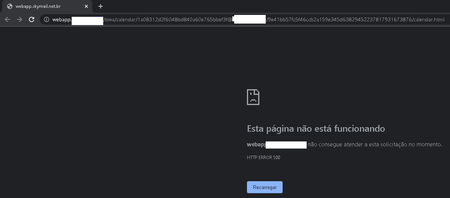
Hi guys, (Scenery) I have 4 Exchange Servers 2016 CU22 Frontend; Only CAS Function | CAS Role I have 6 Exchange Servers 2019 CU9 Backend; Only MBX Function | MBX Role (Flow) Internet ==> HLB (Hardware Load Balancer) ==> CAS ==> MBX PS: Exchange Server 2016 CU22 is kept as CAS Role to maintain compatibility with older email clients. All users when accessing shared calendar settings get this error <HTTP ERROR 500> below using Exchange Server 2016 CU22 with proxy function. But. if i access directly through an Exchange Server 2019 CU9, the feature works perfectly. Follow the configuration: Any ideas guys? T864Views0likes0Comments


Recent Blog Articles
No content to show