orchestrator
19 TopicsModernize Any Integration Platform to Azure Logic Apps Standard with the Logic Apps Migration Agent
Explore the open-source Logic Apps Migration Agent Enterprise integration is entering a new era Enterprise integration platforms have powered business-critical processes for decades. They connect applications, data, partners, devices, and industries, often carrying transactions that an organization cannot afford to interrupt. Expectations have changed. Organizations want cloud-native architectures, AI-assisted automation, stronger governance, improved developer productivity, and faster response to business change. Yet many integration estates contain years of accumulated dependencies, custom code, transformations, operational procedures, and platform-specific knowledge. The challenge is not simply moving an orchestration or flow from one runtime to another. This is not lift and shift. It is a refactoring exercise that preserves business intent and expected behavior while translating source-platform constructs into cloud-ready workflows, connectors, code, operational patterns, and deployment practices for Azure Logic Apps Standard. That is why we created the Logic Apps Migration Agent. Introducing the Logic Apps Migration Agent: An Open-source project to provide an AI End-to-End Modernization Experience The Logic Apps Migration Agent is an open-source Visual Studio Code extension that provides an AI-assisted, end-to-end modernization experience. It uses GitHub Copilot and the Visual Studio Code Language Model API to guide teams through a structured five-stage workflow, while keeping people in control at every stage. Rather than treating modernization as a single conversion step, the agent helps teams discover what they have, understand dependencies, design an appropriate target, generate baseline implementation artifacts, validate expected behavior, and prepare the solution for deployment to Azure Logic Apps Standard. Refactor the implementation, preserve the business intent Lift and shift attempts to reproduce the source platform as closely as possible in a new environment. That approach can carry forward legacy topology, operational assumptions, platform-specific patterns, and technical debt. The Migration Agent supports a different outcome. It uses the source implementation as evidence of the required business behavior, then helps teams design and generate an appropriate Logic Apps Standard implementation. Some components may map directly, while others require restructuring, consolidation, decomposition, replacement, or custom implementation. The objective is functional and semantic continuity, not structural duplication. A successful migration should preserve contracts, transformations, routing rules, ordering requirements, error behavior, and essential business outcomes while allowing the target solution to adopt Azure-native identity, connectivity, observability, resiliency, deployment, and operating practices. Preserve what the integration must do. Refactor how it does it. Start by understanding what you have For many organizations, discovery is one of the most difficult parts of modernization. Documentation may be incomplete, original developers may no longer be available, and relationships between applications, endpoints, schemas, maps, pipelines, and custom components may be difficult to reconstruct. The Migration Agent scans the source project, catalogs supported artifacts, organizes related components into flow groups, and identifies dependencies and migration gaps. It can also generate architecture and message-flow visualizations for review before conversion begins. This discovery output becomes the foundation for migration sequencing, refactoring decisions, effort discussions, and risk management. Use AI to accelerate the work, not remove accountability The Migration Agent uses specialized GitHub Copilot agents for analysis, planning, and conversion. AI helps interpret source artifacts, propose mappings, create task plans, and generate baseline Logic Apps artifacts. Enterprise integration, however, requires more than plausible code generation. Human-in-the-loop checkpoints let teams review discovered flows, resolve missing dependencies, reshape the proposed architecture, approve conversion plans, and validate generated behavior before progressing. This combines the speed of AI assistance with the governance and technical review required for mission-critical integration. Modernize incrementally and reduce migration risk Large integration estates do not need a single big-bang program. The Migration Agent organizes work into logical flow groups so teams can refactor one business capability or integration path at a time. Prioritize workloads by business value, risk, complexity, or platform urgency. Validate target architecture and operating patterns with a representative first migration. Run phased cutovers and coexistence strategies when required. Apply reusable refactoring patterns, templates, and engineering standards to subsequent waves. A phased approach helps teams build experience with Azure Logic Apps while reducing migration risk and preserving delivery momentum. Bring your own tests and validate continuously Migration confidence depends on behavior, not structural similarity. The agent supports validation using source specifications, sample files, test cases, and customer-provided black-box tests. This helps compare expected inputs and outputs and identify semantic differences earlier. Generated artifacts are a baseline. Domain-specific transformations, error-handling behavior, performance characteristics, security controls, and edge cases still require customer and partner expertise. Built for BizTalk today and extensible for other platforms BizTalk Server 2016 and BizTalk Server 2020 are the first fully implemented source platforms. MuleSoft Anypoint support is represented as an in-progress built-in parser. The architecture is open and extensible so contributors can add parsers and platform-specific migration capabilities for other integration technologies. That extensibility is central to the vision. A common modernization workflow can help teams apply consistent governance, target patterns, refactoring practices, and validation across mixed integration estates. Why Azure Logic Apps Standard? Azure Logic Apps Standard provides a modern destination with a local project structure, Visual Studio Code development experience, source-control alignment, CI/CD support, stateful and stateless workflows, enterprise connectivity, and Azure and hybrid deployment options. Modernization is not about reproducing a legacy topology component by component. The target design should be optimized for Logic Apps Standard rather than constrained by the source architecture. The migration preserves valuable business logic while refactoring the implementation around modern practices for identity, networking, observability, reliability, deployment, and operations. What your team should still own The Migration Agent accelerates repeatable work, but it does not replace the decisions that define a production-ready integration platform. Responsibility Refactoring focus Target architecture Refactor application and workflow boundaries for Logic Apps Standard. Select reliability, networking, deployment, and supporting Azure patterns rather than copying the source topology. Semantic equivalence Validate contracts, mappings, transformations, business rules, error behavior, ordering, retries, and edge cases. Capability gaps Redesign source capabilities without direct equivalents using connectors, custom code, local functions, API Management, Service Bus, or other appropriate Azure patterns. Production hardening Implement identity, secrets management, security policies, monitoring, cost controls, performance testing, resiliency, and operational ownership. Cutover and coexistence Plan backlog reconciliation, dual-run periods, data consistency, partner coordination, rollback, and decommissioning. More mission critical features for Logic Apps Standard and Hybrid We are weeks away from shipping the following features, aimed at any customers in the Enterprise Application Integration space: HL7 In-App operations in general availability. MLLP Receive/Send In-App connector in Public Preview. Rules Engine In-App operation for XML facts in Public Preview. MSMQ In-App connector in Public Preview. Oracle DB In-App connector in Public Preview. Flat File generation In-App operations in Public Preview. Integration accounts support (Hybrid On premises). NMS In-App connector in Public Preview. Improvements to our EDI capabilities. BizTalk Mapper to Data Mapper Migration path What about other integration platforms? Yes—the Logic Apps Migration Agent is designed to be customizable so you can migrate from any integration platform to Logic Apps (not just BizTalk). The open architecture lets you plug in new discovery, analysis, and conversion skills for the source product you’re modernizing, while keeping the same stage-gated workflow and human-in-the-loop checkpoints. We provide guidance and examples to help you extend the agent for other platforms than BizTalk —so you can tailor mappings, transformation rules, and validation to your customer’s standards and target patterns in Logic Apps. Benefits Faster time to value with a guided process: A structured discovery→planning→conversion workflow reduces uncertainty and helps teams move from assessment to execution with clear checkpoints. Higher confidence migrations: Human-in-the-loop validation, artifacts generation, and black-box testing support mission‑critical correctness and governance. Customizable for your source platform and standards: Extend the agent with product-specific discovery and conversion steps, tailor mappings and transformation rules, and align outputs with your target Logic Apps patterns and engineering conventions. Open-source transparency and control: Review how the tool works end-to-end, validate what it produces, and adopt changes at your pace without waiting for a closed release cycle. Community-driven innovation: Benefit from contributions across Microsoft, partners, and customers—new adapters, mapping packs, and best practices can be shared and reused. Lower total migration cost: Automating repeatable tasks reduces manual effort while preserving the ability to invest partner expertise where it matters most (architecture, governance, reliability, and operations). Reusable accelerators for partners: Partners can create differentiated offerings by packaging templates, validation suites, CI/CD pipelines, and domain-specific patterns on top of the agent. An accelerator for customers and partners For customers, the Migration Agent provides a practical starting point and a consistent process for moving from assessment to a refactored implementation. For professional services organizations and system integrators, the agent augments delivery rather than replacing it. Automating inventory, analysis, baseline generation, and validation scaffolding allows experts to focus on architecture, governance, security, reliability, domain-specific transformation, DevOps, performance, cutover, and operating-model change. Because the project is open source, partners can contribute parsers or package reusable templates, mapping packs, test suites, CI/CD assets, and industry-specific modernization patterns. Review our public documentation here: https://learn.microsoft.com/en-us/azure/logic-apps/migration/migration-agent-overview How to get started Download VSCode and install the Logic Apps Migration Agent extension. Organize source projects and dependencies in a clear directory structure. Include project files, bindings, schemas, maps, pipelines, orchestrations, custom code, configuration, certificates or certificate references, and available documentation. Once you have all your artifacts ready, point the Migration Agent to the directory with all the artifacts. Review every migration stage. Confirm the discovered architecture, resolve missing dependencies, and refine the target design before authorizing conversion. Prepare a representative test environment. The workstation running Visual Studio Code must be able to reach the systems needed for local or end-to-end validation. Bring known inputs, expected outputs, specifications, and existing test cases whenever possible. These materials improve validation and reduce ambiguity. Treat the first migration as a reusable foundation. Capture architecture patterns, naming standards, deployment templates, observability practices, and lessons that can accelerate subsequent waves. Use Claude Opus 4.8 or higher. Make sure you increase the Maximum number of requests for the Copilot Chat as follows (we recommend changing the value from 60 to 1000) Check the following video for a demonstration on how the Agent works and let us know if you have any questions in the comments.2.4KViews2likes1CommentMicrosoft BizTalk Server Product Lifecycle Update
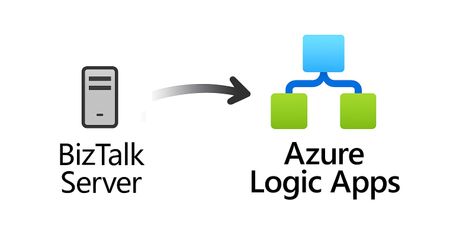
For more than 25 years, Microsoft BizTalk Server has supported mission-critical integration workloads for organizations around the world. From business process automation and B2B messaging to connectivity across industries such as financial services, healthcare, manufacturing, and government, BizTalk Server has played a foundational role in enterprise integration strategies. To help customers plan confidently for the future, Microsoft is sharing an update to the BizTalk Server product lifecycle and long-term support timelines. BizTalk Server 2020 will be the final version of BizTalk Server. Guidance to support long-term planning for mission-critical workloads This announcement does not change existing support commitments. Customers can continue to rely on BizTalk Server for many years ahead, with a clear and predictable runway to plan modernization at a pace that aligns with their business and regulatory needs. Lifecycle Phase End Date What’s Included Mainstream Support April 11, 2028 Security + non-security updates and Customer Service & Support (CSS) support Extended Support April 9, 2030 CSS support, Security updates, and paid support for fixes (*) End of Support April 10, 2030 No further updates or support (*) Paid Extended Support will be available for BizTalk Server 2020 between April 2028 and April 2030 for customers requiring hotfixes for non-security updates. CSS will continue providing their typical support. BizTalk Server 2016 is already out of mainstream support, and we recommend those customers evaluate a direct modernization path to Azure Logic Apps. Continued Commitment to Enterprise Integration Microsoft remains fully committed to supporting mission-critical integration, including hybrid connectivity, future-ready orchestration, and B2B/EDI modernization. Azure Logic Apps, part of Azure Integration Services — which includes API Management, Service Bus, and Event Grid — delivers the comprehensive integration platform for the next decade of enterprise connectivity. Host Integration Server: Continued Support for Mainframe Workloads Host Integration Server (HIS) has long provided essential connectivity for organizations with mainframe and midrange systems. To ensure continued support for those workloads, Host Integration Server 2028 will ship as a standalone product with its own lifecycle, decoupled from BizTalk Server. This provides customers with more flexibility and a longer planning horizon. Recognizing Mainframe modernization customers might be looking to integrate with their mainframes from Azure, Microsoft provides Logic Apps connectors for mainframe and midrange systems, and we are keen on adding more connectors in this space. Let us know about your HIS plans, and if you require specific features for Mainframe and midranges integration from Logic Apps at: https://aka.ms/lamainframe Azure Logic Apps: The Successor to BizTalk Server Azure Logic Apps, part of Azure Integration Services, is the modern integration platform that carries forward what customers value in BizTalk while unlocking new innovation, scale, and intelligence. With 1,400+ out-of-box connectors supporting enterprise, SaaS, legacy, and mainframe systems, organizations can reuse existing BizTalk maps, schemas, rules, and custom code to accelerate modernization while preserving prior investments including B2B/EDI and healthcare transactions. Logic Apps delivers elastic scalability, enterprise-grade security and compliance, and built-in cost efficiency without the overhead of managing infrastructure. Modern DevOps tooling, Visual Studio Code support, and infrastructure-as-code (ARM/Bicep) ensure consistent, governed deployments with end-to-end observability using Azure Monitor and OpenTelemetry. Modernizing Logic Apps also unlocks agentic business processes, enabling AI-driven routing, predictive insights, and context-aware automation without redesigning existing integrations. Logic Apps adapts to business and regulatory needs, running fully managed in Azure, hybrid via Arc-enabled Kubernetes, or evaluated for air-gapped environments. Throughout this lifecycle transition, customers can continue to rely on the BizTalk investments they have made while moving toward a platform ready for the next decade of integration and AI-driven business. Charting Your Modernization Path Microsoft remains fully committed to supporting customers through this transition. We recognize that BizTalk systems support highly customized and mission-critical business operations. Modernization requires time, planning, and precision. We hope to provide: Proven guidance and recommended design patterns A growing ecosystem of tooling supporting artifact reuse Unified Support engagements for deep migration assistance A strong partner ecosystem specializing in BizTalk modernization Potential incentive programs to help facilitate migration for eligible customers (details forthcoming) Customers can take a phased approach — starting with new workloads while incrementally modernizing existing BizTalk deployments. We’re Here to Help Migration resources are available today: Overview: https://aka.ms/btmig Best practices: https://aka.ms/BizTalkServerMigrationResources Video series: https://aka.ms/btmigvideo Feature request survey: https://aka.ms/logicappsneeds Reactor session: Modernizing BizTalk: Accelerate Migration with Logic Apps - YouTube Migration Agent (Complete refactoring from BizTalk to Logic Apps): Bringing all your Integration workloads to Logic Apps Standard | Microsoft Community Hub We encourage customers to engage their Microsoft accounts team early to assess readiness, identify modernization opportunities, and explore assistance programs. Your Modernization Journey Starts Now BizTalk Server has played a foundational role in enterprise integration success for more than two decades. As you plan ahead, Microsoft is here to partner with you every step of the way, ensuring operational continuity today while unlocking innovation tomorrow. To begin your transition, please contact your Microsoft account team or visit our migration hub. Thank you for your continued trust in Microsoft and BizTalk Server. We look forward to partnering closely with you as you plan the future of your integration platforms. Frequently Asked Questions Do I need to migrate now? No. BizTalk Server 2020 is fully supported through April 11, 2028, with paid Extended Support available through April 9, 2030, for non-security hotfixes. CSS will continue providing their typical support. You have a long and predictable runway to plan your transition. Will there be a new BizTalk Server version? No. BizTalk Server 2020 is the final version of the product. What happens after April 9, 2030? BizTalk Server will reach End of Support, and security updates or technical assistance will no longer be provided. Workloads will continue running but without Microsoft servicing. Is paid support available past 2028? Yes. Paid extended support will be available through April 2030 for BizTalk Server 2020 customers looking for non-security hotfixes. CSS will continue to provide the typical support. What is the end of sale date for BizTalk Server? We will announce an end of sale date for BizTalk Server on July 2026. What about BizTalk Server 2016 or earlier versions? Those versions are already out of mainstream support. We strongly encourage moving directly to Logic Apps rather than upgrading to BizTalk Server 2020. Will Host Integration Server continue? Yes. Host Integration Server (HIS) 2028 will be released as a standalone product with its own lifecycle and support commitments. Can I reuse BizTalk Server artifacts in Logic Apps? Yes. Most of BizTalk maps, schemas, rules, assemblies, and custom code can be reused with minimal effort using Microsoft and partner migration tooling. We welcome feature requests here: https://aka.ms/logicappsneeds Does modernization require moving fully to the cloud? No. Logic Apps supports hybrid deployments for scenarios requiring local processing or regulatory compliance, and fully disconnected environments are under evaluation. More information of the Hybrid deployment model here: https://aka.ms/lahybrid. Does modernization unlock AI capabilities? Yes. Logic Apps enables AI-driven automations through Agent Loop, improving routing, decisioning, and operational intelligence. Where do I get planning support? Your Microsoft account team can assist with assessment and planning. Migration resources are also linked in this announcement to help you get started. Microsoft Corporation
Productize, observe, version, and automate MCP servers in Azure API Management
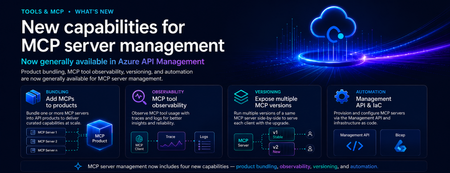
Introduction As organizations move from AI-assisted applications to agentic workflows, MCP servers are becoming a critical integration layer between agents, tools, APIs, data sources, and enterprise systems. Azure API Management already helps teams bring MCP servers under enterprise governance. But as MCP adoption scales, platform teams need more than basic exposure. They need a way to package MCP servers for the right consumers, understand tool usage in detail, manage changes safely, and automate configuration across environments. These are familiar API management challenges — and the same patterns that organizations already use for APIs can now be applied more deeply to MCP servers. We are excited to announce new generally available capabilities for MCP server management in Azure API Management: Add MCP servers to products to package and govern MCP capabilities for specific consumers MCP tool observability to trace tool usage, logs, errors, and payload context MCP server versioning to run multiple versions side by side and manage change safely Management API and Bicep support to automate MCP server configuration as part of CI/CD workflows Together, these capabilities extend MCP server management in Azure API Management and help make MCP servers first-class managed resources — productized, observable, versionable, and automatable. Why MCP server management matters MCP gives agents a standard way to connect with tools and external capabilities. That standardization is powerful, but it also introduces a new operational surface for enterprises. Without a management layer, teams can quickly run into questions such as: Which MCP servers are approved for use? Who can access each server? How do we expose MCP servers to different developer or agent audiences? How do we monitor tool calls, latency, errors, and cost? How do we run preview and production versions side by side? How do we automate MCP server configuration across environments? These are not just developer experience questions. They are enterprise governance questions. With Azure API Management, MCP servers can now be managed using the same core patterns organizations already use for APIs: products, subscriptions, policies, observability, versioning, and automation. What’s new 1. Add MCP servers to products Azure API Management products are a proven way to package APIs for consumption. With this release, you can now add one or more MCP servers to APIM products as well. This makes it easier to expose MCP capabilities to specific consumers, teams, applications, or agent experiences using familiar product-based governance. For example, a platform team can create a product for internal agents that includes approved MCP servers such as: Customer profile lookup Order status retrieval Knowledge base search Ticket creation Workflow automation tools By adding MCP servers to products, teams can use familiar controls such as subscriptions, quotas, approval workflows, and access management to govern how MCP capabilities are consumed. Why it matters: MCP servers are no longer isolated endpoints. They can be bundled, governed, and delivered as secure, consumable products. 2. MCP tool observability As agents use MCP servers to discover and invoke tools, teams need more than basic traffic visibility. They need end-to-end trace context for each agent-to-tool interaction. With MCP observability in Azure API Management, teams can inspect key MCP-specific details, including: Operation context: whether the request was a tools/list or tools/call operation Session context: the MCP session ID through gen_ai.conversation.id Client context: MCP client name and version Protocol context: MCP protocol name and version Server context: MCP server name and version Access context: authentication type and API type Tool context: tool name and tool type for tool invocation traces Error context: error type and error message when a call fails Payload context: tool invocation arguments and results when payload logging is enabled This is especially important for agentic workflows, where a single user request may trigger multiple tool calls across different systems. With APIM, MCP traffic can be traced, inspected, and monitored using the same operational practices teams already use across their API estate. Why it matters: MCP servers are not just accessible through APIM — they are observable. Platform teams can trace tool calls, inspect errors, and understand MCP usage with the same operational discipline they expect from managed APIs. 3. Expose multiple MCP versions Enterprise teams need safe ways to evolve MCP servers over time. With MCP server versioning in Azure API Management, you can expose multiple versions of the same MCP server side by side. This allows teams to run a stable GA version while introducing a preview or next version for early adopters. For example: v1 can serve the majority of production traffic. v2 can be exposed to a subset of consumers for testing. Teams can monitor adoption, errors, latency, and behavior. Once the new version is validated, v2 can be promoted with confidence. This pattern is especially useful when MCP tools evolve, schemas change, new capabilities are added, or teams want to validate agent behavior before rolling changes out broadly. Why it matters: MCP servers can now follow a safer lifecycle model: preview, validate, route, promote, and retire. 4. Management API and Infrastructure as Code MCP server management also needs to work at enterprise scale. With Management API and Infrastructure as Code support, teams can provision and configure MCP servers programmatically through Azure API Management APIs and automation pipelines. This allows platform teams to define MCP server resources as part of repeatable deployment workflows using tools such as Bicep, Terraform, ARM, REST APIs, and CI/CD pipelines. Teams can automate configuration for: MCP server endpoints Runtime and transport settings Authentication configuration Metadata and ownership Versioning Product association Policies Environment promotion This is critical for organizations that need consistent MCP governance across development, test, staging, and production environments. Why it matters: MCP server management can now be automated, reviewed, deployed, and governed like the rest of your API platform. How these capabilities work together Individually, each capability solves an important operational need. Together, they create a complete management model for MCP servers in Azure API Management. A platform team can: Register or expose MCP servers through Azure API Management. Package them into products for specific consumers. Apply access controls, subscriptions, quotas, and policies. Observe tool-level usage, latency, errors, traces, and cost. Run multiple versions side by side. Promote changes safely. Automate deployment through APIs and Infrastructure as Code. This brings the full API management playbook to MCP. Instead of treating MCP servers as unmanaged agent extensions, organizations can operate them as governed enterprise resources. Example scenario Imagine a company building internal copilots for customer support, sales, and operations. Each copilot needs access to different tools: Customer lookup Order history Case management Knowledge search Refund workflows Escalation workflows With MCP and Azure API Management, the platform team can expose these capabilities as MCP servers and organize them into products. The customer support copilot can subscribe to the support product. The sales copilot can subscribe to the sales product. Early adopters can be routed to a preview version of a tool. Operations teams can monitor usage, errors, latency, traces, and cost. Platform teams can automate the entire setup across environments. The result is a more governed and scalable way to bring MCP-based tools into enterprise agent workflows. Getting started To get started with MCP server management in Azure API Management: Create or identify an MCP server you want to expose through Azure API Management. Add the MCP server as a managed resource in APIM. Add the MCP server to an APIM product. Configure access, subscriptions, quotas, and approval workflows. Enable observability to monitor tool-level usage and traces. Use versioning to manage preview and production versions. Use the Management API or Infrastructure as Code to automate configuration. Conclusion MCP is quickly becoming an important standard for connecting agents to tools and enterprise capabilities. But for MCP to succeed in production, organizations need more than connectivity. They need governance, lifecycle management, observability, and automation. With these new MCP server management capabilities in Azure API Management, platform teams can manage MCP servers using the same trusted patterns they already use for APIs. MCP servers are now first-class APIM resources — productized, observable, versionable, and automatable. We are excited to see how customers use these capabilities to build the next generation of governed, enterprise-ready agentic applications.
Orchestrator Scheduling Challenge
Hi. I've been using SC orchestrator for almost a decade now. However, not until today have I needed to run something hourly and on the hour. Presently, when I configure this, in the "Monitor Date/Time activity I specify 0 days, 1 hour, and 0 minutes. Then I check the "Starting" checkbox and enter 0 for "minutes after the hour". Press finish, and come back in and it's unchecked. How can I schedule my hourly job to run at the hour mark? I have a workaround to run at the 1 minute after the hour mark, but that's ... not what we really want.584Views1like1CommentUnable to update Service request via SCO runbook
Good afternoon, Everyone, I’ve started developing a series of runbooks for our new service desk implementation, and one of the key requirements is the ability to automatically update Service Requests and other work items during the workflow. However, I’m running into an issue when attempting to pass the GUID of the Service Request into the “Update Object” activity. Even though the GUID is successfully retrieved from the Service Request and passed into the runbook as an input parameter, the activity reports that the value is an invalid GUID. This suggests that either the GUID is being transformed somewhere in the process, isn’t being interpreted correctly by the activity, or the wrong property is being supplied even though the value appears correct when inspected within the runbook. At this stage, I’m trying to determine whether the issue is caused by the way SCSM exposes the GUID, how the runbook passes the parameter, or a limitation quirk within the Update Object activity itself. Any guidance or examples of correctly updating Service Requests via runbooks especially when using GUID values dynamically would be greatly appreciated.267Views0likes0Comments
Orchestrator 2025 Security Credentials Problem
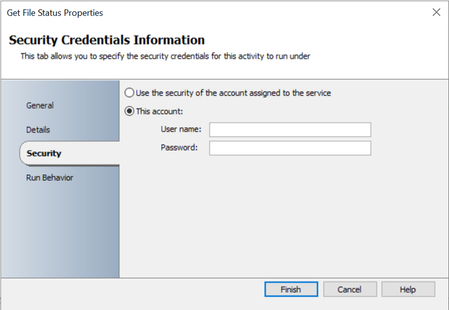
Hi, I’m experiencing an issue in SCO 2025 that has occurred across three different installations. In the Text File Management and File Management IPs, I’m unable to save the security credentials information for the activities. In other activities, such as Get Service Status, it works as expected. If I enter the account information, click Finish, and then reopen the properties, the fields are empty. As a result, the activity runs using the service account specified for the Orchestrator Runbook Service. Has anyone else experienced the same issue, or could there be something wrong with my installations? Get file status: Get service status:285Views0likes0Comments
果博东方开户+威a3322148
DPM 2019, using SQL 2019 on a 2019 server. The server was doing a consistency check on a file server. The check lasted about 33 hours and the items scanned showed over 4 million. There is no way a server could have 1 million files and folders, let alone 4 million. Does anyone know why the number of items scanned would be so high?172Views4likes0CommentsSystem Center Orchestrator - OS Upgrade
Hello community, I am asking for your help to see how we can do an OS upgrade of our System Center Orchestrator infrastructure. We have our System Center Orchestrator 2019 infrastructure on Windows Server 2016. I would like to upgrade to Windows Server 2022. What is the best way to do this? I would like to use new servers and not do an in-place upgrade. What would be the procedure? Is SCORCH 2019 supported on 2022? I don't see it in the documentation. Thank you very much!!398Views0likes0Comments
Issue map prompts to properties
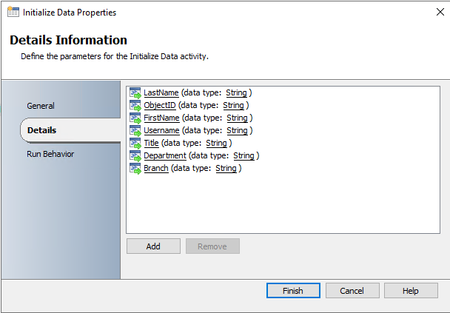
Hi, I am trying to create a new user account runbook so it can be used in the Self Service Portal. I start my runbook with an initialization of data and the following details: I have created my Service Request template and my Runbook automation activity template. In my Request Offering, I can map LastName, FirstName, etc., but I am not able to map Branch. What could be the issue? I need to know in which branch they work and I want it to be a simple list so they can choose from it. Please let me know if more information is required. Thanks for the help 🙂358Views0likes0CommentsSystem Center Orchestrator 2022 - VmWare Vsphere Integration Pack
Hello community, We use System Center Orchestrator 2019 with VmWare VSphere Integration Pack. We would like to upgrade to version 2022, but the integration pack does not seem compatible. Do you have any information about that? Is the integration pack is in development, ot it will not be released? Regards,Solved1.1KViews0likes3Comments