User Profile

FabioO365GoD
Brass Contributor
Joined Feb 19, 2020


User Widgets
Recent Discussions
Re: CSOM SystemUpdate() cannot update Editor field
dzorzi Hi, you should use SP.FieldUserValue.fromUser('i:0#.f|membership|email address removed for privacy reasons') you have to get the LoginName from the user Example var context = SP.ClientContext.get_current(); var list = context.get_web().get_lists().getByTitle(listTitle); var itemCreateInfo = new SP.ListItemCreationInformation(); var listItem = list.addItem(itemCreateInfo); listItem.set_item("Title", "Item Test User"); listItem.set_item("Author", SP.FieldUserValue.fromUser("i:0#.f|membership|email address removed for privacy reasons")); listItem.update(); context.executeQueryAsync( function () { console.log("Request has been created"); }, function logError(sender, args) { console.log(args.get_message()); } ); Thanks2.1KViews0likes0CommentsRe: Use SVG in signature
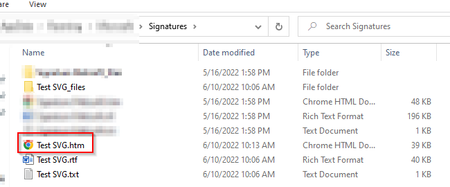
sdudnic to use an SVG you need to change the HTML of the signature https://lazyadmin.nl/office-365/outlook-html-signature/ but you have to post the image otherwise, whoever receives your email does not have the possibility to see the image I suggest you convert it to base64 https://codebeautify.org/svg-to-base64-converter Thank u43KViews0likes6CommentsRe: Use SVG in signature
rubenlourens Hi So you should go to the following link: https://www.base64-image.de/ Then you should do the drag and drop as you see in the picture Then copy the code of the picture and paste it in the following string <img src="[[HERE]]" /> Create an html page and paste the following string <img src="[[HERE]]" /> Open page with browser: command + a --> select all command + c --> copy and command + v --> paste in signature I hope I have been helpful Thanks50KViews0likes8CommentsRe: Sharepoint Online, number column NOT aligned right
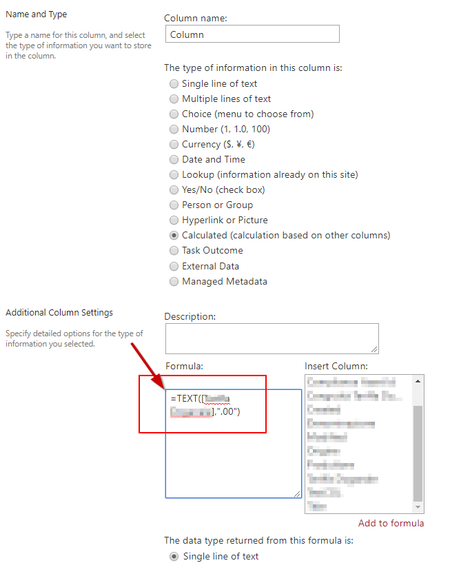
Sinan621 I'm sorry but it takes more steps! Sharepoint doesn't have the possibility to set decimal numbers. As first thing to do you need to create a column, computed with the following formula: =TEXT([column],".00") Then insert the following code { "$schema": "https://developer.microsoft.com/json-schemas/sp/column-formatting.schema.json", "elmType": "div", "style": { "display": "table", "width": "100%" }, "children": [ { "elmType": "div", "txtContent": "@currentField", "style": { "display": "table-cell", "text-align": "right", "vertical-align": "middle" } } ] } Thanks20KViews2likes11CommentsRe: Sharepoint Online, number column NOT aligned right
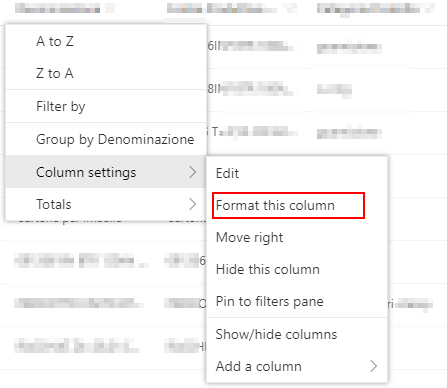
Sinan621 Hi Default Sharepoint aligns left! If you want to align the text to the right, you should copy the following code and paste it in the JSON Formatting to Customize { "$schema": "https://developer.microsoft.com/json-schemas/sp/column-formatting.schema.json", "elmType": "div", "style": { "display": "table", "width": "100%" }, "children": [ { "elmType": "div", "txtContent": "@currentField", "style": { "display": "table-cell", "text-align": "right", "vertical-align": "middle" } } ] } Thanks20KViews2likes13CommentsRe: How to restrict access to SharePoint List
Hi AndersIskov As an administrator or owner of a library, list, or survey, you can change permissions to let the right people access the data they need data while restricting others. Check if you have full control permissions! Thank14KViews0likes3Comments

Recent Blog Articles
No content to show