User Profile

Nishkarsh31
Brass Contributor
Joined Jan 18, 2020


User Widgets
Recent Discussions
Can we compare values between two identical table and generate a new table with the differences?
I've attached the file with sample data, I'm okay with either a power query or a vba solution I have a total of two tables, 1: Minimum selling Price with just one fixed row 2: Price table, with ever expanding rows (Clients) and columns (Products) Since actual data rows are above 1000, and columns above 100, it's hard for me to manually identify who is below the MSP. Can we have a query or vba, who can conditionally format a red colour for all the product prices which are below the MSP? Also, just as a bonus if the query can also sort the cleints based on their total billing amount? SergeiBaklan Riny_van_Eekelen PeterBartholomew11.7KViews0likes4CommentsHow to expand table in a protected sheet using VBA?
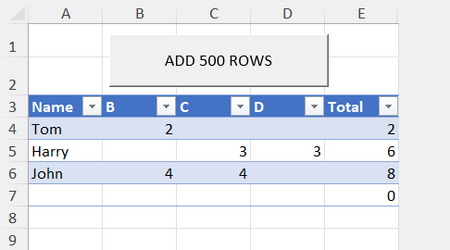
I have a table with one protected column and few columns where I can add data. Since I don't want to delete any formula or rename any header by mistake. I wanna protect the sheet, but then the table doesn't expand on its own, with the last row entry I'm attaching a sample file. Can someone help me with the macro? Assuming that I can always expland the columns ( B, C, D) where I need to enter data PeterBartholomew1 SergeiBaklan HansVogelaarSolved1.6KViews0likes2CommentsMicrosoft 365 recently removed maps from my version. Is it a glitch? If not I'm disappointed.
I had office 365 Home subscription which is now Microsoft 365 and had access to maps, I was using it to plots sales country wise. I had the map working fine till an hour ago and just now the chart and the map icon from the ribbon disappeared, and where the chart stood , there's a message that this chart isn't available in my version. If that's an upgrade by Microsoft 365, I'm utterly disappointed, since they shouldn't have provided it in the first place and getting me to use it in my workbooks.2.3KViews1like2CommentsAre CHOOSECOLUMNS() , TAKE(), DROP() etc faster than INDEX(), FILTER() to return selective columns ?
Hi, so I've made multiple worksheets in the past where when I had to return a particular columns from the spilled array. I either used INDEX() when the required column was dynamic Eg INDEX(array#,,columns(array#)-2) or if I knew the columns won't expand FILTER(array#,{1,0,1,1,0} Since my sheets are getting heavy, I wanna cease every opportunity to micro influence the total speed. Are the new functions (take, drop,choosecolumns) faster than index, filter method? Should I re-do all my formulae? SergeiBaklan Riny_van_Eekelen PeterBartholomew1Solved4.5KViews1like3CommentsMicrosoft is blocking my macros, when shared via onedrive between two laptops. How to solve?
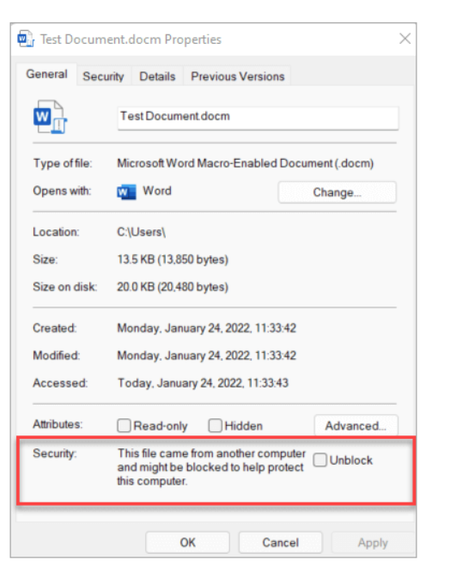
I code from my home latop on windows 10 and share that file via onedrive between my two office laptops which are running on windows 11. The macro is running on my laptop, but on neither factory laptops I've tried everything suggested by microsoft. Nothing works, and it's really frustrating. These are the things I've tried so far. 1) There was no security option available in the properties of the file I had. 2) Next I tried putting the Trusted location to the local hard disk where the one drive file was available 3)Next I tried internet options and put the link of onedrive.live link in trusted sites So the final outcome is, the shared file on onedrive is unable to run macros on my facory laptops, but if I take that same file and put on the personal onedrive of the factory laptops, they work So the probable issue is trusting the source when it's coming from a shared one drive file. How can I resolve it? SergeiBaklan PeterBartholomew1 Riny_van_Eekelen1.1KViews0likes1CommentHow to call macros from other sheets without selecting them first?
I have 3 individual sheets from where I print the receipts. GALLONS RECEIPTS, SHOPIFY RECEIPTS, SAMPLE I've made vba on each of these sheet with some row resizing adjustments As soon as Vstack came, I made a sheet name TODAY, which pulls in data from all these sheet, under one column. Now I want to be able to print all those from TODAY sheet itself I have made a VBA , which works, but I'm not too good with it. Some of the individual macro on sheet consist of minor adjustments, can I just call them from "Today_print" macro, instead of re-writing their respective code again? PeterBartholomew1 HansVogelaar SergeiBaklan ganeshsanap NikolinoDE OliverScheurich706Views0likes0CommentsRe: Can VBA Event "Change" work if the target address cell is a formula that changes dynamically?
I understand, and I was exploring the declarations about the TableUpdate as well. In my original file, the gallon and sample are indeed tables, but with a lot of columns, but there's so much happening in every column of those. Can you help me a TableUpdate macro, in my sample file, so that I can try replicating it? My VBA knowledge is just surface level.3.2KViews0likes2CommentsCan VBA Event "Change" work if the target address cell is a formula that changes dynamically?
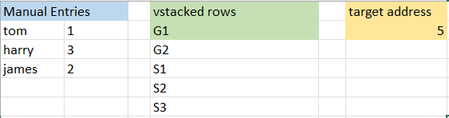
I have data coming in from different sheets using vstack and a target cell, which caluclates the total vstack rows using ROWS(A2#) On "Today" sheet, I have some manual entires, I want to clear that section, Everytime a new entry is done in the sheet from where the stacking is happening This will change the output in target cells, but the vba event is not triggering If this way vba doesn't work, my next option is to trigger the event sheet change, so that if I go on the different sheet to add rows, automatically the event gets triggered. How will we do this? However I want this as my backup option. I've added the sample sheet for reference. PeterBartholomew1 SergeiBaklan HansVogelaarSolved3.4KViews0likes4CommentsRe: Can we write a VBA Code, that automatically overwrites cells values of a formula on workbook close?
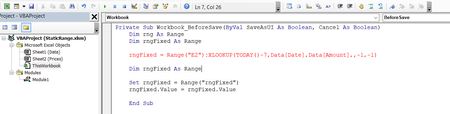
PeterBartholomew1 Is it possible to create the static range inside the VBA instead of name manager in the event handler beforesave? Also, I tried reducing the static range by 7, but somewhere I am getting the syntax wrong How do I correct this?7.9KViews0likes1CommentRe: Can we write a VBA Code, that automatically overwrites cells values of a formula on workbook close?
I was experimenting more with your code My Actual sheet has, 6000+ rows and 50 columns between Date and Amount When I ran the code, it kept on calculating threads and the workbook never closed However I also have a lot of other sheets in the same workbook, So I thought it must be because of that. But when I tried adding 6000+ rows, in the sample file, even it got delayed a considerable amount I am wondering if there's another approach, that will not slow down the workbook With my limited knowledge, I can think of two ways 1) As suggested by PeterBartholomew1 , I use the xlookup to track the end of static range, Now it won't be completely apt, since the dates are not always added in chronological manner I can work around by reducing the static range by 30-40 rows and copying values 2)Is there any way, that in Amount column, it can identify the last copied (non formula) row, so in every workbook close, it doesn't have to loop through the entire date range, to compare the dates? We have like 30 entries per day, so by 7 month, the rows are close to 30 x 7 x 30 = 6000+ and it will keep expanding So it's better to have 30 rows copied and value pasted each day, rather than looping 6000 every time HansVogelaar7.8KViews0likes4CommentsRe: Can we write a VBA Code, that automatically overwrites cells values of a formula on workbook close?
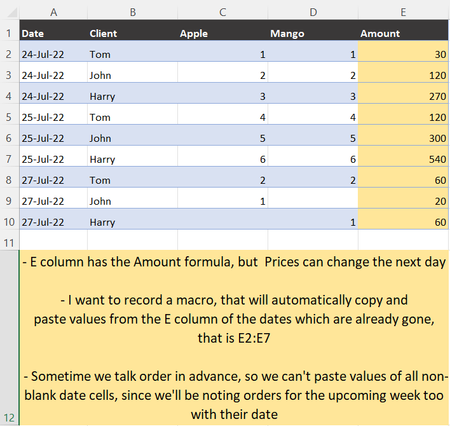
Hi Sir, loved your approach to the problem. However there would be one issue to using the xlookup approach At times in the sequence, we write today's date Eg 25th July Then take a few future orders, let's say 27th July Then back to 25th July. This obviously gets sorted later, during any analysis, but based on this approach the 27th Amount will also be copied as value7.9KViews0likes1CommentRe: Can we write a VBA Code, that automatically overwrites cells values of a formula on workbook close?
Worked Like a charm. My life is so much at ease, Thank you so much 1)Just out of curiosity, is there also a way, this inconsistent Table calculate formula can be removed using VBA Only. I know there's a setting for the same in the main settings, But I would need it just for this table. Active worksheet 2)Also, in line 6 We have manually written offset(0,4) But there are column additions in the table when the products are added, The header name "Amount" will remain same though How can we make it dynamic? P.s. The Date range would also remain the same only (A2:A) HansVogelaar7.9KViews0likes6CommentsCan we write a VBA Code, that automatically overwrites cells values of a formula on workbook close?
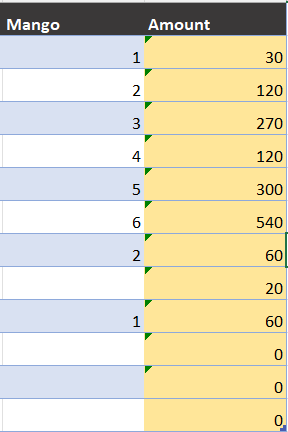
I have a table formula that calculates total amount based on given prices. The trouble is when the prices change, it overwrites the formula of Dates which have already passed, And the ledger never matches for our clients. I wanna write a code that automatically, paste values of the formula once the date is passed. Would really appreciate help with this issue. SergeiBaklan PeterBartholomew1 Riny_van_Eekelen I'm attaching a macro enabled file file too for the sameSolved8.6KViews0likes13CommentsRe: Is it possible to extract PDF data to excel using Power Query?
Sir, you're so amazing, I don't have enough words to express it here. Forever grateful. Although I'll take me sweet time to understand the steps to be able to replicate this on my own. But it's working Perfectly well, on all kind of input data. This is without a doubt, leakproof. Thanks again.2.1KViews0likes1CommentIs it possible to extract PDF data to excel using Power Query?
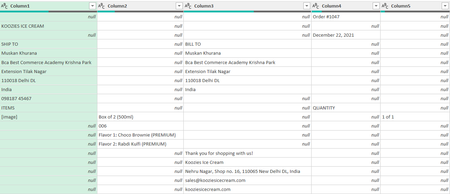
I have a website which exports orders in pdf form I extracted the data, but it's the most scattered query EVER. Could really use your help in organizing the data Can you help me out? I've attached the query file and Raw Data SergeiBaklan Riny_van_Eekelen PeterBartholomew1 HansVogelaarSolvedWhen Power query loads data, it skips a manual data entry. How to solve it (URGENT)
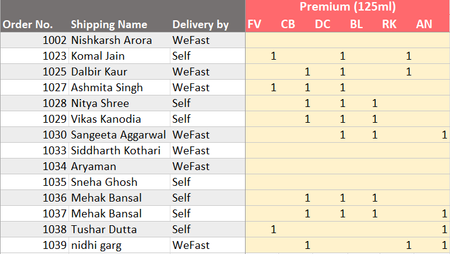
This one is tough to explain, let me try. I'm importing customer names into a table, via power query. In that same Table, I've attached columns, where I put in Manual product quantities. Every time I refresh the updated customer list, the manual data from the last row gets carried forward After refreshing quanties of "nidhi garg" got transferred to "payas bansal" in the last row How can I sort this? I couldn't sent the file, due to a lot of data connections. ow "payas bansal"SergeiBaklan HansVogelaar PeterBartholomew1Re: Can I average the data in the table when the dates are not grouped? Without using Pivot Table?
I do have Microsoft 365, but I still don't have Lambda or map. So I'll try the first option. Also, will be reconsidering power query for the same as suggested by SergeiBaklan But thank you so much for this. Much appreciated.1.5KViews0likes0Comments


Recent Blog Articles
No content to show