User Profile

AmeliaHernandez
MCT
Joined Jun 04, 2019


User Widgets
Recent Discussions
Re: Not able to continue editing in Outlook
Hello aciappa , Just to let you know that the "Edit in Outlook" button via M365 Copilot chat is working now for me. Meaning it opens the mail in Outlook, so I can finalize the email and hit on send. Looks like the feedback sent to Microsoft helped, because that's what I did: Send feedback to MS about it. Giving feedback does pay off. Highly recommended for any issue you find on MS 365 and Copilot too.51Views1like0CommentsRe: Not able to continue editing in Outlook
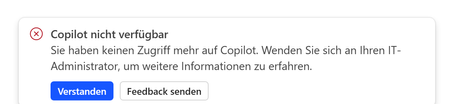
Hi aciappa , I tried to reproduce the error you described. And guess what? I got the same error. At least I can tell you so far, you are not alone. I have a M365 Copilot license. I am logged in with the licensed user. Working with Copilot in Outlook works otherwise perfectly fine. I asked M365 Copilot chat to draft an email. Click on edit in Outlook. Outlook opened and this is the error I received: I sent a feedback to Microsoft. I recommend you to do it so using your "Enviar comentarios" button. I will be troubleshooting, start by doing what Chris_Landtiser recommended. If I find a way to solve it, I will share here. Thanks, Amelia62Views0likes0CommentsRe: Copilot Chat vsus. Microsoft 365 Copilot What's the difference?
Thanks Stephen Neil for your input. Revisiting this post, exactly with that thought in mind! 🔥Unfortunately, as an author I haven't found the way to update a post. The feature is not available to me, at least not yet. I definitely will ask the content managers, maybe there's something they can do for that. If there no option, I will definitely write a new one and keep you posted. Thanks!1.3KViews3likes2CommentsRe: Limitation of Copilot agent development in M365 developer tenants
Thanks for sharing, I think this can be useful for other people too. From the technical architectural perspective, it makes sense that a M365 Copilot license is required to achieve what you described aboved.298Views0likes0CommentsRe: How to start with your Copilot habit
Hey SBrooks , What do you mean with "everything"? To search directories without Copilot, just use the File Explorer, the old same ways are there for us too, because change takes time and in my opinion everyone should go on their own pace.59Views0likes1CommentRe: Microsoft 365 Copilot + SharePoint
How to stay uptodate about the size limitation topic: The MS support article "Keep it short and simple" is the official page to stay uptodate about changes regarding document size limitation: Keep it short and sweet: a guide on the length of documents that you provide to Copilot - Microsoft Support The article is also good to understand how Copilot handles files which are larger than the current limitations. Since M365 Copilot works with data on MS Graph, which means search plays a role in here. Therefore I would keep an eye on this article related to search limitations too: Search limits for SharePoint - SharePoint in Microsoft 365 | Microsoft Learn What you could do now: I would build an agent to handle sumarizing and analyse of the larger files. Here there are limitations to keep an eye on, too: For OneDrive: Quotas and limits - Microsoft Copilot Studio | Microsoft Learn For SharePoint: Quotas and limits - Microsoft Copilot Studio | Microsoft LearnRe: Creating Work Instructions/Process from a video with Copilot
One useful roadmap item, I would keep an eye on to improve the output of this use case, is the Copilot's capability to analyse shared-on screen content while transcribing/recording a meeting. As soon as this is possible, it will open many posibilities to enrich work instructions with images out of the recording. Nowadays it is not possible to generate screenshots on each instruction based on the recording. Here goes to the roadmap item, which is currently planned for August 2026: https://www.microsoft.com/en-us/microsoft-365/roadmap?id=325873416Views0likes0CommentsRe: Creating Work Instructions/Process from a video with Copilot
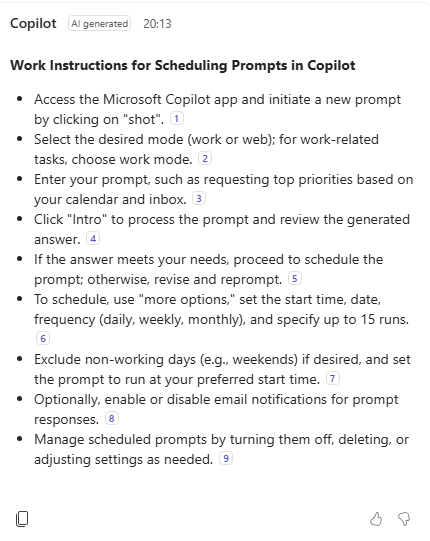
Hi caitlinuser , Thanks for sharing your usecase here! I think it is cool! I have used so far meeting recordings to create follow up e-Mails, but you can use it as you mentioned perfectly to create work instructions. I created a meeting recording where I was giving instructions to colleagues about how to schedule a prompt with Copilot. Here is how I created a work instruction out of it: After the meeting ended, I clicked on my meeting chat and hit the Copilot icon on the top left corner. Then I prompted to Copilot like this: Create work instructions out my meeting recordiing Then it literally created the following steps out of the recroding for me, see screenshot. You could try something similar with the Copilot chat so it could return a word file with the work instructions. And sure that is why Copilot is here to avoid you doing tedious work. Please do keep me posted how this helped you.56Views1like0CommentsHow to start with your Copilot habit
Are you serious about integrating Copilot in your daily flow? But it is hard to stick to it! 🙄 Take a look to these tips. 👇 The trick is to build the Copilot habit A habit, an action that sticks over time. Habits are quite difficult to adopt. One thing is to wish to use Copilot every day. And literally another is to in fact use Copilot every day. At the end of the day, here's the big question: How to get from where you are with Copilot today To where you want to be with Copilot 🎯 1. Pick a fresh start Why? ✅ Fresh starts put you in the right mental state. ✅ They give you permission to reinvent your daily routine. ✅ They help you build on existing habits to adopt new ones. It’s like when the counter resets to 0. It’s like restarting your computer. Suddenly, everything runs more smoothly. 💡 What is a fresh start? September is all about fresh starts. School begins. Summer ends. Fall kicks off. The most popular fresh start is New Years Eve. Fresh starts can be also related to major changes, like moving in to a new apartment. How to use a fresh start? 1️⃣ Set a goal: Think of one area where you want to improve with Copilot. For example, I want to prioritize better so my daily actions align more consistently with my goals. 2️⃣ Choose a fresh start date: Brainstorm upcoming dates that could mark a new chapter with Copilot. How about now the fall kick-off? 🍁 For me, the end of summer signals a new beginning. My fresh start is September 15. 3️⃣ Make it concrete: Write down the new habit you want to build. Good intentions alone won’t create lasting change—they’re easy to forget. By writing your intentions, you are more likely to commit. 2. Formulate your new Copilot habit Behavioral scientists agree on linking a new habit to an existing one makes it easier to adopt. I use James Clear’s Atomic Habits framework to make my habit specific and actionable: “When situation X happens, then I will do Y.” Where X is the trigger, an existing habit already part of your daily flow. Where Y is the new Copilot habit you want to build. Here’s my commitment: 👉 When I open my calendar in the morning, I will use Copilot to identify my top 3 priorities for the day. Here is a simple formular to formulate your new Copilot habit: Formulated habit = your goal + fresh start date + written intentions 3. Make your new habit convenient If Copilot is difficult to access, chances are that you forget to use it. Set you up for success. How? Make it easier for you to use Copilot. Quick access to Copilot is key Currently the quickest way to start chatting with Copilot is pressing Win + C on Windows. At the moment, the easiest way to use M365 Copilot is using the M365 Copilot app on desktop and mobile. Why? The app is pre-installed with Windows. It is pinned to the taskbar by default. It starts when you log in, but minimised. Create the M365 Copilot app shortcut, if you are one of those who prefers to use desktop shortcuts. How? Open the M365 Copilot app >> Click on the ellipses next to your profile pic menu >> Select "Pinning and start" >> Click on "Create desktop shortcut". That's it! Do you have more tips to build your Copilot habit? I would love to hear them all! Hint the comment button and share them 👇SolvedRe: Capabilities of Copilot in Web Browser vs. in Excel
Hi adamhlavaty , Thanks for the test file and for the prompt. It allowed me to try to reproduce the behaviour. I saw you wrote this post in Oct. 2024. Here are my test results: Copilot in Excel (on Desktop): Count of VTT was 109 ✅ Copilot in Excel (on Web): Count of VTT was 0 ❌ Copilot Chat (Web mode on Edge): Count of VTT was 109 ✅ Copilot Chat (Work mode on Edge): Count of VTT was 109 ✅ The test results lead me to the assumption: Copilot in Excel on Web App may be unable to access the entire data set in the Excel file. I would expect Copilot in Excel (on Web) to say in such case: "Sorry, I cannot give you the count 'cause of a lack of access to the data set. BUT I will give you a formula." Here's some feedback worth sharing with Microsoft. 💪 Find attached screenshots showing the results of my tests. AndreThiemannMS frankfalvey, This may be interesting for you too.137Views1like0Comments

Groups

Microsoft Hero Community
Welcome to Microsoft Hero Community, an official Microsoft Learn Learning Room dedicated to empowering learners through a strong focus on Microsoft Cloud technologies. We regularly host sessions, events, webinars, and training programs to support your growth and success. Join us on your cloud journey, we’re here to help every step of the way!Latest Activity: Oct 15, 2025Recent Blog Articles
No content to show