User Profile

sflows
Copper Contributor
Joined Jun 05, 2023


User Widgets
Recent Discussions
Grouped by aggregate value rules in Sharepoint list
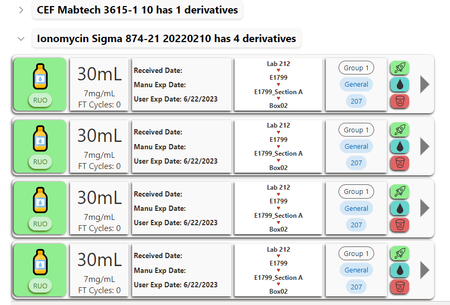
Hello everyone, I am working on an inventory in Sharepoint Online. I want to set up a rule to that when the grouped by aggregate value reaches a certain number (eg 2) an email is sent. I thought Power Automate could work, but not sure how to go about accessing group by aggregate values. For example, in the image below, I would get an email reminder for Ionomycin Sigma if I delete 2 of its children (called "derivatives" in the groupby header) and I set up the rule for "2". Any help is appreciated. Thanks!1.2KViews0likes1CommentAudit Records Link
Hi everyone, I don't think this is a Power Automate exclusive issue, so please redirect me if this does not go here. I have 2 SharePoint Lists: List A where I manage my inventory, and List B where specific actions taken in List A get recorded (like an audit log). I managed to populate List B using a few Power Automate Flows and it works fine. Now, I am trying to add a button or a link on List A that takes me to a filtered or search view of List B so that I can see all recorded actions of the clicked item on List A. So, for example, if I want to see all important transactions on Item 34, I just click that and it will take me to those recorded actions on List B. I tried creating a search view link composing a URL as follows: "='https://inovio.sharepoint.com/sites/myMainSite/SubSite/Lists/MyList/AllItems.aspx?view=7&q=' + [$BarID]" where [$BarID] is a calculated unique identifier to the specific item on List A that gets recorded on List B. However, the search function is not working properly since even exact strings like the BarID do not return anything, even when I can see there are a few items with that string. I tried typing it in directly in the search box and still get nothing, but it somehow works for some other items(?). Anybody have any idea how to accomplish this? Thanks!614Views0likes0Comments
Recent Blog Articles
No content to show