User Profile

Karimulla1125
Copper Contributor
Joined Jun 05, 2023


User Widgets
Recent Discussions
Windows 11 Upgrade Vai Intune with Delivery Optimization MCC
Hi Good day We are planning to set up a MCC for our environment for delivery optimization. We would like to know whether it will also help us in the upgrade process from windows 10 to windows 11 and how? From where exactly the patch will download? how the background mechanism will work (Content will be shared with requested devices without downloaded) We have created a test policy from Intune for Windows 10 already and it works, but we want to know once we setup the MCC is there any specific settings changes required from Intune for this window 11 upgrade. Please suggest Thanks in Advance KarimullaDisable Windows Hello PIN for few devices
Hi Floks, We want few devices to disable for Windows Hello PIN for customer needs, we have tried below steps few Method 1: Using Group policy settings. Go to Computer Configuration -> Administrative Templates -> Windows Components -> Biometrics On the right side, double-click on Allow the use of Biometrics and select Disabled. Method 2: Disabling Windows Hello in Registry As per few blogs we couldn't find the below registry on those device KEY_LOCAL_MACHINE\SOFTWARE\Microsoft\PolicyManager\default\Settings\AllowSignInOptions Even we have tried to apply and see via Intune to disable below settings. Any help how we can make disable via Intune. Thanks Use Passport For Work (User) TRUE Use Passport For Work TRUE959Views0likes3CommentsRe: Microsoft Classic Teams Still Showing as exposed After Updating to Latest New Teams
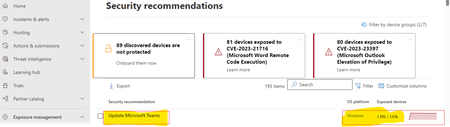
punsontherunAppreciate Your Response May I ask few questions? 1.What about Teams Machine Wide Installer, we have many user devices has installed Teams Machine Wide Installer only 2, If we find Teams Classic & Teams Machine Wide Installer files or registry entries and remove, does it effect users which is already updated with new teams (Such as restart the New Team app and Disconnects Teams Call or Activities) 3.Basically, how it will get removed from devices once New Teams has been updated...? how many days will it take to clean-up Classic Teams data on user devices (Such User Profiles and User Entry Registry & Team -Wide Installer) 4.What and all data we can remove from user profile and Windows folders and user & Device registry entree's 5.Does New Team Vulnerability status and Count, Weakness, Threats will be show in Defender Portal like above i mentioned screenshot which is highlighted on Yellow.? Since we are not able to see in our Defender Portal New Teams Security Recommendation. 6.Please Provide any scripts or process to proceed for testing where we can cleanup some stuff in devices.? Thanks In Advance Your Patience and Response1KViews0likes0CommentsMicrosoft Classic Teams Still Showing as exposed After Updating to Latest New Teams
Hi, Teams classic is showing as exposed in the Microsoft 365 defender Admin portal. But we have already updated to New teams in our environment.Intune report says its updated to latest version. Pls let us know how to fix this issue. Does this New teams is showing in defender. Pls suggest... Or is this a known issue Can you anybody suggest how we can fix the devices vulnerability list Thanks in Advance... Karimulla1.4KViews0likes2CommentsMicrosoft Classic Teams Still Showing as exposed Devices on M365Defender Admin Center After Updating
Hi Everyone, Good day.. Teams classic is showing as exposed in the Microsoft 365 defender Admin portal. But we have already updated to New teams in our environment.Intune report says its updated to latest version. Pls let us know how to fix this issue. Does this New teams is showing in defender. Pls suggest... Or is this a known issue Can you anybody suggest how we can fix the devices vulnerability list Thanks in Advance... Karimulla759Views0likes1CommentRe: Not getting Updated Monthly Updates few Devices
Hi LeonPavesic Thanks for your response I have tried above steps which you given, no change still the same status updates waiting to install Manually. And we have bulk device same status we need to find solution resolve automated process via Intune. Devices having sufficient storge and connected good network Antivirus also not stopping anything. The Issue is Updates are downloading but not installing. Thanks5.3KViews0likes1CommentNot getting Updated Monthly Updates few Devices
Hi, We have 2000+ devices one of the customer, those devices managing Windows Updates via Intune, but a few of them are not being installed automatically every month. As per policy, only a few devices are receiving automatic Downloading and Installing when policy received to devices. and few devices' Updates keep waiting to install on user machines, which are all not Downloading and installing automatically. We are doing each device taking remote and installing manually. Even Updates downloaded not getting installed automatically until click install manually Is there a way fix those devices Windows Updates automatically Download install it when the policy applies? Thanks6.1KViews0likes4CommentsHow to make it Active Defender Sensor on Windows 10 Devices
Hi @ All, We have a few devices that are not active in the Microsoft Defender agent on Windows 10 devices. These devices are users who are using the device regularly but not receiving any status updates on the M365 Defender console. It's showing as device Health Inactive. Is there any way to troubleshoot steps to make it active, Like PowerShell script or any other method. I have referred blow MS article https://learn.microsoft.com/en-us/microsoft-365/security/defender-endpoint/fix-unhealthy-sensors?view=o365-worldwide We don't have any third-party Antivirus tools, we have device managed tool Intune and M365 Defender For your reference I have attached the snapshot link below https://pasteboard.co/hVSEAn17n6eu.png Thanks1.2KViews0likes1Comment
Recent Blog Articles
No content to show