Forum Discussion

Microsoft Classic Teams Still Showing as exposed After Updating to Latest New Teams
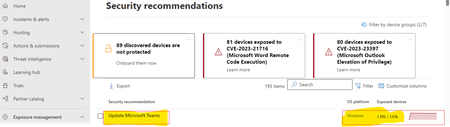


Karimulla1125 New Teams leaves Teams Classic in place - they run side-by-side to allow you to go back. In theory, New Teams will automatically remove Classic Teams after you've been using it for a period of time (seems to be several months) and at that point your machine will show up clean.
However, we got bored waiting after forcing everyone to New Teams, so wrote a script to remove it. Sadly I can't share, but essentially you just need to remove the Machine Wide Installer, then recurse each user profile to look for the Teams folder and delete it. This deletes the user's copy of classic Teams. After that, Teams will report as clean in Defender, Tenable, etc.

punsontherunAppreciate Your Response
May I ask few questions?
1.What about Teams Machine Wide Installer, we have many user devices has installed Teams Machine Wide Installer only
2, If we find Teams Classic & Teams Machine Wide Installer files or registry entries and remove, does it effect users which is already updated with new teams (Such as restart the New Team app and Disconnects Teams Call or Activities)
3.Basically, how it will get removed from devices once New Teams has been updated...? how many days will it take to clean-up Classic Teams data on user devices (Such User Profiles and User Entry Registry & Team -Wide Installer)
4.What and all data we can remove from user profile and Windows folders and user & Device registry entree's
5.Does New Team Vulnerability status and Count, Weakness, Threats will be show in Defender Portal like above i mentioned screenshot which is highlighted on Yellow.? Since we are not able to see in our Defender Portal New Teams Security Recommendation.
6.Please Provide any scripts or process to proceed for testing where we can cleanup some stuff in devices.?
Thanks In Advance Your Patience and Response