User Profile

PoorTatey
Brass Contributor
Joined Aug 22, 2018


User Widgets
Recent Discussions
Re: Updated Copilot app doesn't work with Work account
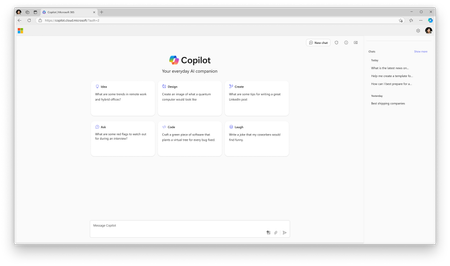
AKamburov Thanks, that seems like a good hack for my personal PC, but not something I can implement for end users at my company (I'm a M365 admin). I had complained about Microsoft just "springing" this change on us, but it turns out there was a message center post on September 16th, which I had missed. It gave scant details about what this new "simplified interface" would entail, and I wish I had known what they'd intended. (Updated) Microsoft Copilot to update to enterprise data protection Message ID MC862983 Published Aug 15, 2024 Last updated Sep 16, 2024 Updated September 16, 2024: The updates to Microsoft Copilot as outlined in MC862983 will start rolling out today with an expected completion date of September 30, 2024. As Microsoft Copilot updates, users will begin to see the new simplified user experience designed for work and education. During the rollout, the updates may not happen to all users—or on all Copilot surfaces—at the same time. As noted above, all updates are expected to be completed by September 30, 2024. These user interface updates include: A shield outline at the top of the user interface to indicate enterprise data protection (this was previously green with commercial data protection) The ‘New chat’ button moving to the top of the user interface next to the shield outline New prompt cards in the center of the user interface to help users get started A new ‘Chats’ pane on the right side of the user interface for users to refer back to previous chats Image of UI on copilot.cloud.microsoft: https://img-prod-cms-rt-microsoft-com.akamaized.net/cms/api/am/imageFileData/RW1p7F8?ver=bf28 Image of UI in the Microsoft 365 web app (if Copilot has been pinned): https://img-prod-cms-rt-microsoft-com.akamaized.net/cms/api/am/imageFileData/RW1oXls?ver=3ceb Additionally, the Microsoft Copilot documentation has been updated to reflect the updates rolling out: https://aka.ms/Copilot/Docs We recommend that you read the documentation to further understand the updates and to prepare your organization. ---Original message--- Next month, we are making several updates to the free Microsoft Copilot service for users with a Microsoft Entra account to enhance data security, privacy, and compliance and simplify the user experience. For users signed in with an Entra account, Microsoft Copilot will offer enterprise data protection (EDP) and redirect users to a new simplified, ad-free user interface designed for work and education. Learn more here: https://aka.ms/MsftCopilot-MTCBlog. Note: There is no change for Copilot for Microsoft 365 graph-grounded chat or any Copilot experience in the Microsoft 365 productivity apps like Word, Excel, and PowerPoint. Enterprise data protection is already provided as part of these experiences. Note: Government cloud customers and students under 18 are not yet eligible. When this will happen: These updates will begin to roll out in mid-September 2024 and expect to complete by mid-October 2024. How this will affect your organization: Microsoft Copilot will offer enterprise data protection and redirect users to a new simplified, ad-free user interface designed for work and education when they are signed in with an Entra account. Users will be able to navigate to Microsoft.com/copilot to access this experience. For existing users who are logged in with their Entra account they will automatically be redirected as follows: Web: Users signed into Bing.com/chat and copilot.microsoft.com with an Entra account will be redirected to the simplified experience on Microsoft.com/copilot. Windows: Users signed in to Windows with an Entra account will be redirected to the Microsoft 365 app and will be able to opt in to Microsoft Copilot. Mobile: Users signed into Copilot mobile app with an Entra account will be redirected to the Microsoft 365 mobile app and will be able to opt in to Microsoft Copilot. Note: Please see "What you need to do to prepare" for instructions on how to manage pinning Microsoft Copilot in your organization. What you need to do to prepare: Users who sign in with an Entra account to Microsoft Copilot will be redirected automatically—no action is required. To ensure people across your organization have easy access to Microsoft Copilot and can benefit from the security and experience updates to Copilot, we recommend you enable in-app access today by pinning Microsoft Copilot. If you elect to pin Microsoft Copilot for your users, it will appear in the Microsoft 365 app starting mid-September, and it will be coming soon to Microsoft Teams and Outlook. The option to pin Copilot can be found under Settings on the https://admin.cloud.microsoft/?#/copilot/settings (Global Admin permissions required). Note: This setting is for users who don't have a license for Copilot for Microsoft 365; licensed users will have it pinned by default just as it is today. Additionally, if your organization manages app distribution for mobile devices, you should push the Microsoft 365 mobile app to these users before mid-September. For self-managed devices, you should encourage users to download the Microsoft 365 mobile app before mid-September or they will be prompted to do so when this change happens. If you wish to inform your users prior to the change, you can use the below message: “Microsoft Copilot provides a powerful, web-grounded AI chat experience for work with enterprise data protection. Starting mid-September, you’ll be redirected from copilot.microsoft.com and bing.com/chat to microsoft.com/copilot to access a simplified, ad-free Microsoft Copilot experience. If you use the Copilot mobile app, you will be redirected to the Microsoft 365 mobile app. If you do not have the Microsoft 365 app installed, you should do so." If you elect to pin Copilot, you can also include the following: "Microsoft Copilot will also be pinned inside the apps you use every day like the Microsoft 365 app, Outlook, and Teams to make it easier to use Copilot in your flow at work.” Note: If you do not make a pinning selection by mid-September, your users will be prompted to pin Microsoft Copilot themselves. While not recommended, you can disable the prompt for end users with the same setting. Additional Information: If you would like to try the updated Microsoft Copilot with enterprise data protection prior to mid-September, a private preview is available (space limited). To apply, please visit here: https://aka.ms/CopilotPreviewSignup For additional information about these changes, please visit the FAQ: https://aka.ms/MsftCopilot-BlogFAQ For information on how to configure the Windows taskbar: https://learn.microsoft.com/windows/configuration/taskbar/pinned-apps?tabs=intune&pivots=windows-11 https://learn.microsoft.com/windows/configuration/taskbar/policy-settings?tabs=taskbar&pivots=windows-11 https://aka.ms/MsftCopilot-MTCBlog3.5KViews0likes1CommentRe: Updated Copilot app doesn't work with Work account
If we're talking about Copilot "Business Chat" then yes, I'm seeing the same thing. Also this new version is very crippled. I sent this complaint to Microsoft via the feedback button: "I hate the new UX for Copilot: What used to be a standalone app at https://copilot.microsoft.com is now redirected to https://copilot.cloud.microsoft/. There is no way to change it back. IT IS NOT AN IMPROVEMENT. You removed the Notebook feature, which I use a lot. You changed the green "shield" icon, which I had been training my users to recognize as a "safe" version of Copilot (vs. the Public version, which exposes their data). You added a history bar to their chat, something I had assured the security people at my company would not be tracked. Each session is supposed to "forget" past conversations. Note, we are using the Copilot that is included with the E3 license, not the standalone M365 Copilot. This new UX is a step down. I may have clicked on "Pin Copilot" without realizing what would change. Please provide a way to change it back." I also left this complaint: Removal of the Notebook feature, which I use often. The prompt box no longer accepts pasting in a screenshot. I cannot upload images, either. I guess AI Vision has been removed from the product? This was super useful for pasting in error dialogs and screenshots so Copilot could help me translate. Why was it removed? The "shield" is no longer green (I had been training my users to look for a green shield so they will know they are using a "safe" version of Copilot vs the public version). It appears that conversation history has been added, something that we do not want, we were told that conversations would not be stored by Microsoft. Does this mean you're training on our data, too? No clear warning that this was coming, no preview of the UX, no explanation of changes anywhere I've looked. There appears to be no way to change it back. We are using the "BizChat" copilot that comes with E3 only, not the standalone M365 copilot. What's kind of maddening is that I just watched the latest "Copilot Wave 2" announcement where Jared Spataro is demonstrating Copilot Pages (https://youtu.be/Gz0jPfCuvsM?si=DcqI_hlaHS2hMhSP&t=250), and the UI in his browser is the old one. Grrr!8.4KViews2likes7CommentsRe: "Feature" popups inside Teams
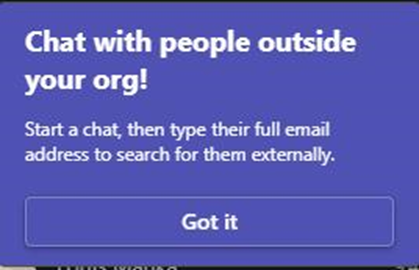
@recep, That's not what I'm talking about. It's the "tips/recommendations" that show up to guide the user on features in the product. Some of these capabilities, although enabled, we'd rather not draw attention to at this time, such as chatting with external users. Disabling notifications does not affect these popups. I suspect these tips are baked into the product and there's no way to disable them. But I thought I'd ask. We want to control our own end user messaging.1.3KViews0likes1Comment
Recent Blog Articles
No content to show