User Profile

sharepointmonions
Copper Contributor
Joined Oct 20, 2022


User Widgets
Recent Discussions
Re: Calculated Column Formula Not Working
Hi ganeshsanap it was saying there was a technical error, but your formula is accepted. However, it doesn't return Stage 2 for the document that is Version 1: Even when I just did =IF([Version]<1,"Stage 1","Stage 2") it would still return Stage 1 for the document that is at Version 2.3.7KViews0likes1CommentCalculated Column Formula Not Working
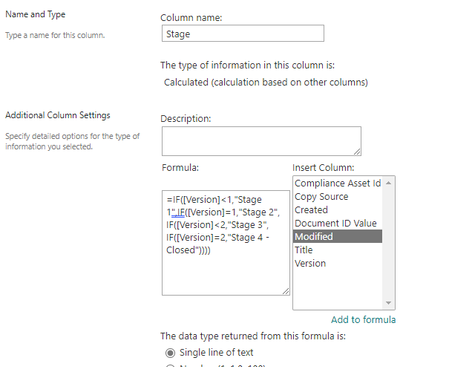
I'm trying to get a column within SharePoint that references another column. Basically: If the Version is <1, column returns Stage 1 If the Version is =1, column returns Stage 2 If the Version is <2, column returns Stage 3 If the Version is =2, column returns Stage 4 I have tried the following formula: =IF([Version]<1,"Stage 1",IF([Version]=1,"Stage 2", IF([Version]<2,"Stage 3", IF([Version]=2,"Stage 4 - Closed")))) In Excel that works sufficiently but when copying this to SharePoint it doesn't work.4.1KViews0likes4CommentsVersion History working but not displaying
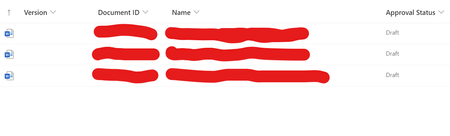
I have Version History as a column. I'm not sure why but all of a sudden it's started displaying blank. I know it technically still has the information there because I have an IF statement in another column saying if it's a certain number then do this, which is working. Any ideas how to get it to display again? Apologies if this is a duplicate, I couldn't see that my first post was displaying.910Views0likes0CommentsDocument ID for one folder only
Hi, I've set up a site that at the minute contains 2 folders. One of the folders needs to have a unique prefix to indicate what type of document it is, and I've set this up using Document ID. However, this is also applying itself to the other folder which I don't want. Is there a way to set up Document IDs for specific folders so that it doesn't apply to the entire site? Thanks!Solved
Recent Blog Articles
No content to show