User Profile

pluviosilla
Brass Contributor
Joined Oct 06, 2022


User Widgets
Recent Discussions
Outlook suddenly cannot access Gmail
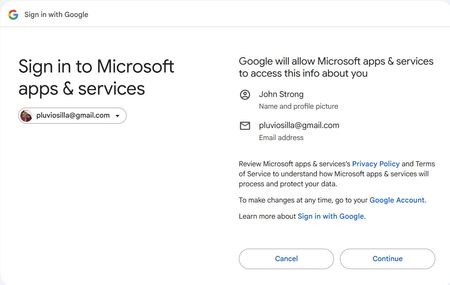
I suddenly started getting a message in Outlook saying "SIGN IN: Your account email address removed for privacy reasons needs attention, please sign in to use your account" It was followed by a button labeled "Sign in via browser". When I press that button, I'm taken to the following webpage: But when I press Continue I get the following error: You have denied Office access to Google - IMAP. Please grant Office access to Google - IMAP and try again. After a lengthy back-and-forth with ChatGPT, I ended up deleting my Gmail account in Outlook as well as my IMAP credentials in Windows 11, but it did not fix the problem. When I try to add back the account, I get all the same errors in all the same places. I found one post on the internet where a use claimed to have fixed this problem by changing the names of the IMAP & SMTP server in Outlook: In Outlook, add the account as IMAP manually: IMAP server: change imap.gmail.com to imap.googlemail.com Port: 993 SMTP server: change smtp.gmail.com to smtp . googlemail.com Port: 465 None of that helps.516Views0likes1CommentRe: Windows 11 No Go Back button
This is one of the main reasons I continue to use Chrome instead of Edge. Microsoft has legions of middle managers who want to make their mark by adding new functionality at the expense of older, often far more basic functionality, so they are prone to shove critical function into the background to make room for their most recent hobby horse. And it's not just Edge. The same infuriating nonsense happens in all Microsoft products. The context menu is a good example. They keep filling it with marginal functionality and making it harder and harder to reach vital context options. There's usually (not always) a fix, but it involves some time-consuming research and then deconstruction of the bloat before you can restore the useful stuff.3.1KViews2likes0CommentsIs there a way to do a global replace from within spellchecker?
I often end up with documents (especially documents generated by Adobe Acrobat) that have a large number of repetitive errors, like a "-" in the middle of a word, but I never know for sure if any particular error is common enough to merit going to the trouble to do a global find and replace. It would be nice if I could do that from within the spellchecker. Is there someway to tell the spellchecker as you are stepping through words that it flags to go ahead and replace some particular word with an alternative spelling throughout the entire document?250Views0likes0CommentsRe: How To Change User Name Windows 11
rahulkhorwal The advice given in this thread does not fix my problem. Windows 11 decided to automatically name my user folder "pluvi" based on the first 5 letters of my truncated email. Seriously? You are going to force me to use this weird random string because that makes it easy for you to create a unique name for user folders without bothering to ask users what we prefer? Why don't you just use something even more human-unfriendly like a GUID or a Welsh place name? Please tell us how to rename our User folder to something less human unfriendly.382KViews6likes2CommentsOutlook Connection to GMail Lapses
I have Outlook installed on desktops in both Texas and Mexico. When I left Mexico one year ago, Outlook 365 was working fine. On my Mexican machine Outlook used a so-called "App Password" to login to the GMail server. Outlook also worked fine on my Texas machine. But when I got back to Mexico, I discovered that Outlook installed on my Mexican machine was strangely able to download mail from 2022 but NOT able to download mail from 2023. I had enabled IMAP, precisely because I wanted to allow Outlook to access GMail from both machines, and it seemed to work at first, but again, the Mexican machine was only able to access the GMail server for the residue of last year's mail it had not yet downloaded when I left. So strange. I see now that the Google configuration menus have changed and they are no longer showing me App Password as an option, which leads me to believe that maybe there was a policy change concerning App Passwords while I was in Texas. One last bit of configuration information: I did NOT have Pop enabled. IMAP seemed to be all that was required while I was in Texas, but most videos on YouTube recommend enabling both Pop and IMAP, and so I tried to enable POP just now, but GMail will not allow me to enable both POP and IMAP. I also tried changing the password in the Outlook Account configuration area, but now I just get endless login prompt dialog popups and when I click on OK, the behavior is the same as before. I get the green progress bars while "Tasks" are completing, but Outlook never downloads any mail, and now in addition to ZERO functionality, I also have to contend with these annoying login dialog popups that I didn't have to fool with before. Any help will be much appreciated.13KViews0likes2Comments
Recent Blog Articles
No content to show