User Profile

LAK_Brady
Iron Contributor
Joined Sep 13, 2016


User Widgets
Recent Discussions
Spacer web part - Horizontal space?
Has anyone used this functionality of the Spacer web part: Drag the gray bar up or down for vertical space; "drag the corner boxes in or out for horizontal space". Or, use the up and down arrow keys to resize. I use it for vertical space, however I have never been able to use this for horizontal space - as the Microsoft guide proposes: https://support.microsoft.com/en-us/office/add-vertical-space-to-a-page-with-the-spacer-web-part-7e6ae288-1634-44e2-bc4c-7fb4042ee905129Views0likes0CommentsRe: SharePoint/ Teams Private channels - can no longer manage or create groups
This was a change implemented by Microsoft: "(Updated) SharePoint channel sites - Temporary permissions editing MC282480 · Published Sep 1, 2021 · Last updated Sep 23, 2021 Service SharePoint Online Message Summary Updated September 23, 2021: In two weeks, the window for editing channel site permissions from SharePoint will close. Once this window closes on October 7th 2021, all channel site level permissions will need to be managed from within Microsoft Teams. We recently provided guidance (June - MC261534) “SharePoint: Updates for Microsoft Teams connected team sites” about how to edit permissions for SharePoint team sites that are connected to a channel in Microsoft Teams. In the post, we specified that the addition, removal, or the editing of permissions for a channel site would need to be done in Settings for the team in Teams. To allow team owners more time to adjust to this change, we have temporarily enabled (for the first three weeks of September) users to continue to edit site permissions in the SharePoint team site. This will allow you to audit and remove permissions that have been added directly to the SharePoint site. Key points: This temporary update is available to all customers until mid-to-late September 2021. We will alert you via a follow-up Message center post to announce when this window is closing. How this will affect your organization: Starting this week, team owners can edit site level permissions for the channel site for the next three weeks. After three weeks, team owners will need to manage channel site permissions in Settings for the team in Microsoft Teams. What you need to do to prepare: You do not need to do anything to prepare. This is a temporary change to the way site permissions will be managed for Teams connected experiences. In a few weeks, all channel site permissions will be managed in Microsoft Teams Settings." Learn more: Manage Teams connected sites: https://docs.microsoft.com/SharePoint/teams-connected-sites Private channels in Microsoft Teams: https://docs.microsoft.com/en-us/MicrosoftTeams/private-channels "A private channel site syncs data classification and inherits guest access permissions from the site of the parent team. Membership to the site owner and member groups are kept in sync with the membership of the private channel within Teams. Site permissions for a private channel site can't be managed independently through SharePoint."5.5KViews0likes0CommentsRe: Teams Private Channel SharePoint Site User Permission
I found this from Microsoft - it is a bit vague though, as I I know I was able to add/modify SharePoint groups in private channel sites previously. https://docs.microsoft.com/en-us/MicrosoftTeams/private-channels?form=MY01SV&OCID=MY01SV Updated: As of Oct 7 2021 A private channel site syncs data classification and inherits guest access permissions from the site of the parent team. Membership to the site owner and member groups are kept in sync with the membership of the private channel within Teams. Site permissions for a private channel site can't be managed independently through SharePoint.16KViews0likes0CommentsRe: Can't add members to private channels
I experienced this as well. I used the following work-around: In the desktop app, I removed the (guest) members - added them back - then I was able to add them to the private channel. Hopefully this gets corrected so it works the first time!! ChrisHoardMVP - I voted on your user voice post as well.198KViews2likes3CommentsRe: SharePoint Online list view threshold question
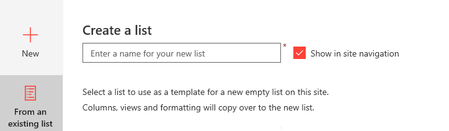
Justin Liu , I know this post is older - however I came across it when the same thing happened to me. I realized there is a new feature in SPO - when you select New > List - you can choose 'from an existing List' This let you pick lists from this current site - or even other SPO sites you have access to! Worked for copying a list that has over 19,000 items - does not copy the items - just the columns, view and formatting.13KViews1like0CommentsRe: Adding MS Planner tab in MS Teams error Failed to update plan
Thomas_Steibl thank you for the suggestion. We did try deleting and adding a new channel - however the user was still unable to create a planner tab. We were fortunate that the Team had not been used too much - so we deleted the entire Team and created a new Team - the user can create planner tabs on the new Team. Something with the original Team was not working - not sure what else would have caused that.7.5KViews0likes4CommentsAdding MS Planner tab in MS Teams error Failed to update plan
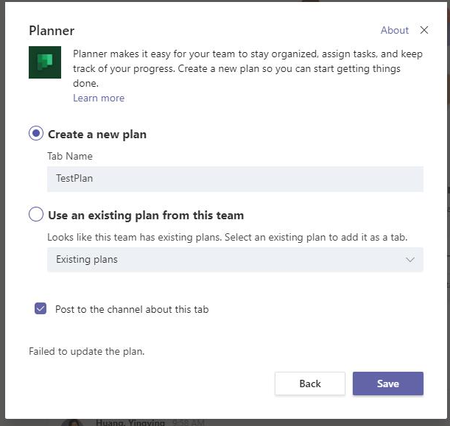
When adding a MS Planner tab to Teams - a user is getting this error "Failed to Update Plan" The tab does not get added to the channel, however a Plan appears in MS Planner only. MS Planner: Has anyone experienced this - and found a resolution?7.9KViews0likes7CommentsRe: Enabling InfoPath for SharePoint Online
Deleted You can enable InfoPath on SPO from the SharePoint Admin Center | Infopath | Browser-enabled Form Templates | "Allow users to browser-enable form templates" and "Render form templates that are browser-enabled by users" are your choices.29KViews1like0CommentsSharePoint Online Content Type field appearing in New & Edit List Forms
In SharePoint Online lists, I have noticed that the Content Type field now appears in the New & Edit forms if you turn on allow management of content types. There are situations when users don't need additional content types, However, want the form columns in a specific order, or hidden fields - in which allowing management of content types provides this functionality. Wondering if there are any out of the box options to hide the Content Type field on the New & Edit form when there is only 1 content type. This does not happen in classic SharePoint - however would like to avoid using that. Also, I know you can use Power Apps, however that is currently not an option. Thank you!!Solved24KViews0likes9CommentsRe: Enabling InfoPath for SharePoint Online
Thank you Gregory Frick. I appreciate the updated lifecycle information. We did go ahead and enabled InfoPath on our SP Online platform. We are not going to promote it, however it will be there for users that have that comfort level. Now on to learning Power Aps!! I hope it will become second nature like InfoPath was to me.67KViews2likes12CommentsRe: Enabling InfoPath for SharePoint Online
Thank you everyone for your feedback. We are going to use PowerApps, however since InfoPath is still available we figured it would be much easier to create a few forms this way as InfoPath is a more familiar tool to our users at this time. It's been very misleading when you read statements such as "You should continue to use InfoPath technology". Either way, it sounds like it is not a good idea to use InfoPath anymore. Regarding Microsoft Flow, not sure how much we will use this as it appears to be more of a personal workflow application. Most of our workflows are set up by a site administrator or site owner, on a list/library for multi level approvals, permissions settings, adding users to AD groups, notifying groups of users, updating items that meet certain criteria, in which all users with access can start these workflows. Or am I misunderstanding the use of Microsoft Flow?67KViews1like1CommentRe: InfoPath support in SharePoint Online
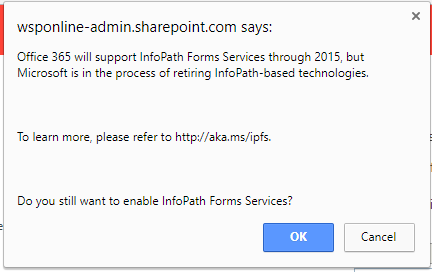
I still see the 2015 message in O365 - SharePoint Admin center when enabling InfoPath. Will this eventually be updated, or did "until further notice' end up being 2015? Does anyone have any experiences they can share with enabling/using InfoPath with SharePoint Online?49KViews0likes1CommentEnabling InfoPath for SharePoint Online
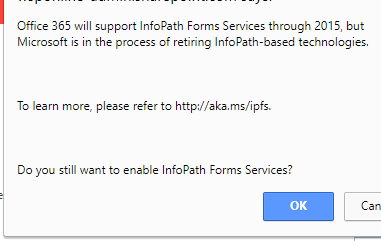
We were thinking about enabling InfoPath on our SharePoint Online platform. The attached message appears which caused some concern. It states that O365 will support InfoPath forms through 2015. When you go to the web site that is suggested, it takes you to the original InfoPath announcement. Which includes that for O365 - InfoPath will be support until further notice. So was this 2015... or is this a typo? Has anyone enabled InfoPath on SharePoint Online? If so can you share your experiences?73KViews0likes36Comments
Recent Blog Articles
No content to show