User Profile

EliiO
Copper Contributor
Joined May 15, 2021


User Widgets
Recent Discussions
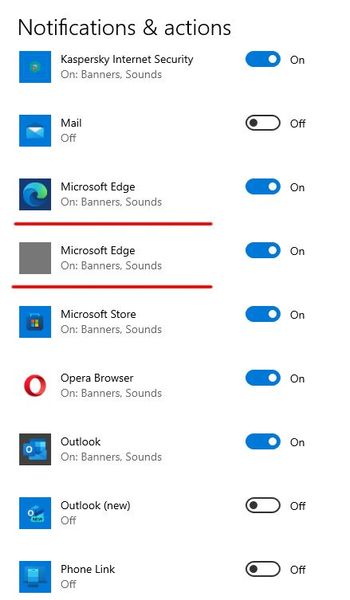
Is it possible to delete a sender from notifications senders list?
Is it possible to delete a sender from "Get notifications from these senders" list (Settings —> System —> Notifications & actions)? Tried to delete all the keys from: HKEY_CURRENT_USER\SOFTWARE\Microsoft\Windows\CurrentVersion\Notifications\Settings but to no avail.619Views0likes3CommentsRe: Cannot preview txt and html email attachments in Outlook 2019 x64
Finally I've found the solution (for all extensions having associated preview handlers in registry). I had 64-bit Preview Handler Surrogate Host registry key missing in HKCR\AppID section, but did have 32-bit version. So I recreated 64-bit version similarly to 32-bit key. HKEY_CLASSES_ROOT\AppID\{6d2b5079-2f0b-48dd-ab7f-97cec514d30b} @="Preview Handler Surrogate Host" "DllSurrogate"(REG_EXPAND_SZ)="C:\Windows\System32\prevhost.exe" From that point all the previews in Outlook desktop (2019) and in Preview pane in Windows Explorer started working, no need to restart (Explorer or Windows).1.1KViews1like1CommentCannot preview txt and html email attachments in Outlook 2019 x64
Hello, when I try to preview a txt or html attachment in Outlook 2019 x64 (on Win 10 20H2 x64) email I've got an error: This file cannot be previewed because of an error with the following previewer: Windows TXT previewer (Html Previewer) To open this file in its own program, double-click it. And it is ok with xlsx, docx, pdf and images previews. PreviewHandlers key is in the Registry and seems to be ok. Also I have no previews at all (blank preview without any text, except images and videos) in Explorer Preview pane (for what it's worth).2KViews0likes2Comments
Recent Blog Articles
No content to show