User Profile

BrunoSiqueira450
Copper Contributor
Joined Apr 27, 2021


User Widgets
Recent Discussions
The Linked image cannot be displayed error in an Outlook email message
My team uses CRM Dynamics and, through it, emails are sent to my company. The email that is sent has images that are referenced by HTML code, which works normally, except (And only in these cases) when I insert the Sharepoint images link. When I reference the link of images stored in Sharepoint in the code, those images are not loaded in the email and instead a red icon and the error message below appear. I performed the settings described in the documentation provided by Microsoft (Documents below), however, none of them worked. The error only occurs with images stored in Sharepoint. Everything else works fine. Error message: The linked image cannot be displayed. Perhaps the file was moved, renamed, or deleted. Make sure the link points to the correct file and location Documentation used as referrence: https://docs.microsoft.com/en-us/outlook/troubleshoot/message-body/the-linked-image-cannot-be-displayed-error https://docs.microsoft.com/en-us/outlook/troubleshoot/message-body/pictures-not-displayed-and-shown-as-red-x https://docs.microsoft.com/en-us/outlook/troubleshoot/message-body/https-linked-images-in-html-emails-show-red-x1.6KViews0likes0CommentsA specific user is unable to checkout a single Excel spreadsheet.
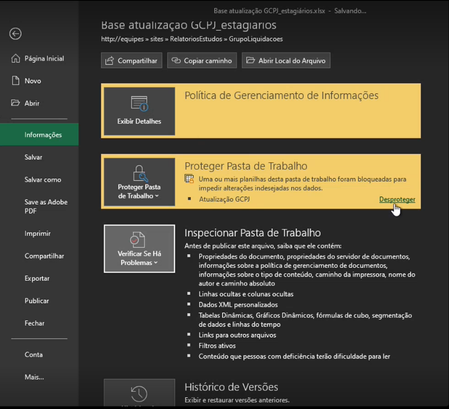
A user in my Sharepoint Server 2016 environment is not able to checkout a specific excel spreadsheet. The problem only occurs in the application's desktop client and although it manages to open the spreadsheet, the checkout option does not appear when it navigates to "File" > "Information". The user has edit permissions on the spreadsheet and the library in which it is stored. - This error only happens to a specific user - The file is stored on an on-premises server with Sharepoint 2016 installed on it. - The user has permission to collaborate on the spreadsheet in question. - The employee is able to check-in and check-out of the spreadsheet within Sharepoint, that is, the error only occurs on the desktop client. - The spreadsheet has a password protection applied to it.Extended Header Problem
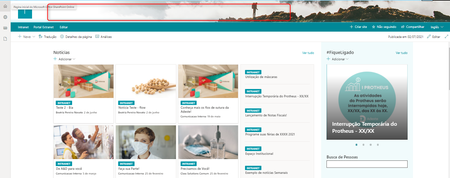
When I apply the extended header to my Sharepoint site, the site navigation links disappear. This error was only seen with this header format. When I switch from extended to any other format, the navigation links reappear. Extended Header: (The links aren't really there, it's not the image that's hiding them) Non Extended Header1.4KViews0likes1Comment

Recent Blog Articles
No content to show