api
573 Topics
Purview Graph API
Hello. I'm trying to find information on the Purview Graph API and it's endpoints. It looks like the endpoints aren't posted publicly and are listed within an admin console. Can someone help me with how to view the endpoints? Also, are the graph API endpoints capable of reading and creating assets into Purview?17Views0likes0Comments
Unable to use MS Graph DLP Api's to use with my Entra Registered App
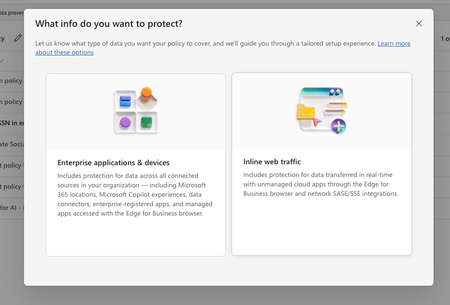
In purview, I have set of policies in DLP, where I have registered to block the US SSN in the text contents and I have created different policies in all of them I have selected the available locations: Exchange email - All accounts SharePoint sites OneDrive accounts - All accounts Teams chat and channel messages - All accounts Devices - All accounts Microsoft Defender for Cloud Apps On-premises repositories And selected action as block all, in all of them for the rule and enabled the rule (not in simulation mode) Now, I have the app registered in Entra and I try to use the following API's https://learn.microsoft.com/en-us/graph/api/userprotectionscopecontainer-compute?view=graph-rest-1.0 https://learn.microsoft.com/en-us/graph/api/userdatasecurityandgovernance-processcontent?view=graph-rest-1.0&tabs=http But whenever I use the compute api I can see i'm only getting curl -X POST https://graph.microsoft.com/v1.0/users/5fd51e08-c5f1-4298-b79b-a357eaa414ff/dataSecurityAndGovernance/protectionScopes/compute\ -H 'Authorization: Bearer <ACCESS_TOKEN>'\ -H 'Content-Type: application/json' -d '{ "activities": "uploadText,downloadText" }' { "@odata.context": "https://graph.microsoft.com/v1.0/$metadata#Collection(microsoft.graph.policyUserScope)", "value": [ { "activities": "uploadText,downloadText", "executionMode": "evaluateOffline", "locations": [ { "@odata.type": "#microsoft.graph.policyLocationApplication", "value": "b48106d9-1cdb-4d90-9485-fe2b6ee78acf" } ], "policyActions": [] } ] } My sample App's Id is showing up but always with `evaluateOffline` I don't know why it always gives 'evaluteOffline' and policyActions is always empty array Also, I can see my Entra registered app is showing up here in the value of the locations And when I use the processContent api , I always get modified in the response and nothing else like below: curl -XPOST https://graph.microsoft.com/v1.0/users/5fd51e08-c5f1-4298-b79b-a357eaa414ff/dataSecurityAndGovernance/processContent \ -H 'Authorization: <ACCESS TOKEN>'\ -H 'Content-Type: application/json' -d '{ "contentToProcess": { "contentEntries": [ { "@odata.type": "microsoft.graph.processConversationMetadata", "identifier": "07785517-9081-4fe7-a9dc-85bcdf5e9075", "content": { "@odata.type": "microsoft.graph.textContent", "data": "Please process this application for John VSmith, his SSN is 121-98-1437 and credit card number is 4532667785213500" }, "name": "Postman message", "correlationId": "d63eafd2-e3a9-4c1a-b726-a2e9b9d9580d", "sequenceNumber": 0, "isTruncated": false, "createdDateTime": "2026-04-06T00:23:20", "modifiedDateTime": "2026-04-06T00:23:20" } ], "activityMetadata": { "activity": "uploadText" }, "deviceMetadata": { "operatingSystemSpecifications": { "operatingSystemPlatform": "Windows 11", "operatingSystemVersion": "10.0.26100.0" }, "ipAddress": "127.0.0.1" }, "protectedAppMetadata": { "name": "Postman", "version": "1.0", "applicationLocation": { "@odata.type": "microsoft.graph.policyLocationApplication", "value": "b48106d9-1cdb-4d90-9485-fe2b6ee78acf" } }, "integratedAppMetadata": { "name": "Postman", "version": "1.0" } } }' In the above request I have mentioned some sample US Security SSN, but the response I get is { "@odata.context": "https://graph.microsoft.com/v1.0/$metadata#microsoft.graph.processContentResponse", "protectionScopeState": "notModified", "policyActions": [], "processingErrors": [] } But Ideally I want to see whether I can get the content is valid or not, for example in the above request, it has SSN, so ideally I should get restrictAction or something right? Or is that evaluateInline is not available or something? Note that I have purchased E5 and assigned to the user who is trying this Also, whenever I choose to create a Policy in DLP , I got two options And Lets say I choose "Enterprise applications & devices", what happens is in the Locations, I'm seeing only these as the options: And If I choose the "Inline Traffic", i'm seeing only these options In Unmanaged, I'm seeing the following And in the Enforcement Options, I have the following : And in the "Advanced DLP rules" I'm seeing only these So, can you tell me the exact steps in the Purview suite, I couldn't where to mention the Entra registered App, I searched and I couldn't find one But in the compute endpoint, https://learn.microsoft.com/en-us/graph/api/userprotectionscopecontainer-compute?view=graph-rest-1.0 I'm getting my app but only with "evaluateOffline" and with that ETag, If I use the processContent Api, its not giving anything except as I mentioned above in the postSolved41Views0likes1Comment
Introducing Skills in Azure API Center
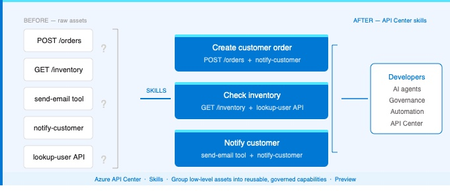
The problem Modern applications depend on more than APIs. A single AI workflow might call an LLM, invoke an MCP tool, integrate a third-party service, and reference a business capability spanning dozens of endpoints. Without a central inventory, these assets become impossible to discover, easy to duplicate, and painful to govern. Azure API Center — part of the Azure API Management platform — already catalogs models, agents, and MCP servers alongside traditional APIs. Skills extend that foundation to cover reusable AI capabilities. What is a Skill? As AI agents become more capable, organizations need a way to define and govern what those agents can actually do. Skills are the answer. A Skill in Azure API Center is a reusable, registered capability that AI agents can discover and consume to extend their functionality. Each skill is backed by source code — typically hosted in a Git repository — and describes what it does, what APIs or MCP servers it can access, and who owns it. Think of skills as the building blocks of AI agent behavior, promoted into a governed inventory alongside your APIs, MCP servers, models, and agents. Example: A "Code Review Skill" performs automated code reviews using static analysis. It is registered in API Center with a Source URL pointing to its GitHub repo, allowed to access your code analysis API, and discoverable by any AI agent in your organization. How Skills work in API Center Skills can be added to your inventory in two ways: registered manually through the Azure portal, or synchronized automatically from a connected Git repository. Both approaches end up in the same governed catalog, discoverable through the API Center portal. Option 1: Register a Skill manually Use the Azure portal to register a skill directly. Navigate to Inventory > Assets in your API center, select + Register an asset > Skill, and fill in the registration form. Figure 2: Register a skill form in the Azure portal. The form captures everything needed to make a skill discoverable and governable: Field Description Title Display name for the skill (e.g. Code Review Skill). Identification Auto-generated URL slug based on the title. Editable. Summary One-line description of what the skill does. Description Full detail on capabilities, use cases, and expected behavior. Lifecycle stage Current state: Design, Preview, Production, or Deprecated. Source URL Git repository URL for the skill source code. Allowed tools The APIs or MCP servers from your inventory this skill is permitted to access. Enforces governance at the capability level. License Licensing terms: MIT, Apache 2.0, Proprietary, etc. Contact information Owner or support contact for the skill. Governance note: The Allowed tools field is key for AI governance. It explicitly defines which APIs and MCP servers a skill can invoke — preventing uncontrolled access and making security review straightforward. Option 2: Sync Skills from a Git repository For teams managing skills in source control, API Center can integrate directly with a Git repository and synchronize skill information automatically. This is the recommended approach for teams practicing GitOps or managing many skills at scale. Figure 3: Integrating a Git repository to sync skills automatically into API Center. When you configure a Git integration, API Center: Creates an Environment representing the repository as a source of skills Scans for files matching the configured pattern (default: **/skill.md) Syncs matching skills into your inventory and keeps them current as the repo changes For private repositories, a Personal Access Token (PAT) stored in Azure Key Vault is used for authentication. API Center's managed identity retrieves the PAT securely — no credentials are stored in the service itself. Tip: Use the Automatically configure managed identity and assign permissions option when setting up the integration if you haven't pre-configured a managed identity. API Center handles the Key Vault permissions automatically. Discovering Skills in your catalog Once registered — manually or via Git — skills appear in the Inventory > Assets page alongside all other asset types. Linked skills (synced from Git) are visually identified with a link icon, so teams can see at a glance which skills are source-controlled. From the API Center portal, developers and other stakeholders can browse the full skill catalog, filter by lifecycle stage or type, and view detailed information about each skill — including its source URL, allowed tools, and contact information. Figure 4: Skills catalog in API Center portal, showing registered skills and the details related to the skill. Developer experience: The API Center portal gives teams a self-service way to discover approved skills without needing to ask around or search GitHub. The catalog becomes the authoritative source of what's available and what's allowed. Why this matters for AI development teams Skills close a critical gap in AI governance. As organizations deploy AI agents, they need to know — and control — what those agents can do. Without a governed skill registry, capability discovery is ad hoc, reuse is low, and security review is difficult. By bringing skills into Azure API Center alongside APIs, MCP servers, models, and agents, teams get: A single inventory for all the assets AI agents depend on Explicit governance over which resources each skill can access via Allowed tools Automated, source-controlled skill registration via Git integration Discoverability for developers and AI systems through the API Center portal Consistent lifecycle management — Design through Production to Deprecated API Center, as part of the Azure API Management platform and the broader AI Gateway vision, is evolving into the system of record for AI-ready development. Skills are the latest step in that direction. Available now Skills are available today in Azure API Center (preview). To register your first skill: Sign in to the Azure portal and navigate to your API Center instance In the sidebar, select Inventory > Assets Select + Register an asset > Skill Fill in the registration form and select Create → Register and discover skills in Azure API Center (docs) → Set up your API Center portal → Explore the Azure API Management platform1.4KViews0likes2CommentsSlow UI update for deleted events
I've built an integration that continuously syncs events between an external scheduling system and Exchange Online using Microsoft Graph. I'm observing a recurring issue when deleting calendar events via Graph: A DELETE request to Graph returns success (204 No Content). A subsequent GET /events/{id} returns 404, confirming the event is deleted server-side. However, the event continues to appear in the Outlook UI (both Outlook Web and desktop) for an extended period (sometimes hours), even after page reloads or app restarts. The odd behaviour The event is still displayed in the user interface for up to several hours The event persist through page reloads If the user clicks the event it opens briefly and immediately closes, the event disappears from the UI afterward. Additional details Delete endpoint: /users/{id}/events/{id} Graph response: 204 No Content Verified deletion via GET → 404 Reproduces in both Outlook Web and Outlook desktop Questions Is this a known Outlook client caching or calendar view indexing issue? Is there a way to force client reconciliation after deletes? Are there Graph or Exchange constraints around rapid create/update/delete cycles that could cause this UI inconsistency?115Views2likes1CommentUpdated Failover Clustering API Documentation
Does anyone know when the Failover Cluster API documentation will be updated? Currently, in learn it only shows Server 2008 and 2012. https://learn.microsoft.com/en-us/previous-versions/windows/desktop/mscs/failover-cluster-apis-portal The same goes for storage spaces. Is there any updated documentation?28Views1like0Comments
Unable to retrieve all attachments from forwarded Outlook emails using Graph API
We have integrated Outlook with our system using Microsoft Graph API and subscribed to message events. Whenever we receive an event, we process the email message at our end. Currently, we are facing an issue related to attachments in forwarded email conversations. Scenario An email conversation contains multiple replies. Some of these replies contain attachments. When a user forwards the entire email thread, Outlook generates a forwarded email that includes the conversation history in the email body. Problem When we receive the forwarded email event and fetch the message details using the Microsoft Graph API, we observe the following: The forwarded email only contains the latest reply's attachment. Attachments from earlier replies in the thread are not included in the forwarded message attachments. In some cases: The first reply contains an attachment. Subsequent replies do not contain attachments. When the user forwards the email, the forwarded message JSON shows: hasAttachments: false But, the forwarded email body still contains the previous conversation that had attachments. Our Questions Is there a way to retrieve all attachments from the entire email thread when a conversation is forwarded? Can we retrieve these attachments using the current user's access token via Microsoft Graph API? If there is a way, please also let us know how we can identify forwarded emails using the Microsoft Graph API, so that we can apply this solution only for forwarded emails. Our Requirement We need a reliable solution that works in production to ensure that all attachments from the email conversation are retrieved, even when the email thread is forwarded. This issue is currently impacting our production system, so we would greatly appreciate any guidance on the correct approach. Thank you in advance for your support.47Views0likes0CommentsUpdate To API Management Workspaces Breaking Changes: Built-in Gateway & Tiers Support
What’s changing? If your API Management service uses preview workspaces on the built-in gateway and meets the tier-based limits below, those workspaces will continue to function as-is and will automatically transition to general availability once built-in gateway support is fully announced. API Management tier Limit of workspaces on built-in gateway Premium and Premium v2 Up to 30 workspaces Standard and Standard v2 Up to 5 workspaces Basic and Basic v2 Up to 1 workspace Developer Up to 1 workspace Why this change? We introduced the requirement for workspace gateways to improve reliability and scalability in large, federated API environments. While we continue to recommend workspace gateways, especially for scenarios that require greater scalability, isolation, and long-term flexibility, we understand that many customers have established workflows using the preview workspaces model or need workspaces support in non-Premium tiers. What’s not changing? Other aspects of the workspace-related breaking changes remain in effect. For example, service-level managed identities are not available within workspaces. In addition to workspaces support on the built-in gateway described in the section above, Premium and Premium v2 services will continue to support deploying workspaces with workspace gateways. Resources Workspaces in Azure API Management Original breaking changes announcements Reduced tier availability Requirement for workspace gateways2.7KViews2likes8Comments