Forum Discussion

davidashworth
Jun 19, 2022Copper Contributor
Updating an existing Auto Attendant
Hi all, I have been looking and cant find specific help on this subject. Ive seen loads of posts to create new AA's but not really to change an existing one. The scenario is that i want to update...
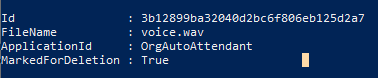
- Jun 20, 2022
This is a quick example i made,
$attendantName = 'AA_BV_01'
$aa = Get-CsAutoAttendant -NameFilter $attendantName | Where-Object Name -eq $attendantName


$content = Get-Content "C:\Message.wav" -Encoding byte -ReadCount 0
$audioFile = Import-CsOnlineAudioFile -ApplicationId "OrgAutoAttendant" -FileName "Message.wav" -Content $content


$greetingPrompt = New-CsAutoAttendantPrompt -AudioFilePrompt $audioFile

$aa.DefaultCallFlow.Greetings=$greetingPrompt


# save the config
Set-CsAutoAttendant -Instance $aa
The key is to save the changes to the $aa object
s

davidashworth
Jun 20, 2022Copper Contributor
thank you - that works perfectly. I was missing the part
$aa.DefaultCallFlow.Greetings=$greetingPrompt
$aa.DefaultCallFlow.Greetings=$greetingPrompt

Jun 21, 2022
Glad to hear!
- davidashworthJun 27, 2022Copper ContributorHi Andres,
Have you ever tried to update the audio for an auto attendant using flow and either a form or power app? Seems there is a trick to passing the audio file from the form\app to the runbook. Ive tried various suggestions from other forums but not really getting anywhere. Or perhaps you know of a forum i can have a look at?
Thanks,
David