Forum Discussion

Teams meeting policy "allow everyone" not working - anonymous users stuck in lobby
 Jun 15, 2020
PeterRising Hello mate! Guess what? It's working!
I've done nothing since Friday, so I suppose it was a case of waiting for it to take effect (but it shouldn't take that long!).

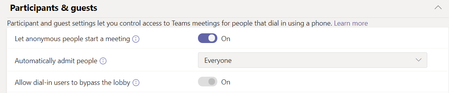
have you checked if the meeting organizer has that same Global Policy assigned to them? I checked and although my organization had it, I (the organizer of the meetings) did no. Also I've read somewhere the setting applies only to new meetings. Thanks for the great input!
My solution worked, now we are able to schedule meetings with anon users starting the meeting. Should you want to create different types of meetings - some having the setting to be joined by anons, some not, then you'd have to have different policies associated with different users.
E.G. According to policy assigned:
User 1 has permission to create meetings where all anons can start the meeting (Custom policy)
User 2 has permission to create meetings where the meeting can only be started by signed in users (guests or otherwise - according to policy setting - it's usually AllOn)
User 3 has permission to create meetings where it is always mandatory that an organization member is present to let people in. (GlobalPolicy normal settings)
- ChristianBergstromAug 30, 2020Silver ContributorHello, thanks for the reply. As you can see from the conversation (and the ”best response”) this was solved in June. I just had to wait ~48 hours for the policy to be synchronized. No issue with assigned policies.