Forum Discussion

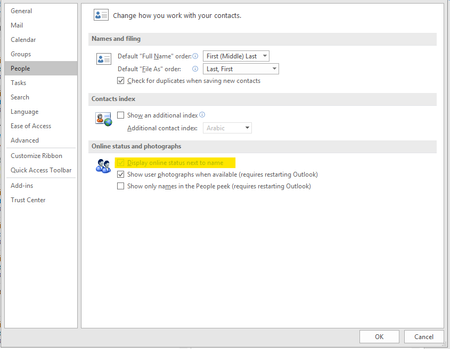
Display online status next to name in Outlook Greyed Out
 Jul 08, 2019
It is not effecting all users which was/is the aggravating part
Installed but did not login to skype for business Free/Busy Jellybeans in Outlook showed up but did not sync
Changed
Computer\HKEY_CURRENT_USER\Software\IM Providers
Changed DefaultIMAPP Value to Teams
Fixed :) Bit of a cheap and nasty fix but it will do until hopefully next update that will address this issues


ChrisWebbTech also, I found out today that my team had changed the ProPlus config customisation file about two weeks ago, this causes new ProPlus deployments, including the refresh builds, to use the new config file, and this has ExcludeApp=Lync.....
So, are you other impacted guys doing the same, excluding Lync frominstalling?
- Jul 04, 2019I exclude Skype for business from install via intune. Pretty sure it still works without but now you have me curious. I’ll do some testing soon and see what my results are.
- Don PickardJul 08, 2019Brass Contributor
ChrisWebbTech I had some time today so I uninstalled and reinstalled ProPlus without the ExcludeApp=Lync config, and still no presence jellybeans in Outlook.
I ran an offscrubC2R and then reinstalled ProPlus using Monthly channel and still no presence in Outlook.
I launched SfB, didn't signin, exited SfB, and then launched Outlook, and now the presence jellybeans are working in Outlook. seems like there's a correlation there...
- Jul 08, 2019Still sounds like upgrade mode to me. You guys still haven’t told me what that is set too in the admin center. Seems your still on a Skype or islands mode which will still use the Skype presence and hence why Skype loading is working.