admin
1440 TopicsTransfer MS Office 365 Business ownership from MSP to own MS Business account
Hello Everybody I need to transfer my clients MS Office 365 Business from current MSP to their own MS Business account. Current MSP very bad service. So, at the end they want to manage their Emails\Licenses on MS Admin Center. What are the steps on doing this?56Views0likes1CommentI built a free, open-source M365 security assessment tool - looking for feedback
I work as an IT consultant, and a good chunk of my time is spent assessing Microsoft 365 environments for small and mid-sized businesses. Every engagement started the same way: connect to five different PowerShell modules, run dozens of commands across Entra ID, Exchange Online, Defender, SharePoint, and Teams, manually compare each setting against CIS benchmarks, then spend hours assembling everything into a report the client could actually read. The tools that automate this either cost thousands per year, require standing up Azure infrastructure just to run, or only cover one service area. I wanted something simpler: one command that connects, assesses, and produces a client-ready deliverable. So I built it. What M365 Assess does https://github.com/Daren9m/M365-Assess is a PowerShell-based security assessment tool that runs against a Microsoft 365 tenant and produces a comprehensive set of reports. Here is what you get from a single run: 57 automated security checks aligned to the CIS Microsoft 365 Foundations Benchmark v6.0.1, covering Entra ID, Exchange Online, Defender for Office 365, SharePoint Online, and Teams 12 compliance frameworks mapped simultaneously -- every finding is cross-referenced against NIST 800-53, NIST CSF 2.0, ISO 27001:2022, SOC 2, HIPAA, PCI DSS v4.0.1, CMMC 2.0, CISA SCuBA, and DISA STIG (plus CIS profiles for E3 L1/L2 and E5 L1/L2) 20+ CSV exports covering users, mailboxes, MFA status, admin roles, conditional access policies, mail flow rules, device compliance, and more A self-contained HTML report with an executive summary, severity badges, sortable tables, and a compliance overview dashboard -- no external dependencies, fully base64-encoded, just open it in any browser or email it directly The entire assessment is read-only. It never modifies tenant settings. Only Get-* cmdlets are used. A few things I'm proud of Real-time progress in the console. As the assessment runs, you see each check complete with live status indicators and timing. No staring at a blank terminal wondering if it hung. The HTML report is a single file. Logos, backgrounds, fonts -- everything is embedded. You can email the report as an attachment and it renders perfectly. It supports dark mode (auto-detects system preference), and all tables are sortable by clicking column headers. Compliance framework mapping. This was the feature that took the most work. The compliance overview shows coverage percentages across all 12 frameworks, with drill-down to individual controls. Each finding links back to its CIS control ID and maps to every applicable framework control. Pass/Fail detail tables. Each security check shows the CIS control reference, what was checked, what the expected value is, what the actual value is, and a clear Pass/Fail/Warning status. Findings include remediation descriptions to help prioritize fixes. Quick start If you want to try it out, it takes about 5 minutes to get running: # Install prerequisites (if you don't have them already) Install-Module Microsoft.Graph, ExchangeOnlineManagement -Scope CurrentUser Clone and run git clone https://github.com/Daren9m/M365-Assess.git cd M365-Assess .\Invoke-M365Assessment.ps1 The interactive wizard walks you through selecting assessment sections, entering your tenant ID, and choosing an authentication method (interactive browser login, certificate-based, or pre-existing connections). Results land in a timestamped folder with all CSVs and the HTML report. Requires PowerShell 7.x and runs on Windows (macOS and Linux are experimental -- I would love help testing those platforms). Cloud support M365 Assess works with: Commercial (global) tenants GCC, GCC High, and DoD environments If you work in government cloud, the tool handles the different endpoint URIs automatically. What is next This is actively maintained and I have a roadmap of improvements: More automated checks -- 140 CIS v6.0.1 controls are tracked in the registry, with 57 automated today. Expanding coverage is the top priority. Remediation commands -- PowerShell snippets and portal steps for each finding, so you can fix issues directly from the report. XLSX compliance matrix -- A spreadsheet export for audit teams who need to work in Excel. Standalone report regeneration -- Re-run the report from existing CSV data without re-assessing the tenant. I would love your feedback I have been building this for my own consulting work, but I think it could be useful to the broader community. If you try it, I would genuinely appreciate hearing: What checks should I prioritize next? Which security controls matter most in your environment? What compliance frameworks are most requested by your clients or auditors? How does the report land with non-technical stakeholders? Is the executive summary useful, or does it need work? macOS/Linux users -- does it run? What breaks? I have tested it on macOS, but not extensively. Bug reports, feature requests, and contributions are all welcome on GitHub. Repository: https://github.com/Daren9m/M365-Assess License: MIT (free for commercial and personal use) Runtime: PowerShell 7.x Thanks for reading. Happy to answer any questions in the comments.851Views2likes1Comment
Latest MS Trend: abysmal AI phone support
Hello, I've just tried three times the MS 365 Support Phone Hotline. The AI Bot is designed to just hang up or provide an aka.ms/??? link which exactly leads to the problem that I am trying to contact support for. Thanks for nothing. Hope you fire also the people that worked on the Bot and not only your support hotline staff. It seems there are none left. I am going to recommend my company to move to a different product and drop ms ai slop. Bye27Views0likes0CommentsPrimer: How to Use RBAC for Applications to Control App Use of the Mail.Send Permission
The temptation to use the Mail.Send application permission in scripts can lead PowerShell developers into trouble because the permission allows access to all mailboxes, including sensitive executive and financial mailboxes. Fortunately, RBAC for Applications allows tenants to control the access that apps have to mailboxes and other Exchange content. All explained here with an example script to test RBAC of Applications. https://office365itpros.com/2026/02/17/mail-send-rbac-for-applications/227Views3likes4Comments
Cross tenant migration tools : New MS solution compared to Migration Wiz?
Hi, I'm looking for informations about advantages and limitations between new Microsoft Cross Tenant migration solution (Preview) and "Migration Wiz". Microsoft solution look more limited and doesn't seem to have Free/busy sync. What are the returns for those who did use MS cross tenant solution ? Thanks,1.5KViews0likes4CommentsMicrosoft Unified Tenant Configuration Management
Unified Tenant Configuration Management (UTCM) is a new tenant configuration management solution that can monitor changes to over 300 resource types found within Microsoft 365 tenants. Currently accessible via Microsoft Graph beta APIs to all tenants, UTCM offers an alternative to Microsoft DSC and third-party configuration management products. No details are available yet about an admin UX, licensing, or availability. https://office365itpros.com/2026/02/03/utcm-beta/1KViews0likes1Comment
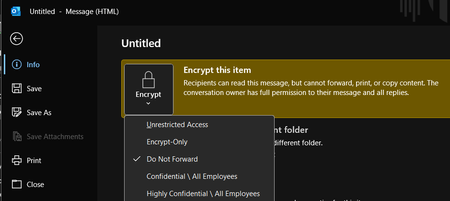
Outlook Classic for M365 - File > Encrypt > 'Encrypt-Only' option applies 'Do Not Forward' label?
I recently joined a new company and am helping support their M365 tenant and admin duties. I'm running into a very weird issue where no recipients can actually read/view the message when we encrypt emails using only 1 specific method (our organization largely uses the Outlook Classic for Microsoft 365 desktop app). If a user follows this method, for some reason the 'Do Not Forward' label is applied to the encryption, despite specifically selecting 'Encrypt-Only' - it defaults to 'Do Not Forward' every single time: New Email > File > Encrypt > Encrypt-Only Sending emails with this method gives any/all recipients a "You don't have sufficient permissions to open the mail." regardless of where they try to open the email (OWA, Outlook Classic, New Outlook) Yet, if the user tries this other method below - the proper Encrypt-Only label is applied, and any Outlook client immediately and opens/views the email as you'd expect: New Email > Options ribbon > Encrypt properly applies the Encrypt-Only label I verified IRM (Identity Rights Management) is enabled for our tenant: And encryption tests pass with flying colors: Ultimately, I'm at a loss for what's going on here and specifically where to check to fix this issue for this 1 specific encryption method. Poking around in the Purview portal, I'm having a hard time figuring out where these encryption policies/settings lie and how to get this method to stop defaulting to 'Do Not Forward' even though 'Encrypt-Only' is checked.Solved724Views2likes5CommentsA Method to track current and upcoming changes to M365 Products
Good evening (from Ireland at least), I've spent most of today traipsing down a variety of dead-ends and soon-to-be-discontinued features looking to create a useful location where I can find/send all new updates to products that I can peruse and ultimately highlight ones that may be of particular importance in my organisation. I've had a long chat with Copilot today and while I've made significant progress in some areas (had upwards of 30 great questions according to Copilot! ;P), when it comes to the final product, there's always some missing connector, or some RSS feed that is no longer supported. What I'm looking for here is any input on how you manage to stay ahead of changes and I'll share everything I'm doing and have learned as well, in the hope that the discussion is somewhat mutually beneficial. What I do: Message Centre: Manually check the Message Center (under Service Health in M365 Admin Center). You can sort by product here and by relevance which is quite handy. Link: https://admin.cloud.microsoft/?#/MessageCenter (Access to the M365 Admin Center on your tenant is required for this). Today I found out you can also send emails to yourself (and Teams channels) here so awaiting the next message to see if this has worked. Unfortunately, there doesn't seem to be a way of migrating past messages over so I'll have to go through these myself first. Road Maps: These have been the bane of my day. Currently, I actively check the road maps of the products I manage but going forward, I'd like to be able to track major changes to products used in my organisation so I can give users a heads up. I initially tried Power Automate to send updates to myself, however, it's not a feature widely used in our org yet and isn't well supported, so I wasn't too surprised when my efforts were blocked by existing policy. Not long after, I found RSS feeds, which seemed to be the answer to my problems. I created RSS Feeds for each of the Road Maps that I found useful, assured by Copilot that these would work. The assurance wasn't fell founded however as, true to form, once I showed Copilot by errors, they remembered that they were there all along! :') I'm yet to find a useful solution here beyond my current efforts so any assistance would be greatly appreciated. Community Blogs The final recommendation was these Community Blog posts which, to be fair, I've had immense success with to date. However, there is a slight issue with filtering. While I did finally get the RSS Feed to work on something (the Tech Comm M365 RSS Feed), it did then proceed to send me a mass of emails on every topic under the Sun & Moon. I've decided to return to the drawing board tomorrow with this, but I'm content in knowing that RSS isn't just a myth at least. I think what I'd like here is just to receive notifications when approved Blogs are posted (i.e., Monthly OneDrive Updates and the equivalent for other products). OneDrive Office Hours: This is a fansastic resource I do use every month as it gives you the opportunity to get in contact with the people who know the most about the product and the issues you're facing. I've spent weeks in a ticket before, only to raise it in one of these meetings and get a solution that took half an hour to set up. You'll get a yes or a no, but at least you'll have an answer. Copilot Chat: I don't have the full Copilot license because I haven't had a need for it yet. Everything I've wanted to do, I've been able to do in Copilot Chat. We haven't yet looked too much into Agents, and as a Public body, aren't going to rush into it until we know it's viable and can be supported. In the interim, I'm happy to test the waters with Copilot Chat asking it for Monthly Summaries on a variety of products, time frames, etc. It isn't perfect but it's faster than I am. It can find the sources for me and I can take it from there. As an organisation, we'll be pushing out all users on the most recent version (-1) on the Monthly Enterprise Channel. This means that they'll be supported whilst also being shielded from any brand new features. Our team will be on the most recent version and will be able to note any upcoming changes ahead of time. These are what I'm using so far but would be very grateful for any further input. Thanks in advance, Chris Martin337Views0likes2Comments