device management
1320 Topics
Cloning HDD to SDD
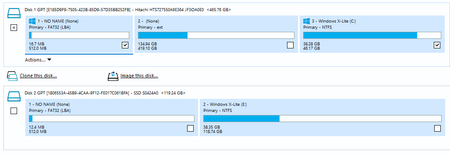
Hi! I used Macrium Reflect to clone two volumes (EFI system partition used for Windows Boot Manager and GRUB, and primary NTFS containing operating system with files) from HDD to SDD. After I tried to boot, the cloned GRUB gave errors. Then I deleted the cloned GRUB from the EFi volume from SDD. Now I see black screen for some minutes and laptop shuts down. I am suspecting that the EFI volume on SDD includes reference to the old drive letter(s). How to fix that issue? With diskpart on Windows on HDD? HDD contains Windows 11 and latest Ubuntu with FAT32 partition. During cloning, I only selected FAT32 and Windows 11 partition. Ext on Hitachi is for Ubuntu. During cloning, I also extended the original size of Windows volume to the maximum that was free on SDD. Firstly the GRUB did not detect Windows on SDD. I then refreshed the GRUB on Ubuntu and now I have two Windows entries on GRUB. 1 on HDD is working but second on SDD is not booting (black screen for 2 minutes and then laptop shuts off).8Views0likes0CommentswindwosBright Mode Software Properties Interface Font is Completely White
After enabling the light mode on the system, all fonts in the property dialog boxes/settings interfaces of all software are displayed in white (the light background makes it difficult to read the text), which severely affects normal use. I need a fix or a temporary workaround. Thank you for your response.34Views0likes2CommentsHow to fix blue screen of death on windows 11?
My Windows 11 PC has recently started crashing frequently, triggering a Blue Screen of Death (BSOD). I haven't made any recent hardware changes, but the system has become unstable enough that I can't maintain a session for more than a few minutes. In fact, I have already tried a basic restart and checking for Windows Updates with no luck. I am looking for help analyzing my minidump files or identifying if this is likely a driver conflict or a hardware failure. Could someone walk me through the best way to fix blue screen of death on windows 11, or suggest which system logs I should provide here to help pinpoint the exact cause? I want to avoid a full OS reinstall if possible, so any targeted troubleshooting steps would be greatly appreciated.81Views0likes10Comments
Windows 11 Media Player gives an 0x80070323 error when playing an MP4 file
I get a 0x80070323 error when I play an MP4 file on my computer and then close the actual folder the file is in. I shouldn't need to keep the folder open just to play the file. Jesus Microsoft is getting more and more frustrating to use. Any solutions?14Views0likes1Comment
How to repair Windows 11 from USB stick for corrupted os?
My Windows 11 os has become corrupted and is no longer booting to the desktop, instead stuck on automatic repair forever. However, the standard "Startup Repair" tool has failed to fix the issue, and I want to ensure I don't accidentally wipe my personal data while attempting a more advanced fix. I heard this could be fixed by a repair usb. How can I create a Windows 11 repair USB and repair windows 11 from usb for a corrupted OS? I would prefer to exhausted all repair options before resorting to the built-in factory reset option or a clean installation to avoid data loss!112Views0likes6CommentsWhy oobe\bypassnro Not Working for Windows 11 25H2
Hi all, I managed to install windows 11 with a local account by applying the oobe\bypassnro trick. It worked like a charm in the past with Windows 11 22H2, 23H2 and 24H2 installation as far as I have tried. However, it seems this bug was patched by Microsoft and oobe\bypassnro not working for Windows 11 25H2. Is there any other methods I can try in order to install Windows 11 without a Microsoft account? Thank you31KViews1like10Comments
Windows Hardware Errors
Hello, This is my third attempt at posting. The prior two times, my post has vanished with no emails or notifications of any kind, just gone. Hope someone besides a bot will read this. I have been getting several 'windows hardware errors' showing up in the 'reliability history' tool on Windows 11. I'd post the information about them, but maybe that is why my post is being removed? Is there someone willing to help troubleshoot? Thanks61Views0likes2Comments
Windows 11 24H2/25H2 System Freeze After January 2026 Updates – Lenovo ThinkPad G2
Dear Microsoft Support Team, We would like to raise a high-priority technical support case regarding a stability issue observed after installing the January 2026 cumulative updates on our Windows 11 devices. Environment Details: Device Model: Lenovo ThinkPad G2 (multiple units) OS Versions: Windows 11 24H2 and 25H2 Update Installed: January 2026 Patch Tuesday cumulative update (KB number can be provided) Deployment Method: WSUS / Intune / Windows Update (specify accordingly) BIOS Version: (Installed Latest available from Lenovo) Issue Description: After installing the January 2026 cumulative updates, devices intermittently experience a complete system freeze. The system becomes fully unresponsive: Mouse and keyboard input stop responding No BSOD is displayed Task Manager cannot be opened System recovery is only possible via hard reboot (power button) Frequency: The issue occurs randomly, both during active use and idle state. Multiple users across our environment are impacted. Troubleshooting Performed: Reinstalled OEM-certified Lenovo display drivers Disabled Fast Startup Ran SFC and DISM health checks (no integrity violations) Updated BIOS to latest version Setting power idle mode, then work normally Request: - Please confirm whether this is a known global issue under investigation. - Advise if any hotfix, Known Issue Rollback (KIR), or registry-based mitigation is available. - Provide guidance on additional diagnostic logging required at kernel or driver level. - Confirm whether crash dump analysis is recommended for this scenario. We are prepared to provide additional diagnostic logs, memory dumps, or reproduction steps upon request. Kindly treat this as a priority case due to multi-user impact in a production environment. Thank you for your support. #Windows11, #Windows 11 24H2, Windows Update, Cumulative Update, System Freeze, Lenovo ThinkPad, Display Driver, Enterprise4KViews12likes28Comments