user interface
1654 Topics
Planner task comments no longer send email notifications – critical regression
This change removed a previously existing core functionality without providing an adequate replacement. With the new Planner experience, task comments no longer trigger automatic email notifications to assigned users. This breaks a critical communication mechanism that many teams relied on for reliable task coordination. As a result, assigned users are no longer consistently informed about updates, introducing a high risk of missed information and operational issues in day-to-day work. There is currently no supported or enforceable alternative to ensure users are notified. Previous behavior: Task comments triggered automatic email notifications Assigned users were reliably informed Communication was traceable and consistent Current behavior: No automatic email notifications No configuration to restore this @mentions required (manual, error-prone, not enforceable) Microsoft Support has confirmed that this is by design and cannot be reverted. From an enterprise perspective, this is not just a design change, but a regression of critical functionality without an equivalent replacement. Request: Please restore automatic email notifications for task discussions or provide a reliable, enforceable alternative for notifying assigned users. Question to the community: How are you handling this change in real-world scenarios? Switching tools? Enforcing @mentions? Moving communication out of Planner? Would appreciate hearing how others are dealing with this.41Views1like0Comments
Inaccessible colour contrast for high text in Microsoft Teams in Dark mode on desktop
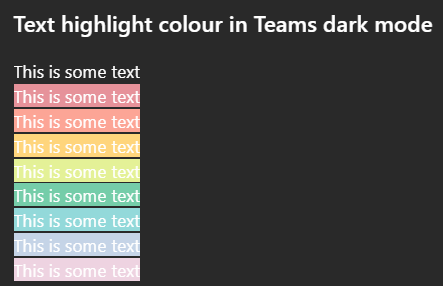
Issue: All highlighted text in Teams has poor colour contrast when in Dark mode on desktop. While some may be readable, none of the highlight colour options meet WCAG colour contrast minimums. How to reproduce Go to MS teams app on Win 11 and set appearance to dark mode. Create any default coloured text (this is white in dark mode) and apply any text highlight colour The result is inaccessible: it does not meet WCAG colour contrast thresholds and is very hard to read. Notes on behaviour On mobile (android MS Teams app) - the text colour changes to black which does meet the colour contrast minimum. This behaviour (illegible white text) on light backgrounds is also found on high contrast mode. This is different behaviour from MS word, which meets colour contrast minimum in a different way. Here highlight colours in dark mode are adjusted (e.g. the background highlight ffff00 --> is shifted to 393900 when dark mode is selected), and the text colour remains unchanged so there is enough contrast between the highlight and the white text colour. What happens next This needs a fix in make this accessible to users in dark mode so content can be read if another user has highlighted text. I'm not sure if this is the right place to post this but I was unable to register my MS account on the https://learn.microsoft.com/en-gb/answers/30Views0likes0Comments
Teams & channels names are blank
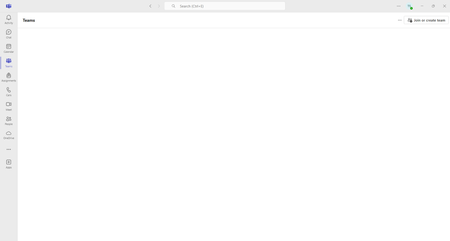
So fun UI issue on Desktop application (26072.519.4556.7438).. Teams and channels are blank and not clickable.. I've reset & repaired app, cleared the cache and reinstalled (temp fixed but same issue came back) Web version works good, but user wants a fix not a "workaround" Any ideas?36Views0likes0Comments
Can no longer "log out" (signing out is not logging out)
Hello, Up until recently, when right clicking the Teams icon on the task bar, there was an option to Log Out of teams, which had the effect of logging out (re-opening the program would instantly lead to LOGGING IN). On the most recently release, this is gone. There is now only an option to SIGN OUT, which is done through a menu in the program itself, and has further consequences (namely a full Sign in (with username/password etc) is required, themes disappear etc). How to log out of current session, but not SIGN OUT?17Views0likes0Comments
Missing Teams and Classes under Teams Tab (Desktop Version)
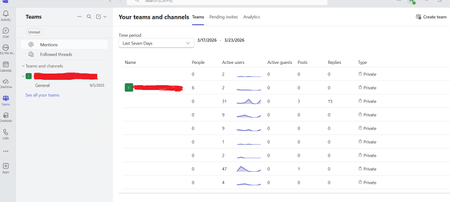
Good morning, Our organisation utilises Microsoft Teams for internal and external communication. We have recently received several reports of users missing their Teams and Classes under the Teams tab in the Microsoft Teams desktop version. However, when users access Teams via the website version, all of their Teams and Classes are visible. Has anyone else in the community experienced this kind of behaviour before? The Microsoft Teams Version is - 24335.208.3315.1951 and the Client Version is - 49/24120100213 I have included two screenshots for reference. I hope you can help. Thank you.Solved12KViews2likes5CommentsCopy time and users name when copy paste conversation.
As far as I can se this was removed due to the fact that some people copy paste code directly into production system where time and usernames caused problems. However in the normal world it not to uncommon to quote, even between organisations or even mail. And then you REALLY REALLY need to have time and user name. This was also what was default until recently, and currently everyone is sending screenshots, something that ofcourse is not a good solution. In order to make everyone happy, make an option in settings to not copy username/time and make it unset as default, those who need it will find it for sure, the rest will get the expected "what you mark is what you copy" behavior.613Views3likes4Comments
Feature Suggestion: hover over description for teams within MS Teams
My organization has been using teams for about six years now. Slowly, my left column in teams has filled up with many teams. Sometimes I'm added to a team and I don't even know what it is! Sometimes I joined the team three years ago and forget what they do. The name of the team may not be very descriptive, or is an acronym I've forgotten / never learned, and this leads me to browsing posts to get an idea of the main function of the team. I predict that this issue will only grow as time goes on. In the early days of teams, this was not as much of an issue. I'm suggesting a feature with this intent: allow users either with a mouseover on the team name, or with clicking on the three dots next to a team name (ideally both), to see a brief 200 character or less synopsis / description of the team. In this way, we'll quickly relay the intent of the team to any / all users. Currently, hovering your mouse over the team name produces the team name again and "Public" or "Private" as far as I can tell. Currently it is clean and light, but I propose adding an optional description below the "Public" / "Private" part. Thoughts? NOTE: I would have submitted this in other more appropriate forums like feedbackportal.microsoft.com but i don't have access.36Views0likes0Comments
Customize the Basic Approval Request
Is there any way that I can customize the Basic Approval Request in Teams? For example, at the top, it states Approvals. Can this be changed to state Acknowledgement instead? Is there anything else that can be customized just by using the MS Teams Basic Approval template?105Views0likes1CommentTeams duplicates contacts until it maxed out at 15000
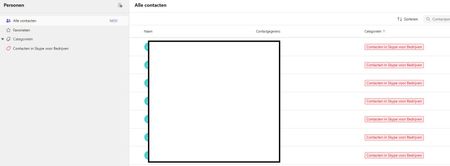
Hi, I have a weird issue with some users, Teams seems to be duplicating old Skype for Business contacts until it maxes out at 15000 contacts. I have been digging into it a bit and found out the location of the folder through Exchange powershell but I can't clear or delete it. Skype for Business is phased out and disabled in my tenant for a long time now so I couldn't do much there, I can't login to it through powershell. We've had Teams since like 2017 so I suspect this is a niche legacy issue popping up recently somehow. Manual deleting is possible through the browser environment but that is such a hassle because it keeps glitching if you delete per 100 and skipping pages and stuff, need to refresh constantly. Just a pain, it would take days. And no guarentee its not coming back either. See screenshots. Does anyone know why this is happening and how to fix this? Thanks for reading, cheers!125Views0likes3Comments