outlook
2114 Topics
Locked Out of Global Admin – Lost Authenticator – Case 2602060010000939 – Need Escalation
I am locked out of my Global Administrator account because my phone broke on February 5, 2026 and I no longer have access to Microsoft Authenticator. There is no alternative authentication method configured. Case ID: 2602060010000939. I contacted support on February 6 and the ticket was set as Severity C with an 8-hour response expectation. After several days, I have only received generic replies and no contact from an engineer. This account is critical for my business operations, and I have now been without access for five days. I understand it was my responsibility to maintain backup methods, but I urgently need help from Microsoft to recover access. Please contact me. Samuel LeoSolved235Views1like2Comments
Exchange SE HU6: PDF attachments truncated to 13 KB via Outlook Desktop — OWA unaffected
We've spent days isolating this and ruled out everything we could touch. The corruption survives agent disabling, Bitdefender removal, and BypassFiltering — and the message tracking logs show exactly where it happens. Environment: Exchange Server SE, Build 15.2.2562.41 (HU6 / KB5081755), Windows Server 2025 Problem: PDF attachments sent internally via Outlook Desktop (MAPI) arrive corrupted at ~13 KB (original: ~32 KB, no xref/EOF). All PDF sizes, all internal recipients affected. Started 21 May 2026. Key finding — OWA works, Outlook Desktop doesn't: Sending the identical email via OWA → attachment arrives intact. Outlook Desktop → truncated. Message tracking proof: Both paths deliver the message at full size (~42 KB) via STOREDRIVER DELIVER. Only the Outlook Desktop delivery shows an additional X-SDDS=0.106 step in the STOREDRIVER latency breakdown. That step does not appear in the OWA delivery. The corruption happens inside that MAPI/TNEF store write step — not in transport. Systematically ruled out: All transport agents disabled → still 13 KB Exchange Malware Agent + Set-MalwareFilteringServer -BypassFiltering $true → still 13 KB Bitdefender GravityZone fully uninstalled from server → still 13 KB EEMS mitigations: only PING1 and M2.1.0 applied, neither affects MAPI delivery Temporal correlation: Three Windows updates installed 21.05.2026: KB5087051 (.NET Framework 4.8.1), KB5087539 (Windows Server 2025 CU), KB5089717 (Servicing Stack). Exchange SE HU6 (KB5081755) was installed around the same period. Workaround: Sending via OWA works. Not acceptable long-term. Has anyone seen this? Is this a known regression in HU6 or KB5087051?65Views0likes2Comments
Feature Request: Add "Recent Activity Feed" combining Sent & Received emails
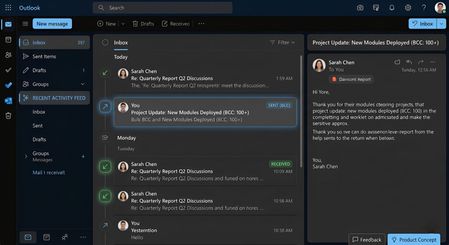
Respected Outlook Product Team, I am writing to submit a feature request aimed at improving productivity and message tracking for power users who heavily rely on Microsoft Outlook for their daily communication workflows. The Problem: Currently, Outlook separates communication into distinct folders: "Inbox" for incoming mail and "Sent Items" for outgoing mail. When managing large-scale communications—specifically when sending bulk or recurring emails via BCC (Blind Carbon Copy)—it becomes incredibly tedious to constantly switch back and forth between the Inbox and Sent Items folders to track recent operations or verify the exact sequence of historical activities. The existing "Group messages by conversation" feature also fails to merge these independent outgoing streams seamlessly unless a direct reply is received. The Solution / Feature Proposal: I highly request the product team to introduce a "Recent Activity Feed" filter or view within the main Outlook Inbox interface. Inspired by modern social media and collaboration timeline feeds, this feature should display both Sent and Received emails chronologically in a single unified message list. Incoming and outgoing messages should be clearly distinguishable using intuitive icons (e.g., incoming/outgoing arrows) and labels (e.g., "SENT (BCC)" vs "RECEIVED"). This will allow professionals to review all recent actions, sent bulk updates, and incoming threads at a single glance without breaking their operational focus. I have attached a UI/UX Concept Design image with this email to visually demonstrate how this feature would streamline the user experience seamlessly. I sincerely hope the engineering and product management teams will consider this feature in future Microsoft Outlook updates to adapt the platform to modern, high-volume workflow requirements. Thank you for your time and continuous efforts to improve Microsoft Outlook. Regards, Pawan Kumar69Views0likes3CommentsHow Microsoft 365 Backup works and how to set it up
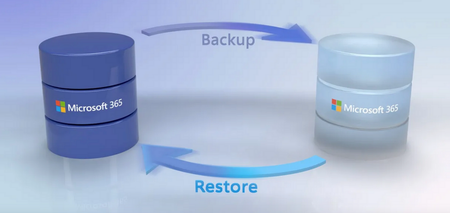
Protect your Microsoft 365 data and stay in control with Microsoft 365 Backup — whether managing email, documents, or sites across Exchange, OneDrive, and SharePoint. Define exactly what you want to back up and restore precisely what you need to with speeds reaching 2TB per hour at scale. With flexible policies, dynamic rules, and recovery points up to 365 days back, you can stay resilient and ready. In this introduction, I'll show you how to minimize disruption and keep your organization moving forward even in the event of a disaster with Microsoft 365 Backup. Fine-tune what gets backed up. Back up by user, site, group, or file type — to meet your exact needs. Get started with Microsoft 365 Backup. Restore data in-place or to a new location. Compare versions before committing. Take a look at Microsoft 365 Backup. Restore content from months ago. Use fast weekly snapshots — even when the issue went unnoticed for weeks. Start here with Microsoft 365 Backup. QUICK LINKS: 00:00 — Automate recovery process 00:37 — How to use Microsoft 365 Backup 01:49 — Compare with migration-based solutions 02:30 — How to set it up 03:33 — Exchange policy for email backup 05:00 — View and manage backups 05:24 — Recover from a restore point 07:45 — Restore from OneDrive & SharePoint 08:33 — Bulk restore 09:41 — Wrap up Link References Check out https://aka.ms/M365Backup Additional backup and restore considerations at https://aka.ms/M365BackupNotes Unfamiliar with Microsoft Mechanics? As Microsoft’s official video series for IT, you can watch and share valuable content and demos of current and upcoming tech from the people who build it at Microsoft. Subscribe to our YouTube: https://www.youtube.com/c/MicrosoftMechanicsSeries Talk with other IT Pros, join us on the Microsoft Tech Community: https://techcommunity.microsoft.com/t5/microsoft-mechanics-blog/bg-p/MicrosoftMechanicsBlog Watch or listen from anywhere, subscribe to our podcast: https://microsoftmechanics.libsyn.com/podcast Keep getting this insider knowledge, join us on social: Follow us on Twitter: https://twitter.com/MSFTMechanics Share knowledge on LinkedIn: https://www.linkedin.com/company/microsoft-mechanics/ Enjoy us on Instagram: https://www.instagram.com/msftmechanics/ Loosen up with us on TikTok: https://www.tiktok.com/@msftmechanics Video Transcript: -If something bad happens, like someone accidentally does a bulk file deletion or files are corrupted by a malicious user or ransomware, the first question is, can we recover from our backup? And the second question is, how long until we’re back online? Now to help you automate a targeted recovery process, Microsoft 365 Backup has a self-service solution that helps you scope the data that you want to recover. Your data remains inside your Microsoft 365 trust boundary, providing bulk restore recovery speeds of up to 2 terabytes per hour at scale. -Now, you might be wondering, do I even need to back up Microsoft 365 data? Let’s look at where it makes sense. So, first, if there’s a natural disaster, Microsoft 365 already natively offers high availability and disaster recovery with built-in service resiliency. That said, if you experience a data breach or maybe unexpected data corruption from a processor person on your end, or because of ransomware, your Microsoft support options depend on the workload in Microsoft 365. For example, for SharePoint, if you do nothing additional at all, when you contact Microsoft Support, if the event happened up to 14 days prior, Microsoft will recover OneDrive and SharePoint to a previous state within that timeframe. That said, if you want to get more specific on what gets restored or want to go back further than 14 days to recover your data, this is where the Microsoft 365 Backup service comes in. It’s self-service by design for SharePoint Exchange and OneDrive, giving more targeted control to scope exactly what you need to restore for up to 365 days. We’ll be adding more Microsoft 365 Backup coverage to other Microsoft 365 workloads over time. -Let’s compare this with migration solutions that you may be familiar with. These solutions work by moving your data and transforming it to store it into their service. Then, for recovery, the backup has to be restored back to its original form, then migrated back to your Microsoft 365 tenant, adding significant recovery time. Instead, Microsoft 365 Backup takes incremental snapshots of your data. The data stays in your Microsoft 365 service boundary in its native encrypted form. So, when you need to recover your data, the recovery process is accelerated. Microsoft 365 Backup is a consumption-based service with billing based on the amount of data protected. -Next, let’s walk through the setup steps and controls to manage backups and restore them. Starting with setting up a billing plan, where in advance, you’ll need to have an Azure subscription as well as a defined resource group. So, from the Microsoft 365 admin center under Setup, you’ll activate pay-as-you-go services and select Get started. Here, I’ll choose my Azure subscription and the resource group, and the region. Note that this region here is only used for billing. Your data will remain in the location that it’s currently in. Now, still on this page from the Settings tab, in the Storage location, you’ll choose Backup. Then, turn it on and save to confirm. -Now, with the service running, the rest of the steps will be performed from the Microsoft 365 Backup page in the admin center. So, here, I can configure backup policies to initiate automated backup processes. I have navigated within settings to Microsoft 365 Backup. From there, each workload, SharePoint, Exchange, and OneDrive, can have its own individual policies. So, I’m going to walk through an Exchange policy for email backup, but all three follow similar steps. After hitting Set up policy, the overview page displays policy attributes like the backup frequency. In this case, it’s every 10 minutes. The backup retention up to one year. -Now, the backup frequency does not impact your costs. Here, I can choose the selection method. The options are to upload a CSV file with mailboxes. Now, for SharePoint policies, this would be sites, and for OneDrive, we’d target user accounts. You can also use a dynamic rule, which allows the mailboxes in scope to dynamically update as group membership changes. Or you can define specific filters where you can select up to three distribution lists or security groups, or both. Now, these are the same filters for OneDrive policies. And for SharePoint, you can use filters for site names, URL contains values, or site last modified dates. The final option is then to select mailboxes individually, where you can manually select the mailboxes that you want to back up. In my case, I’ll choose the dynamic rule and use distribution lists, and I’ll select Project Falcon and Northwind Traders. -Now, I just need to review, and from there, I can create the policy. The policy will typically be active within an hour of creation, depending on the size of your group, and you can edit policy attributes at any time. So, now with the policy created, let’s move on to the process of viewing and managing backups. I’m back on the Microsoft 365 Backup page, and now I have active policy set up for each workload. And as mentioned, I can make required edits and changes to these policies from here. For example, you can pause backups or add, or remove sites from the SharePoint policy. -So, at this point, all of our services are running automated backups. Now, let’s assume that something happened to our Exchange mailboxes that were backed up and we want to recover from our restore point. Now, to simulate that, I’m logged in as Adele. I’m deleting email from the last month and even removing those from the Deleted items folder. One thing to note is that a restore from Exchange will only impact items that were modified, hard-deleted, or purged during the recovery window. So, let’s recover those deleted emails. So, I can start that for Exchange by hitting Restore mailboxes. -Now, for the choose selection method option, there is an option to upload a CSV list of mailboxes or select them individually. I’ll choose that one. And then, I’ll search for Adele and there she is. Now, I’ll add her mailbox and hit Next. Then, in content scope, I can select all emails including notes, contacts, calendars, and tasks, or I can choose a specific timeframe as well as apply filters, as you can see here. I’m going to keep the default of all items. Then, I can choose a time before the event happened to restore too. From there, I’ll be presented with available restore points. Email restore points are created every 10 minutes from when the policy’s active for up to 365 days. And I’ll choose this one for April 4th at 8:40 AM. -Then, for the destination of restored items, I have two primary options. I can replace mailbox items with backups, or the current version of the items will be overwritten by the items recovered from the restore point. Or I can create new mailbox items from backups within the user’s mailbox, which will be named Recovered Items, with the year, month, day, and time. I’ll keep replace mailbox items. Note that only effective items as mentioned will be overwritten. Any items received after the restore point or unmodified items will not be reverted and will also not get copied over if you decide to create a new folder. Once I confirm and commit to the file restore, from there, I can track progress from the Restoration tasks tab in the Microsoft 365 Backup page and see how things are going. So, I’m going to fast forward a little in time. And just to prove it, I’m back in Adele’s mailbox, and you can see that all of the emails that I deleted before have returned. That’s Exchange. -And there are also a few differences when restoring from OneDrive and SharePoint worth pointing out. Now, I’ll start with SharePoint. Here, I can upload a CSV file of site addresses or select them individually. I’ll do that. Now, I can select exactly which sites I want. There we go. Then, in Search for backups, you’ll see that things are a little different compared to Exchange. And again, I need to choose a date closest to the restore event, as well as a time of day. And for the previous two weeks, there are standard restore points captured every 10 minutes. And for a small-scale restore where you want to prioritize speed over the exact restore time, the prioritized backup options shown here will be faster and is recommended. These faster restore points are taken roughly every 24 hours. -One other thing to note here, if you’re doing a bulk restore, for example, to thousands of sites, then the fast restore points are not relevant. If you want to restore beyond two weeks, because these are weekly snapshots, if I choose the most recent date, where I know that my content is safe, the tool will automatically select the closest restore point captured prior to my selected time. And these weekly restore points are also fast restore points too. The other options are similar to what I showed in Exchange, where you can use in-place Restore or also create new sites. Note that content restored to a new location will apply and address suffix of R, followed by the restore number in a numeric sequence for each restore, starting with R0, as you can see with this site’s URL. In this case, you can copy restored items manually from the restored location to the prior location as needed, and in-place restore will mean users recent edits made to sites, files, and metadata since the time of the restore point will be lost. You can find additional backup and restore considerations at aka.ms/M365BackupNotes. -As you saw today, Microsoft 365 Backup doesn’t just let you self-manage your backups, it helps you recover faster. To find out more, checkout aka.ms/M365Backup. And keep watching Mechanics for the latest tech updates, subscribe to our channel, and thanks for watching.4.7KViews0likes1Comment
Microsoft 365 Outlook Classic Latest Update Copilot issues
Hello to all, we are currently using the Microsoft 365 Outlook Classic, using version Version 2604 Build 16.0.19929.20172 (Current Channel) Copilot works as expected; However ever since the next update was released (Version 2605 (Build 20026.20076)) some users including me, have been getting the below error: I have tried uninstalling and installing the latest version directly, with the same issue. Scanned for any corrupted system files with no issues,but still get the error; I have tried the update Licence from the Outlook application, with no issues but the copilot something went wrong error keeps on persisting. Internet searches are very vague and the I have found some registry suggestions which I have also tried with no solution. The only way to get Copilot working on Outlook Classic was to revert to a previous working version, only then Copilot works as expected. This only happens in Outlook Classic; Copilot works fine on the latest version of Microsoft Office 365 with Word, Excel, etc. For those that maybe might ask why not switch to the New Outlook, we have had issues with it and it has been recommended to use the Classic Outlook for the time being. Has anyone been experiencing such issues please? Thanks for any help.1.9KViews5likes11CommentsOutlook Cached Mode Repeatedly Re-syncs Mailbox After Restart (Starts Again Around 3.99 GB)
Hi everyone, I’m experiencing a strange Outlook Cached Exchange Mode issue with a Microsoft 365 mailbox after a recent Windows rebuild and wanted to see if anyone has seen similar behavior. Environment: Microsoft 365 mailbox (Exchange Online) Outlook for Microsoft 365 Version 2605 Build 16.0.20026.20076 64-bit Windows 11 25H2 Fresh OS rebuild performed twice New Outlook profile created Office completely reinstalled OST recreated multiple times Issue: When Cached Exchange Mode is enabled, Outlook starts downloading/synchronizing mail normally, and the OST file continues to grow correctly. However, after every reboot or Outlook restart, Outlook again shows “Downloading…” starting from around 3.99 GB. Important observations: Online Mode works perfectly OUTLOOK.EXE closes properly after exit OST file is NOT deleted and continues growing Sync slider changes (1 month, 1 year, all mail) make no difference Disabling Outlook indexing did not help New Outlook profile did not help Reinstalling Office did not help Problem only started after OS rebuild Before rebuild, same mailbox worked normally in Cached Mode No pending office or windows update. It does not appear to actually re-download the mailbox from scratch because the OST size keeps increasing, but Outlook repeatedly processes/downloads from around the same 3.99 GB point after restart. Has anyone seen: Cached Mode replaying synchronization repeatedly after restart? Similar behavior on recent Current Channel builds? Security/EDR products interfering with OST synchronization state? Any known regressions with Outlook Version 2605 Build 16.0.20026.20076? Any suggestions or similar experiences would be appreciated.123Views0likes2Comments
Is Office 365 E3 Developer free
Hi, My tenant had a license named "Office 365 E3 Developer" which allowed us to use Outlook / Exchange (among other Microsoft Office products). This license isn't from the Microsoft 365 Developer Program, which come with free licenses. This license costed CA$11.60 a month per user when we initially purchased it. On May 2, 2026 it still costs $11.60, but when I received my monthly invoice for this tenant, this license was free. I searched around to see whether this license became free recently, but I couldn't find any info on this. The links I found all say it's a paid license. I was wondering if there's any info on this to see why it became free? Or is it a mistake and Microsoft'll be charging us the next billing cycle? Jason71Views0likes1Comment