purview
144 Topics
[HELP] "Action required for browser protections" alert
Hello! I have an Endpoint DLP policy with Device location. After several scoping changes (device groups, inclusions/exclusions) to narrow it to a specific target group, the orange alert appeared: Action required for browser protections. One or more policies were not applied in Edge for Business. This could be due to a policy sync issue, lack of required permissions, or an issue with the server. Either resync these policies or contact an admin with the required permissions to resync. After resyncing, you might still see this message for up to 1 day while the system completes the sync and activates protections. The policies were working before. Clicked Resync multiple times, only for the error to return. Please help!148Views0likes2Comments
Integrate MS Purview with ServiceNow for Data Governance
Hi team, We are planning to leverage Microsoft Purview for core Data Governance (DG) capabilities and build the remaining DG functions on ServiceNow. We have two key questions as we design the target‑state architecture: 1. What is the recommended split of DG capabilities between Microsoft Purview and ServiceNow? 2. How should data be shared and synchronized between Purview and ServiceNow to keep governance processes aligned and up to date? Thanks!Solved206Views0likes3CommentsGetting sensitivity label working for specific domain
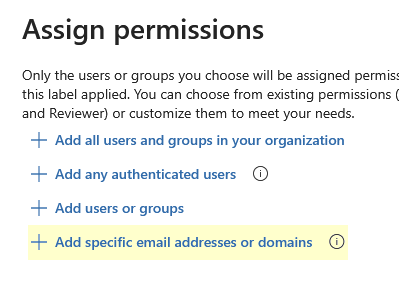
Good morning all I am trying to setup a sensitivity label to work so anyone with '@mail.com' will have access to a document that has this label. I have attempted to apply this in the control access settings with the label under 'Add specific email addresses or domains' However for the life of me, I cannot get this to work, I have tried "*@mail.com. mail.com, mail.com", nothing seems to work. I have run through the MS material on this and can't see anything specific to setting this up. Has anyone been successful in setting this up? Is there a trick I am missing? Grateful for anyone who can help on this!71Views0likes2Comments
Connection Failed Issue scanning Google BigQuery from Microsoft Purview Azure environment
Hi everyone, I am currently setting up a laboratory environment in Microsoft Purview to catalog data from Google BigQuery, but I am encountering a connection error during the testing phase. I have verified that the Service Account has the required permissions in GCP (BigQuery Metadata Viewer and BigQuery Data Viewer) and the JSON key is correctly stored in Azure Key Vault. Has anyone faced a similar issue when connecting BigQuery to Purview recently? I want to rule out if this is a networking issue or a specific configuration requirement for the BigQuery connector that I might be missing. Thanks in advance for your help!201Views0likes2Comments
Email to external(trusted user) not require verify user Identity(with Google or One-time passcode)
Dear Expert and Community, I am starting with MS Purview - Data Loss Prevention. I have one point to clarify and seek your advise / comment / contribute or sharing good practice regarding with below: - Firstly, we can send email to externally user contain sensitive information, it is encryption or blocked (result: worked as expected). If remail encrypt, the external receiver require verify the Identity via sign in with google acc / with a one time password. - Second: we plan sending email to external user (only trusted user / domain). Is it possible, do not require these scope user reverify their Identity again and again? If yes, how to do it? If not - why? Well appreciated for update and supporting. Thanks,156Views0likes3CommentsClassification on DataBricks
Hello everyone, I would like to request an updated confirmation regarding the correct functioning of custom classification for Databricks Unity Catalog data sources. Here is my current setup: The data source is active. Source scanning is working correctly. I created the custom classification in “Annotation management / Classifications”. I created and successfully tested the regular expression under “Annotation management / Classification Rules”. I generated the Custom Scan Rule Set in “Source management / Scan Rule Sets”, associated to Databricks and selecting the custom rule. However, when running the scan on Databricks: I do not find any option to select my Scan Rule Set (for another source like Teradata, this option is visible). No classification findings are generated based on my custom rule. Other tests do produce findings (system-generated). Does anyone have insights on what I should verify? Or is this custom classification functionality not supported for Databricks?Solved177Views1like2Comments
Datascan not picking up the schema of .parquet files ParquetFormat JavaInvocationException happened
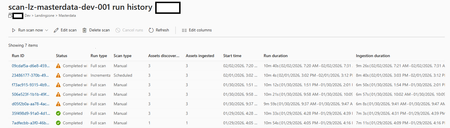
Since about a week we have a problem with our datascan on ADLS not picking up the schema of .parquet files. It does pick up on the asset but not on the schema of said asset. The parquet files are perfectly readable and writeable with Fabric/spark. Purview had no issue picking them up before last week, but it seems that something has changed on the Microsoft side? Anyone else facing these issues recently? 2026-02-02T06:21:47.116Z,SystemError,ReadData,https://xxx.dfs.core.windows.net/landingzone/masterdata/someotherfile.parquet,ParquetFormat JavaInvocationException happened,ScanErr0000109Views0likes1CommentCan´t Sign confidential documents
Hello, I have a problem. I want to send confidential contracts to customers for signing with Adobe DocuSign. This contracts have a label "confidential" from purview and are encrypted. But now the customer cant sign the contract with DocuSign because of the encryption. Is there a way that they can sign the document? We must encrypt the documents because compliance reasons and ISMS. Thank you.167Views2likes5Comments
Lifecycle using Custom Protection with Purview Sensitivity Labels
Organizations using Purview Sensitivity Labels with custom protection face a fundamental governance challenge: there is no lifecycle‑ready way to maintain, audit, or update per‑document user rights as teams evolve. This affects compliance, need‑to‑know enforcement, and operational security. Document lifecycle challenges Team growth: new members do not inherit document‑specific rights. Team shrinkage: departing members retain access unless manually removed. Employee offboarding: accounts are disabled, but compliance may require explicit removal from protected documents. Audit requirements: organizations need to answer “Who has what rights on document X?” — and today, no native tool provides this for custom‑protected files. Existing method Limitation Purview PowerShell Overwrites all existing assignments; no granular updates MIP Client Not yet capable of bulk lifecycle operations OlaProeis/FileLabeler Great tool, but limited by the same PowerShell constraints What the tool enables Rights audit trail per document Controlled lifecycle updates (add/remove/transfer rights) Preservation of original files for rollback Multi‑action batch processing Admin‑only delegated workflow with MIP superuser role Full logging for compliance Supported operations ListRightAssignments – extract all rights from each document under a given label GUID SetOwner / AddOwner – assign or add owners AddEditor / AddRestrictedEditor / AddViewer – role‑based additions RemoveAccess – remove any user from all roles AddAccessAs – map one user’s role to one or more new users Multi‑action execution – combine operations in a single run Safe mode – original files preserved; updated copies created with a trailer Because this tool can modify access to highly sensitive content, it must be embedded in a controlled workflow: ticket‑based approval, delegated admin, MIP superuser assignment, and retention of all logs as part of the audit trail. This ensures compliance with need‑to‑know, separation of duties, and legal requirements. I would appreciate feedback from the community and Microsoft product teams on: whether similar lifecycle capabilities are planned for Purview whether the MIP SDK is the right long‑term approach how others handle custom‑protected document lifecycle today interest in collaborating on a more robust open‑source version Max110Views0likes1CommentDefault Sensitivity Label to be added to migrated files (from Local Network Server)
Hi Experts, We are migrating our file-sharing services from a local network file server to MS Teams/SPO. The requirement is to enable and give default sensitivity labels from the migrated files. Manually assigning sensitivity labels in over a TB of files is hectic and could be prone to error as well. MS Purview MIP labels and label policies are configured, however, at present, only new documents and/or revised files are only having the sensitivity labels assigned. Any suggestions, guide, and tips will be highly appreciated. Thanks, Rhey1.1KViews1like6Comments