Forum Discussion

VLOOKUP and INDIRECT Formula assistance needed
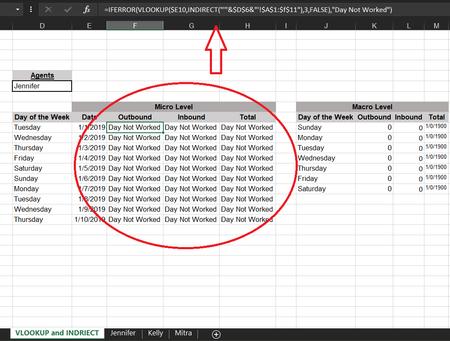
- Dec 24, 2019
First, name list of the sheets as sheets (or whatever name your prefer)
Second, correct column number in your latest version of VLOOKUP(), it shall be on one more in each formula.
Third, make branches for the selection from drop-down list, one for ALL and another one for any other name
IF($D$6="All",<sum on all sheets>, VLOOKUP as before)Next, adjust for your ranges formula from the link and combine all together. In F10 it'll be
=IFERROR(
   IF($D$6="All",
      SUMPRODUCT(
         SUMIF(
            INDIRECT("'"&sheets&"'!"&"$B$2:$B$10"),
            $E10,
            INDIRECT("'"&sheets&"'!"&"$C$2:$C$10")
         )
      ),
      VLOOKUP(
         $E10,
         INDIRECT("'"&$D$6&"'!$B$1:$f$11"),2,FALSE
      )
   ),
   "Day Not Worked"
)
similar for next columns and drag first row to the bottom.
Additionally, I'd suggest to take day of the week from the date to avoid extra errors

Sorry, I didn't check the rest of formulas. In second INDIRECT() ranges shall be adjusted to proper columns.
One more point. If calculate Total as Inbound+Outbound it will be different from the value if sum directly. I guess that's due to rounding of source data. You may check sums at the bottom of Jannifer sheet and column V in Dashboard.

Thank you so much!!! SergeiBaklan
- SergeiBaklanDec 26, 2019Diamond Contributor
shade206 , you are welcome