Forum Discussion

Pull member ID number from sheet 2 into sheet one if the name matches?

Patrick2788 Unfortunately I can't share the actual source data, but here's a screen shot where I put Bugs Bunny as cell C2 & D2 on the Whole List sheet to show you what it was doing. Hopefully that can help discern where/what the problem is. The member numbers are real, but only useful in our database so I left those. There are several members with two first or last names. Would those potentially be screwing this up?
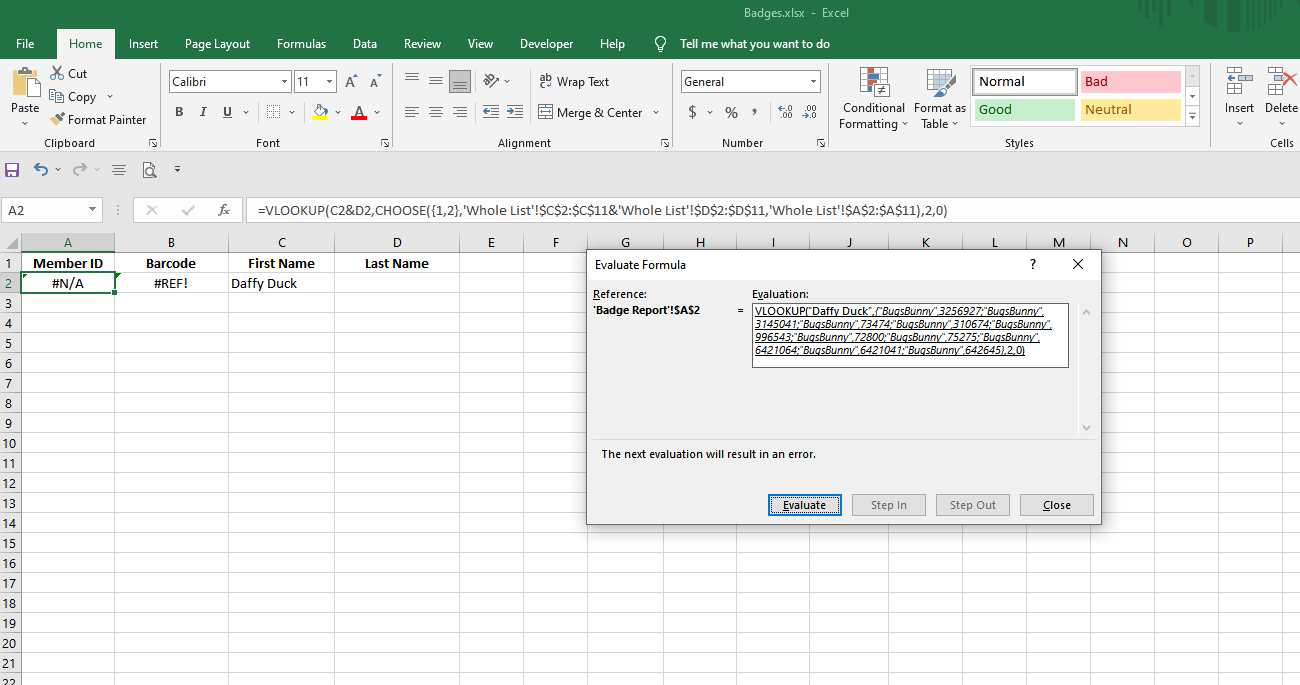

It seems the names are not listed the same consistently. Based on the image you posted, perhaps this:
=IFERROR(VLOOKUP(C2&D2,CHOOSE({1,2},'Whole List'!$C$2:$C$11&'Whole List'!$D$2:$D$11,'Whole List'!$A$2:$A$11),2,0),VLOOKUP(SUBSTITUTE(C2," ",""),CHOOSE({1,2},'Whole List'!$C$2:$C$11&'Whole List'!$D$2:$D$11,'Whole List'!$A$2:$A$11),2,0))- Patrick2788Jul 28, 2023Silver ContributorYour request is straight forward lookup but it's not certain what your data looks like. There could also descrepancies in the way names are listed in the sheets or stuff like leading or trainling spaces.
- BrattyBlondeJul 28, 2023Copper Contributor
Patrick2788 What do you mean consistently? I've even tried removing the 2 first/last names from the first 11 cells and making the search term one of the names in those first 11 cells and it still won't work even without editing your formula at all. Thank you for all your effort, but I guess it just won't work for me.
