

Forum Widgets
Latest Discussions

power querry
Hi everyone, I've run into a recurring issue: after refreshing a Power Query that's loaded into an Excel Table, a completely blank column sometimes appears that doesn't exist in the query output itself. In my case the table starts at cell B2, and the blank column shows up right next to my actual data. My working hypothesis is that this happens when the number of columns returned by the query decreases compared to a previous refresh: Excel's Table object doesn't always shrink to match the new result, so it keeps a "ghost" column inherited from the previous load's structure. However, This behavior seems unpredictable: when I went from 10 columns down to 5, I could only got one extra blank column, not five. Has anyone else experienced this? Is there a reliable way to force the Table to always match the query's current column count exactly, instead of refreshing on top of the old structure? And if the "ghost column" theory is right, why would only one extra column show up regardless of how many were actually dropped? Thanks in advance!LéaJun 19, 2026Copper Contributor60Views0likes6Comments
Excel Pivot table showing only part of one row
Hello, I have an Excel pivot table that literally has one row that shows data for the 1st 3 columns and then no data for the remainder of the columns in the pivot table. All other rows in the pivot table show data for every field in the pivot table (as long as there is data in the underlying data source). The data source for the row in question is fully populated and contains no trailing spaces or other oddities that I can see. What could be causing this and how can I fix it so the data shows properly in my pivot table for this one row? (Some cell info. partially blanked out intentionally)SolvedPatDoolsJun 19, 2026Brass Contributor78Views0likes2Comments
Excel image not showing up on Windows users
I use Excel on Mac, and I've prepared a quotation list with all of the product images inserted into cells. When I send the Excel document to another Mac user, they are able to see the images. However, when I send it to a Microsoft user, they don't see any images in the document. I've attempted to upload it to Google Drive, but I encountered the error message below: Does anyone know a solution to this?FeydalginJun 18, 2026Copper Contributor1KViews0likes2Comments
CountIFS/SumIFS Question
Hello everyone, I'm working with a lot of data, and trying to find a way to add quantities already in the sheets but spread out over 500 or more rows. I'm not able to change how the data is delivered to me, as it's a downloaded file from a 3rd party. Here's a sample of what I'm looking at: A B C D Plain Bagel 7 Plain Bagel Bagel Spreads Cream Cheese 5 Plain Bagel Bagel Spreads Butter 2 Plain Bagel Toasted/Warmed Yes Toasted/Warmed 7 Double Espresso Food Selection Plain Bagel w/ Cream Cheese 4 Hot Chai Latte Food Selection Plain Bagel w/ No Spread 2 Iced Coffee Food Selection Plain Bagel w/ Butter 6 Basically, I'm trying to add the numbers in column "D," but only if these requirements are met: If column A says Plain Bagel, column's B and C have to be empty. If column C has any type of Plain Bagel, then those should also be added. In case it's needed: I'm currently using Excel for the web, but I do have access to the desktop version as well.SolvedAKing123Jun 18, 2026Copper Contributor219Views0likes12CommentsWelcome to the Excel Community
The Excel Community is a place we've built for all of you. You can learn more about how to do something with Excel, discuss your work, and connect with experts that build and use the product. With over half a billion Excel customers, we want to engage with you in fundamentally different ways and the community is a starting point for that. Our community helps answer your product questions with responses from other knowledgeable community members. We love hearing feedback and feature requests from you which helps us build the best version of Excel ever. If you have found an outage or a bug please post at our Answers forum. We look forward to getting to know you! Sangeeta Mudnal & Olaf Hubel on behalf of the Excel TeamSangeeta MudnalJun 18, 2026Former Employee66KViews30likes98CommentsCharting help needed
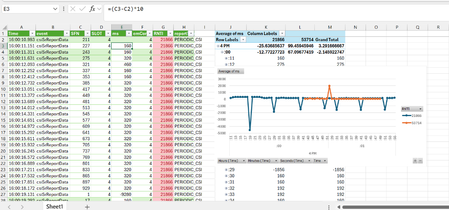
Dear Experts, I have a data as below, So , in Column "G" we have 2 Rntis( 21,8,66 & 53714), and I need to plot the time difference for report of each rnti, which is calculated by subtracting the consecutive - SFNs, for that rnti. Now , the problem here is that in below for example , for the rnti-53714, it's not correct, for example at row-244, my last report for rnti=53714 came at row 241, so the difference should be (821-789) * 10, while in my case it's doing the subtraction in consecutive SFNs, which basically messes up my analysis. I tried to do something like below from column W to AF, but not sure how to achieve this properly( X axis should be my time, Y axis should be my average-ms and distribution should be based on the RNTI. Attached is the worksheet..(anything in -ve and above 400 is Outliers and need to be removed) in ms column also. Thanks in Advance! Br, Anupamanupambit1797Jun 18, 2026Steel Contributor96Views0likes2Comments
PLEASE HELP - Excel Horizontal Scroll Not Working
Hello all: I have an excel workbook that is many columns wide. I am on a Macbook Pro, Office 365. Scroll lock is *not* on, please do not suggest I turn it off. I can scroll in other workbooks. On this workbook, if I am selecting cells and trying to scroll horizontally, it won't continue the horizontal scroll beyond what is visual on screen. I am extremely annoyed, please help. Thank-you, Carlcarlj2265Jun 17, 2026Copper Contributor144KViews1like20Comments
Data Model error
I am getting the following error in Excel. "We couldn't get data from the Data Model. Here's the error message we got: An unexpected error occurred (file 'pcminorobjcoll.inl' , line 109, function 'PCMinorObjectCollection<class PCProperty, class NameHashSupport> :: SetNameAndUpdateCollection'). I have found various articles that have suggested going through and checking the source data headings. I did this and nothing seems to be out of the ordinary. https://contexturesblog.com/archives/2020/03/26/excel-pivot-table-refresh-error-with-data-model/ Is there anyone that can help me? The document is fairly large and used frequently by staff. I'd like to avoid recreating it, or tearing it apart. If possible.Erin412Jun 16, 2026Copper Contributor37KViews0likes11CommentsMacros in Excel Programs
I am developing a macro enabled spreadsheet that creates a second macro enabled spreadsheet upon exit. Is there a way for the macro in my main spreadsheet to create UserForms and Modules in the second spreadsheet? My goal here is to distribute the second spreadsheet to users and their use of it will be controlled by the UserForms and macros within it.SolvedaekbusJun 15, 2026Brass Contributor98Views0likes2Comments
Macros blocked in shared OneDrive Excel workbook as untrusted source
I have a macro-enabled Excel workbook (.xlsm) stored in OneDrive and shared with another user. When they open the shared workbook in Excel Desktop, they receive the error: "Microsoft has blocked macros from running because the source of this file is untrusted." We've already tried enabling macros in Trust Center, adding Trusted Locations, and opening the file from a synced OneDrive folder rather than Excel Online, but the error persists. Since downloading the file creates a separate copy and defeats the purpose of a shared workbook, what is the correct way to allow VBA macros to run in a shared OneDrive-hosted workbook while keeping everyone working from the same file?morrisandsonsJun 14, 2026Copper Contributor79Views0likes1Comment


Tags
- excel43,843 Topics
- Formulas and Functions25,372 Topics
- Macros and VBA6,567 Topics
- office 3656,331 Topics
- Excel on Mac2,739 Topics
- BI & Data Analysis2,489 Topics
- Excel for web2,010 Topics
- Formulas & Functions1,716 Topics
- Need Help1,703 Topics
- Charting1,699 Topics