

Forum Widgets
Latest Discussions

Multiple Inventory entries on the same item
Okay so I'm wondering if there is a way for excel to automatically advance to the next column when entering inventory data so if I need to make another entry on the same item I don't have to advance to the next cell myself. This would be helpful in streamlining inventory and making it foolproof when adding inventory to a specific item (without having to worry about deleting previously entered data). I'm hoping there is a way to do this so I can take a tablet when completing my inventory and avoid the old clipboard and paper.HarpoonsJan 16, 2026Occasional Reader18Views0likes2Comments
Bank recon matching
Happy New Year everyone! Can someone please assist me with this to a matching exercise for a bank reconciliation. Tried to do XLOOKUP with REGEXTEST but no luck. Below is the link to the excel file. https://1drv.ms/x/c/80b0e5c8d40a83ef/IQAn2IxiOBDpSJBIIZCfPj3TAexy2EEPYT5VjpDkcpTzpB4?e=S4NEuoTot86Jan 16, 2026Copper Contributor81Views0likes3CommentsChange in return of AVERAGE function - Mac Excel
I was puzzled that a spreadsheet I use daily generated an error today that had not existed in earlier versions. Attempts to confirm the validity of the spreadsheet functions by running prior versions that had previously run error free resulted in the same error. Eventually, it seems that the operation of the AVERAGE function has been changed in an Excel program update that was installed yesterday. Previously, if an AVERAGE function addressed a range of empty cells, it would return a zero value. Now it is returning the error #DIV/0! This is strange because the AVERAGE function will now return zero if the addressed range contains zeros rather than just being empty. Not sure if Microsoft intended this change or if the change might also apply to other functions. In muy case, I'm able to change my spreadsheet to provide for this but it would have been nice to have some warning.Stuart_MillerJan 16, 2026Copper Contributor17Views0likes0Comments
Duplicate Values that are not exact match
Hello, I have an excel file with names I need to clean up. I started with using conditional formatting to highlight all duplicate values and deleted the duplicates. There are still duplicates in the file that don't share the exact name. For example, there's one cell called "Blackline Safety", and another called "Blackline Safety Corp". These are duplicates, but I don't know how to do it without looking manually. Is there any way to get excel to find the duplicates like that? ThanksgjrotondaroJan 16, 2026Copper Contributor1.4KViews0likes4CommentsSummary sheet, copy entire row if a cell criteria is met
https://arengio-my.sharepoint.com/:x:/g/personal/melanie_stokes_areng_io/IQC2OhPfZnKEQL6qfPj11gqfAQSh8Em3Zp95fkYbLBTZc3g?e=oNU1pEHi Can you please help me, I have a schedule for jobcards, each tab is a book that is given to someone, if that specific jobcard is invoices, then in column T where it says "Incomplete", I want that entire row to be copied to the "Outstanding Jobcards"tab. As a new book is handed out, a new tab is create and the tab is named according to the book sequence. This is updated daily as jobcards are being invoiced.36Views0likes2CommentsTop n vs. Others in Excel
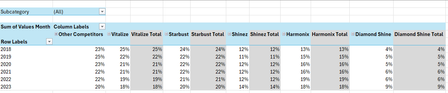
Hi all, I'm seeking some help because I'm kind of new to the more intermediate stuff in Excel. I have an Excel table with the following columns: Subcategory in column A, Brand in column B, Region in column C, Year in column D and Values Month in column E. I want to create a PivotTable and a Pivot line chart from this PivotTable that ranks the Top 5 Brands vs. Other Competitors by each region. For added context: There are 5 subcategories, 3 regions and 25 brands. Currently, I've tried grouping the remaining 20 brands as "Other Competitors" vs. the Top 5 brands within a selected region and possibly all regions (when no selection is made). I'm seeking a solution similar to this... Please mind the colours. I will sort those out later. But, the problem that I'm faced with is that upon selection of a region, the PivotTable won't update to the Top 5 brands of a selected region because they've already been grouped. How can I make this more dynamic so that I'm able to show The Top 5 brands vs. Others? Please help. EDIT: My operating system is Windows 10 (64-bit) and I use Excel 365 (Desktop version). For reference, I've attached a link to a sample file. https://1drv.ms/x/c/b2d878e32a062614/IQC1wcnwLICcQasOfnGcwKn0ASjpXp9xQ6rjnOP10Jal5cc?e=HaXEWd Thank you all once again.SolvedAnonymous29007Jan 16, 2026Copper Contributor265Views2likes11Comments
Current Date and time per cell
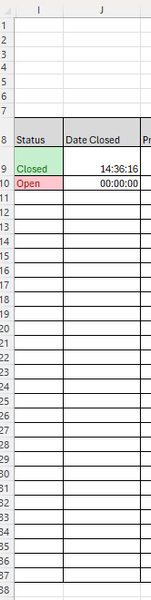
I have a table with one column listing rows with a dynamic text box (open; closed) in the next column I would like to display the date and time when the status changes. The purpose is to show when a task was completed, I have used the now() function but it keeps refreshing, I need it stay the date The snip of the sheet below shows how is is currently working, so can any one help with some code for column J please. thank you LeeBuilditJan 16, 2026Occasional Reader10Views0likes0Commentsis it possible to capture HH:MM from the cell in text format DD-MM-YYYY HH:MM
Hi Expertise, Need you help again. I need to capture the HH:MM from another cell DD-MM-YYYY HH:MM (text format) as below From 16-01-2026 00:30 (text format) To 24:30 (HH:MM format) Regards LawrenceLawrence_Lam_320Jan 16, 2026Copper Contributor5Views0likes0Comments

Resources
Tags
- excel43,529 Topics
- Formulas and Functions25,230 Topics
- Macros and VBA6,533 Topics
- office 3656,257 Topics
- Excel on Mac2,711 Topics
- BI & Data Analysis2,461 Topics
- Excel for web1,992 Topics
- Formulas & Functions1,716 Topics
- Need Help1,703 Topics
- Charting1,682 Topics